
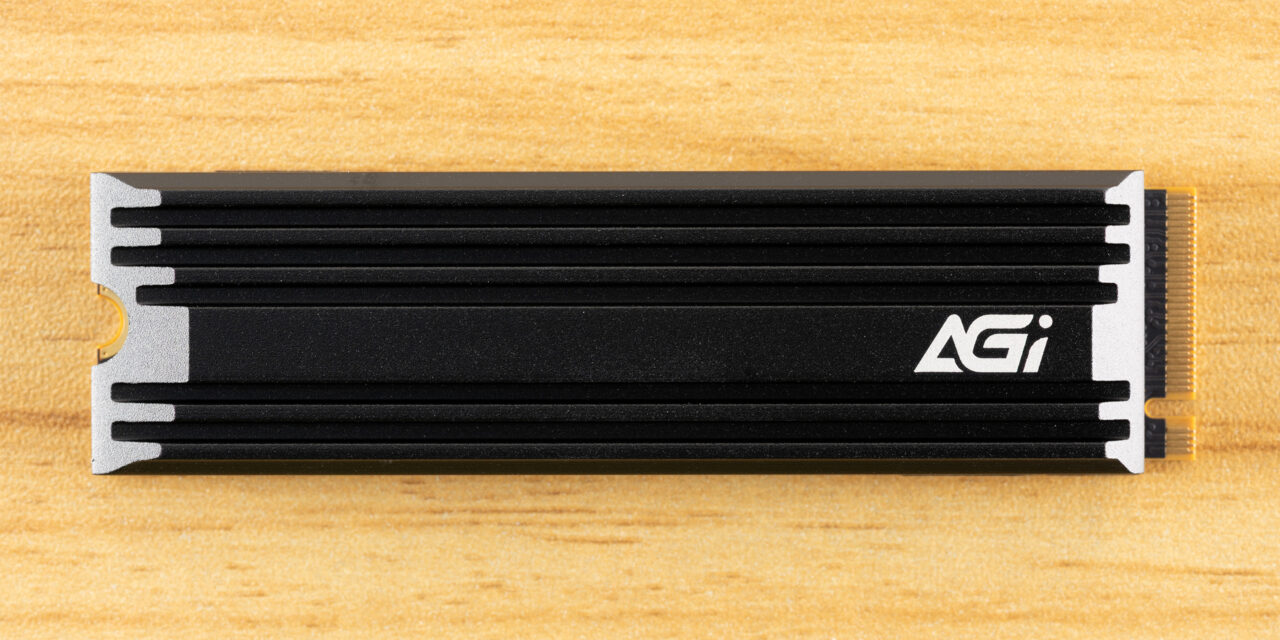
AGI AI828 SSD Review: A near-last resort for those on a budget
AGI is back with another drive, this time with one more oriented at budget shoppers who want different capacity options with a heatsink. The AI828 slots in somewhere between the AI818 – a drive that didn’t impress us at all – and the AI858, a drive that was surprisingly good. The AI828 is a “one size fits all” type of drive that can work in a desktop, the PS5 console, or in a laptop if you don’t use the included heatsink. It’s not the best choice for any of these, but beggars can’t be choosers in this market. After all, we have PCIe 3.0 drives returning and entry-level drives like the TeamGroup NV5000 showing up, as well. The AI828 can outdo those and some of our original PCIe 4.0 favorites like the TeamGroup MP44L. Just don’t expect miracles.
AGI AI828 Specifications
|
Product |
512GB |
1TB |
2TB |
4TB |
8TB |
|
Pricing |
N/A |
$239.99 |
$449.99 |
N/A |
N/A |
|
Form Factor |
M.2 2280 |
M.2 2280 |
M.2 2280 |
M.2 2280 |
M.2 2280 |
|
Interface / Protocol |
PCIe 4.0 x4 / NVMe 1.4 |
PCIe 4.0 x4 / NVMe 1.4 |
PCIe 4.0 x4 / NVMe 1.4 |
PCIe 4.0 x4 / NVMe 1.4 |
PCIe 4.0 x4 / NVMe 1.4 |
|
Controller |
Varies |
Varies |
Varies |
Varies |
Varies |
|
DRAM |
N/A (HMB) |
N/A (HMB) |
N/A (HMB) |
N/A (HMB) |
N/A (HMB) |
|
Flash Memory |
Varies |
Varies |
Varies |
Varies |
Varies |
|
Sequential Read |
6,800 MB/s |
7,400 MB/s |
7,400 MB/s |
7,400 MB/s |
7,400 MB/s |
|
Sequential Write |
4,100 MB/s |
5,200 MB/s |
6,700 MB/s |
6,300 MB/s |
6,100 MB/s |
|
Random Read |
N/A |
N/A |
N/A |
N/A |
N/A |
|
Random Write |
N/A |
N/A |
N/A |
N/A |
N/A |
|
Endurance |
350TBW |
750TBW |
1,500TBW |
3,000TBW |
6,000TBW |
|
Part Number |
AGI512G44AI828-CB |
AGI1T0G44AI828-CB |
AGI2T0G44AI828-CB |
AGI4T0G44AI828-CB |
AGI8T0G44AI828-CB |
|
Warranty |
5-Year |
5-Year |
5-Year |
5-Year |
5-Year |
The AGI AI828 covers every capacity you could ever hope for: 512GB, 1TB, 2TB, 4TB, and 8TB. Unfortunately, only 1TB and 2TB units were available at the time of review. These were going for $239.99 and $449.99 which is on the expensive side in both cases. Right now, however, this drive comes in and out of stock and can be priced competitively. It’ll probably be difficult to find the 8TB SKU, though.
The drive can hit up to 7,400 / 6,700 MB/s for sequential reads and writes, with no specification for IOPS given. IOPS tend not to be important for this segment – that is, a budget drive – and AGI is likely mixing multiple controllers and flash types based on availability and cost, which makes it less straightforward to try and nail down performance numbers. However, we would expect it to match the Seagate FireCuda X1070, with more than enough performance for this class.
AGI’s warranty covers the drive for the standard five years, with a bit extra on the writes front: the drive can absorb up to 750TB of data writes per TB capacity. The industry standard is 600TB. You probably won’t need this amount of writes, but it can be reassuring nonetheless, especially when dealing with less well-known brands and drives. It also suggests, but doesn’t guarantee, that TLC flash is used on the drive.
AGI AI828 Software and Accessories
AGI does not offer any substantial, direct software support. We recommend using CrystalDiskInfo for monitoring the health status of your drive. For basic benchmarking, CrystalDiskMark is a good choice. If you’re looking to backup data we suggest MultiDrive for windows and either Clonezilla or Rescuezilla for bootable options.
AGI AI828: A Closer Look
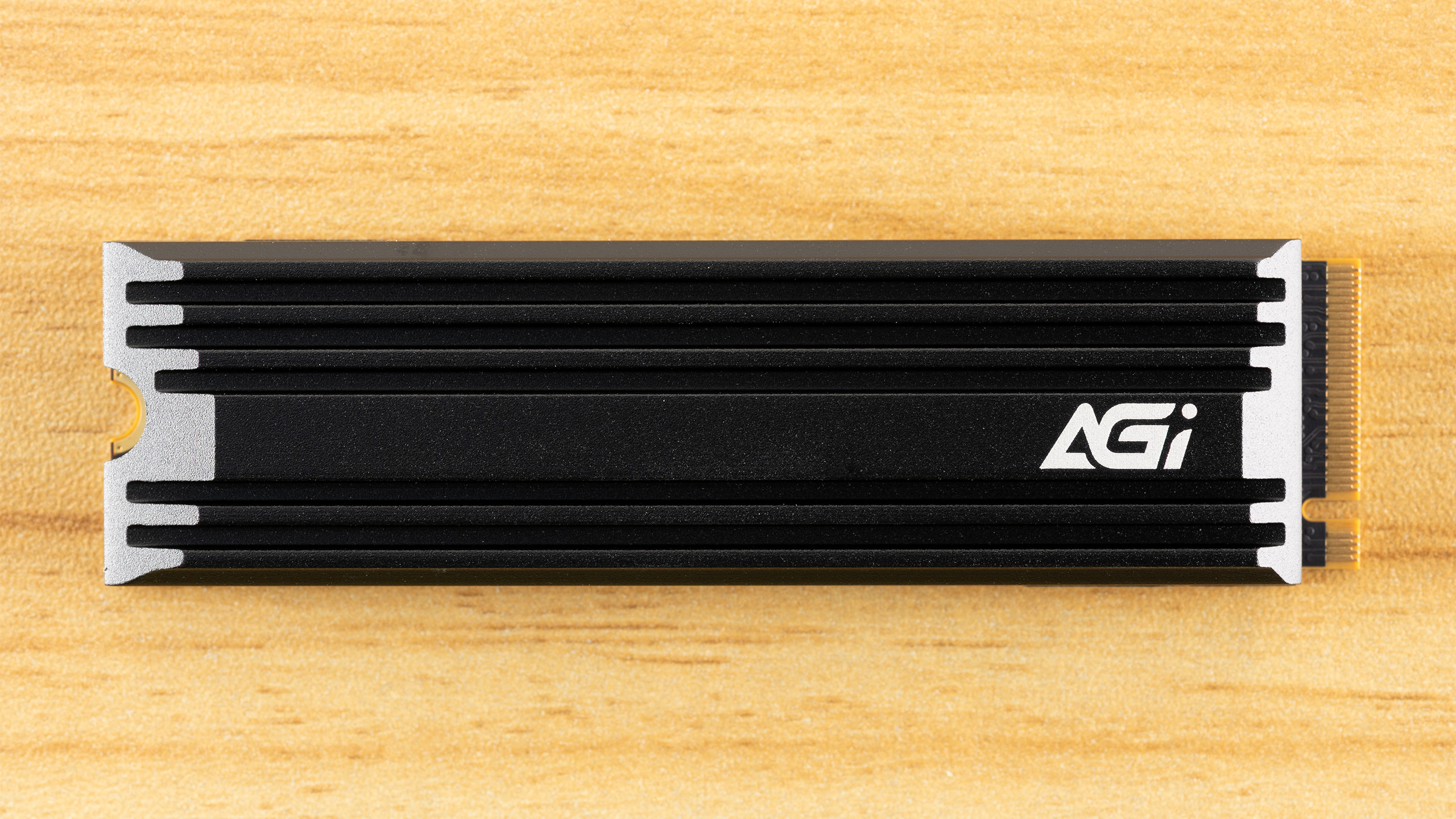
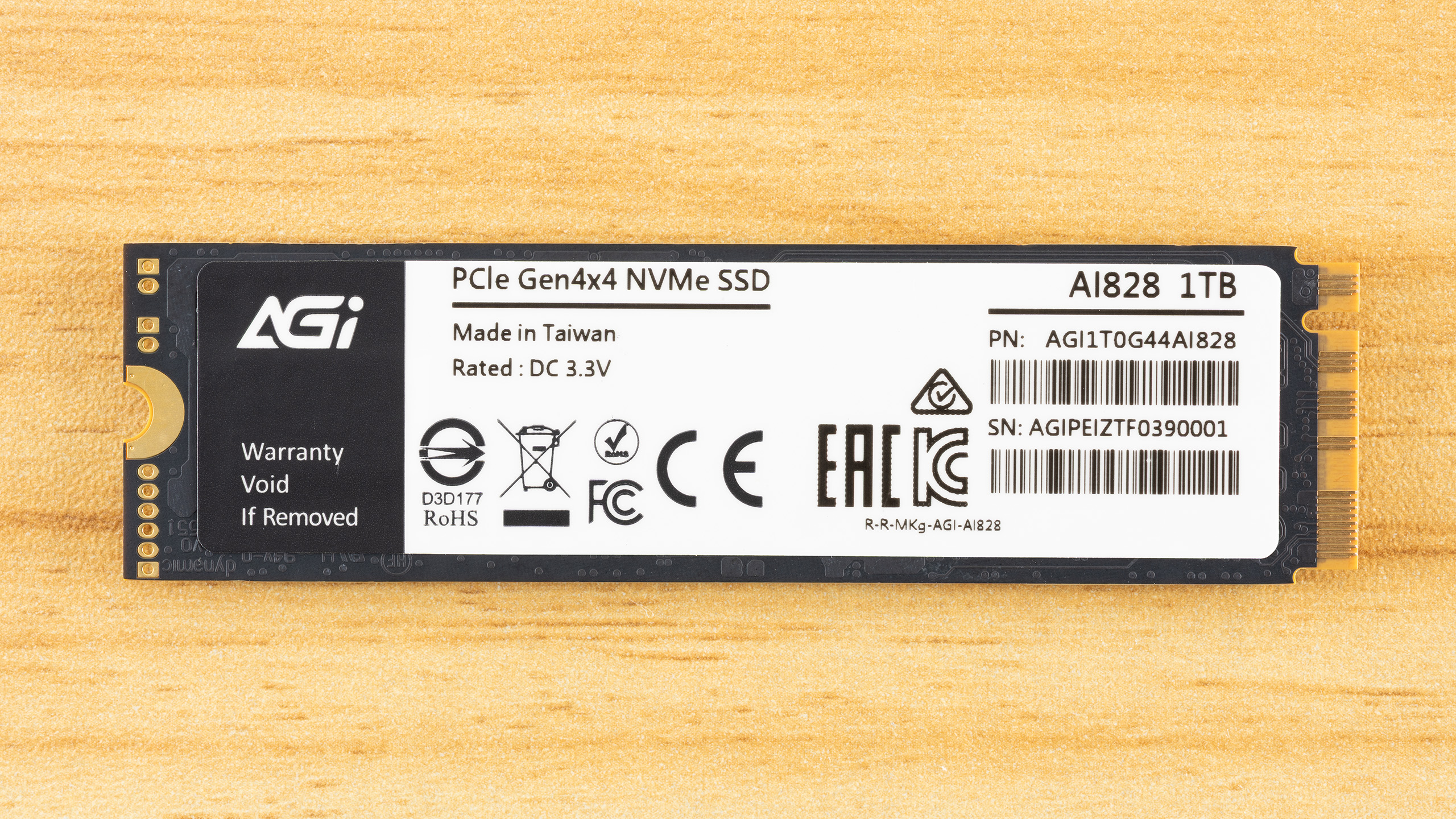
This is a single-sided drive that comes with an optional heatsink. This makes it great for the PS5 and many desktops, with the heatsink, and for laptops without. As this is intended to be a budget drive, that’s a bonus, as often there is no heatsink option. It’s best not to have to worry about a drive overheating in any circumstance, and the heatsink is sufficient for the job, but may not always be necessary.
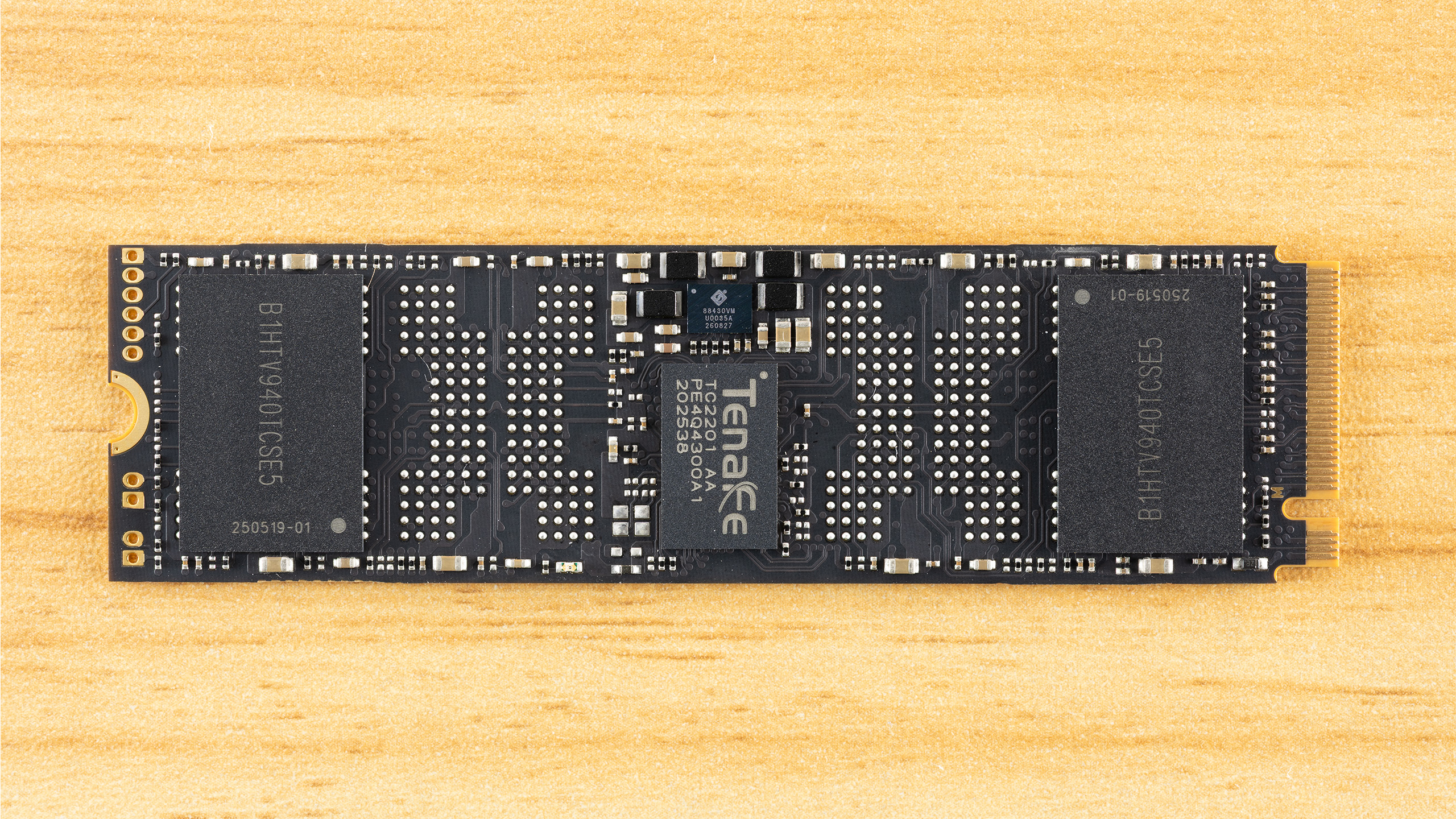
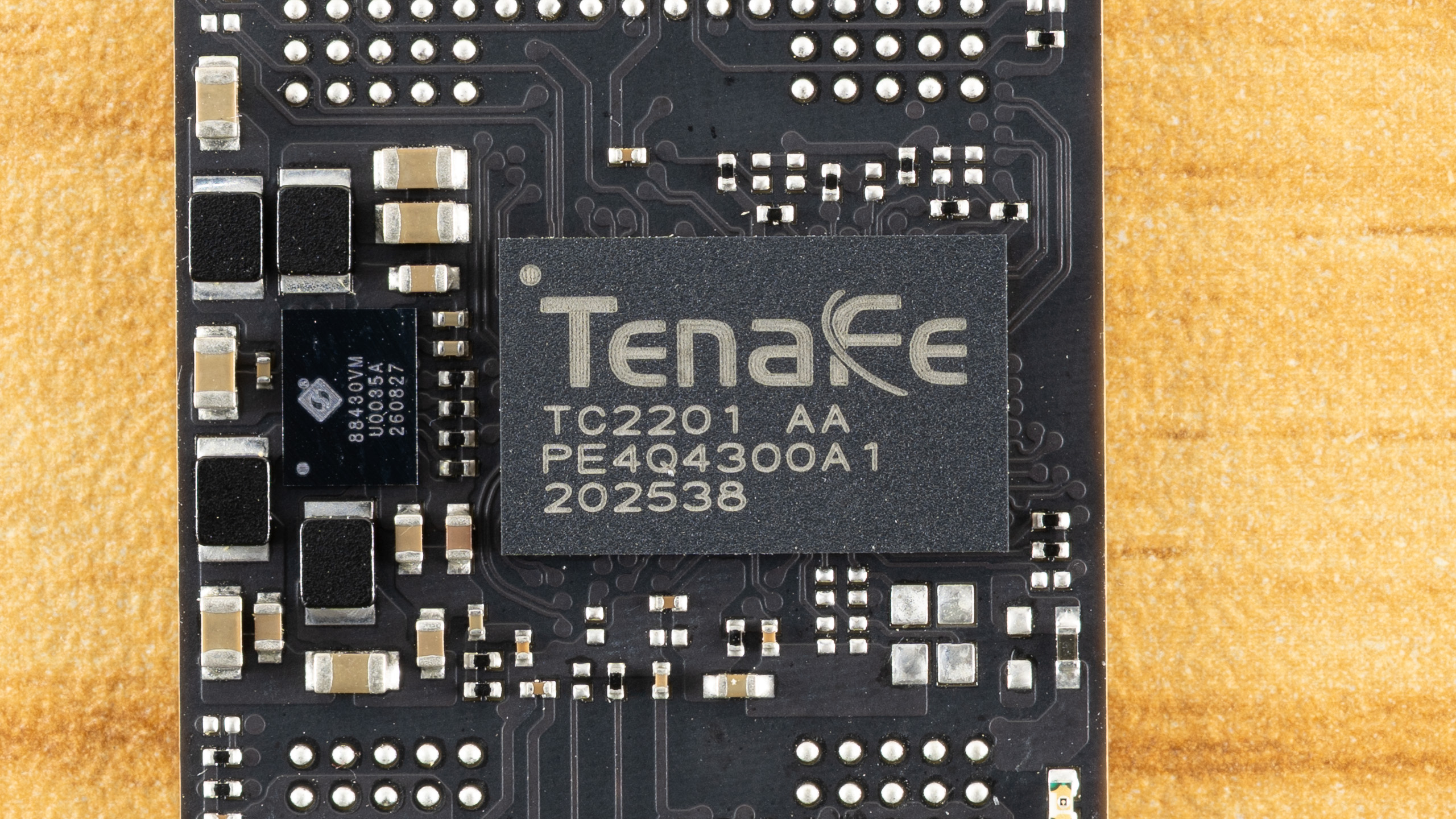
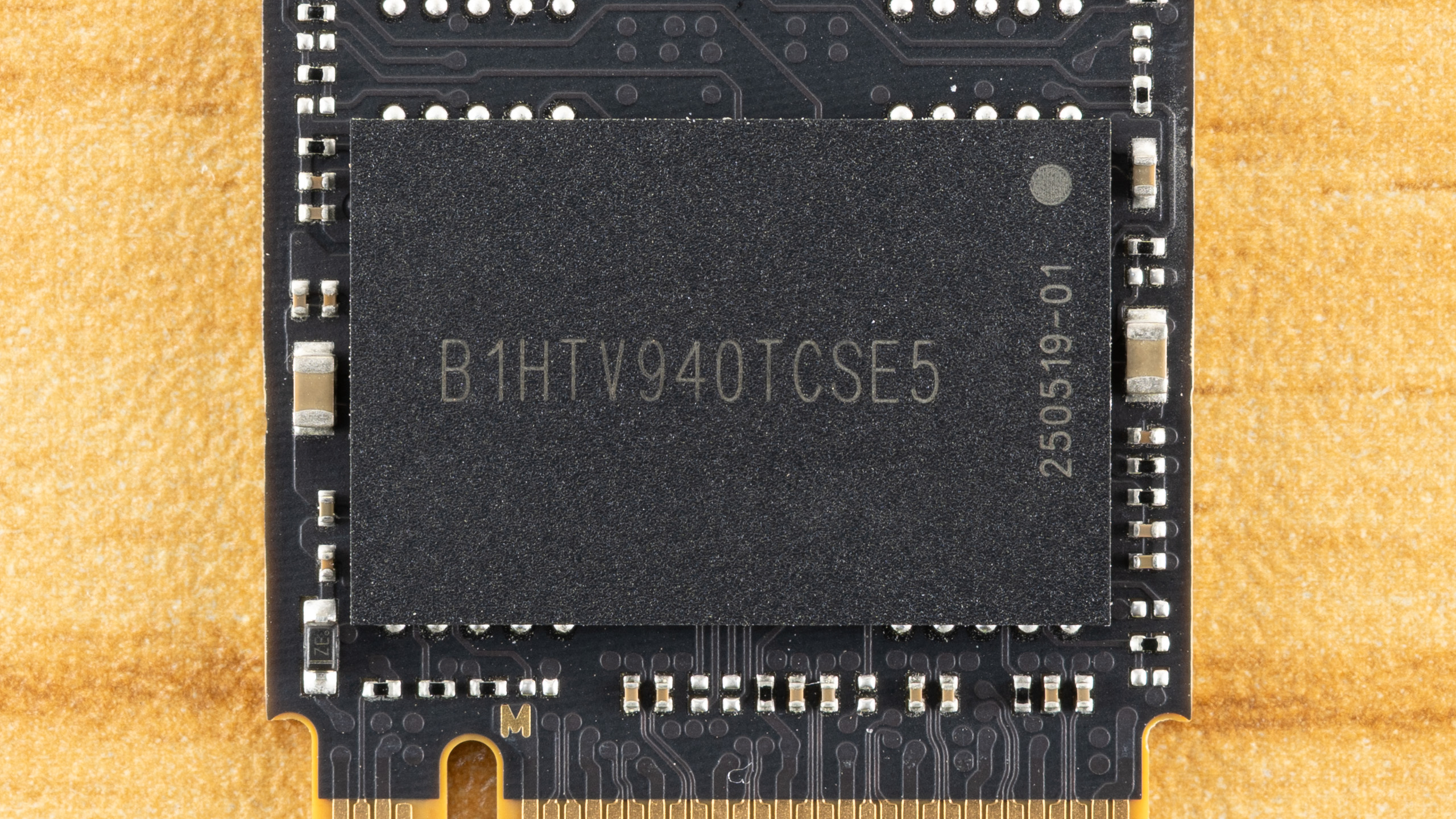
The drive is pretty barebones with a DRAM-less SSD controller, two NAND flash packages, and a power management IC. As there is room for four flash packages, this drive could very well be single-sided at even high capacities. Not having a DRAM package helps. The PMIC is an Active-Semi or Qorvo part similar to what we’ve seen on some WD drives in the past. Power management can be handled this way, with discrete components, or as an embedded feature of the controller, each method with its own trade-offs.
The use of the PMIC makes sense when we look at the alignment of the drive: the controller is in the center. Leaving enough space for four NAND flash packages is ideal for a budget drive, and having the controller in the middle can be beneficial in some ways. We remember the WD Black having this configuration to help with cooling and to make even-length traces to the flash packages. Cooling is also aided as the heatsink can spread heat out to either side, with flash usually running cooler than the controller. This gives the center, hottest area of the drive a lot of heatsink surface area to dissipate heat before thermal equilibrium is attained.
As for traces, SSD controllers generally have to contend with timing issues to make sure all the flash operates in tandem, and even small differences can impact latency and, ultimately, drive efficiency. While we don’t think you should buy a drive based on this arrangement, it shows attention to detail on AGI’s part, even though that’s probably giving them too much credit with this being focused on the lowest possible BOM cost.
The flash is not directly identifiable through decoding or through utility use. We suspect the flash can vary on this drive, anyway, especially at different capacities. Examples we’ve seen have used TLC flash, and that matches the endurance rating of the drive. On the other hand, the Seagate X1070 with the same controller and TLC levels of TBW is using Micron’s 232-Layer QLC flash. Looking at the performance characteristics of the drive as a whole, we’re limited by the controller and relatively small capacities on hand. Usually, you will have TLC flash with smaller SKUs as it offers higher baseline performance, as historically, QLC flash dies have been denser, which means fewer dies. However, in this era of 1Tb dies for both TLC and QLC, this is less of a certainty.
The flash that can be paired with this drive is somewhat limited to newer generations due to the required I/O speed, but there is still enough variance – especially if you take flash quality into consideration – that nothing is guaranteed. This isn’t particular to this drive, especially in the current market where flash supply is limited. Still, we can be reasonably certain that it won’t be using “bad” flash, which puts it a cut above lower-end drives that are once again becoming common.
MORE: Best SSDs
MORE: Best External SSDs
MORE: Best SSD for the Steam Deck
Comparison Products
We’re pulling no punches. The AGI AI828 is going up against drives that can match or outclass it and are generally of a higher capacity. This puts the drive at a disadvantage, but we don’t really think it belongs in a lower class, either. Adjust your expectations accordingly.
The drive is up against some of the best DRAM-less PCIe 4.0 drives we’ve tested, with both TLC and QLC flash. These include the Crucial P310 with QLC, the Biwin Black Opal NV7400, the Addlink A93, the Inland TN470, and the WD Black SN7100 with TLC. The last one is using exceptional BiCS8 TLC, which has very low latency and very high power efficiency.
Drives that may be considered a step or half step lower include the Klevv CRAS C925 with different TLC flash, the Biwin NV7200 with QLC, and the Kingson NV3 with variable hardware. The AI828 is more of a match with these drives, but they are all tested at 2TB versus the 512GB and 1TB SKUs of the AI828. With fewer flash dies, the AI828 is at a disadvantage in some sequential workloads.
Trace Testing — 3DMark Storage Benchmark
Built for gamers, 3DMark’s Storage Benchmark focuses on real-world gaming performance. Each round in this benchmark stresses storage based on gaming activities, including loading games, saving progress, installing game files, and recording gameplay video streams. Future gaming benchmarks will be DirectStorage-inclusive, and an evaluation for future-proofing is included where applicable.
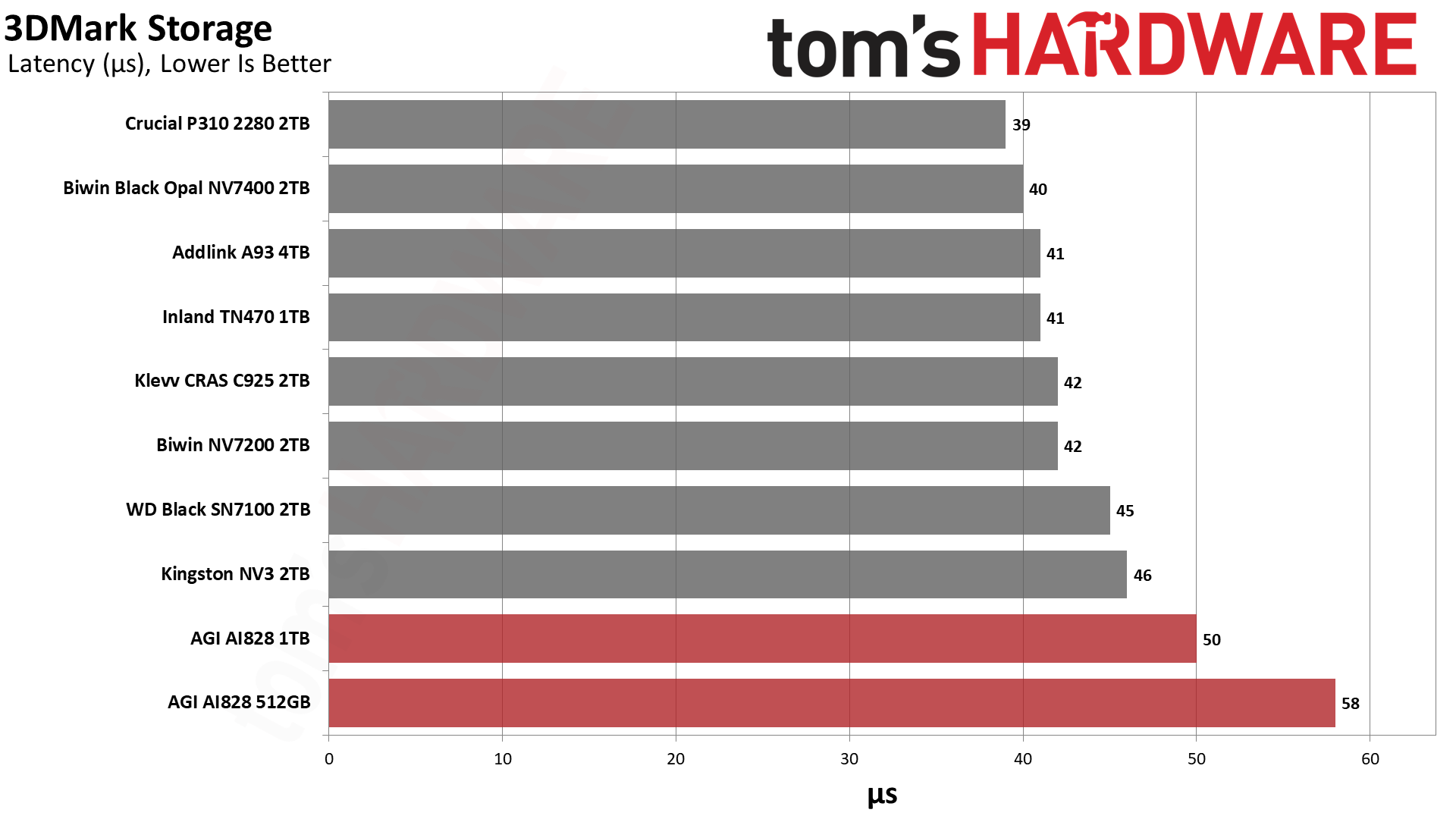
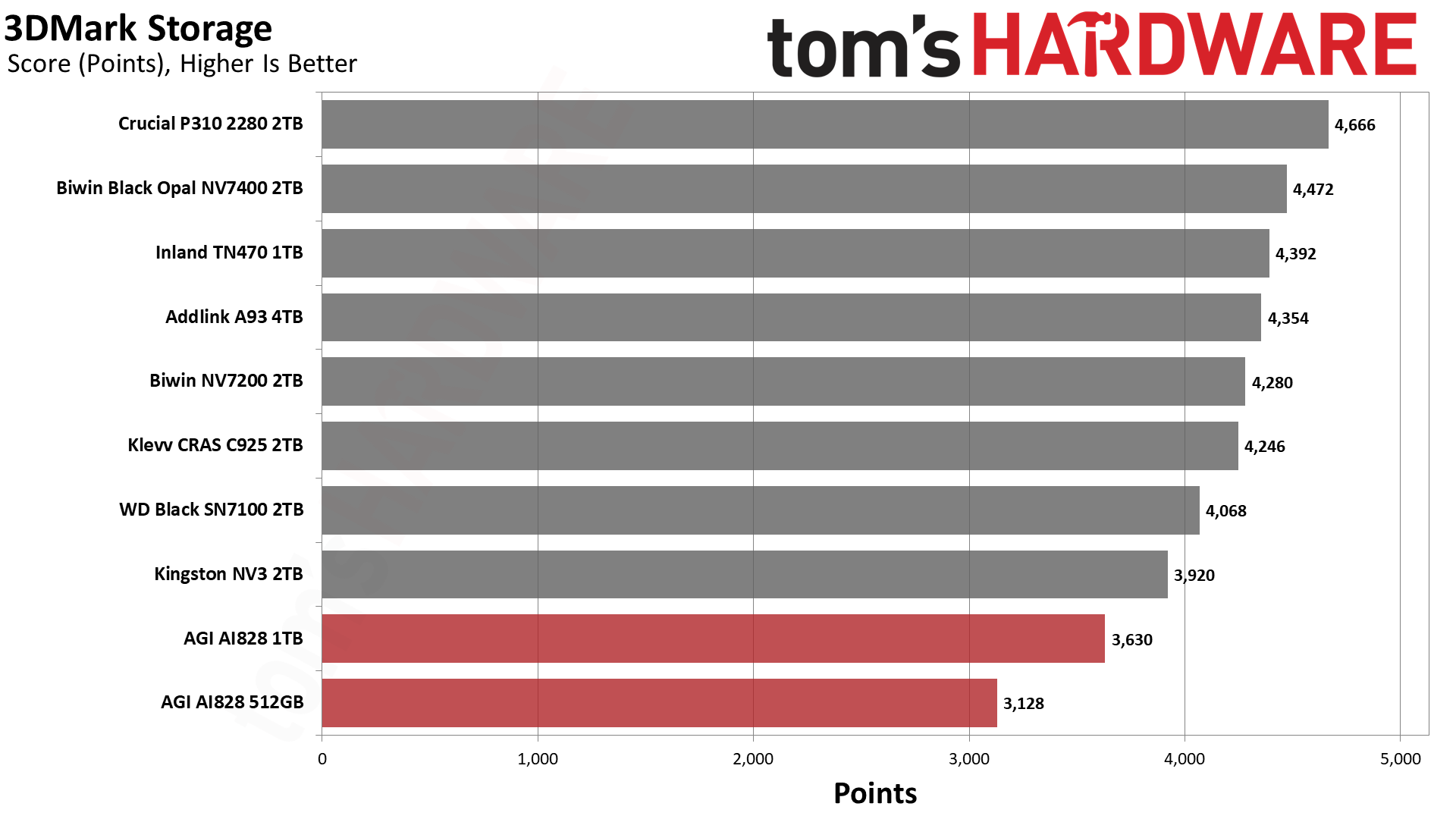
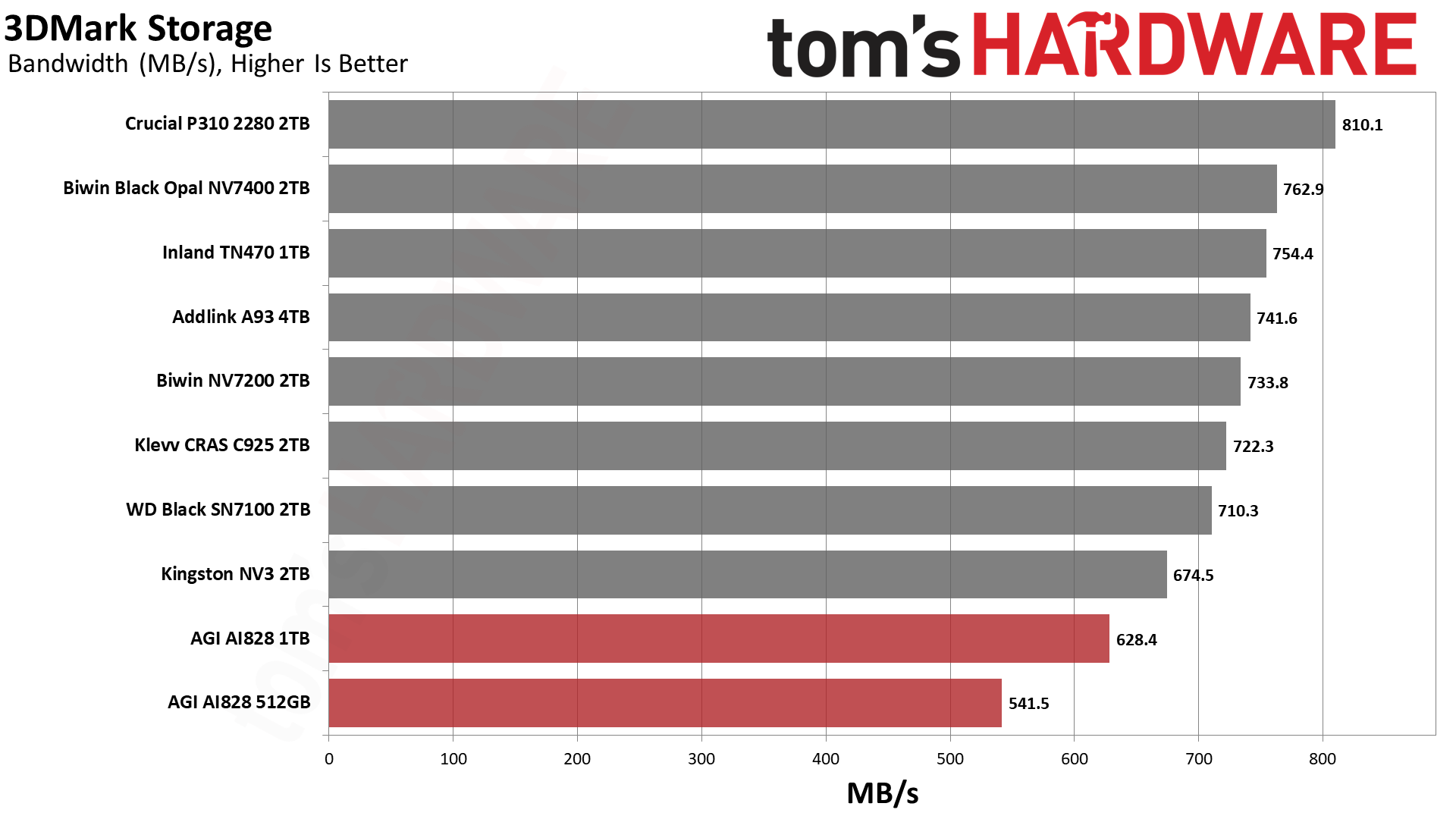
The AI828 is at the bottom of the chart, but it’s not as bad as it could be. Poor performance at 512GB is to be expected – remember that most of the comparison drives are 2TB or larger. Such a low capacity for the AI828 does not allow for optimal use of newer, denser flash. Even at 1TB, things are stretched a bit.
We recorded 53µs for latency in 3DMark for the 2TB Seagate X1070, which means the AI828 1TB’s result here is actually not that bad. 50µs is far from a good score, but it’s good enough for gaming. 512GB probably isn’t enough space for a gaming drive, but the AI828’s other capacities would work. This is not our first choice for a gaming drive unless it’s the least expensive, but your experience in general will not suffer from using it.
Trace Testing — PCMark 10 Storage Benchmark
PCMark 10 is an industry standard trace-based benchmark that uses a wide-ranging set of real-world traces from popular applications and everyday tasks to measure the performance of storage devices. The results are particularly useful when analyzing drives for their use as primary/boot storage devices and in work environments.
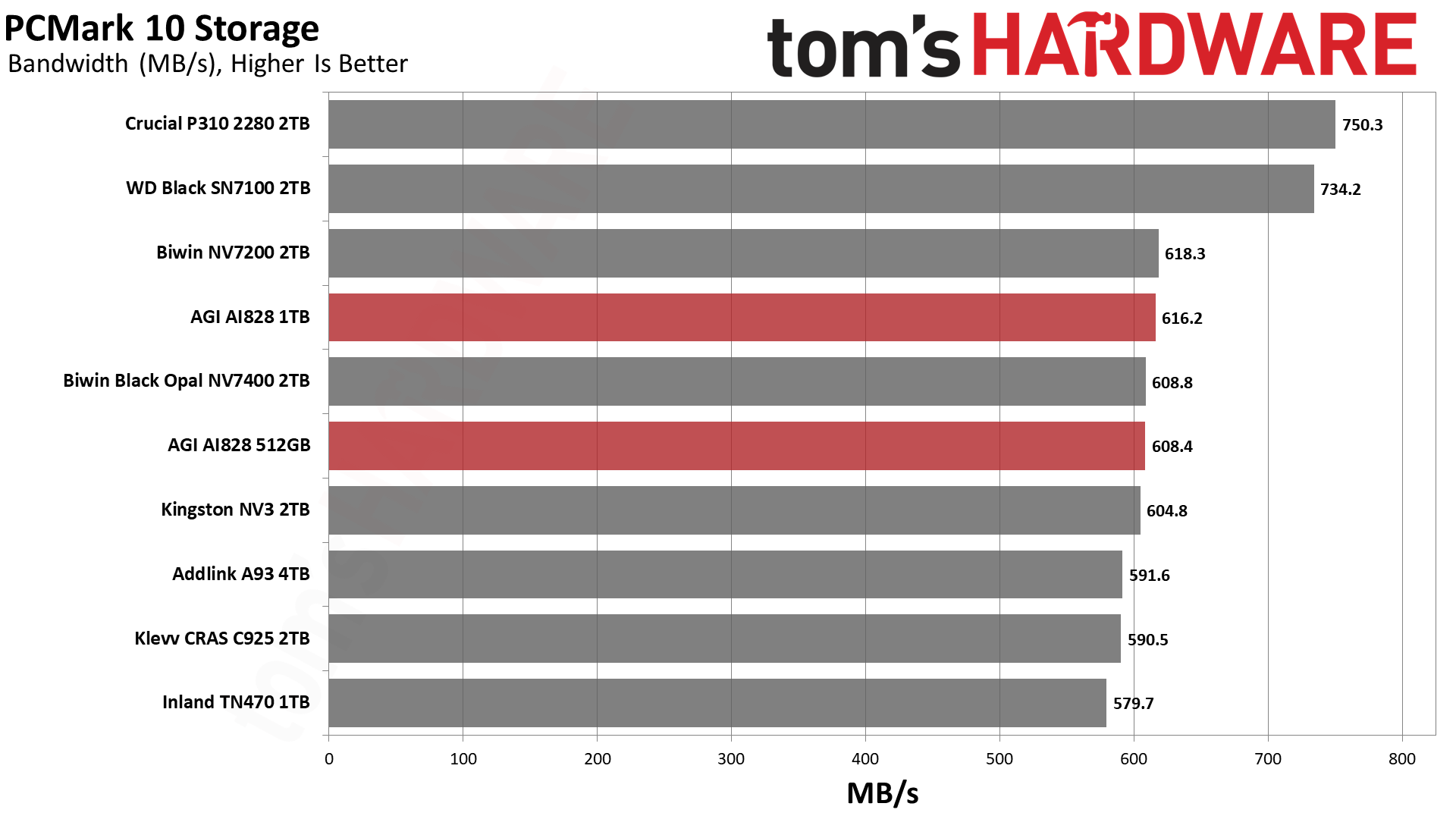
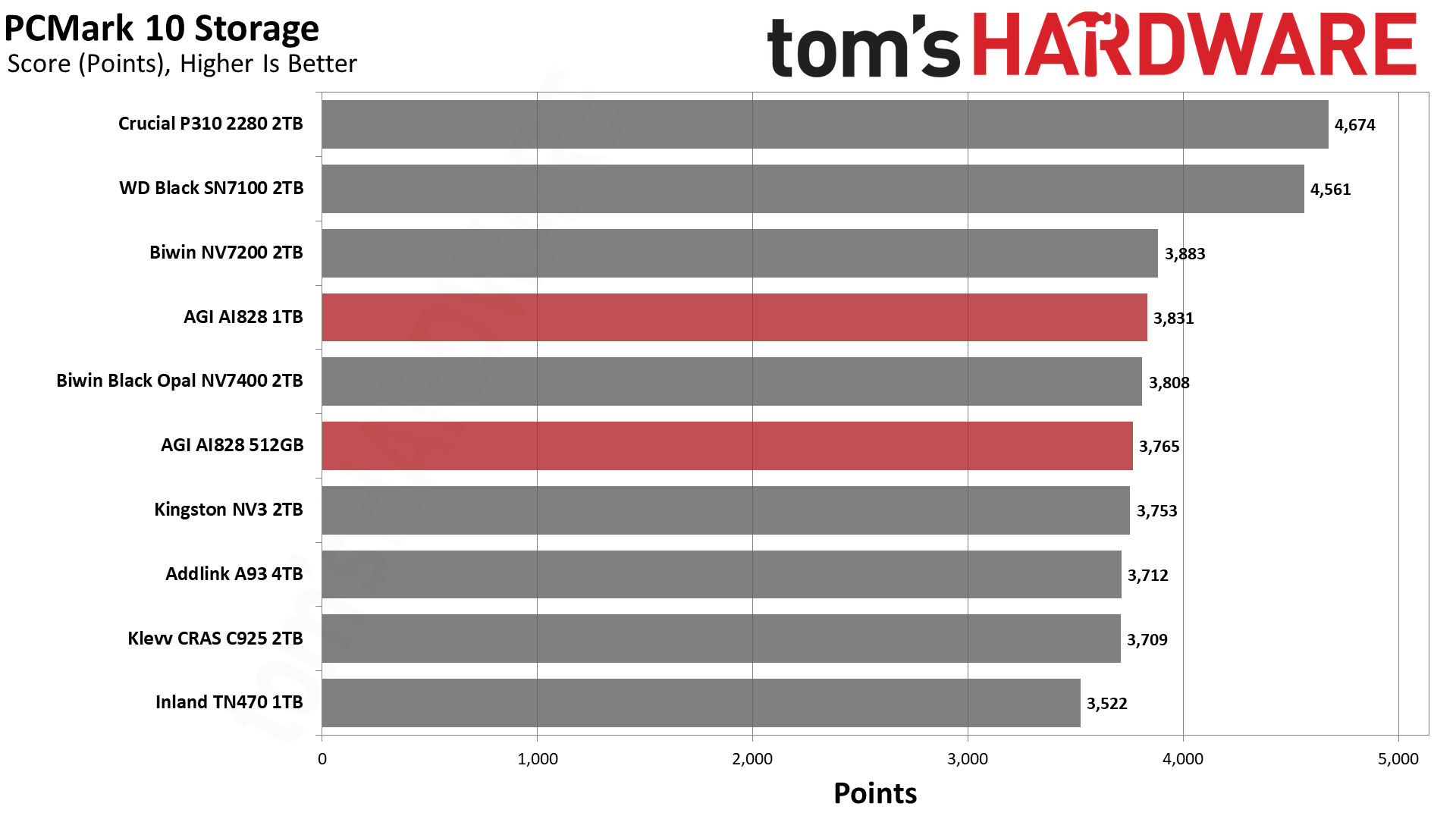
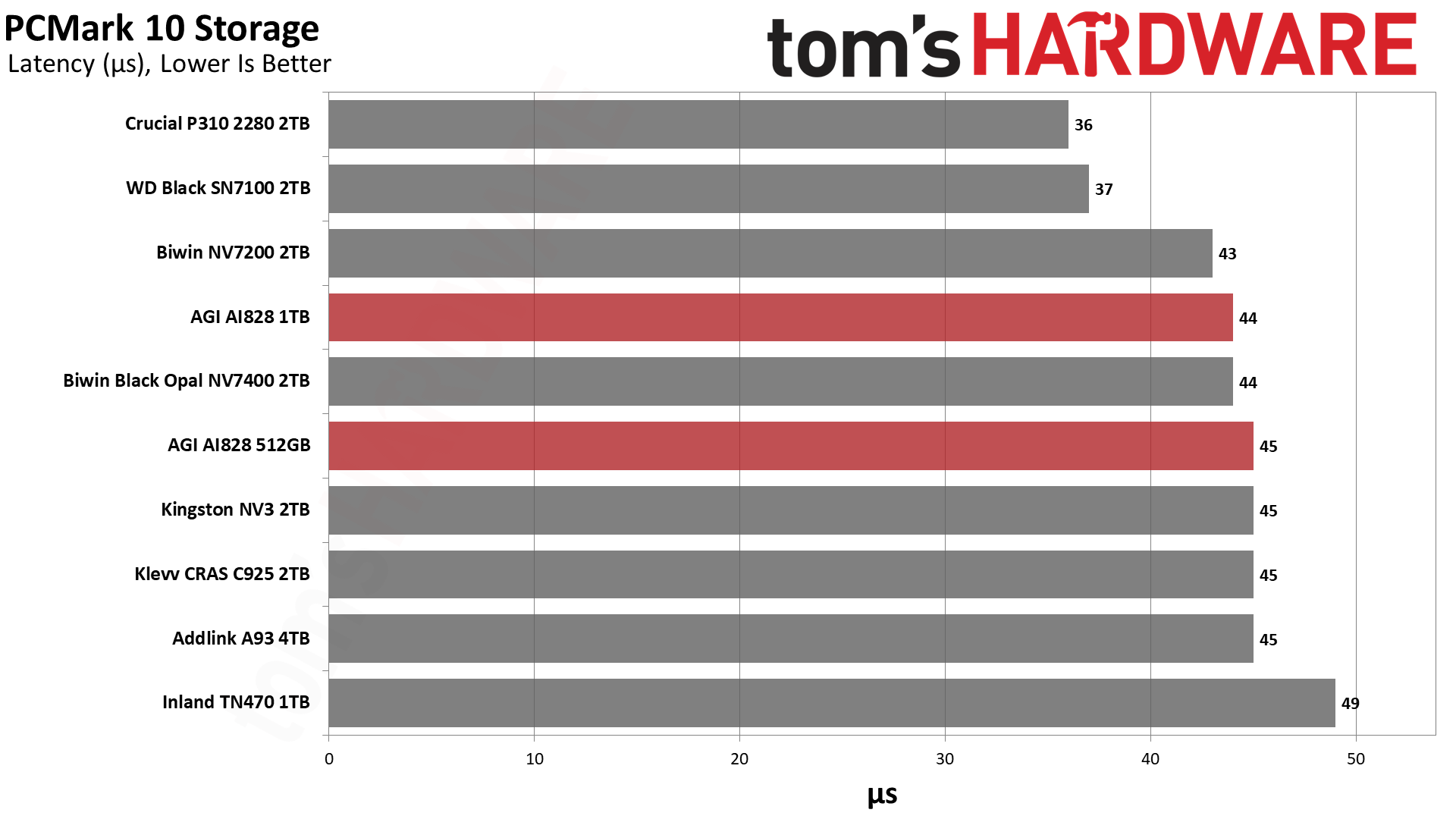
Things are significantly better in PCMark 10, which is not entirely surprising, as the flash compatible with this controller is likely to be newer. We want to point out that this doesn’t necessarily help us discern the flash in use. QLC flash, for its part, can have surprisingly good read performance because, for one, you can end up reading hot data from the pSLC cache, and two, QLC tends to be optimized for 4KB reads to compensate for the flash’s slower native speed. So the flash type is not always made clear through synthetic tests.
We consider ~45µs to be an ideal target for drive responsiveness, and both capacities of the drive hit this. We should add that 44µs is the same score we got on the 2TB X1070, so we see nothing unusual here. As always, a drive with BiCS8 TLC or QLC flash – that would be the Black SN7100 here – is optimal for the very lowest 4KB read latency. However, the AI828 is quite fast enough to serve as a primary drive or as the only drive in your system.
Console Testing — PlayStation 5 Transfers
The PlayStation 5 is capable of taking one additional PCIe 4.0 or faster SSD for extra game storage. While any 4.0 drive will technically work, Sony recommends drives that can deliver at least 5,500 MB/s of sequential read bandwidth for optimal performance. Based on our extensive testing, PCIe 5.0 SSDs don’t bring much to the table and generally shouldn’t be used in the PS5, especially as they may require additional cooling. Check our Best PS5 SSDs article for more information.
Our testing utilizes the PS5’s internal storage test and manual read/write tests with over 192GB of data, both from and to the internal storage. Throttling is prevented where possible to see how each drive operates under ideal conditions. While game load times should not deviate much from drive to drive, our results can indicate which drives may be more responsive in long-term use.
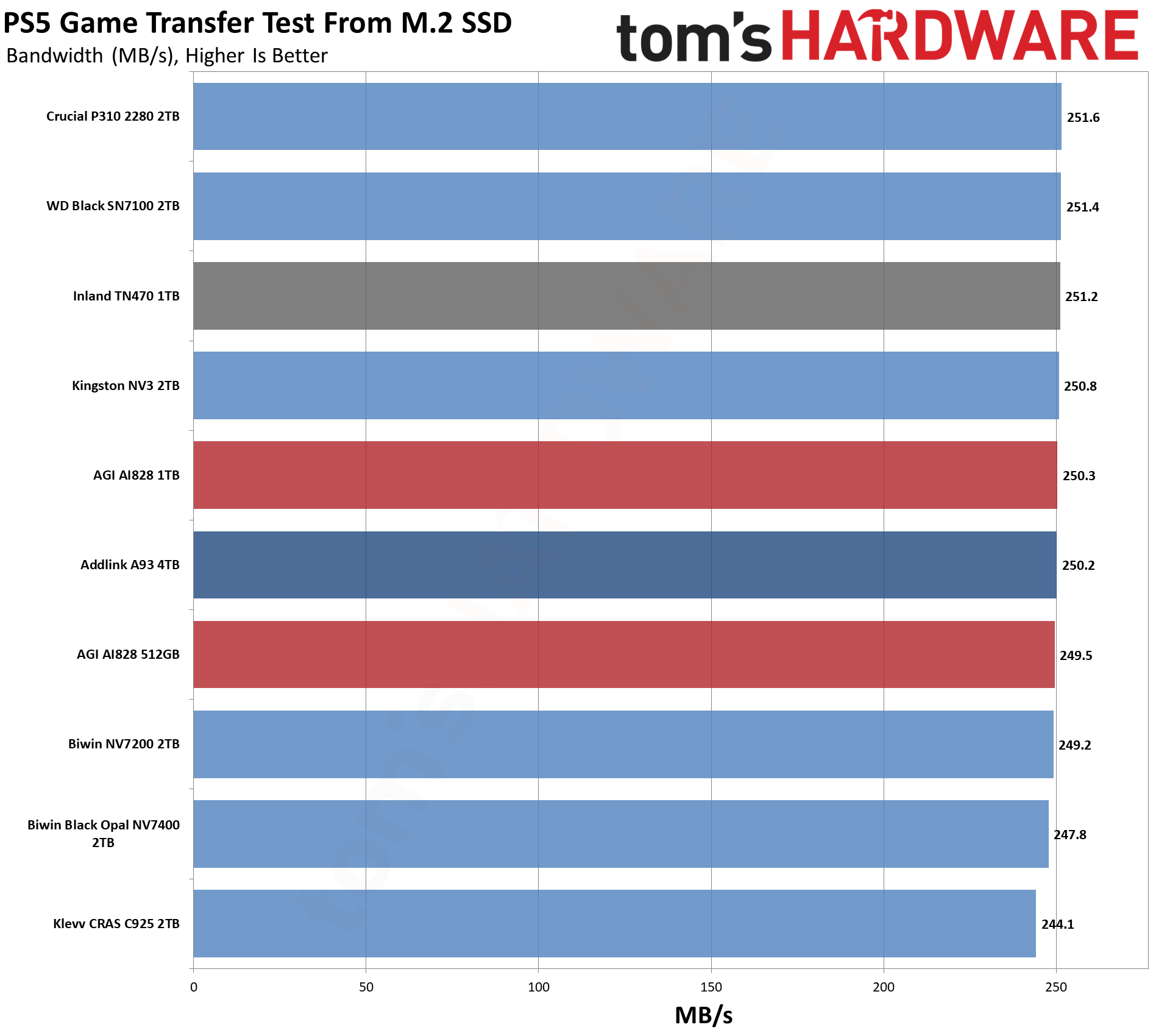
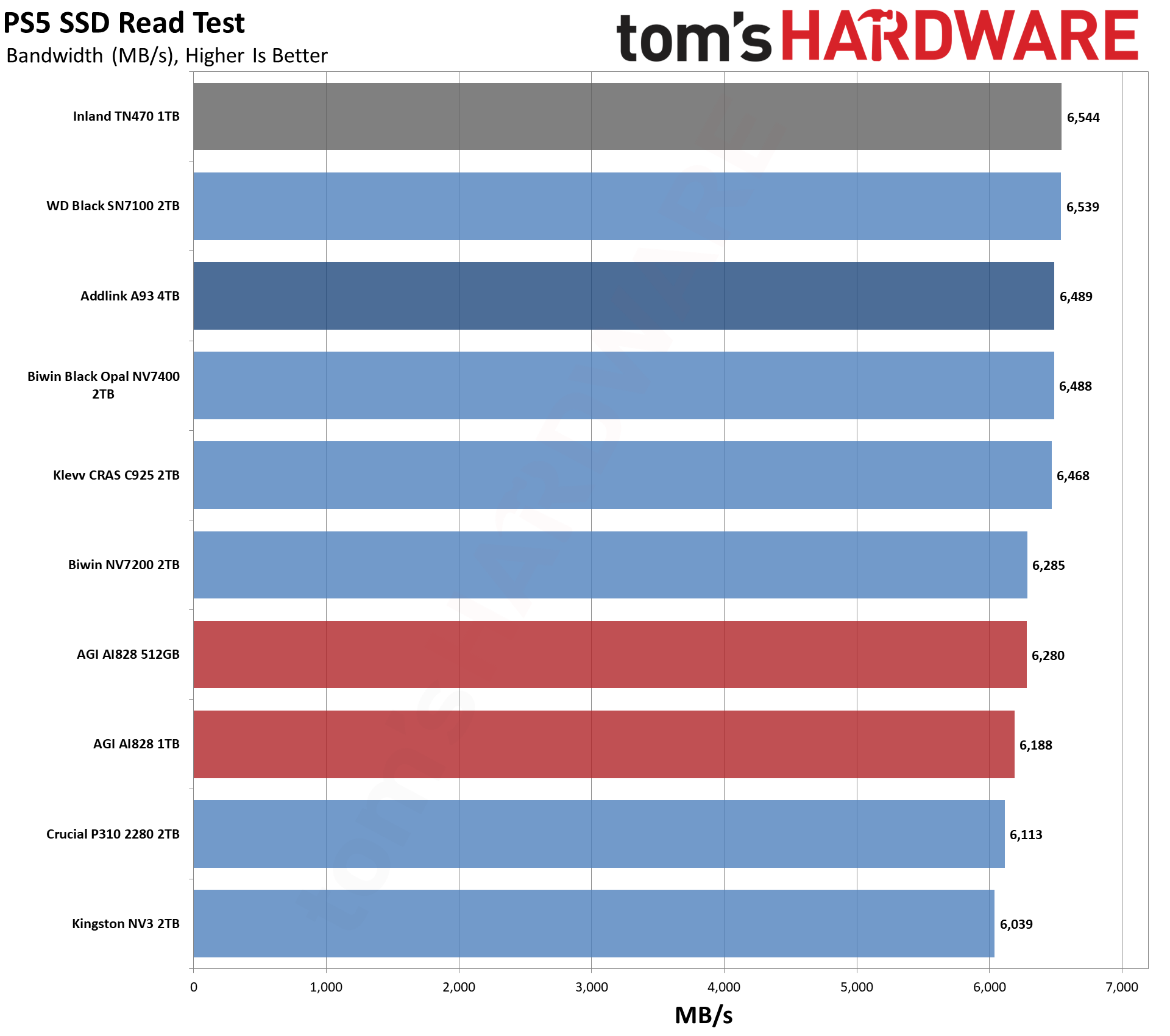
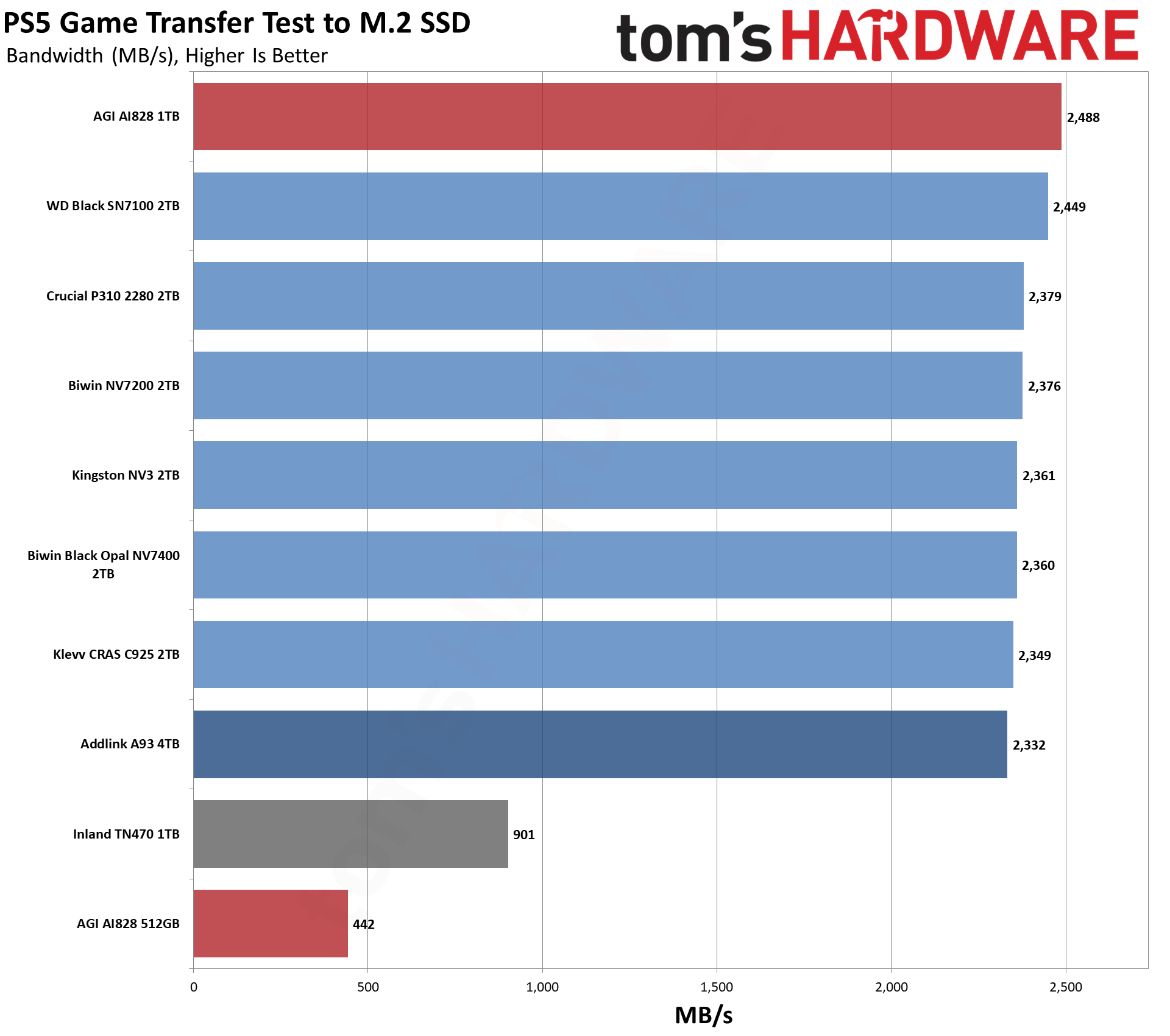
Our main PS5 tests show no problems with the PS5. These would be the read test and the game transfer test from the M.2 SSD. The problem comes with the write test – game transfer test to M.2 SSD – where clearly the 512GB drive is not writing or not writing fully to the pSLC cache. Generally, this is not a problem in our testing because pSLC caches are large enough to handle even larger writes, plus drives have sufficient idle time to free up the cache. However, the cache size varies with capacity, so it is smaller at 512GB, and for drives using denser flash, especially that is going to be an issue.
This is not likely to be a real-world problem as a drive, and especially a PS5 drive, probably won’t be taxed this hard, and even if it is, the average speed here is still largely sufficient. This just demonstrates why smaller drives have gone away as the move to denser flash makes performance less consistent – even a 512GB drive lacks sufficient dies for optimal parallelization. In fact, it’s just one die per channel with 1Tb dies. On the other hand, SSD prices scale with flash, especially with the price hikes, which means lower-capacity drives are making a return. Unfortunately, that just doesn’t work well at this performance level. So you are left in a situation where you either have to make do with a much slower drive or spend enough money to get 1TB or more to make a faster drive worthwhile.
Transfer Rates — DiskBench
We use the DiskBench storage benchmarking tool to test file transfer performance with a custom 50GB dataset. We write 31,227 files of various types, such as pictures, PDFs, and videos to the test drive, then make a copy of that data to a new folder, and follow up with a reading test of a newly-written 6.5GB zip file. This is a real-world type workload that fits into the cache of most drives.
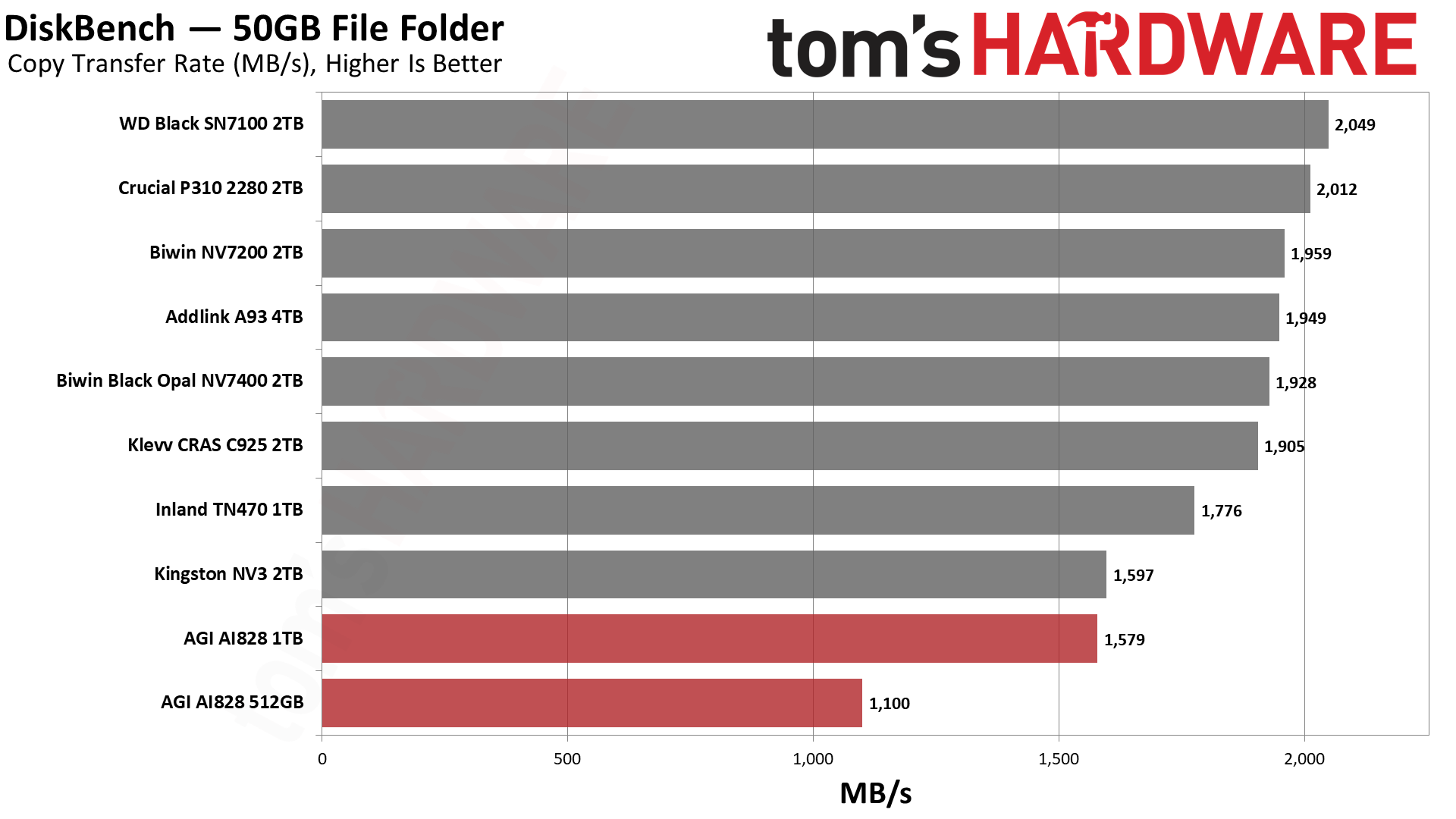
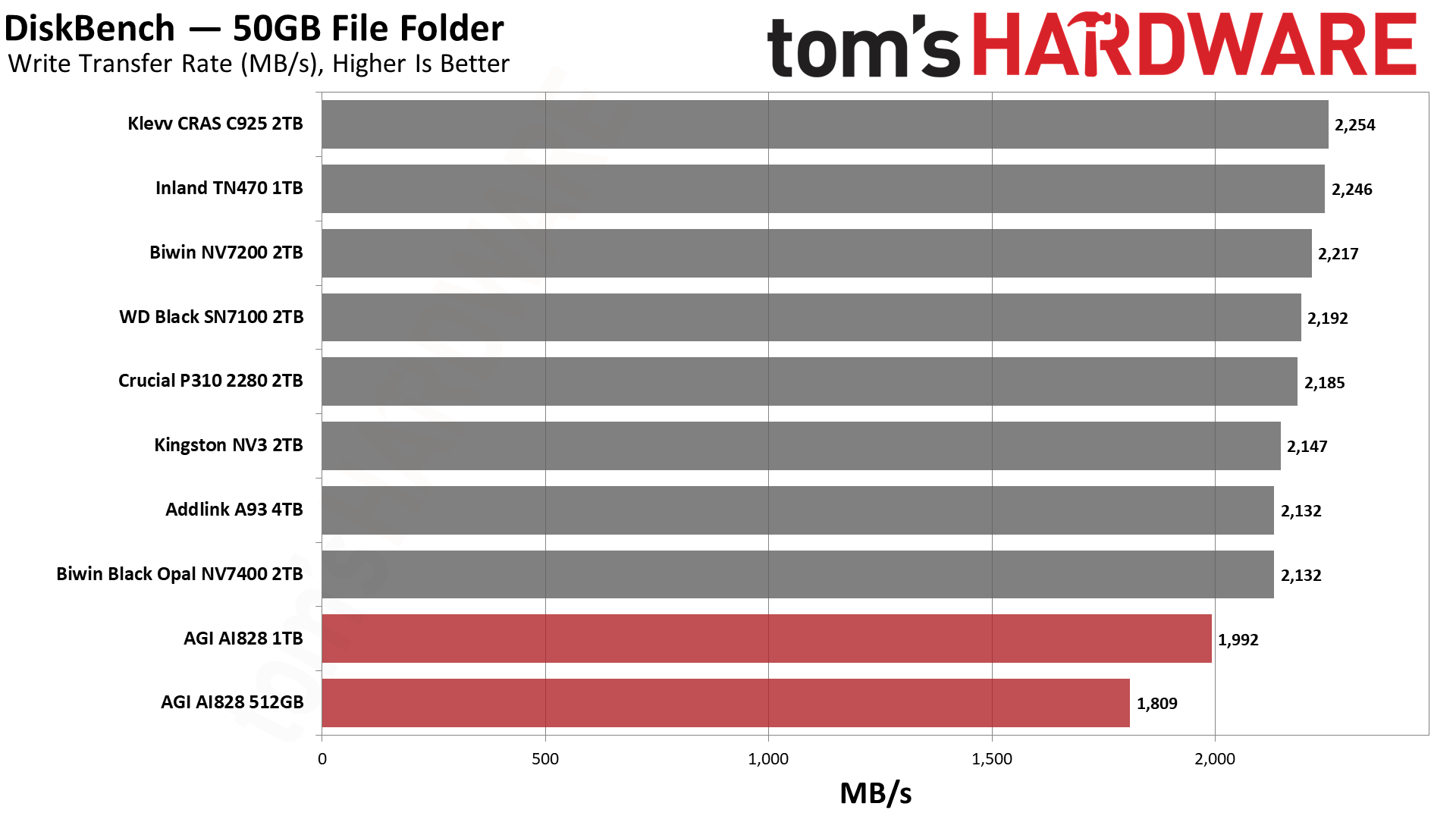
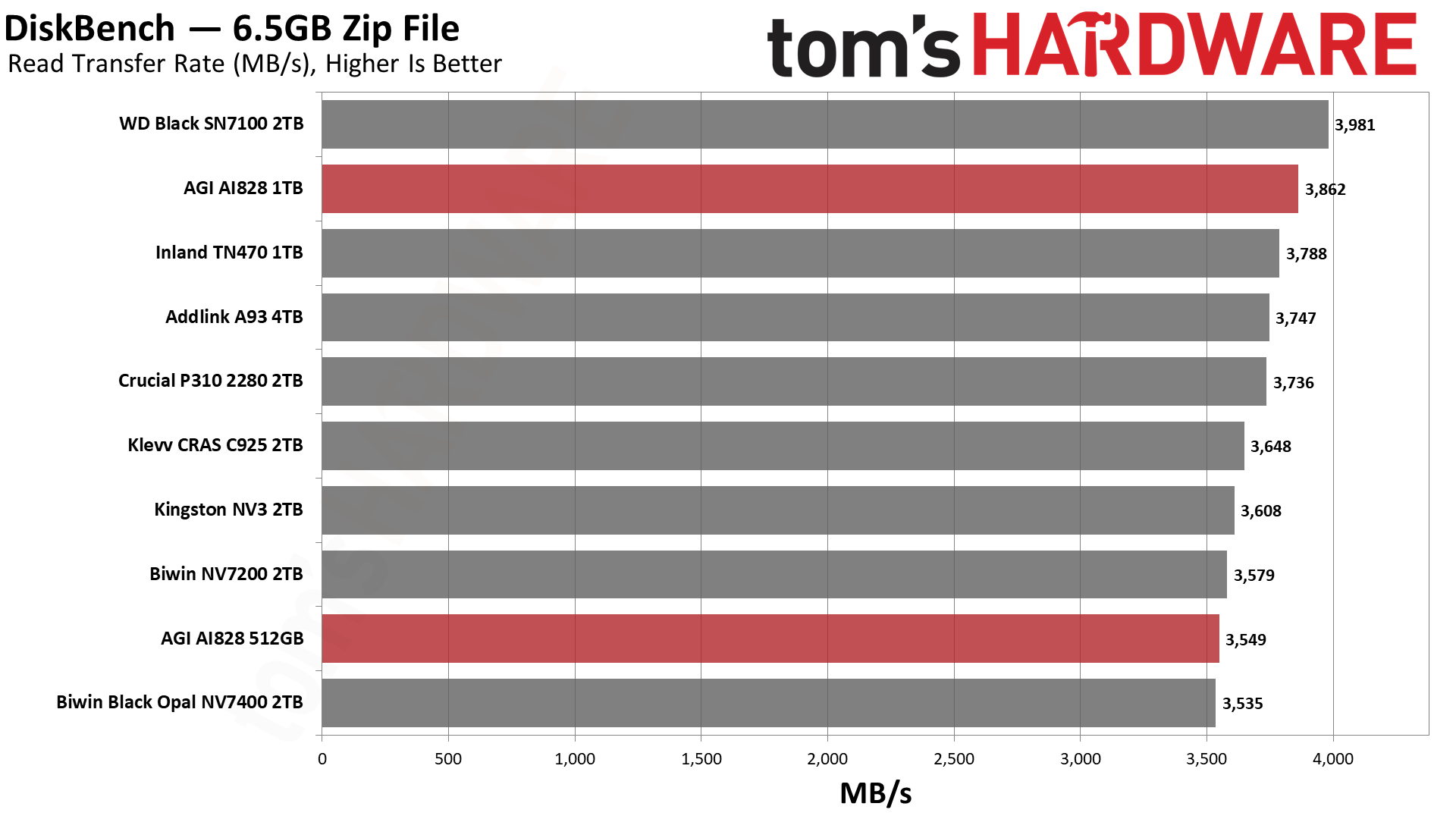
The AGI reads data fine, but struggles a bit during write workloads. This impacts copy performance, as writes are more limited than reads. Write performance can be impacted by the size of the pSLC cache, but if that is not too small, then it is impacted by the amount of parallelization the drive achieves. Smaller drives have fewer flash dies, and therefore less parallelization, and as a result write more slowly, which in turn reduces copy performance. This means the 512GB AI828 struggles to match the larger drives in this list, although, actually, its performance is not terrible for a drive of its size.
When you double the number of dies, you can reach up to double the speed, and with half the dies, you might drop to half the speed. The 512GB SKU here manages to maintain 1.1 GB/s, which, for this type of workload, isn’t world-endingly bad.
The 1TB SKU also struggles against the larger drives. The only other 1TB drive, the TN470, is near the bottom of the list. The budget NV3 is about as fast as the 1TB AI828. So, we can be somewhat happy with the AI828’s result. We’d figure that with at least a slower controller, the AI828 is going to fall behind the TN470. That doesn’t change the fact that this drive should be at a discount as a result. We are merely saying that the performance here is not unexpected, although things should be better at 2TB.
Synthetic Testing — ATTO / CrystalDiskMark
ATTO and CrystalDiskMark (CDM) are free and easy-to-use storage benchmarking tools that SSD vendors commonly use to assign performance specifications to their products. Both of these tools give us insight into how each device handles different file sizes and at different queue depths for both sequential and random workloads.
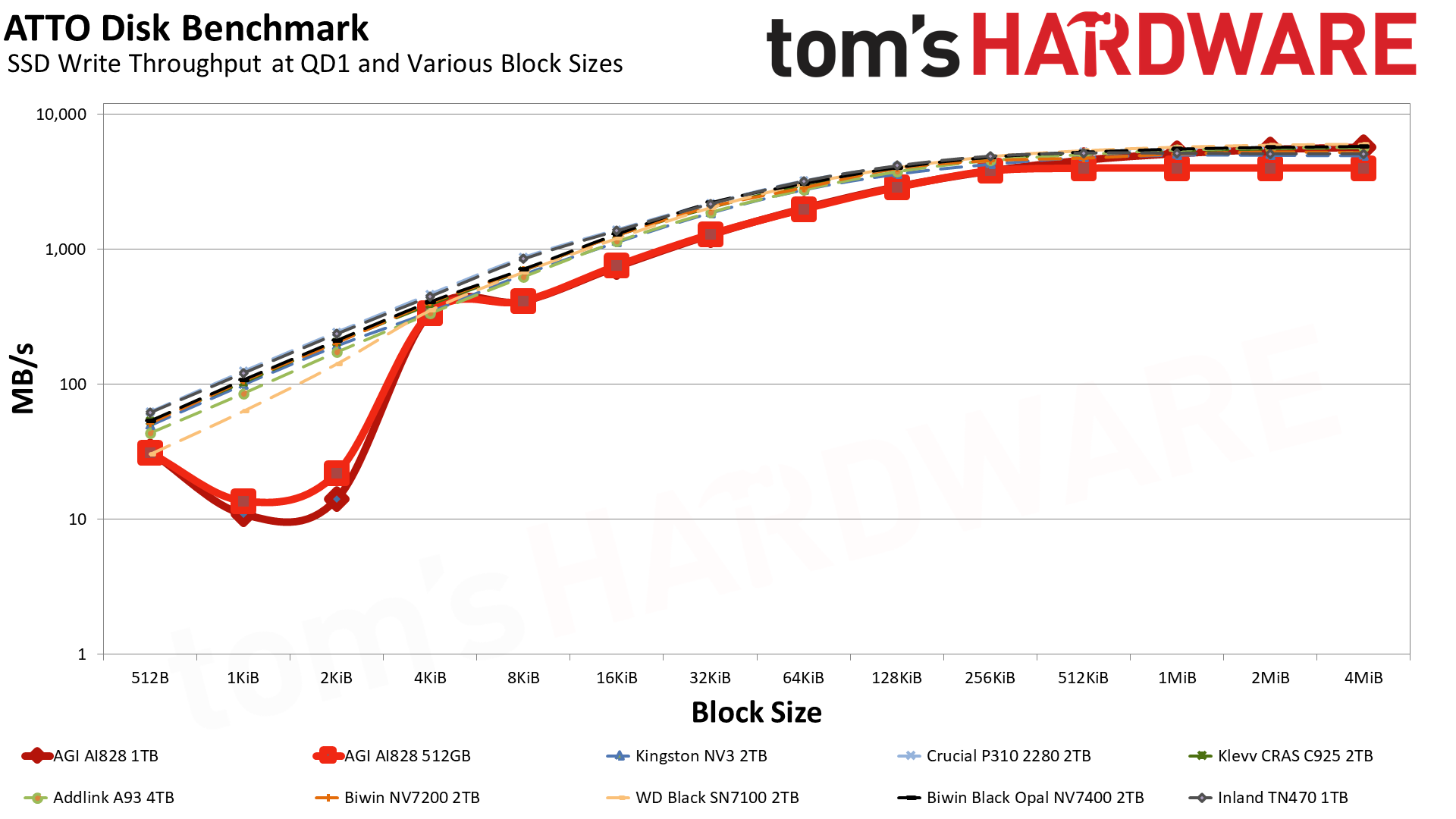
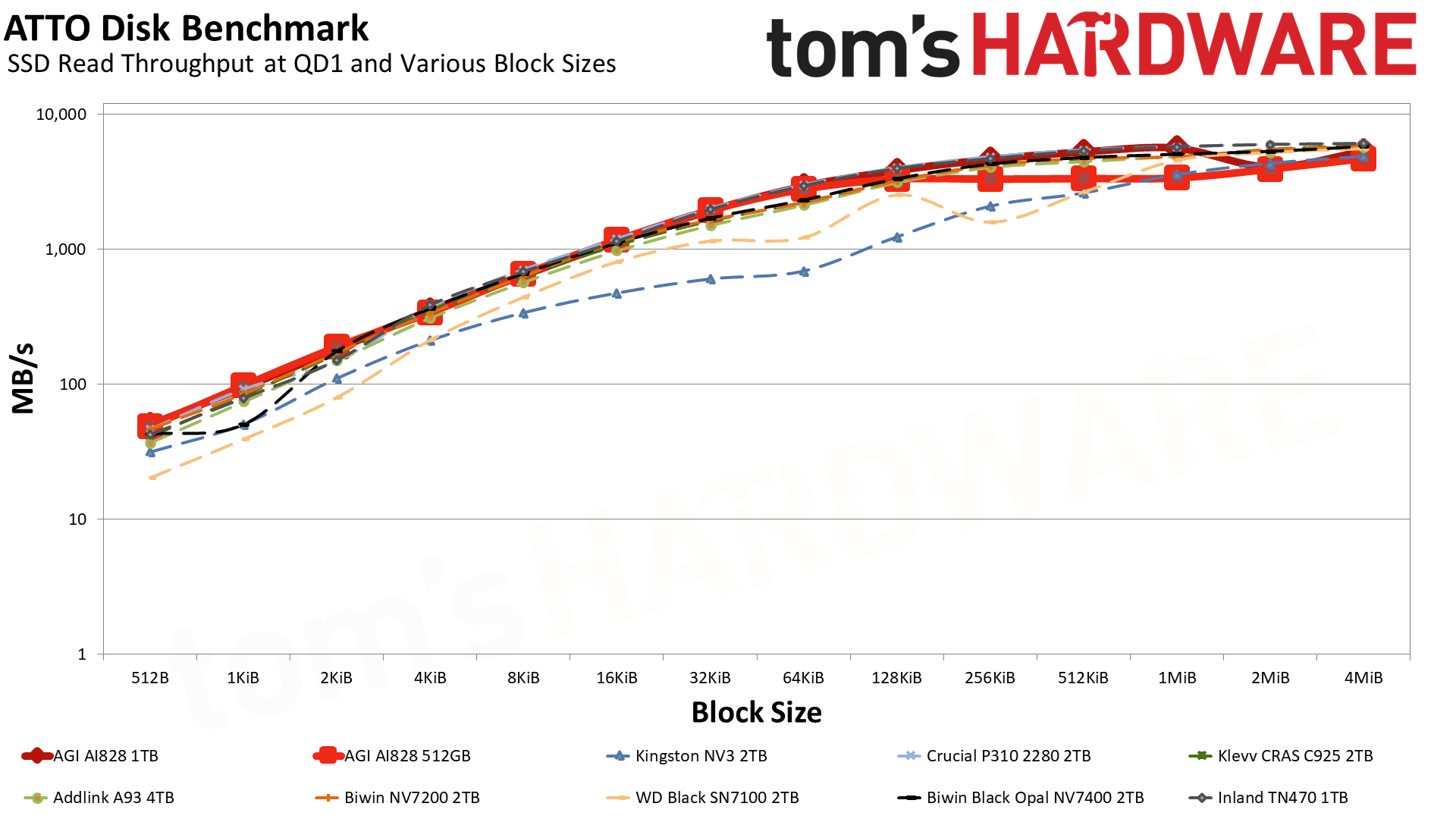
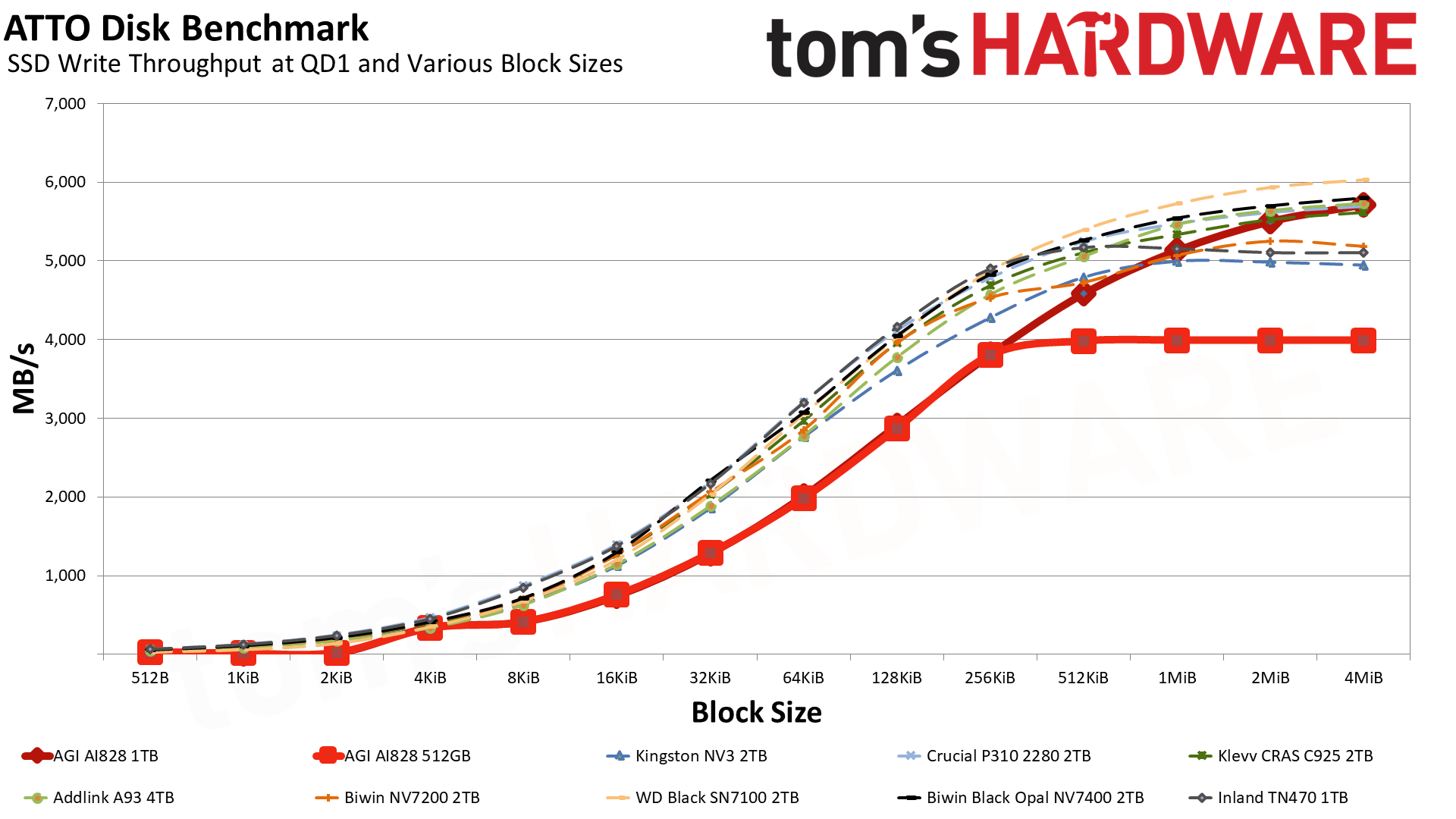
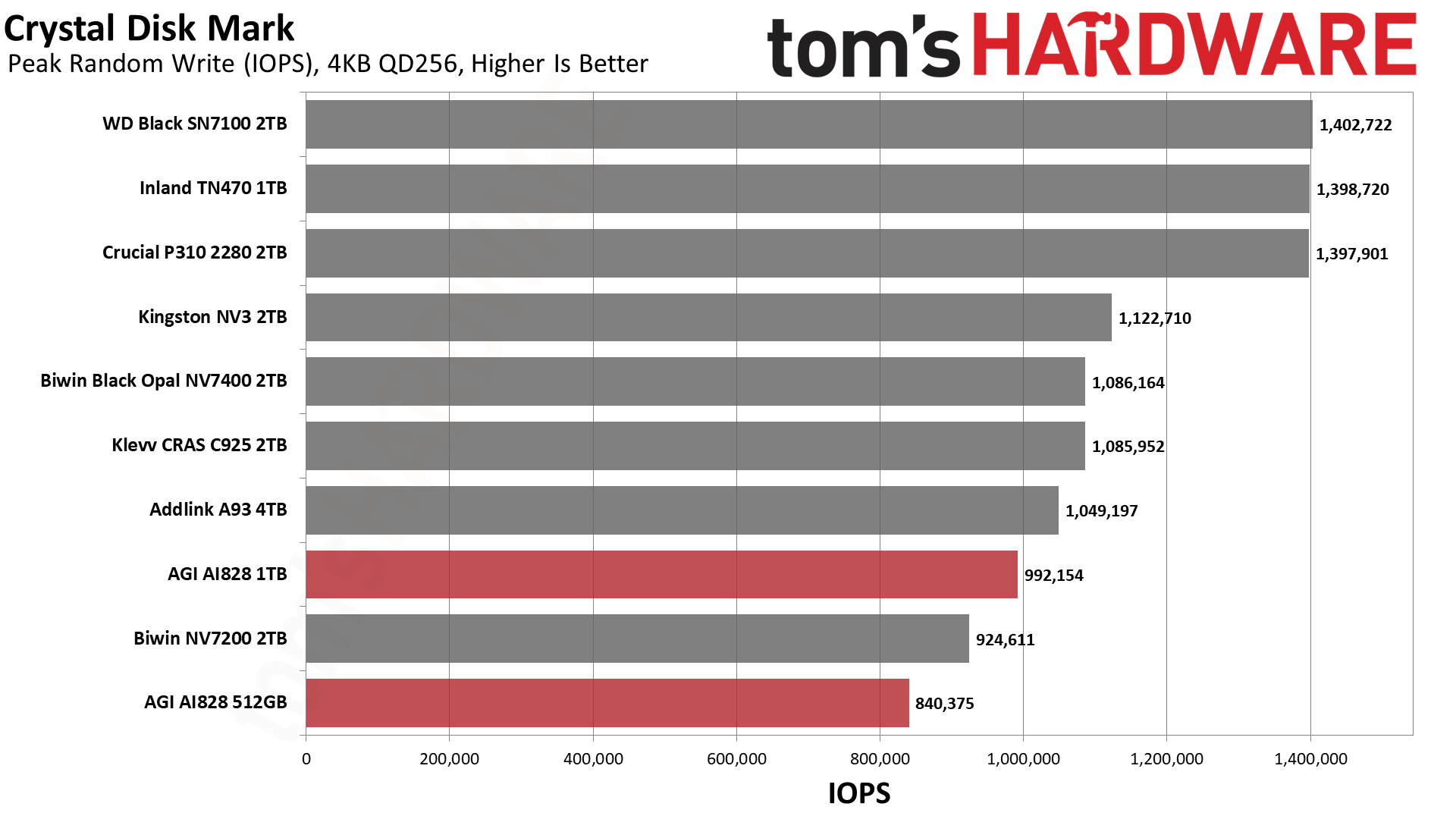
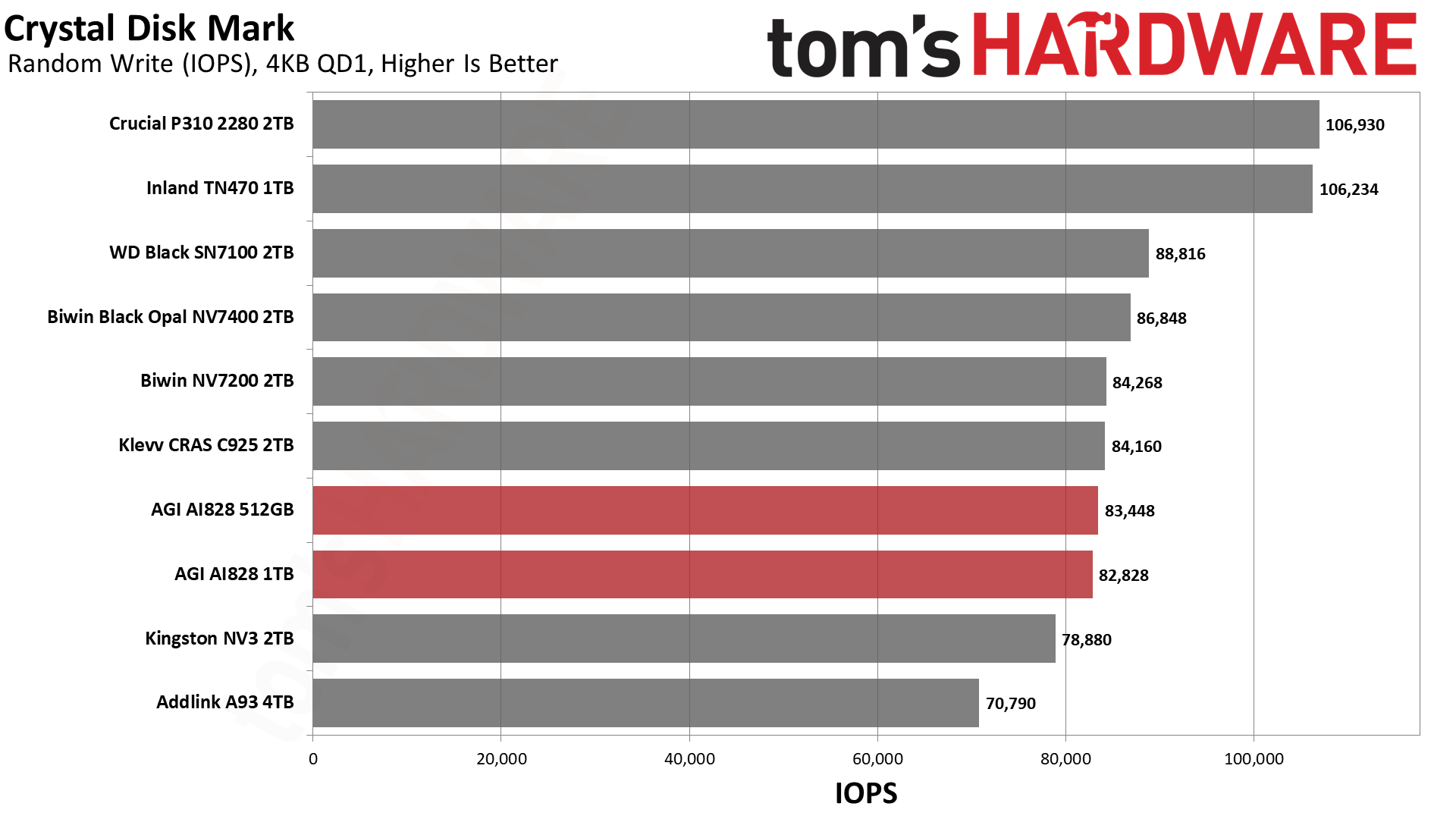
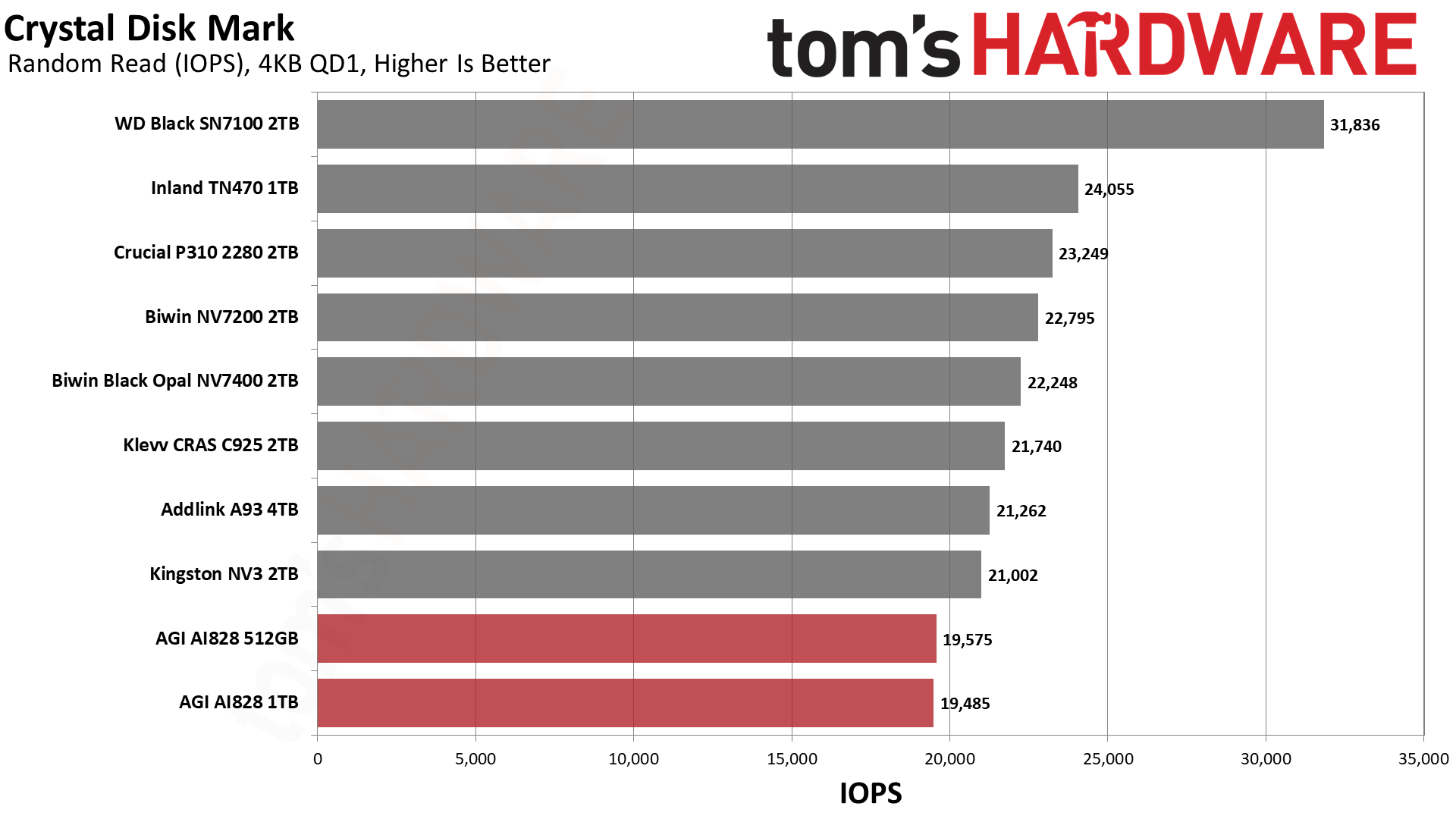
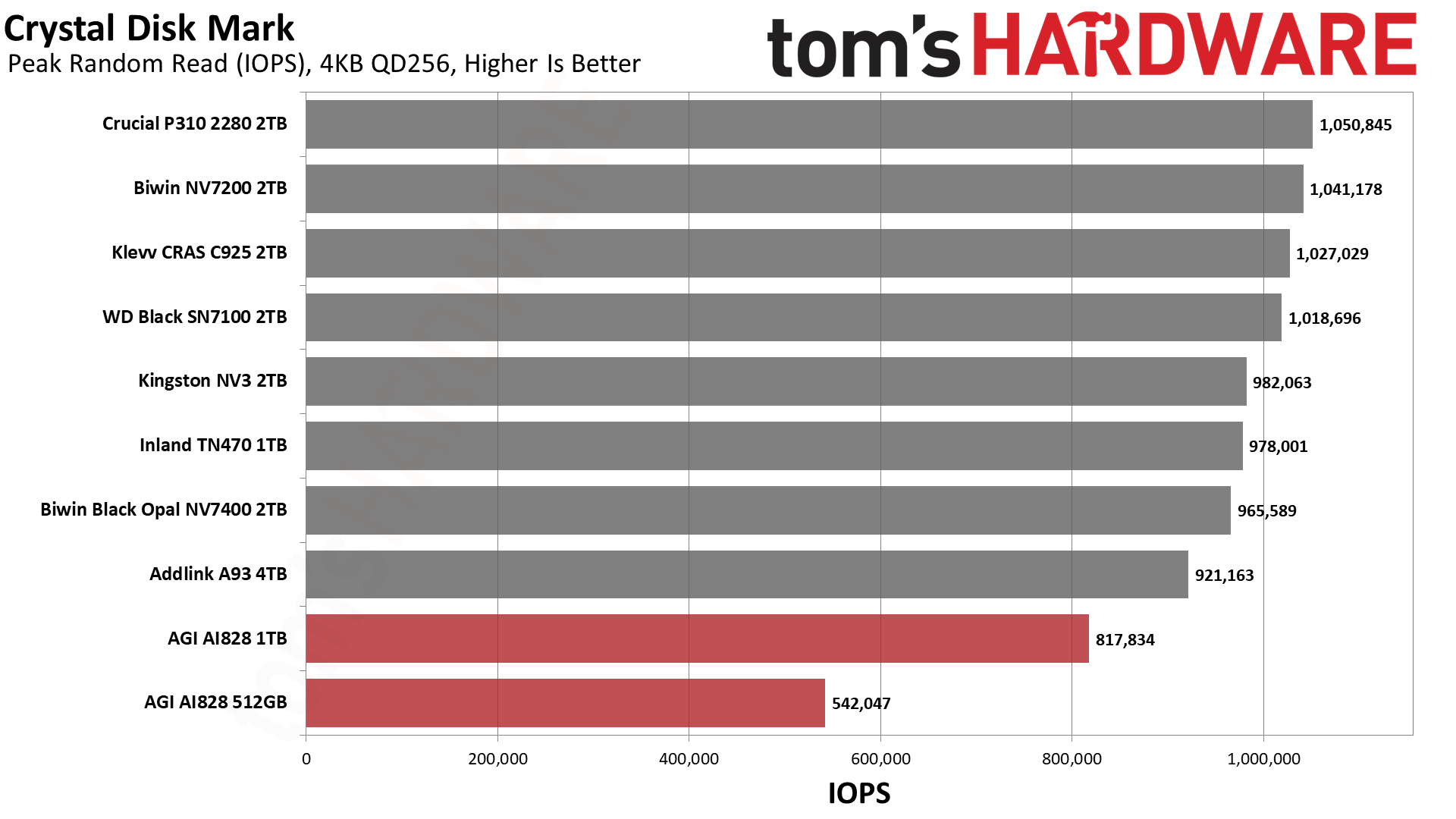
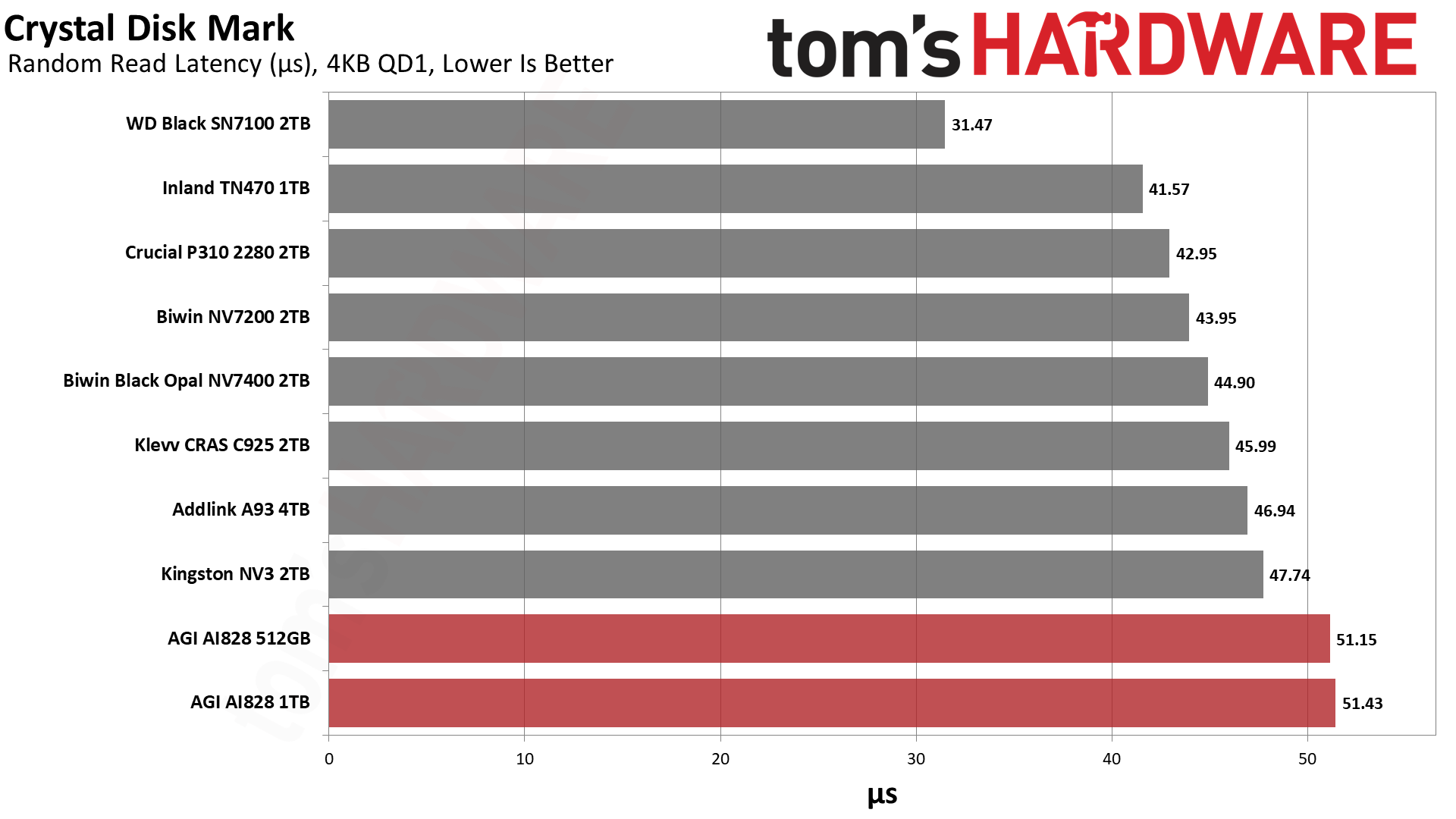
Fundamentally, we don’t see any issues with the AI828 in ATTO. The dips for 1KiB and 2KiB writes, for example, have little to no impact on real-world performance. This is not only because you mostly feel the reads with consumer workloads, but because writes are preferably combined into full 16KiB pages, and typically your logical page will be at 4KiB. Likewise, the dip for larger writes with the smaller 512GB SKU is expected because you lack sufficient dies for parallelization. This could be an issue if you intend to write or store larger files to the drive, but then a 512GB drive is probably not ideal. One exception might be if it’s used externally, in which case picking a heatsinked drive is odd, but even if that weren’t the case, the typical NVMe to USB enclosure is rated for a meager 10Gbps, anyway.
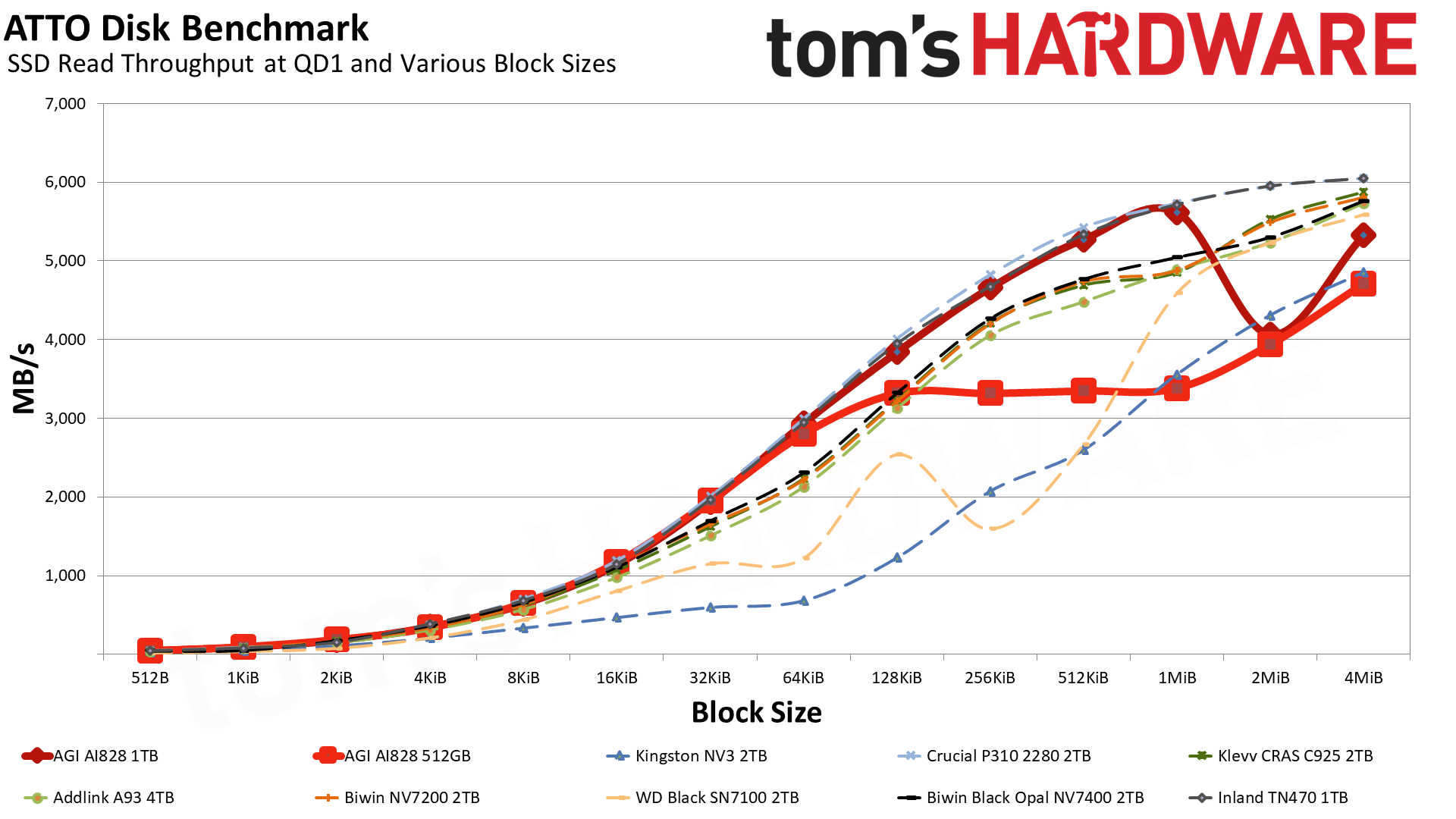
Read performance is more problematic. The 512GB SKU still has issues with larger I/O for the reason mentioned, although this begins at a smaller size. You will likely have files or blocks at 128 KiB or larger, and your performance may suffer from going with a smaller drive. The 1TB drive is better off except at 2MiB, where we have a dip. We’ve in the past hypothesized this could be a flash alignment issue, which would suggest this drive uses six-plane flash. With the 2,400 MT/s requirement here, that would mean 232-Layer YMTC or Micron TLC.
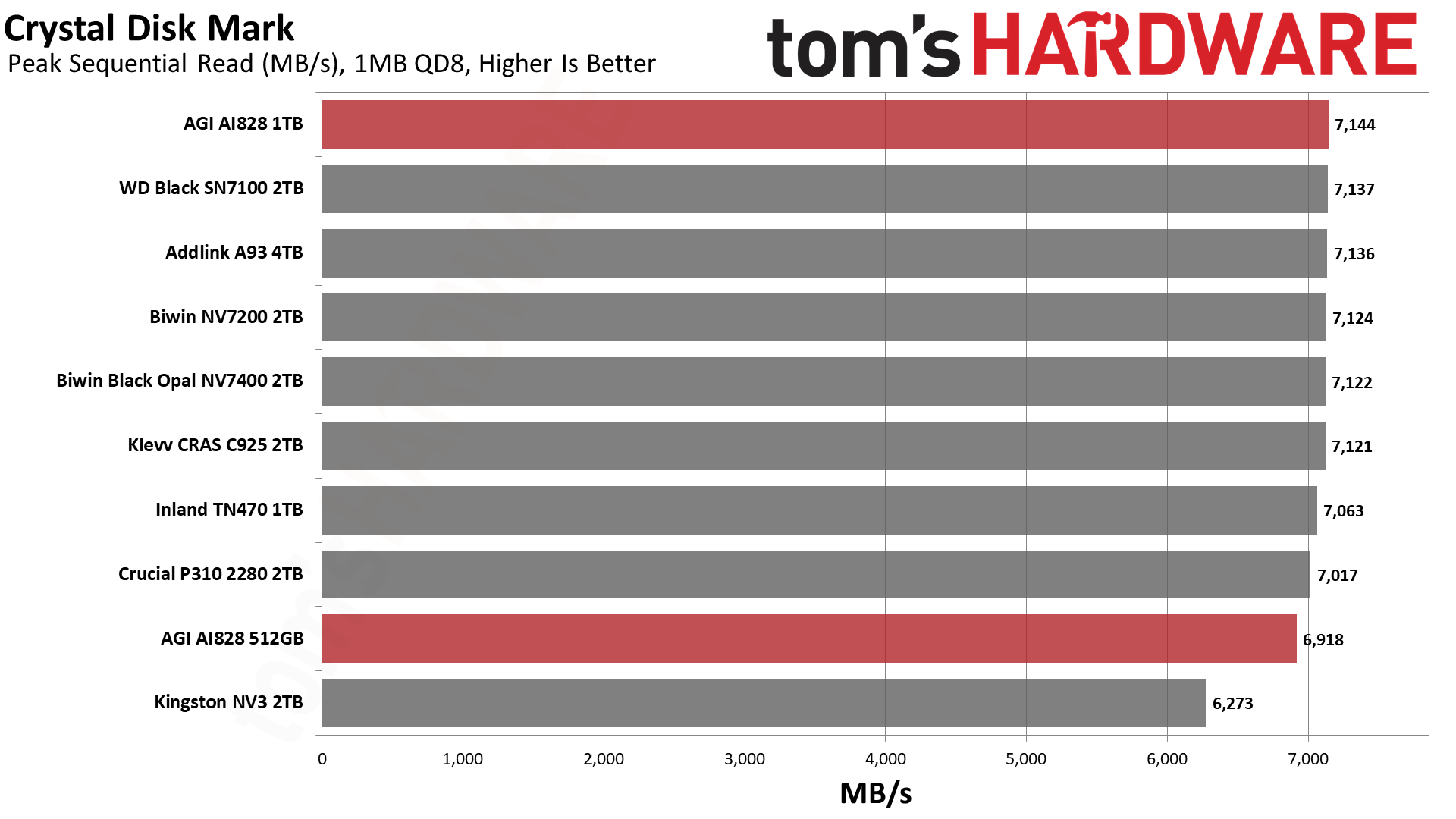
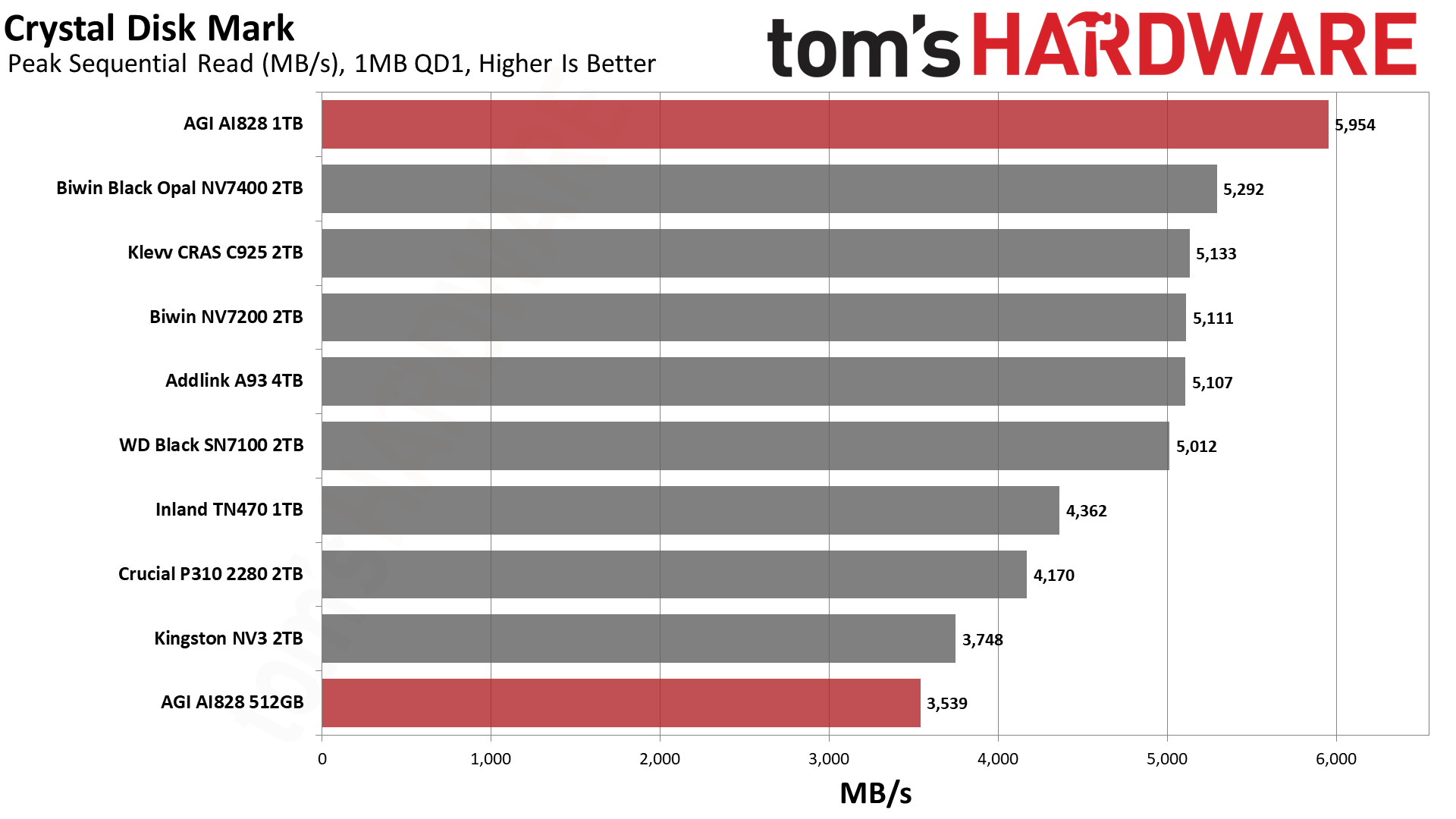
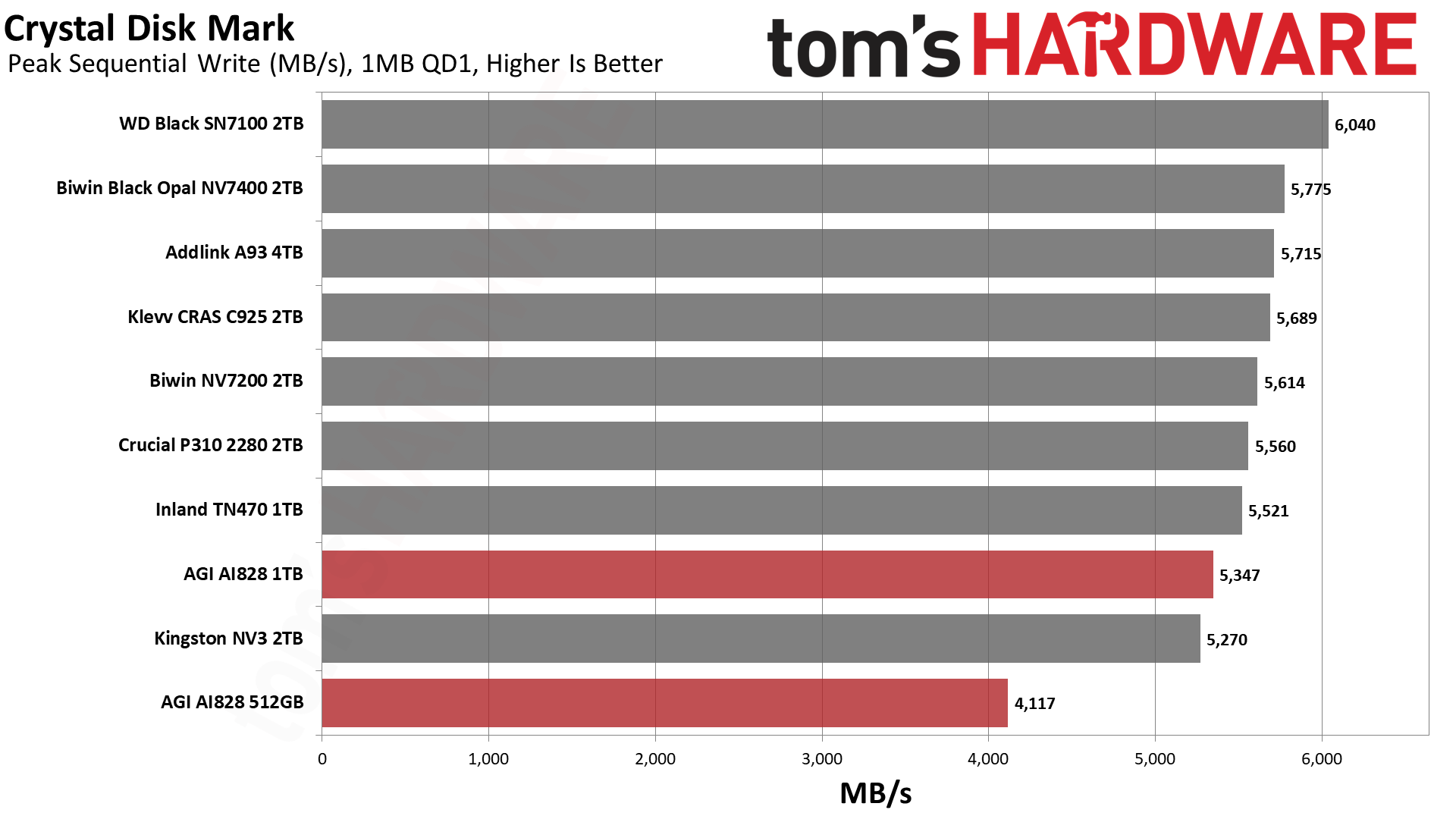
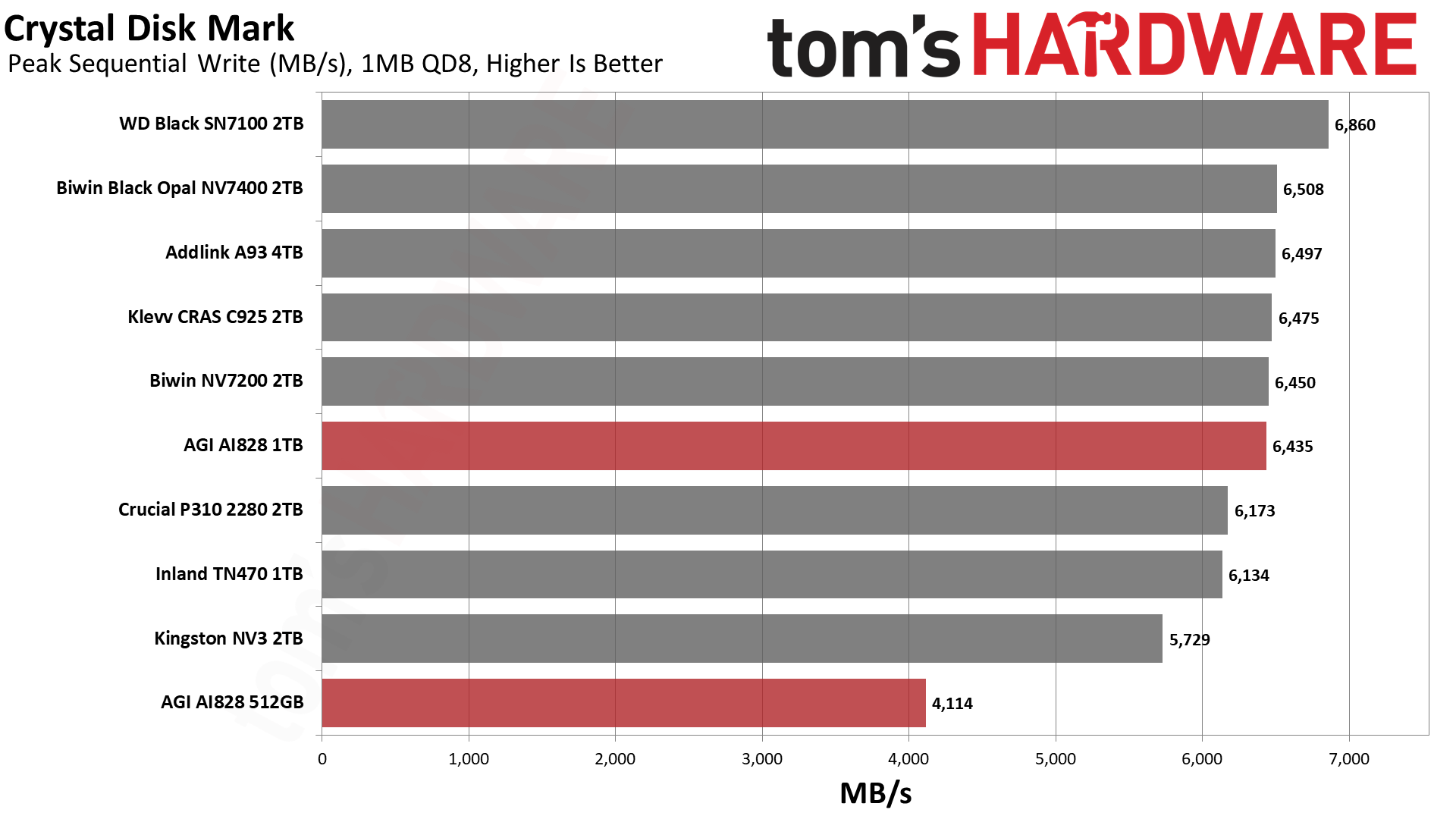
In CDM, we can move right over to sequential reads and writes to get a fuller idea of performance. For example, both capacities are fine with sufficient queue depth, but at queue depth 1 – which is a realistic workload for file transfers – the smaller 512GB model struggles. It’s still within striking distance of the 2TB NV3, which means it’s actually pretty good for a drive of its size. The 1TB drive has no issues at all. We see something similar with sequential writes, except that the 512GB SKU sees no performance improvement with queue depth. It simply doesn’t have enough flash to eke out more than ~4.1 GB/s.
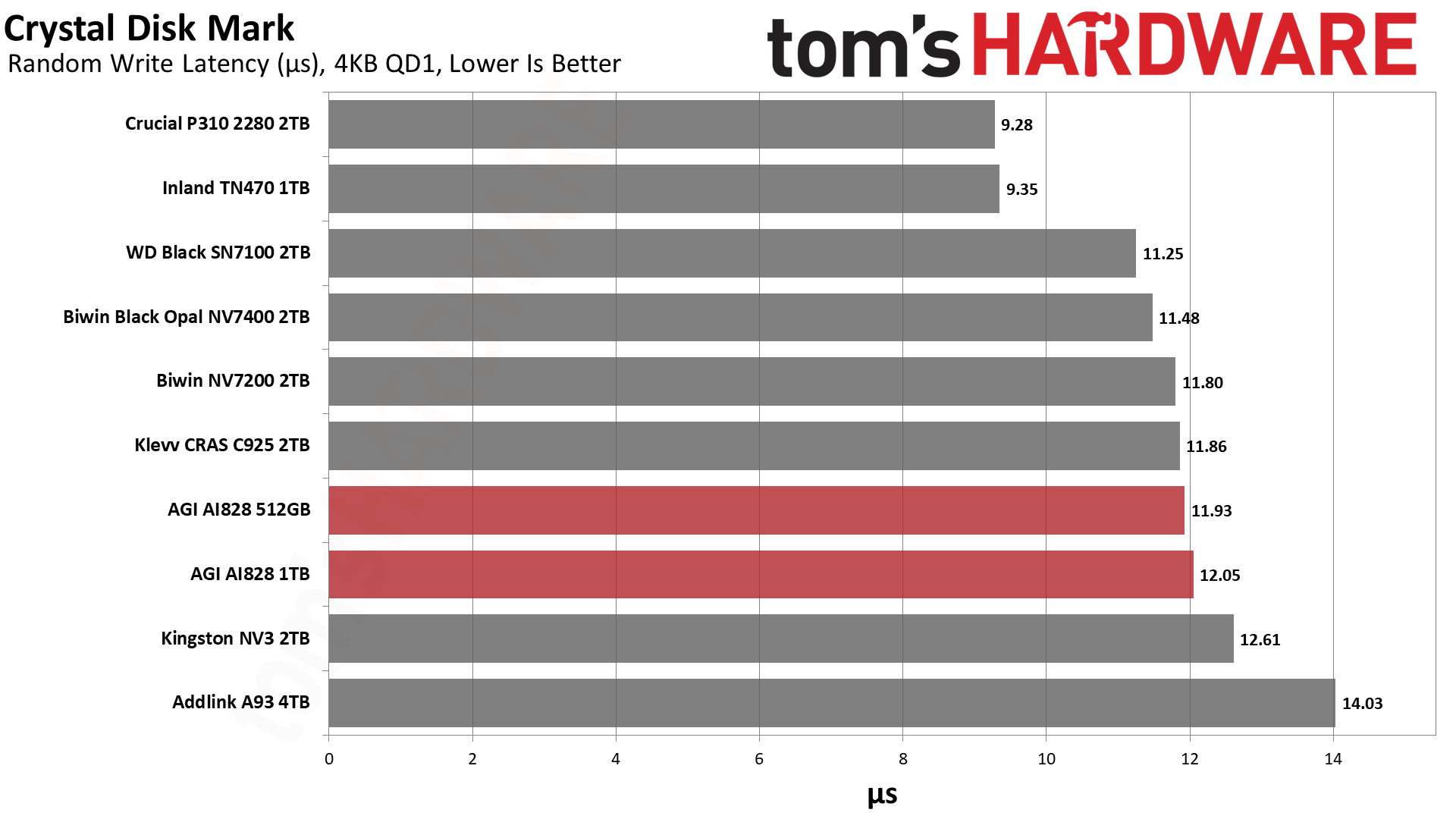
With random 4KB operations, though, the amount of dies won’t matter at QD1. This is because you’re only hitting one die at any given time. As a result, both capacities have the same latency for both reads and writes. This isn’t always the case, as sometimes a large-capacity model might have more overhead, or you may see different hardware combinations at some capacities. However, in this case, both drives are dead even. While the 4KB write latency is fine, the 4KB read latency is not great. However, this is actually better than the X1070’s 55.44µs we got at 2TB and is better than any of the 5 GB/s budget, PCIe 4.0 SSDs we’ve tested.
Again, we consider ~45µs to be excellent, with ~50µs being a second dividing point. The AI828 is close enough to put it above last-generation drives, but it’s slow enough to be relegated to game duty. The exception would be if you really only need 512GB and have to save money any way you can. In that case, this drive is passable, as you might otherwise be looking at older PCIe 4.0 or even PCIe 3.0 drives. This one still feels more snappy than those. At higher capacities and on a tight budget, if you can find the drive at the right price, it could also work, but would not be our first choice.
Sustained Write Performance and Cache Recovery
Official write specifications are only part of the performance picture. Most SSDs implement a write cache, which is a fast area of pseudo-SLC (single-bit) programmed flash that absorbs incoming data. Sustained write speeds can suffer tremendously once the workload spills outside of the cache and into the “native” TLC (three-bit) or QLC (four-bit) flash. Performance can suffer even more if the drive is forced to fold, the process of migrating data out of the cache in order to free up space for further incoming data.
We use Iometer to hammer the SSD with sequential writes for 15 minutes to measure both the size of the write cache and performance after the cache is saturated. We also monitor cache recovery via multiple idle rounds. This process shows the performance of the drive in various states including the steady state write performance.
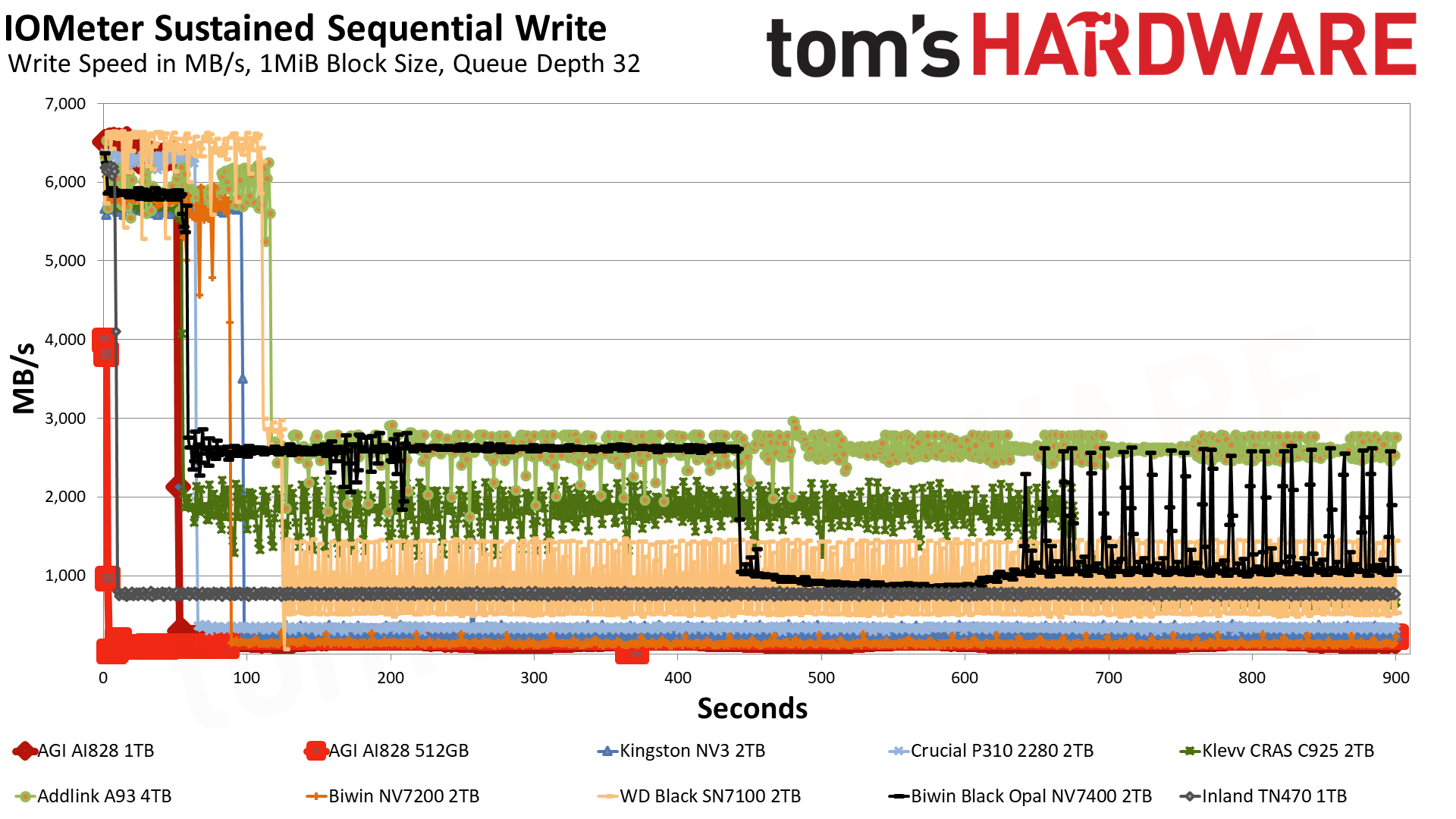
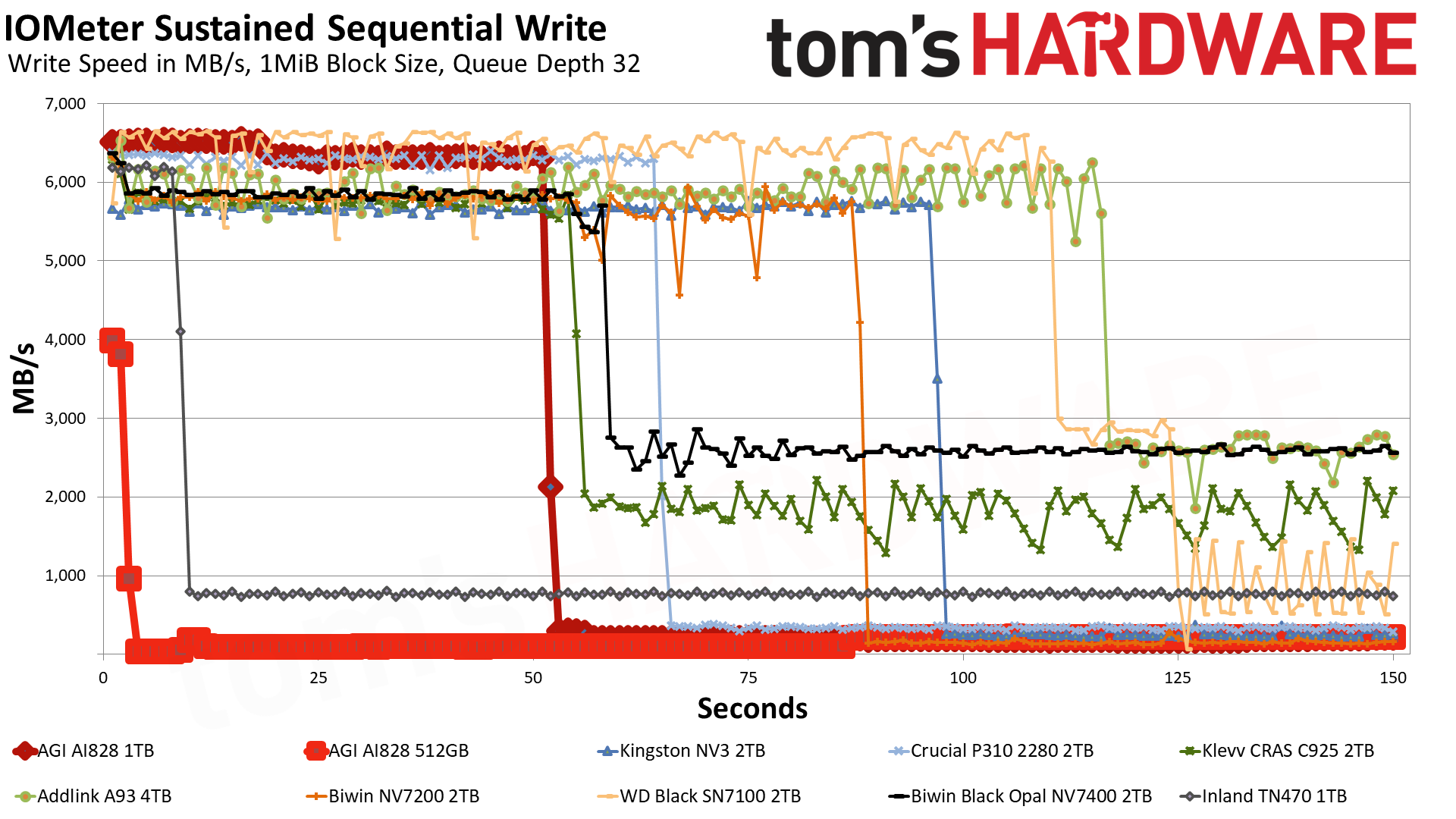
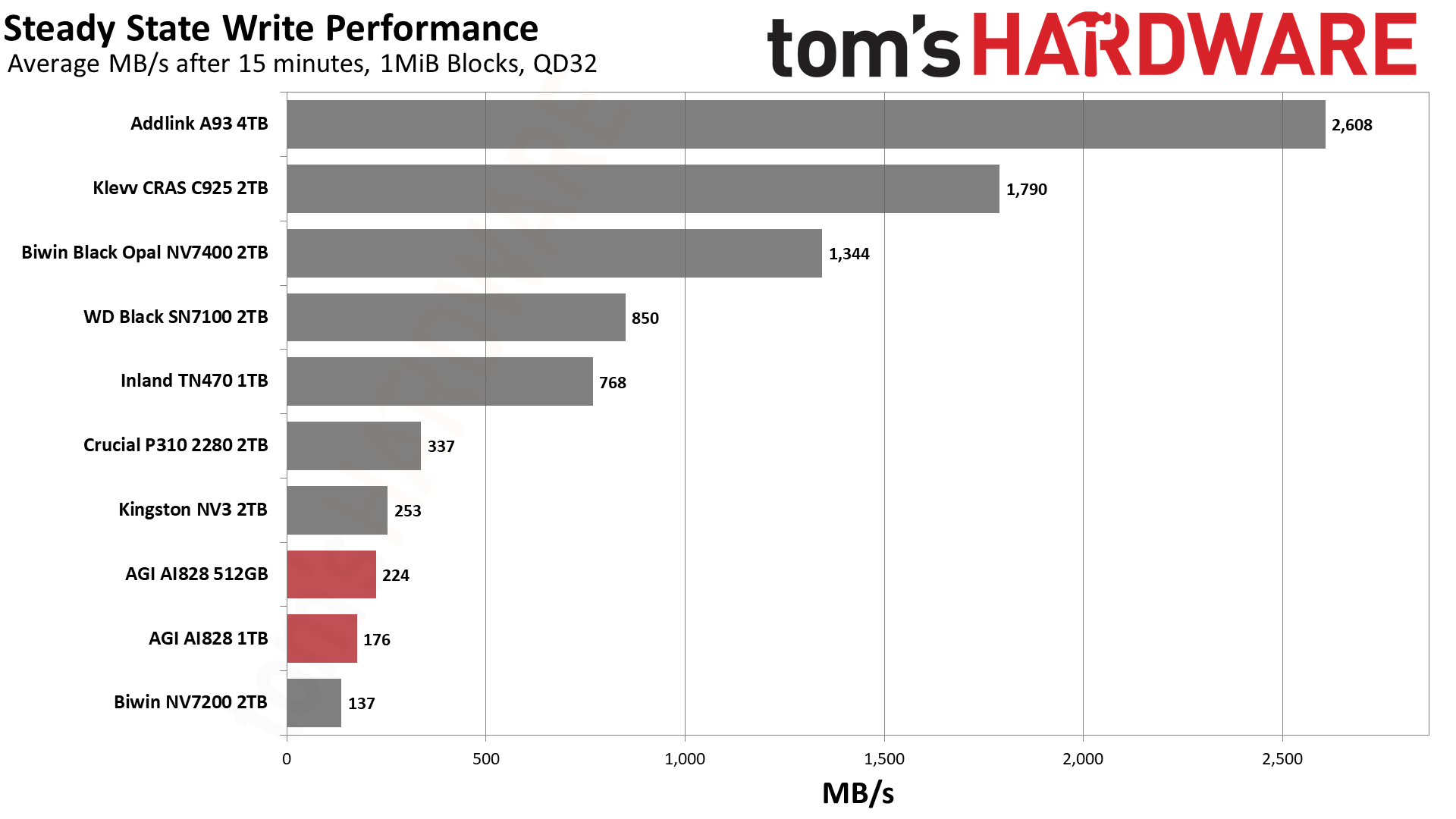
The AI828’s first, fastest mode in pSLC writes at ~6.4 GB/s for 51 seconds with a 328GB cache on the 1TB SKU. Given that this is almost one-third of the full capacity, we’re dealing with TLC flash. This is a large cache, which means the drive will struggle once it’s depleted. That is the case with the 1TB drive, averaging below 200 MB/s in the post-cache mode. This is very slow, HDD slow, and even QLC flash slow, but that is not completely unexpected. A modern 1TB drive does not have enough dies to hit a higher speed, and if the cache is very large, as is the case here, the trade-off is slow performance outside the cache. The good news is that the large cache hides this very well in 99% of real-world cases.
The 512GB SKU has even fewer dies, too few to really manage sustained writes very well. It’s better in a read-heavy role, but it’s too small for large media. In many cases, you’re better off with an HDD in that case. If, however, you need a smaller option for a primary drive in, say, an older machine, this could do the trick. Older machines benefit greatly from going to an SSD – especially an NVMe SSD – and will usually be read-heavy or even read-exclusive. If you are intending to get a small, 512GB caching drive, this is certainly not the way to go.
We must admit that, in our testing, the smaller SKUs’ cache size is tiny. This is highly unusual and points to AGI using a static cache in that circumstance. Such a small cache means the drive can rebound better, even with half the interleaving or parallelization of the 1TB drive, so it scores higher in steady state write performance testing. The use of static pSLC makes sense here to improve post-cache performance and potentially also to improve flash endurance. Static pSLC can lead to lower effective write amplification if you’re not doing big writes, and it is still ample enough to cache potentially damaging random writes. So, it’s possible AGI is making the best of a bad situation.
Power Consumption and Temperature
We use the Quarch HD Programmable Power Module to gain a deeper understanding of power characteristics. Idle power consumption is an important aspect to consider, especially if you’re looking for a laptop upgrade, as even the best ultrabooks can have mediocre stock storage in terms of capacity and performance. Desktops are often more performance-oriented with less support for power-saving features, so we show the worst-case scenario for idle.
Some SSDs can consume watts of power at idle while better-suited ones sip just milliwatts. Average workload power consumption and max consumption are two other aspects of power consumption, but performance-per-watt, or efficiency, is more important. A drive might consume more power during any given workload, but accomplishing a task faster allows the drive to drop into an idle state more quickly, ultimately saving energy.
For temperature recording, we currently poll the drive’s primary composite sensor during testing with a ~22°C ambient. Our testing is rigorous enough to heat the drive to a realistic ceiling temperature, but real-world temperatures will vary due to the environment and workload factors.
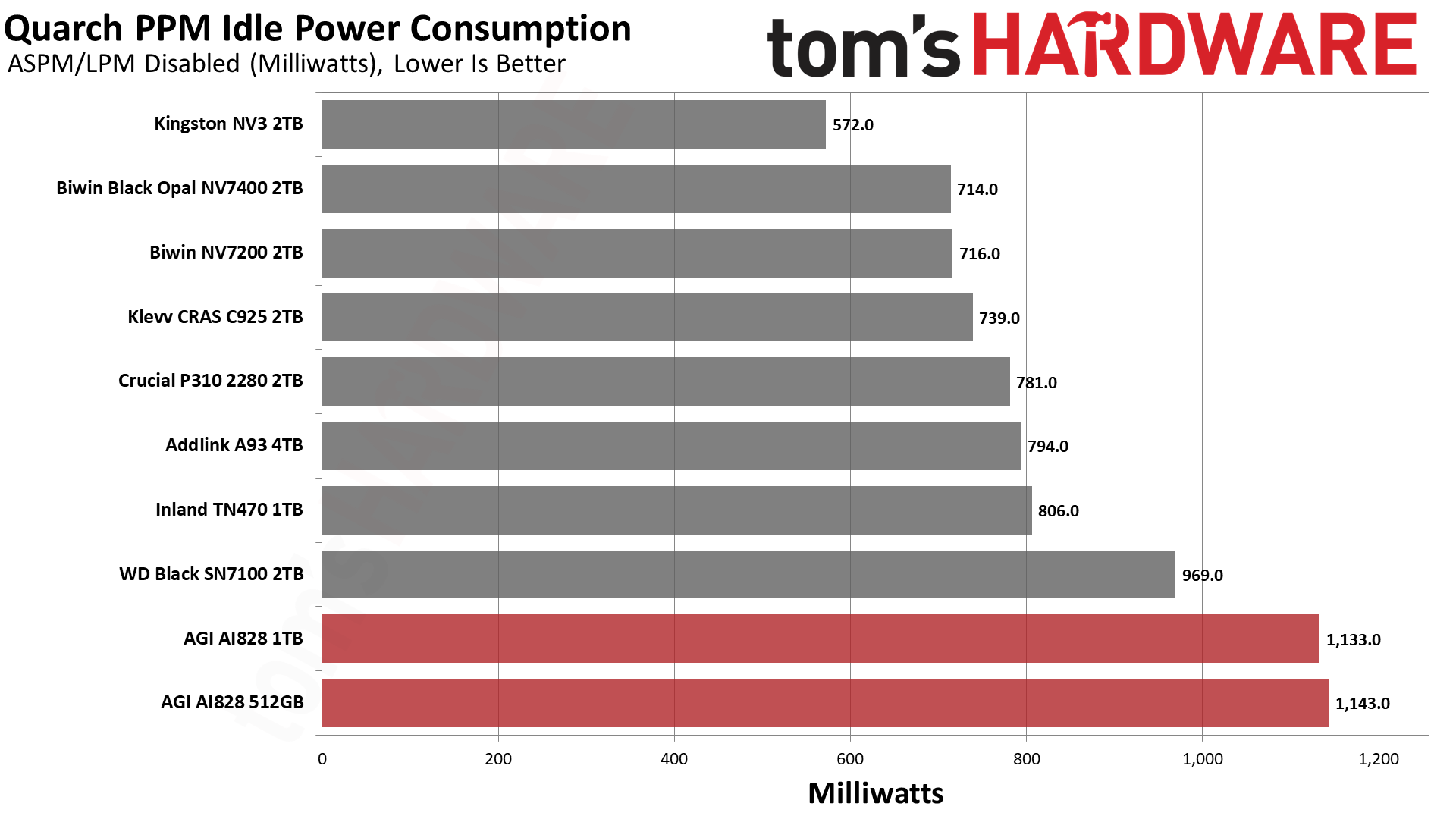
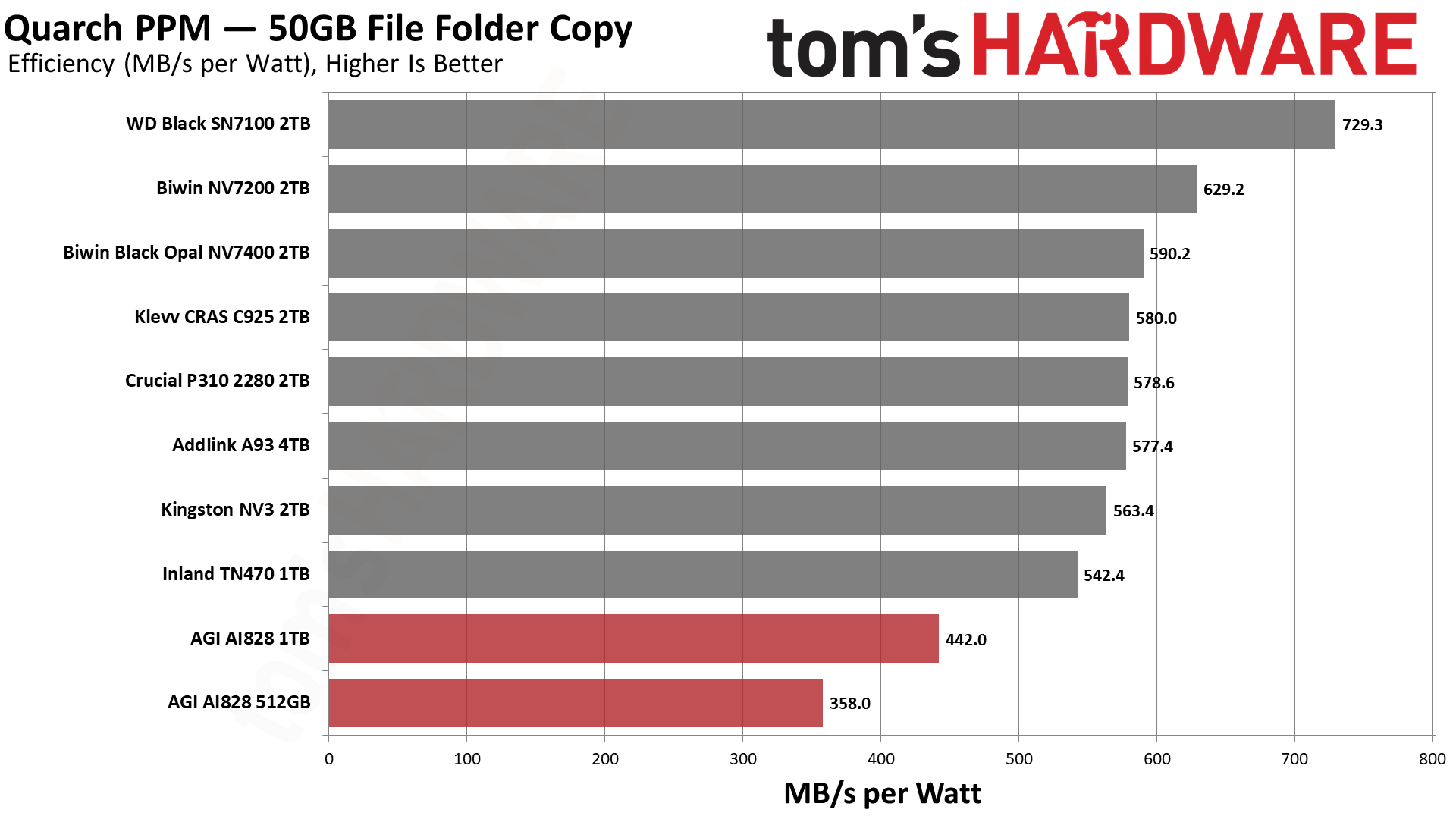
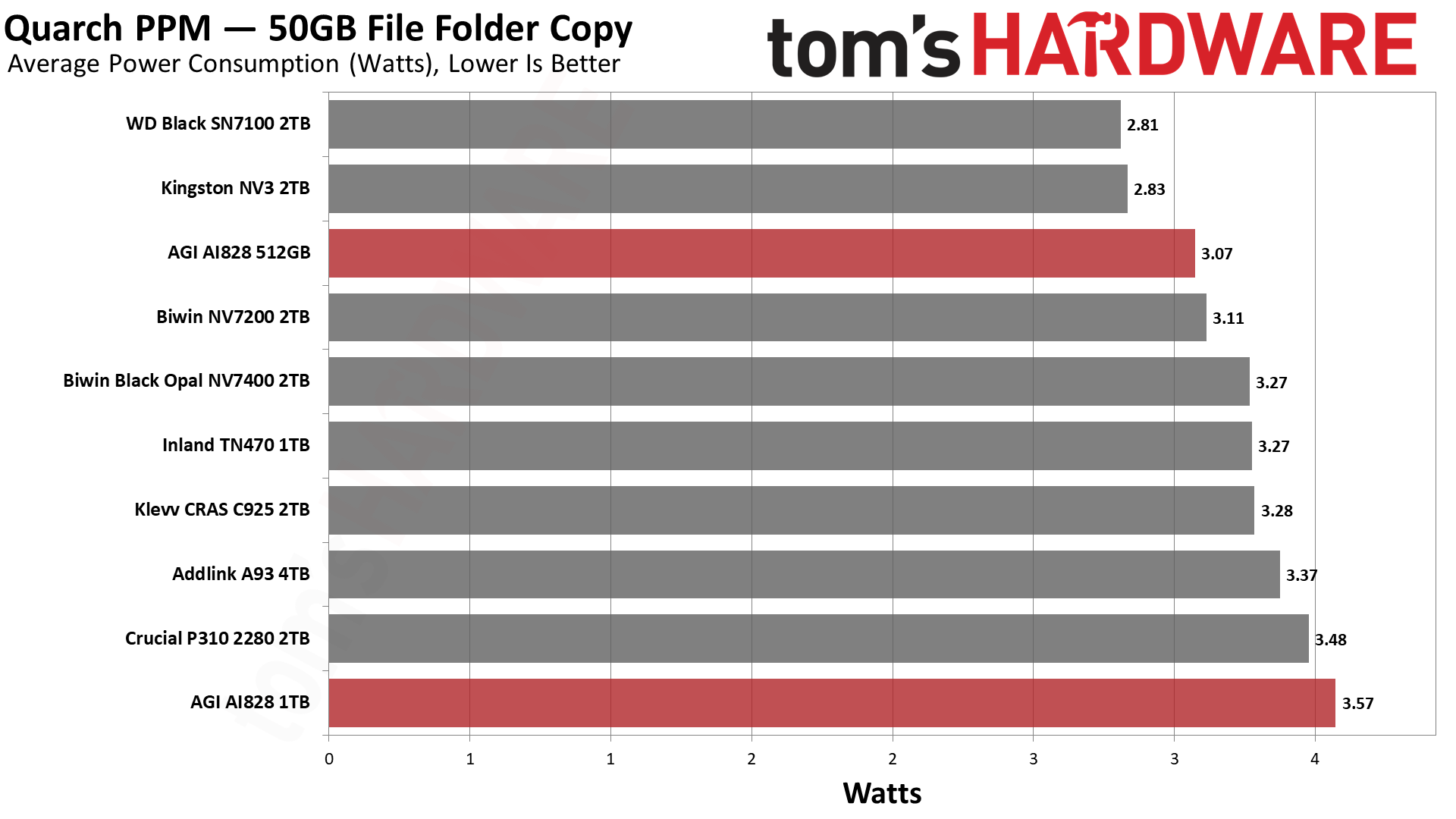
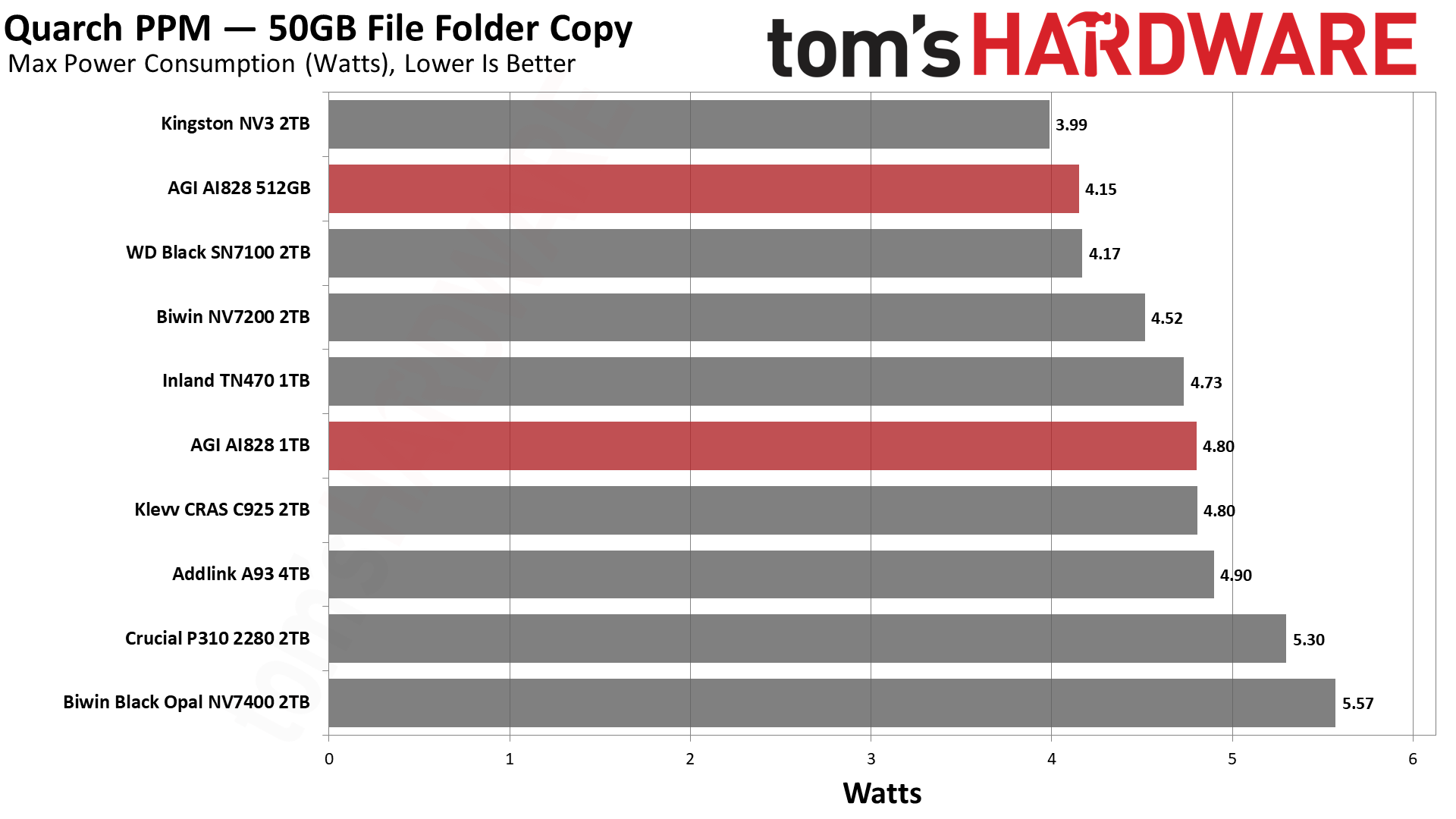
Power efficiency is rough on the AI828. We also saw this with the X1070, so it must be chalked up to the controller. We suspect it’s because our workload is hard on the drive, and this controller is not as strong. You will likely not have issues with everyday, read-heavy activities. Also, our idle testing is for desktops, and a laptop with proper power-saving states will not be in as bad a shape. That’s all to say that we don’t think these results preclude the drive’s use in a laptop because, frankly, this drive isn’t fast enough to be an issue in most cases. We might recommend a different drive like the Black SN7100 if you’re aiming at power efficiency or want/need a cool-running option, though.
Speaking of the heatsink, it kept both drives at a maximum temperature of 54°C. This means plenty of headroom, and the drive should be suitable for any machine that can take it. It won’t overheat. That’s a bonus for PS5 usage because the thermal envelope can be tighter.
Test Bench and Testing Notes
|
CPU |
Intel Core i9-12900K |
|
Motherboard |
Asus ROG Maximus Z790 Hero |
|
Memory |
2x16GB G.Skill DDR5-5600 CL28 |
|
Graphics |
Intel Iris Xe UHD Graphics 770 |
|
CPU Cooling |
Enermax Aquafusion 240 |
|
Case |
Cooler Master TD500 Mesh V2 |
|
Power Supply |
Cooler Master V850 i Gold |
|
OS Storage |
Sabrent Rocket 4 Plus-G 2TB |
|
Operating System |
Windows 11 Pro |
We use an Alder Lake platform with most background applications, such as indexing, Windows updates, and anti-virus, disabled in the OS to reduce run-to-run variability. Each SSD is prefilled to 50% capacity and tested as a secondary device. Unless noted, we use active cooling for all SSDs.
AGI AI828 Bottom Line
The AGI AI828, like the Seagate X1070, is not a great drive, but it’s also not one to dismiss. Memory prices have risen greatly within the last year, which impacts SSD prices through NAND flash costs and, sometimes, DRAM costs as well. An SSD’s cost is derived almost entirely from the flash, in fact. We’ve seen budget drives return in force, and we’re seeing low-end PCIe 4.0 and even PCIe 3.0 drives coming back.
This is also a reality for volatile memory markets – DDR4 is coming back, there was a threat that included even DDR3, and, believe it or not, DDR2 prices are increasing as well – with no end in sight. To put it simply, the AI828 would not have gotten far a year or so ago, but in the current climate, it’s not too bad. We feel that Seagate did a better job of presenting and supporting its drive, and, simultaneously, we feel like AGI has made improvements in its SSDs, so our score falls somewhere in between.
Let’s start with the good. AGI offers a wide capacity range for the drive, which is good for people who need 512GB or, theoretically, 8TB at a lower price. We think 8TB luxury buyers might opt for a faster drive like the Sandisk Optimus GX Pro 8100, WD Black SN8100, or Samsung 9100 Pro, or frankly, the less-expensive WD Black SN850X. The lower-end 512GB version of the AI828 perhaps makes more sense, but that’s one area where older technology might make sense. Newer flash is more dense and so really prefers higher capacities. On the other hand, the AI828 is more responsive than older drives, which is probably more important from a user experience perspective. So, despite some of the bad results, the fact that it’s using newer hardware is a bonus.
The drive also comes with a heatsink and runs pretty cool. It should be great for a normal desktop or in a PS5. It’s not very efficient, but that generally doesn’t matter in these two scenarios. Certainly not in most desktops, although there are exceptions. If you do have proper power-saving, it should be fine, though. The drive is designed to pull 5.5W or less at peak, which frankly isn’t concerning. So, we’re willing to give it a pass on the power side, although there are better options for laptops. One thing we have to mention again is that smaller SKUs don’t perform as well, and, since we’re testing at 512GB and 1TB today, the AI828 looks worse than it is. Most of the competition is sitting at 2TB because that was the sweet spot back when prices were sane.
It’s still hard to love the performance on this one. Like the X1070, which uses QLC flash, things are inconsistent across our benchmarks with relatively poor results on the whole. We opted not to put this one up against older or slower drives, even though some of those are making a comeback. The fact is, this drive will beat PCIe 3.0 and many lower-end PCIe 4.0 options and really shouldn’t be compared to those. You’re probably better off going with its newer tech unless budget is your only priority. Against other PCIe 4.0 drives in this range, however, even adjusting for capacity, it’s going to struggle. This drive has to be priced inexpensively to make sense, and if it is, we can recommend it for lighter duty.
MORE: Best SSDs
MORE: Best External SSDs
MORE: Best SSD for the Steam Deck

