Local AI clustering with Dell’s Pro Max GB10 — connecting two Nvidia Grace Blackwell to scale out AI compute at home
Our local AI testing in 2026 has focused on large language models that can fit entirely into the 128GB of unified memory on Nvidia GB10 and AMD Strix Halo systems. Useful as those smaller open models can be, there is sometimes no replacement for displacement. Today, we’re exploring what’s possible from a local AI cluster with a pair of Nvidia GB10 systems, namely Dell’s Pro Max with GB10 (henceforth Pro Max), which gives us 256GB of RAM for a local AI sandbox.
Quantizing an AI model from higher-precision to lower-precision data types involves tradeoffs for performance and accuracy. And even in quantized form, some advanced open models are still too large to fit within 128GB. But those models can be distributed across multiple local systems using the network as a scale-out backbone, just as they are in the data center.
Why scale out GB10 systems (or Strix Halos, or Macs)? Local token factories with large VRAM pools built up from discrete GPUs can get crazy, fast. Scaling one to even 128GB of VRAM requires a costly host system with enough PCI Express slots and bandwidth to feed those cards, and going beyond 128GB means spending $20K or more in Nvidia GPUs at a minimum, even if you’re building up from older 48GB Ada cards.
The preferred recipe for this kind of setup typically includes a Threadripper Pro or Epyc platform, which means a costly CPU, motherboard, and DDR5 kit even before you start adding graphics cards. The power requirements for such a system can quickly get beyond the capabilities of a standard USA 15A circuit (1,800W maximum).
And having four discrete GPUs running their blower fans at high speeds under load, along with whatever other active cooling you might need for what is essentially a GPU server, is not going to make for the most pleasant company if you’re sharing a space with it.
While a GPU server with four RTX Pro 5000 or RTX Pro 6000 cards is useful for getting the absolute best performance for a given application, those potentially high costs, platform challenges, and quality of life concerns have led local AI enthusiasts to explore other ways of achieving large local memory pools with acceptable LLM inference performance, like the GB10 cluster we’re building today.
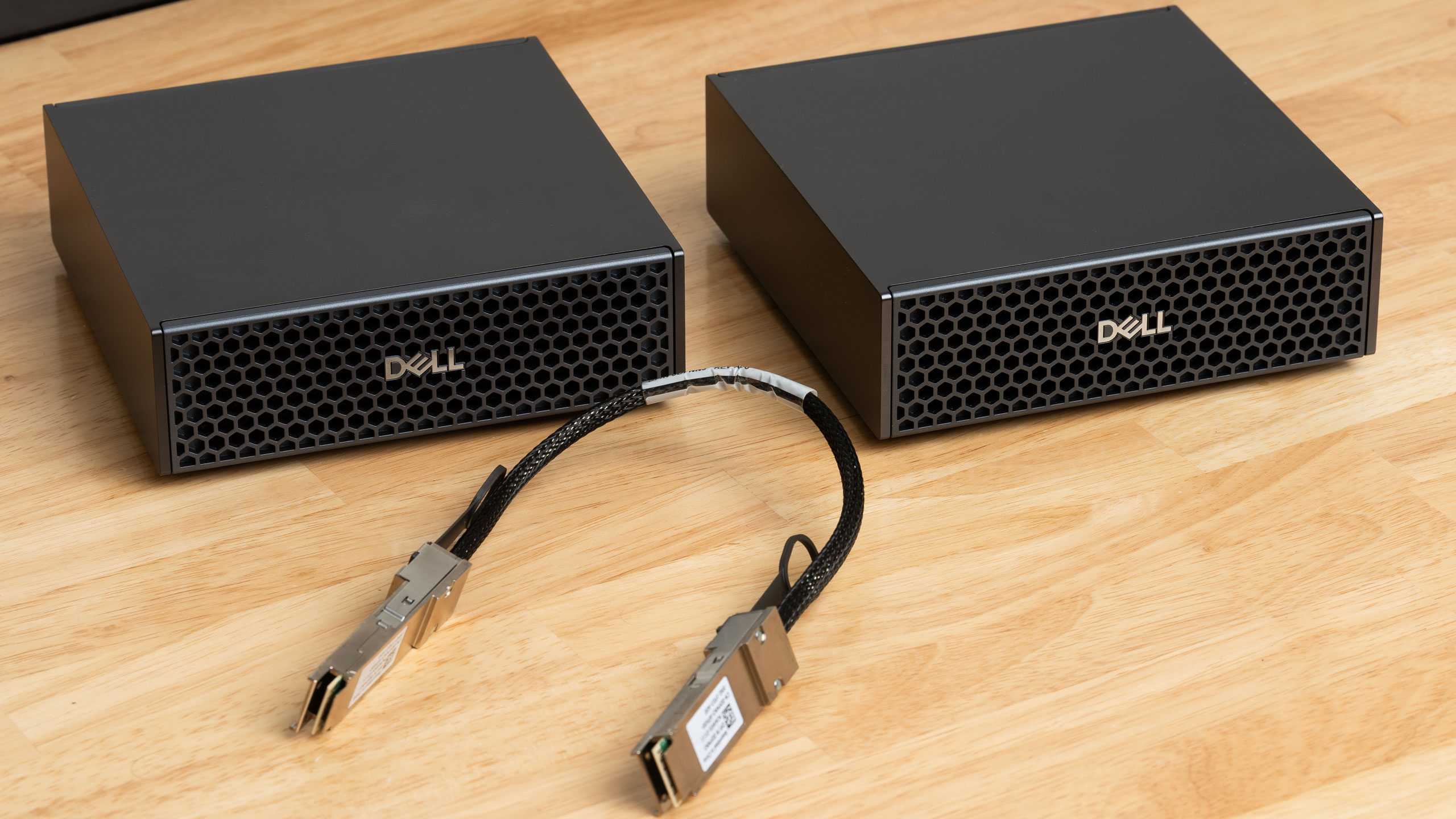
Nvidia made the DGX Spark and its Spark-alikes scalable, cluster-able systems right out of the box thanks to their built-in ConnectX 7 200Gbps NICs. These high-end interfaces support Remote Direct Memory Access over Converged Ethernet, or RoCE, so two (or more) GB10 boxes can use them as the backbone for a distributed AI computing cluster.
We didn’t have multiple Sparks to test RDMA clustering during our initial review, but Dell sent us a pair of Pro Max GB10 systems along with the QSFP cables necessary to join them together.
These systems still aren’t anywhere near cheap, but at $6332 each as of the time of this writing for the tested configuration with 4TB SSDs, you can build a complete, turn-key cluster with 256GB of RAM for less than the cost of the four 48GB or 72GB GPUs you’d need to scale a similar GPU server build.
If you need to save cash and can trade off absolute performance in the bargain, there’s no cheaper way to get into big local models right now, period, but especially not with the level of networking performance that the DGX Spark platform offers.
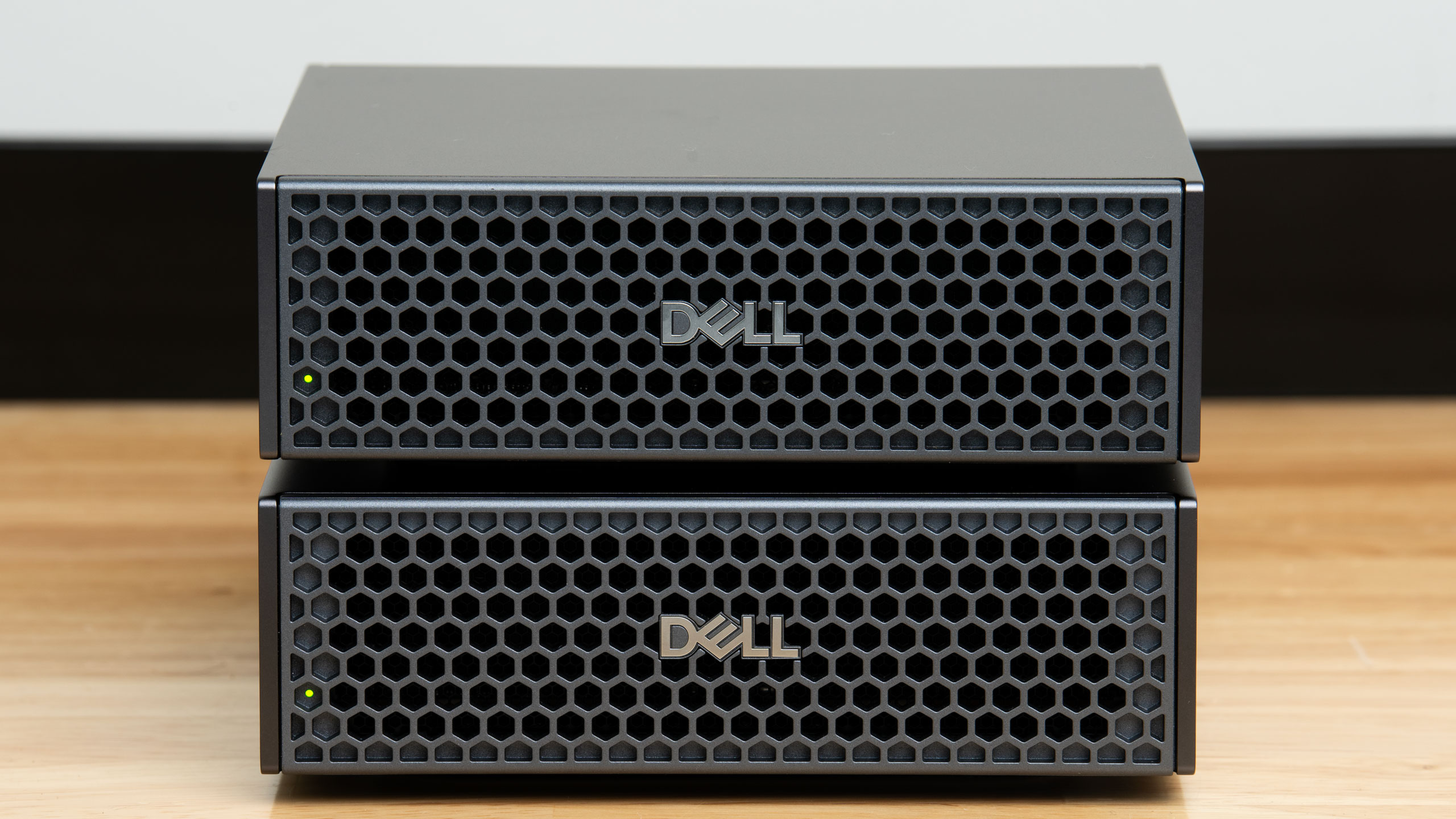
Dell’s Pro Max with GB10 closely follows the Spark template, but it adds an extremely handy power LED to the front panel that the DGX Spark lacks, and the hexagonal grilles on the front and rear panels doesn’t catch on clothes or microfiber cloths like the metal foam front and rear panels of the DGX Spark do.
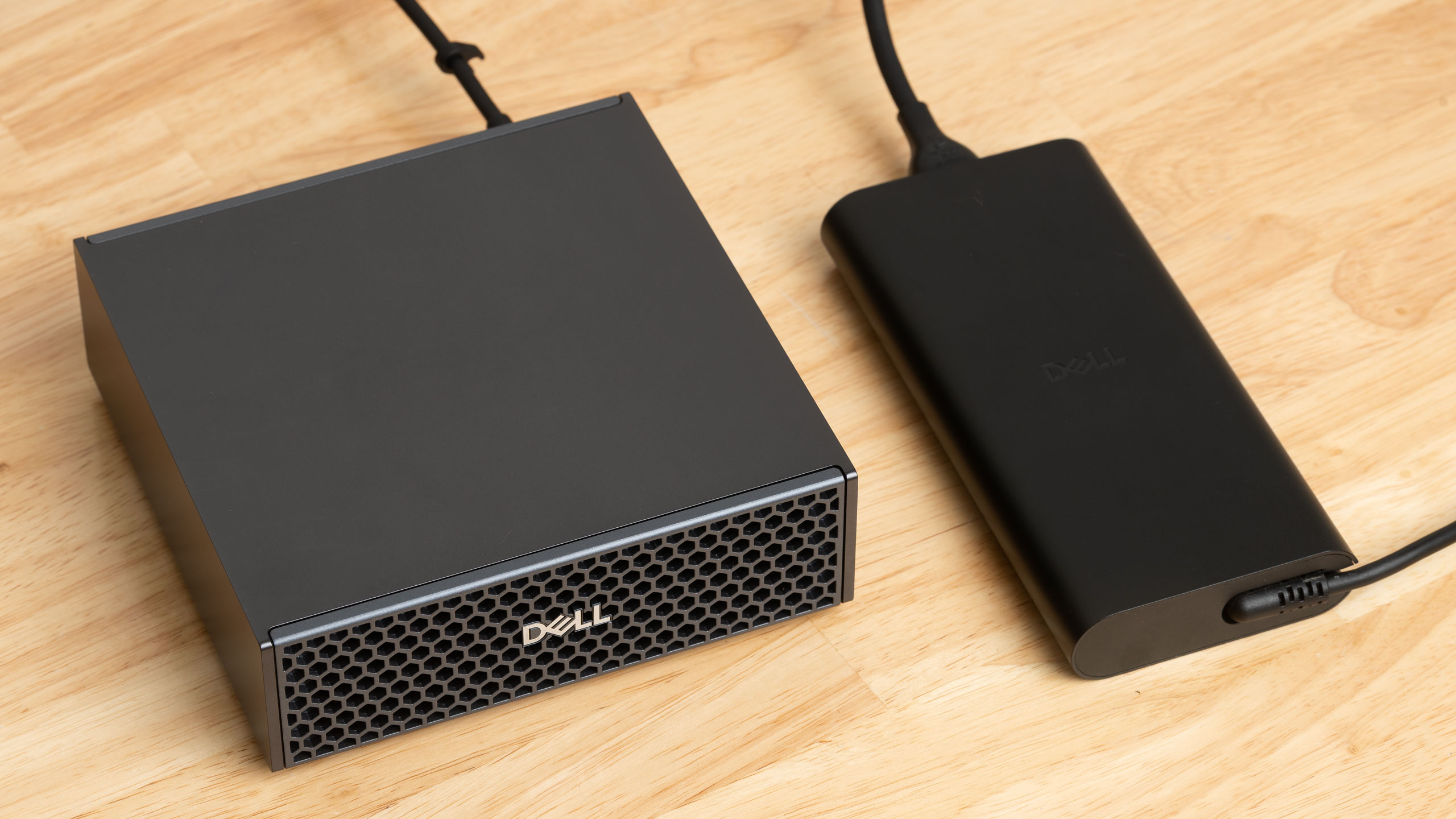
Dell also provides a large 280W USB-C power adapter with each Pro Max GB10 system, or 40W more capacious than the adapter included with the reference DGX Spark. However, there’s nothing to suggest this system has a higher TDP or clocks than the reference Spark design as a result.
|
CPU |
Nvidia GB10 10x Arm Cortex-X925 |
|
GPU |
Nvidia Blackwell GPU, 6144 CUDA cores |
|
Memory |
128GB LPDDR5X |
|
Storage |
4TB PCIe Gen 4 NVMe SSD |
|
Peripheral and display connectivity |
3x USB 3.2 Gen2x2 Type-C ports with DisplayPort Alt Mode support 1x HDMI 2.1b port Bluetooth 5.4 |
|
Networking |
Nvidia ConnectX 7 Smart NIC, 200Gbps (QSFP) 10Gb Ethernet (RJ45) Wi-Fi 7 |
|
Operating system |
Nvidia DGX OS (Linux) |
|
Power adapter |
280W USB Type-C |
|
Dimensions |
5.9” x 5.9” x 2” (HWD) (150mm x 150mm x 51mm) |
Dell does drop the Pro Max with GB10 back to a PCIe Gen 4 SSD compared to the launch DGX Spark’s Gen 5 drive, but it appears that the ongoing NANDpocalypse has forced Nvidia to source Gen 4 drives for its reference systems to keep costs down, so we’re not holding this decision against Dell here.
Setting up
We’ve already covered the DGX Spark reference design in its own review, so if you’re unfamiliar with the basics of this platform, we’d suggest reading that coverage first. We’ll keep the focus today on the specific challenges and hurdles of clustering two of these systems together.
While the ConnectX 7 NIC on these systems supports both Infiniband and Ethernet protocols in its add-in card form, Nvidia has stated on its official DGX Spark forums that GB10 systems exclusively support Ethernet, and therefore, RoCE for clustering. Don’t buy multiples of these systems hoping to connect them through any Infiniband switches you might have lying around.
The ConnectX 7 NIC on the Spark and Spark-alikes like the Dell Pro Max is also connected to the GB10 SoC in a somewhat weird way due to some possible platform limitations. In short, the largest PCIe bus width one can apparently get off GB10 is a PCIe 5.0 x4 link, so to achieve 200Gbps on any one QSFP port, the two x4 links to the ConnectX 7 have to be teamed behind any one physical port. As a result, each physical port on the NIC is presented to the system as two logical interfaces.
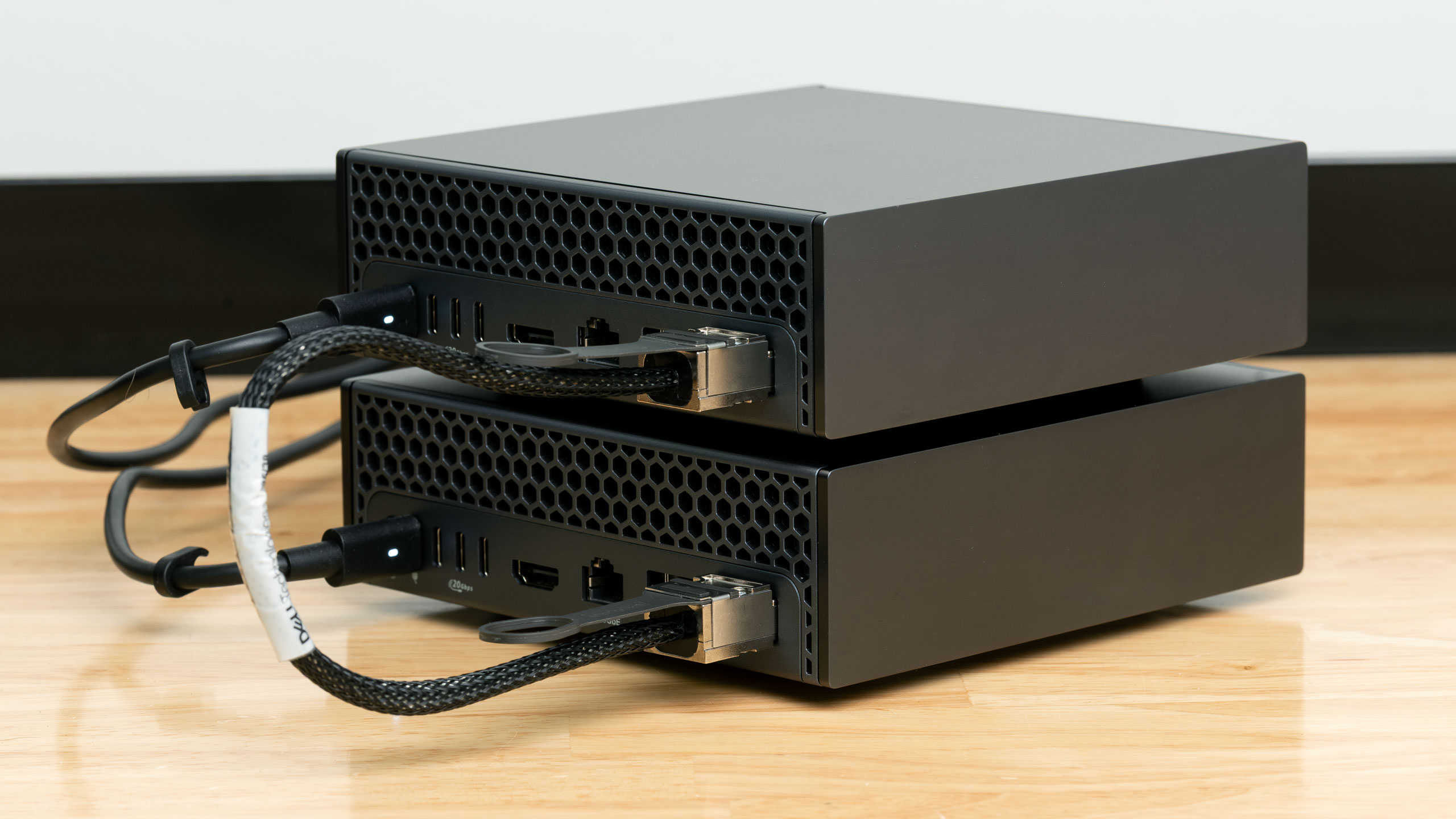
To achieve the full 200Gbps bandwidth available from the ConnectX 7, you have to configure your networking topology carefully. Nvidia has a Spark playbook on how to do this, and the spark-vllm-docker project also offers its own guide on how to set up these interfaces. I’d recommend following them closely unless you have good reason to roll your own configuration.
After connecting my Dell Pro Max boxes together using the same QSFP cages on their back panels, configuring their network interfaces according to the spark-vllm-docker guide above, configuring passwordless SSH on my second node, and running the recommended NCCL bandwidth test on the link, I found that I was only getting a small fraction of the expected RDMA bandwidth, despite both boxes reporting that they were fully up to date through the DGX Dashboard app.
Community wisdom suggested that a firmware version mismatch was to blame, so I verified that the head Pro Max node in my cluster was fully up to date, both through the DGX Dashboard app and through the command line using the apt package manager.
But even though the DGX Dashboard reported that my second Pro Max system was fully up to date, running the recommended command-line apt checks revealed that there was an update for the fwupd package stuck behind a phasing fence, so I force-installed it.
Once this forced update was complete, it unlocked a new round of firmware updates for the second Pro Max, which I dutifully applied. After rebooting both systems and re-running the recommended NCCL bandwidth tests, I was finally getting something approaching the full 25GB/s one would expect from a proper 200Gbps link.
While none of the issues I had getting my Pro Max GB10 systems clustered were show-stopping, it’s also far from a plug-and-play experience. But once both systems were settled in, I didn’t see the bandwidth over the ConnectX 7 ports drop back to the degraded performance levels I first observed, even across multiple reboots of the cluster.
Cluster management and performance
If you’re thinking about clustering Sparks, you want an inference engine that can handle tensor parallelism, or the distribution of model weights across GPUs during computation. vLLM is an easy choice for doing this on the DGX Spark platform thanks to actively maintained community tools like spark-vllm-docker and sparkrun, but you can also achieve these results with SGLang if that’s your platform of choice.
The spark-vllm-docker project comes with several handy scripts that make starting the cluster and distributing models across it easy, and the sparkrun project provides similar functionality. We focused on spark-vllm-docker for this round of tests, but you have options in this space if you want to explore them.
With our inference engine settled, we went off in search of an advanced model that would utilize a decent chunk of the 256GB of VRAM available from our cluster.
DeepSeek v4 Flash is one such model. It’s a 284-billion-parameter mixture of experts model with 18 billion active parameters per token, and it claims to support a context window of up to 1 million tokens. (vLLM gave us a 400K-token cap on this setup). spark-vllm-docker offers a prebaked vLLM recipe for it, so we downloaded it, deployed it across our cluster, and got to benching.
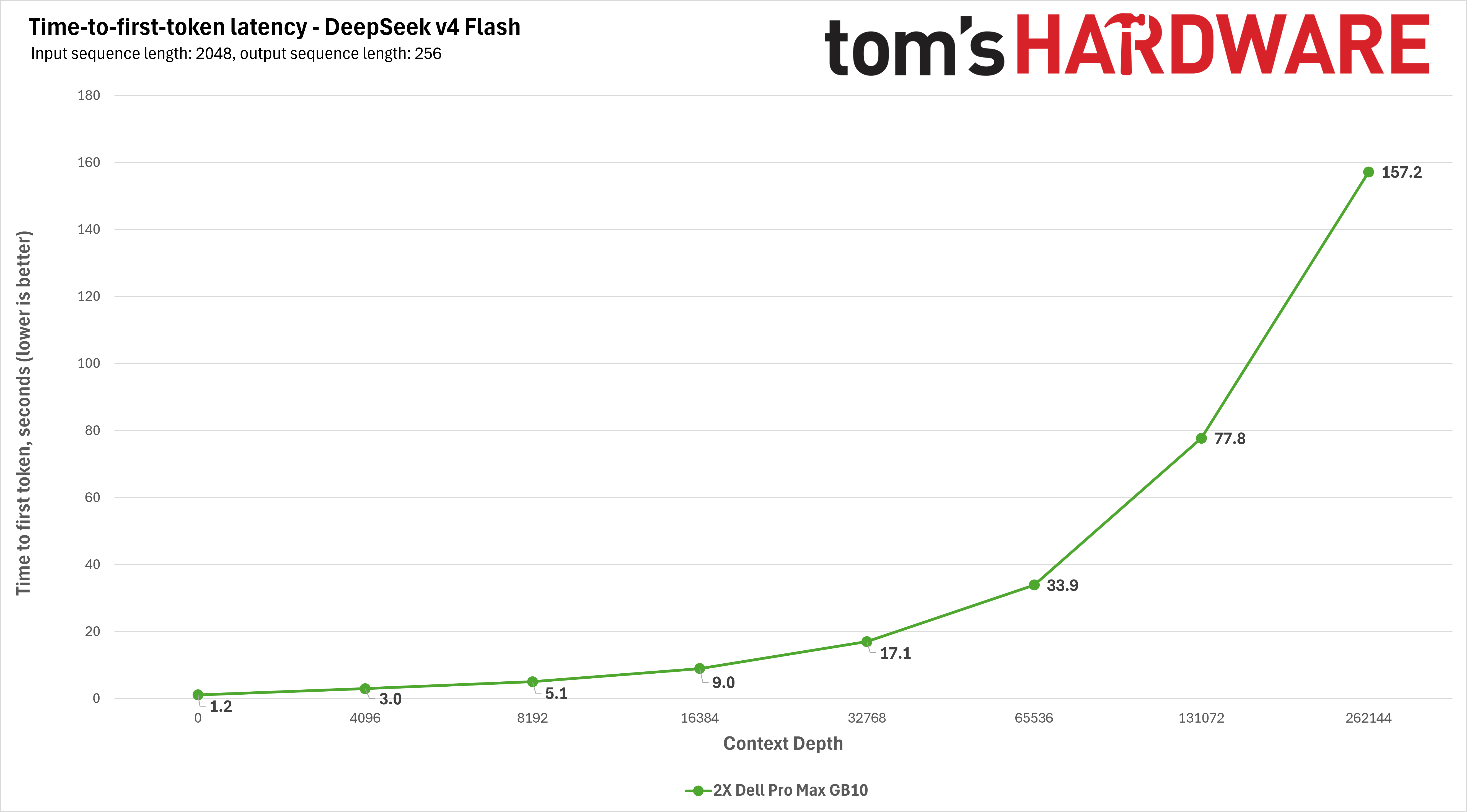
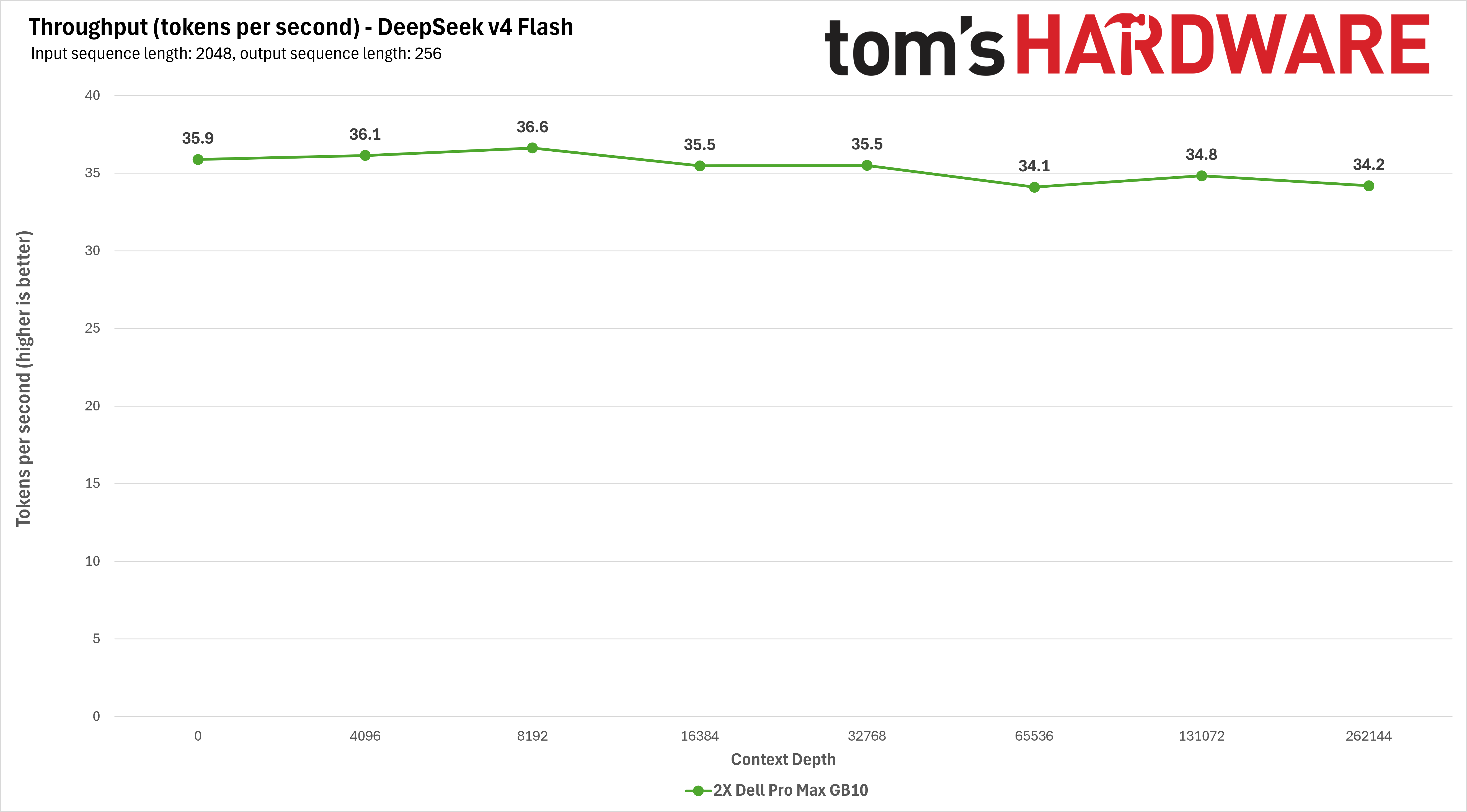
The DeepSeek v4 Flash vLLM recipe we used takes advantage of this model’s built-in multi-token prediction capabilities, so decoding throughput remains essentially the same even as time to first token climbs with context lengths up to 200K+ tokens, or about 333 pages of A4 text. That’s impressive and usable performance for a model of this size and capability.
We also loaded up CyanKiwi’s four-bit quantization of MiniMax M2.7. This is another large mixture-of-experts model with 230 billion total parameters and 10 billion active parameters, and it supports a context window out to 200K tokens, which is exactly what vLLM gave us after initialization on our Spark cluster.
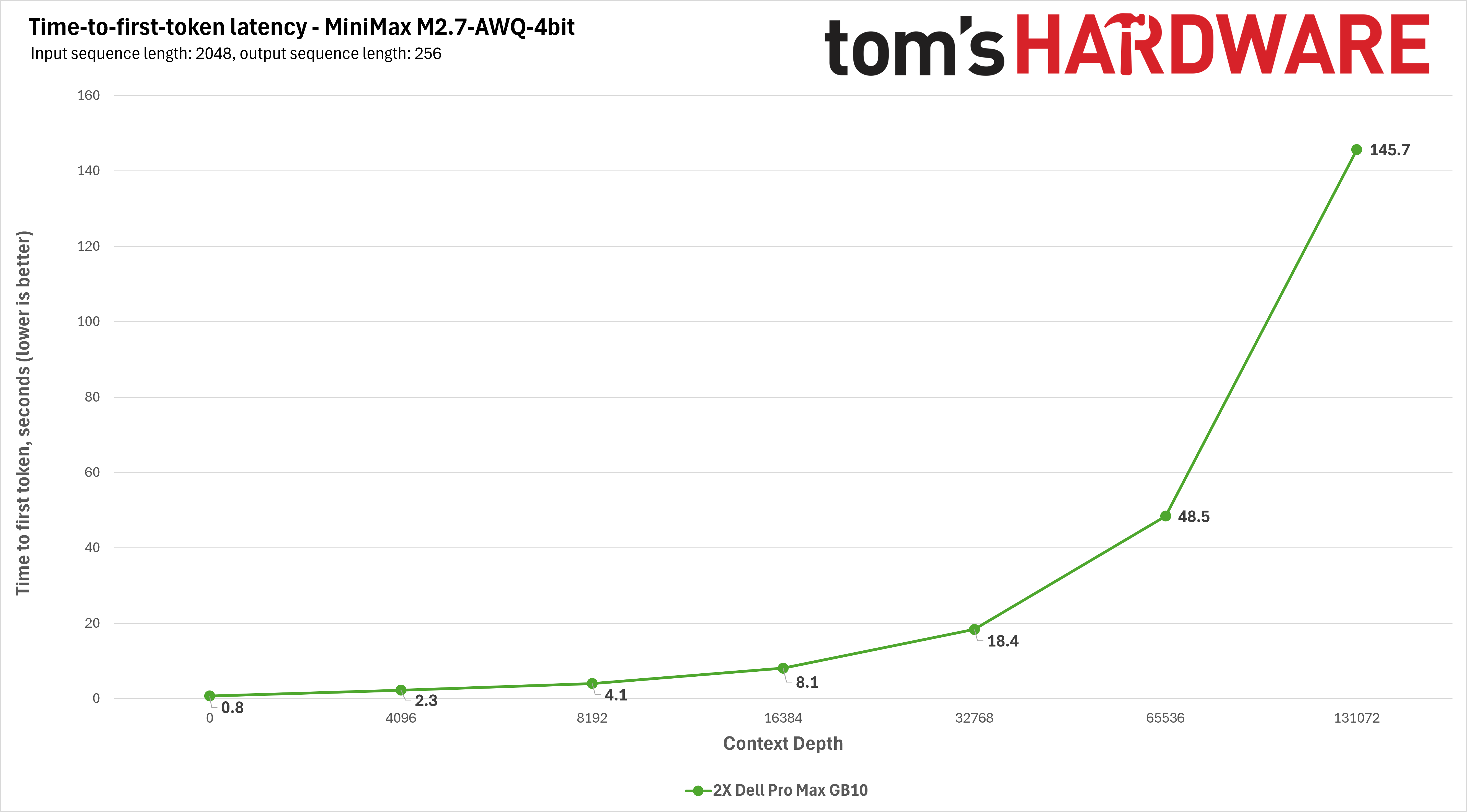
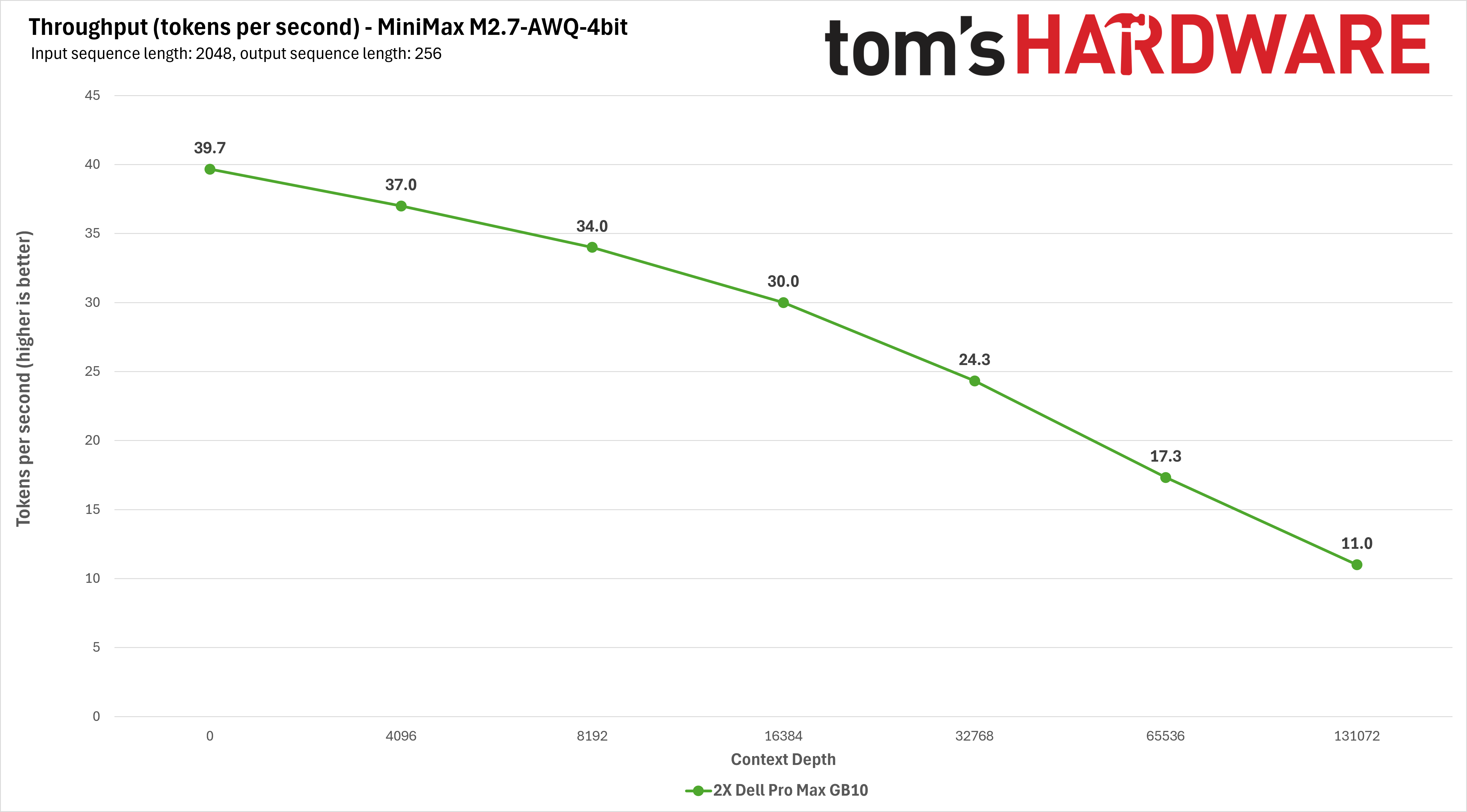
This model doesn’t have the built-in MTP advantage of DeepSeek v4, so even with the four-bit quantization we used for this test, its time-to-first-token and tokens-per-second throughput follow a more familiar curve. Throughput starts in a relatively usable range, but falls off quickly as we approach the limits of the context window.
Our experience running DeepSeek v4 Flash and MiniMax 2.7 shows that even though a Spark cluster isn’t fast, it can still produce enough tokens per second to be a useful sandbox with these demanding models.
Power and thermal notes
As we discussed in our intro, a major advantage of a cluster like this is that it doesn’t require exotic power and cooling to run, and you also don’t have to banish it to a garage or server closet to keep it quiet.
Imeasured peak wall power draw of about 375W to 415W across my cluster during inference performance testing, which is just a bit higher than the TGP of a single RTX 5080 without its host system.
That figure bodes well for adding even more Spark-alikes to a local cluster if you need to, as even four of them running all-out are likely to need less than 1kW from a circuit (before any outboard networking gear is factored in, at least).
Noise levels from my dual Dell Pro Max setup under load were also well controlled, measuring about 40 dBA at 18 inches away. If you need to keep these systems in an inhabited office space or cubicle, they’ll be perfectly tolerable to be around.
If you’re expanding beyond two GB10 systems, I’d guess that any 200G/400G networking gear that you’d need to throw into the mix will likely be far louder than even four of these systems under load, as it’s likely built for a server closet, not a continuously inhabited space.
Bottom line
If you’re a local LLM trailblazer and need more VRAM for large, capable models, and don’t want to fiddle with or don’t have the cash for a from-scratch GPU server build with more than 128GB of memory, the Dell Pro Max with GB10 cluster we’ve built here exemplifies how clustering Nvidia GB10 systems is a straightforward, space-efficient, low-power, low-noise, and relatively cost-effective way to scale up your local AI sandbox beyond 128GB of VRAM.
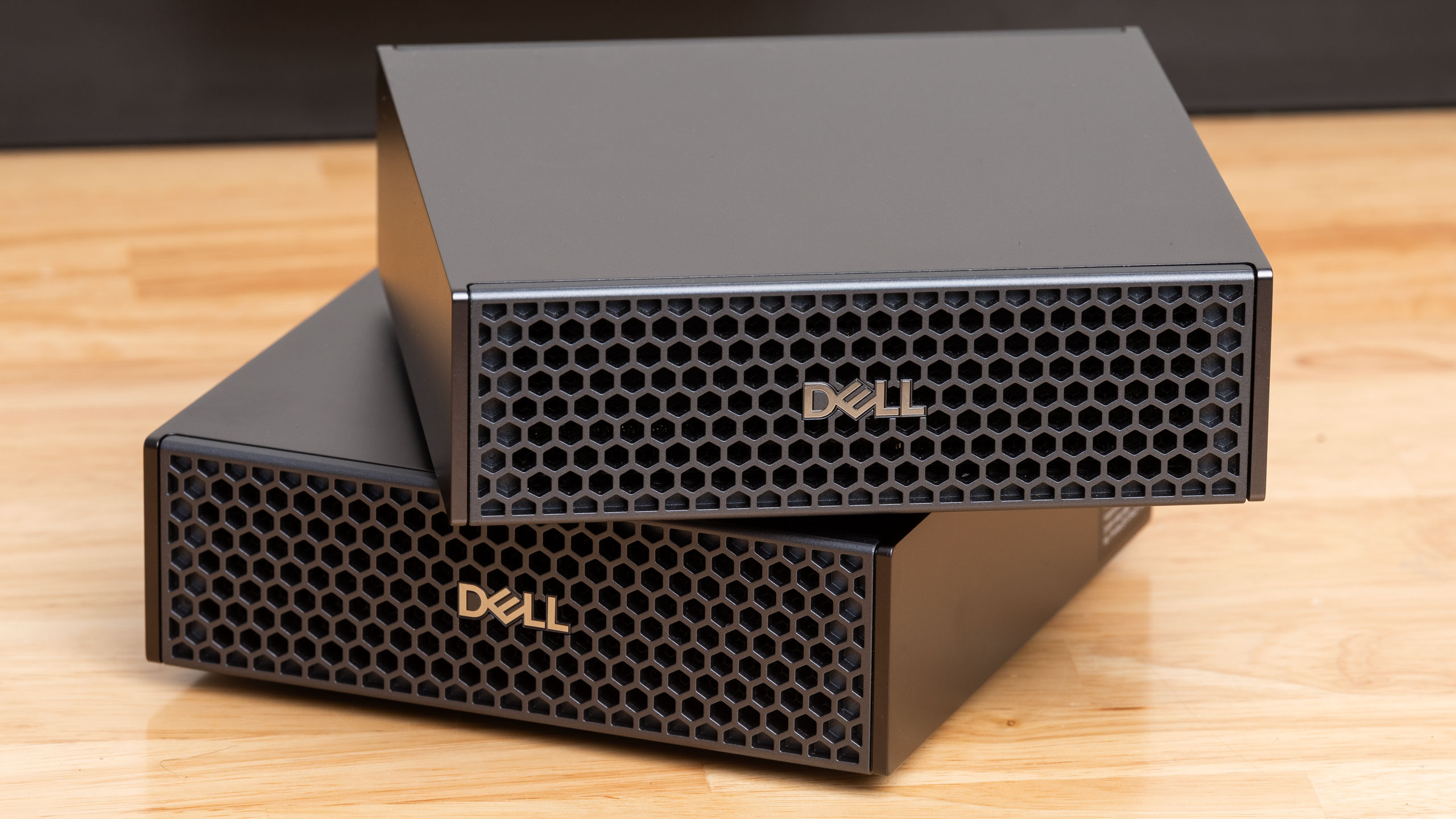
“Relatively” is doing a lot of work here because a pair of Dell Pro Max with GB10 boxes as tested here rings in at $12,664 right now, plus another $50 for the QSFP cable you’ll need to hook them together. For organizations or institutions with departmental budgets to spend and existing Dell accounts and support contracts to work within, that dollar figure is likely secondary to the ROI on whatever proposal might drive a purchase order.
But for individuals who just want to build a bigger AI sandbox in their home lab and don’t have those relationships to worry about, it’s still possible to construct a similar cluster with Asus’s Ascent GX10 from stock for under $10K, even at current prices. And as we explained in the intro, going above 128GB of local memory by using multiple discrete GPUs will cost you far more than such a cluster, even before you factor in the cost of a host system.
Not everybody needs to connect multiple Sparks, of course, but if that possibility does intrigue you, the ConnectX 7 NIC in every GB10 box means that there isn’t a cheaper way to achieve a 256GB (or larger) distributed memory pool with this class of networking performance behind it.
Some AMD Strix Halo mini-PCs offer PCIe slots for expansion, but they’re limited to PCIe 4.0 x4 speeds, so even the funky teamed PCIe 5.0 x4 links to the ConnectX 7 NIC inside GB10 boxes means you’re getting far higher potential RDMA bandwidth than you would from adding an aftermarket NIC to a Strix Halo system.
Even though Apple’s Mac Studio briefly enjoyed a turn in the spotlight as a cluster-friendly alternative for local AI thanks to the massive memory pools and high bandwidth available from Apple Silicon, along with RDMA over Thunderbolt 5, that star has dimmed, as the company no longer offers memory options larger than 64GB with M4 Max Studios or 96GB with M3 Ultra models. And the lead times on either of those systems are currently over three months out, which is an eternity in the rapidly evolving local AI market.
So Nvidia sort of has this field to itself right now, as GB10 boxes remain readily available from stock with 128GB of RAM at prices that aren’t completely bonkers. And if you’re a novice to distributed computing concepts, the active community, actively developed tools, and ecosystem software support around GB10 systems are all invaluable for getting your AI cluster running quickly. All that makes Dell’s Pro Max with GB10 (and other Spark-alikes) hard to beat for building a big local AI sandbox to experiment with.