Motherboard VRM thermal testing – budget vs. high-end boards, does it really matter?
If you’re a PC enthusiast, chances are you’ve bought or at least looked into picking a motherboard, and it can be daunting. The list of specifications is long and includes (but is not limited to) CPU support/compatibility, port count and type (think USB, networking, etc.), storage options, audio solutions, slot count and speed, aesthetics, and last but not least, power delivery, which is critical to ensuring you get everything out of your processor.
Should you buy a board with more phases or more powerful MOSFETs? What’s good enough? Using data from our motherboard reviews, we’ll examine details such as temperature and performance to assess the magnitude of the differences and whether power delivery should be a key factor when choosing a motherboard.
What are VRMs?
Some may be reading this and asking, “What are VRMs?” VRM stands for Voltage Regulation Modules. Their primary function is to take the 12V power from your power supply and reduce it to a lower, stable voltage (around 1-1.5V) that your CPU and other components need to function. Or, in electrical terms, they are advanced DC-to-DC step-down converters tasked with smoothing out electrical noise and voltage spikes, which could crash your CPU. If they seem important based on that description, congratulations, you are paying attention.
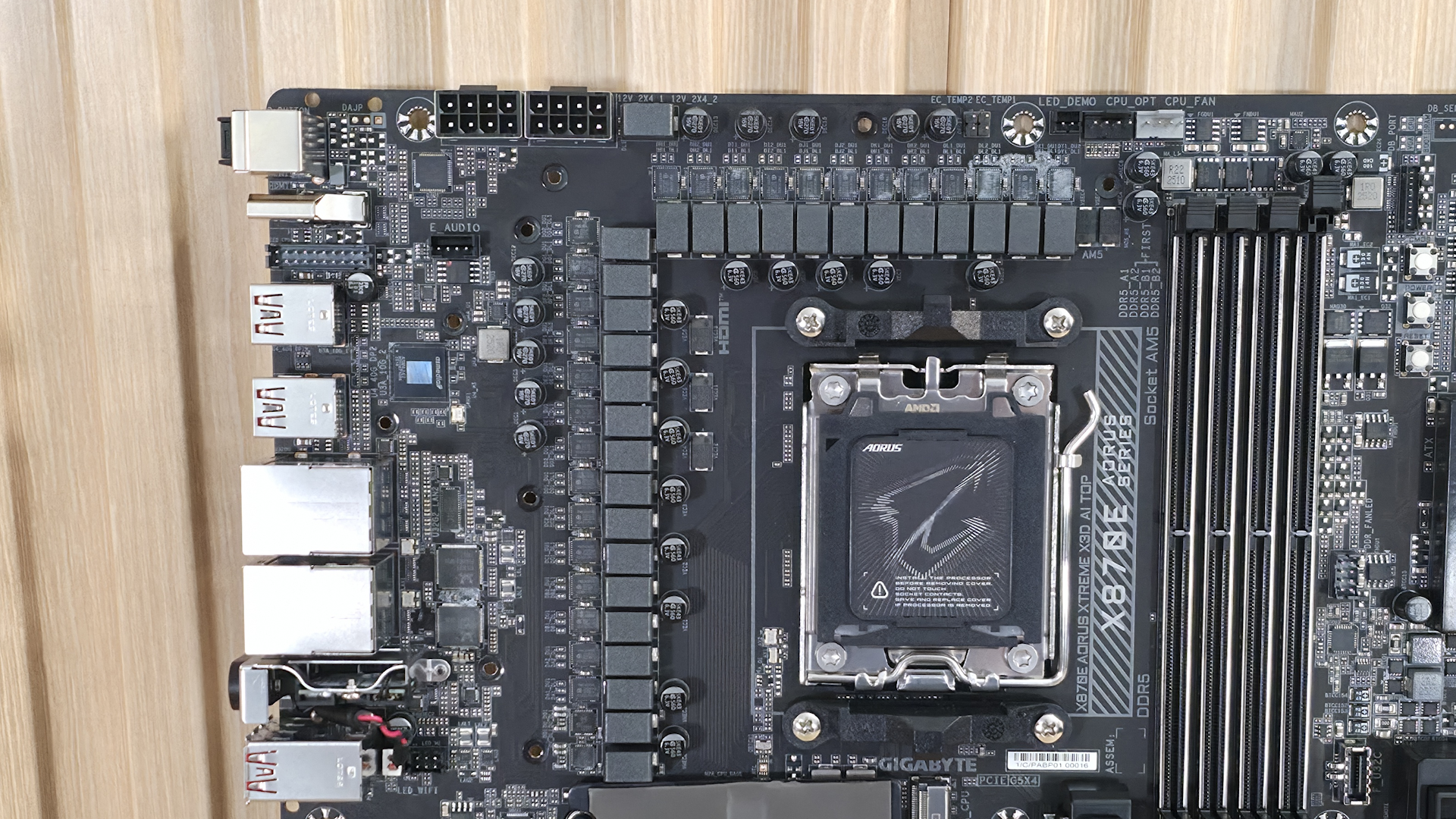
VRMs are not a single component but a group of parts working together as a “power phase,” and a typical motherboard has multiple phases to share the electrical and thermal workload. The PWM controller is the brain of the whole system, telling the components how much voltage is needed at any given millisecond. The MOSFETs are the switches that rapidly turn the 12V power on and off to regulate the current. The chokes are coils that smooth the pulsating current from the MOSFETs into a steady current, while the capacitors store and release energy to maintain a stable voltage. The controller, MOSFETs, Chokes, and Capacitors all work together and make up your VRMs.
VRM quality is important because, when dealing with significant voltage fluctuations and output (its job), a lot of heat is generated. And if you have a power-hungry processor like a flagship-class Intel Core Ultra or AMD Ryzen 9, the chips require a lot of power and places a lot of stress on the VRMs. Most motherboards have metal heatsinks on top to help remove the heat generated. If it gets too hot (the exact temperature varies by MOSFET, but is generally around 100 degrees Celsius), the CPU then automatically throttles to prevent damage, which can hurt your performance, and that’s what we’re here to shed some light on.
What makes VRMs better (or worse)?
VRM quality varies widely by motherboard. Typically, your enthusiast-class chipsets (Z890, X870E) have the most capable power delivery components, followed by the mainstream chipsets (B860, B850) and budget-class (A620 for AMD, “H” series for Intel). On most enthusiast-class boards, you’ll see 80-110A MOSFETs, more phases, and robust heatsinks, while mainstream and budget boards typically have 50-80A MOSFETs, fewer phases, and smaller heatsinks.
Entry-level motherboards, although they list support for flagship-class processors, are designed for low-power CPUs and may throttle under heavy workloads if you overbuy on the processor or don’t have adequate case cooling. These basic boards often come with minimal heatsinks (or none at all), a low phase count, and lower output capability, and are designed for simple tasks and office use. Mid-range motherboards offer a better balance of price and performance and can handle most any processor, even with some overclocking. These are better suited to gaming and productivity builds, where sustained performance needs are more common. High-end boards can support any processor and any type of overclocking (ambient, extreme/sub-ambient).
A ‘better’ VRM has more power stages with higher current capacity. At a high level, 20-phase VRMs with 110A MOSFETs, as you’d see on high-end enthusiast-class boards, are better than a 12-phase VRM with 60A MOSFETs, as is common on budget-class offerings. More details matter, such as whether the phases are ‘teamed’ (as most are today) or the type of MOSFETs used (DrMOS or SPS – the latter relays real-time telemetry), but for the purposes of this article, we’ll stick with count and type and try to stay out of the minutiae.
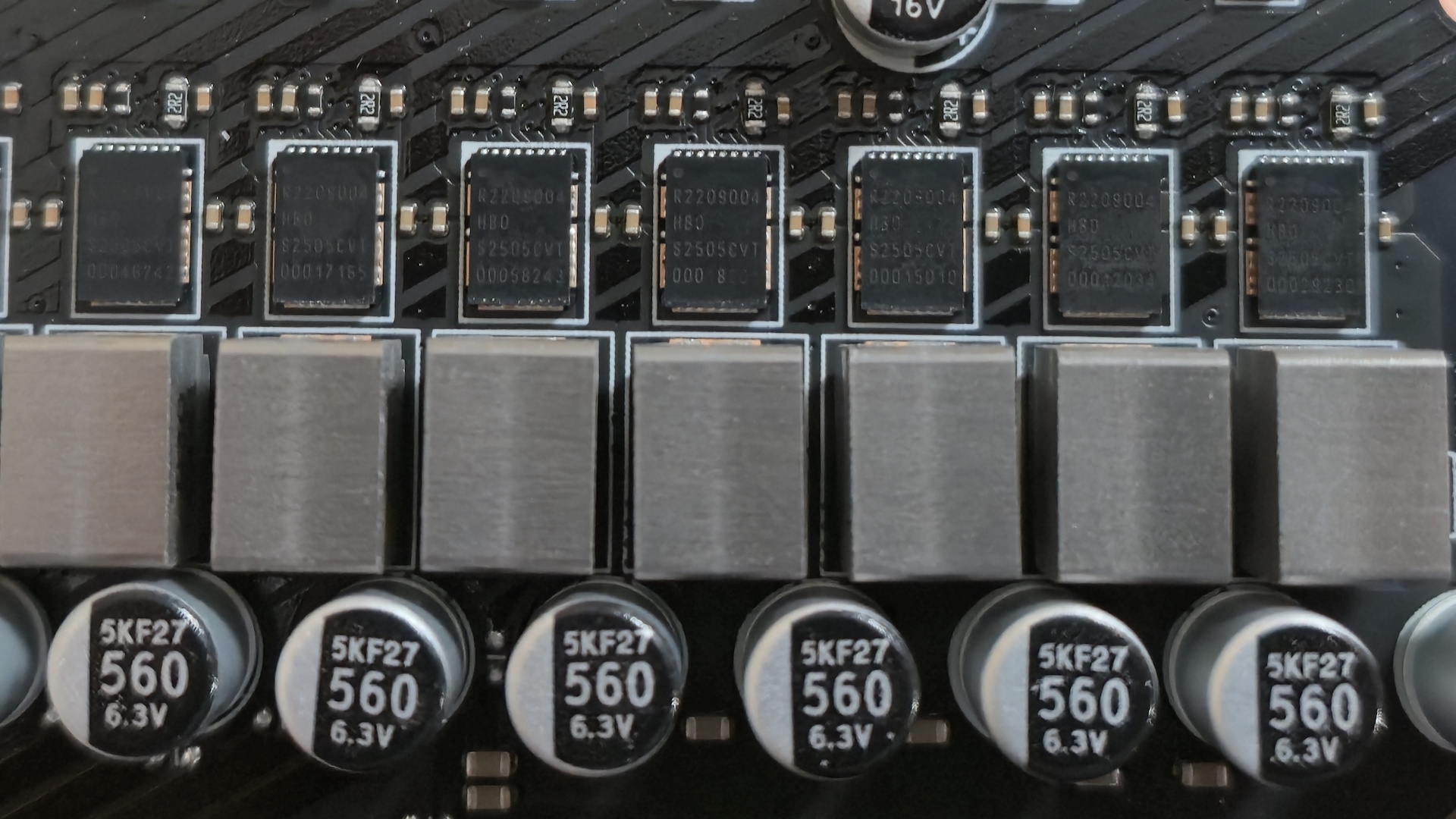
To understand what a board can handle, you need to know the phase count as well as the output of the MOSFETs. For example, a 12-phase VRM with 80A MOSFETs outputs up to 960A, and a 20-phase VRM with 110A MOSFETs outputs up to 2,200A. The higher the amperage/output, the more it can handle from your processor. In general, for flagship-class processors, I like to have at least 900A available, as this provides enough headroom to avoid stressing the chips too much.
Cooling can also make a big difference. From no heatsinks on the extreme budget and business-class boards to massive, actively cooled hunks of metal on high-end boards, keeping the VRMs cool prevents throttling, ensures sustained performance, and helps prolong their lifespan. Heatsinks come in all shapes and sizes, and some even include fins and heat pipes, along with improved thermal pads to help transfer and dissipate heat. The more power phases and output, the larger and more capable the cooling tends to be. At a high level, unless you’re using a low-power processor (think ~65W TDP), stay away from any boards without heatsinks on the VRMs. And even then, make sure you have good airflow to keep the temperatures in check.
Real-world Results
Our first set of charts shows VRM temperatures for our Intel- and AMD-based systems. We have a lot of data for the AMD X870/X870E/B850 data sets, but less for Intel (Z890/B860). Still, the data we have gives us a good idea of the differences (or lack thereof) between the enthusiast-class and mainstream chipsets. It has been a generation or two since we covered the budget and business-class chipsets and motherboards, so we don’t have information on the latest platforms using the absolute bottom-of-the-barrel motherboards (where you typically see performance/throttling issues due to VRMs).
CHARTS – VRM test result charts (3x – X870, B850, Intel)
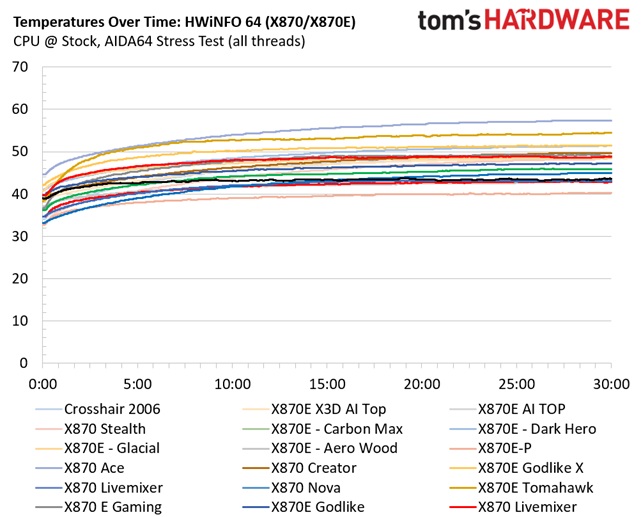
As you can glean from the charts above, all of the results are generally close together, a range of around 15 degrees Celsius, for this set of mainstream and enthusiast-class motherboards. Even the hottest board is still 10s of degrees away (think 30 degrees or more) from running ‘too hot’ and potentially throttling.
The next set of charts hails from our motherboard reviews and shows the performance of all the boards across a wide variety of tests, including gaming, productivity, and creative workflows. As you can see, none of the boards, ranging from $179.99 to over $1,000 (new/MSRP), throttled with our flagship Intel Core Ultra 285K, nor did any using the Ryzen 9 9900X.
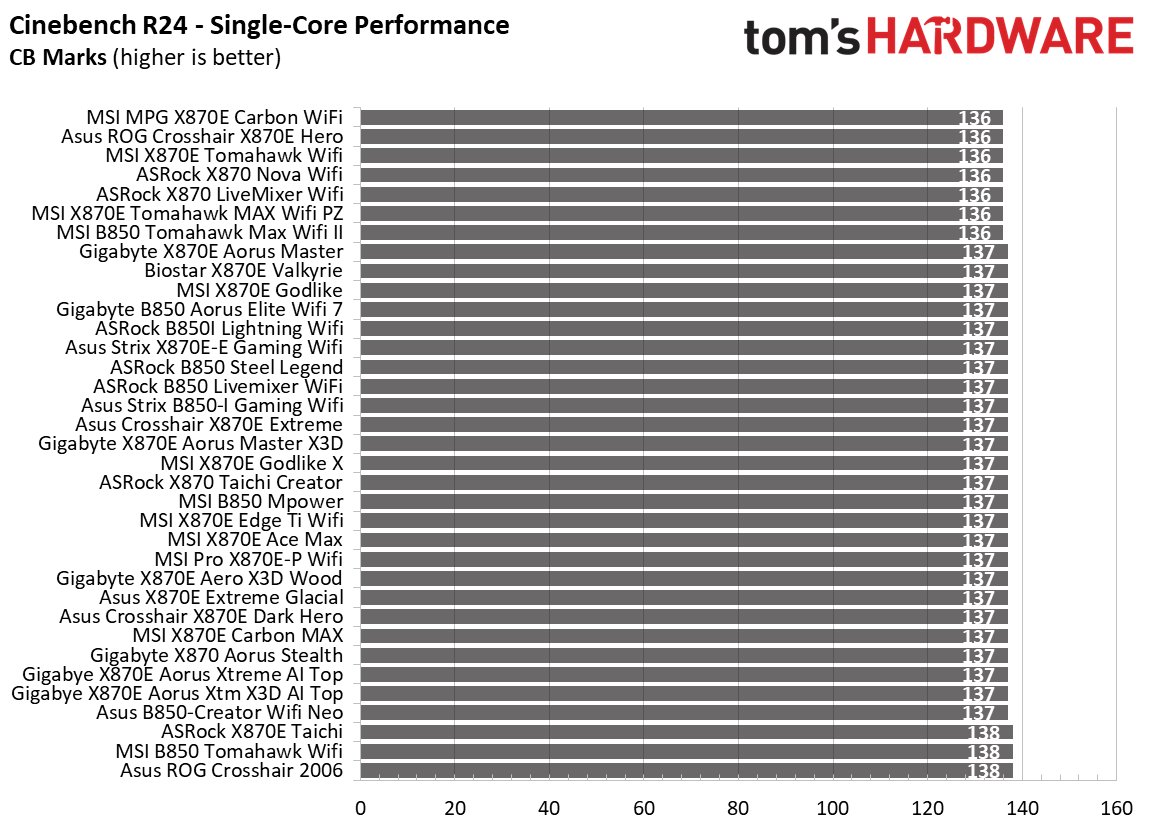
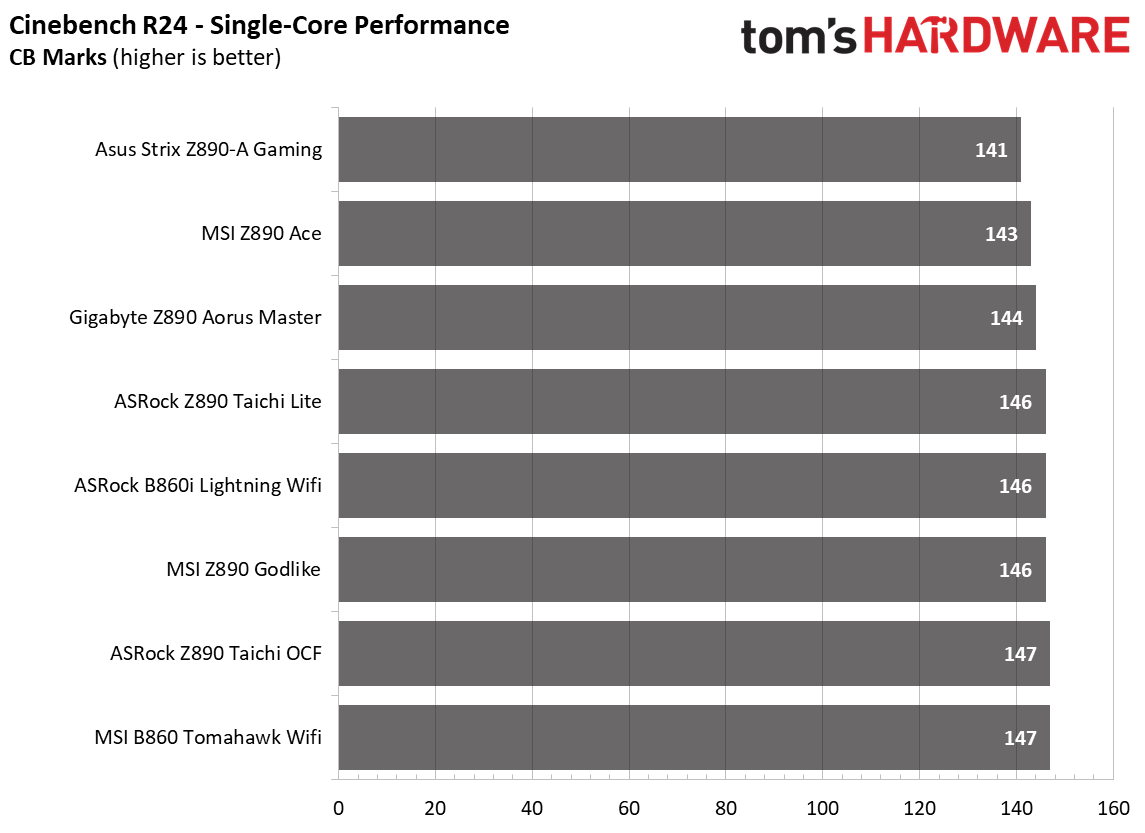
While we know the 9900X isn’t AMD’s current flagship, it still produces a fair amount of heat (~150W in our testing) for an upper-midrange processor. Even if we had used a high-power Ryzen 9 9950X, it wouldn’t have changed things much.
On the Intel side, we don’t have many datasets as we haven’t reviewed as many of the company’s Z890 motherboards at the time of this writing (we’re covering more now with the release of the new Intel Core Ultra 270K Plus and 250K Plus processors). That said, we’re confident the story remains the same, and you’ll get everything out of your processor on this and the B860 chipset-based boards. But if you plan on extended periods of high CPU use, you should always get more than you need, if only for longevity.
The last set of charts covers previous-gen Intel and AMD, including Z790, B760, and H770 for Intel and X670E and B650 for AMD (though still AM5, like 800-series). In the following multi-threaded tests, you can see a significant difference in performance between budget-class boards and mainstream and enthusiast boards.
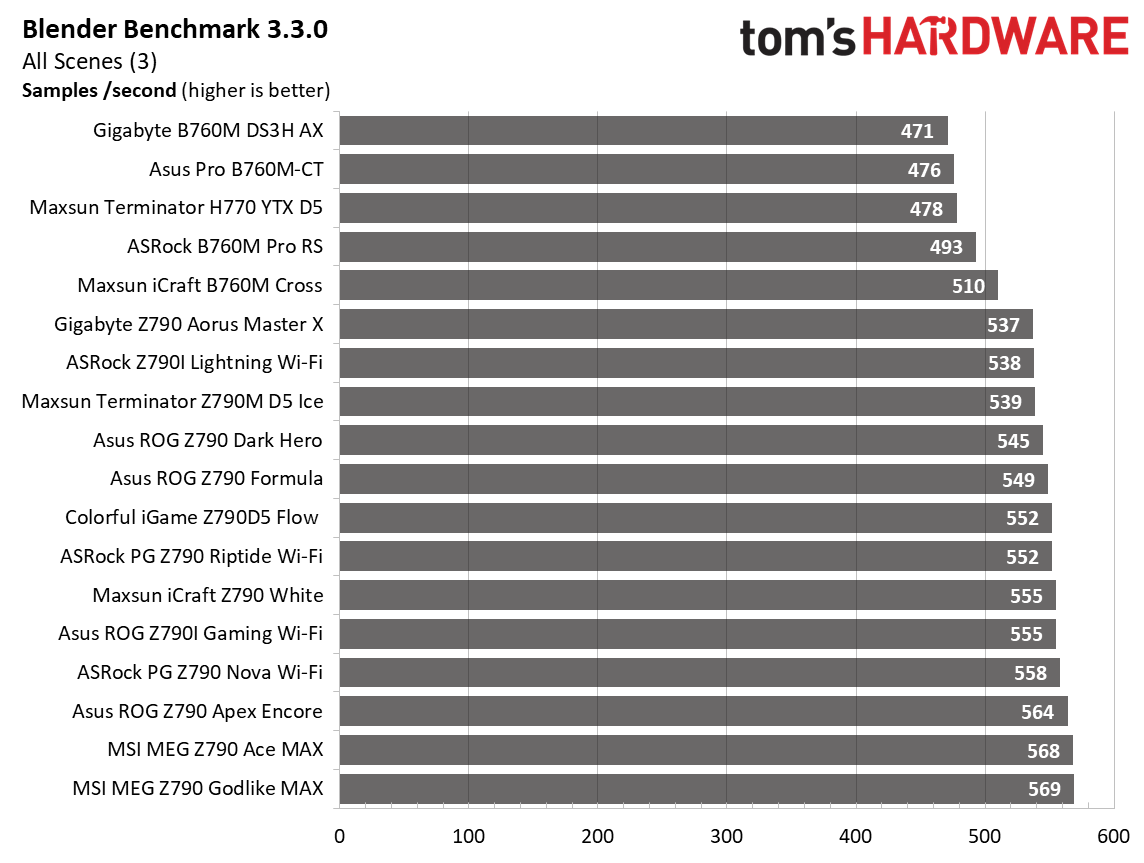
Intel budget boards tend to take a bigger hit, as their CPUs use more power than AMD’s Ryzen 9 7950X. On the AMD side, we still saw performance differences, but overall not extreme when looking at these data sets, even in some of the cheapest mainstream boards we tested. This could also be due to throttling or BIOS settings, as some budget/business-class boards strictly limit the processor to its baseline specification. In contrast, others take liberties with settings, especially with Intel processors.
Final Thoughts
Ultimately, a vast majority of the boards we’ve tested were able to get the most out of the processor we use for testing. It’s typically only the absolute entry-level offerings, most in the budget/business class, that notably hinder performance. Sadly, there isn’t a smoking gun of ‘…if you’re using this processor, then you want this many phases/amps.’ But at a high level, the more phases and the higher the amperage rating, the better off you are.
Whether you can utilize a budget-tier board depends on several factors. If your primary use cases are office productivity and gaming with a mid-range or budget CPU, you’ll likely encounter few issues. However, if your workflows consist of sustained, heavily multi-threaded workloads, investing in a more capable board is advisable. On top of having paltry power delivery, the cheap boards tend to have fewer ports, slower overall connectivity (think USB and networking), a basic audio solution, and they just don’t look as good as mid-range to high-end boards that offer more and faster connectivity.
Does this mean a flagship motherboard is the only solution? Simply put, no. The vast majority of users don’t require extreme-class VRMs and would do fine with any motherboard from the mainstream or enthusiast chipsets. Your goal should be to find a balance that provides sufficient power headroom for your CPU and usage patterns.
However, if you intend to push high-TDP processors to their limits or want to overclock, VRM quality should be one of your top priorities, aside from the connectivity you need. Now that we have a better idea of what you may need, check out our curated best motherboards article or best motherboard deals to find a board that’s right for you.