
Acemagic K1 review: This cheap Ryzen mini PC has one easy-to-fix weakness
At a glance
Expert’s Rating
Pros
- Compact case with plenty of ports
- Impressive multi-core performance for its price range
- Low power consumption of around 5 watts when idle
- Second M.2 slot for additional mass storage
- Windows 11 Pro with updates largely up to date
Cons
- SATA SSD significantly slower than NVMe
- RAM is soldered in place; cannot be upgraded
Our Verdict
The Acemagic K1 handles office work, video conferencing, and streaming without a hitch. For the price, the Ryzen 5 delivers surprisingly good multi-core performance; power consumption remains low and the range of ports is just right. The device is held back by the slow SATA SSD and the soldered-in RAM. Those who retrofit an NVMe SSD will get significantly more out of it.
Price at time of review
This value will show the geolocated pricing text for product undefined
Best Pricing Today
Price When Reviewed
$339
In 2026, mini PCs cover a wide range of applications. They range from AI workstations costing four-figure sums to simple office computers for under $400. Technically speaking, the Acemagic K1 is positioned in the more affordable performance class. With six CPU cores and 16GB of RAM, the K1 is well-equipped for typical office tasks. It also features a 512GB SSD and Windows 11 Pro. We’ve assessed where the cost-cutting measures pay off and where they get in the way.
Acemagic K1 design and build
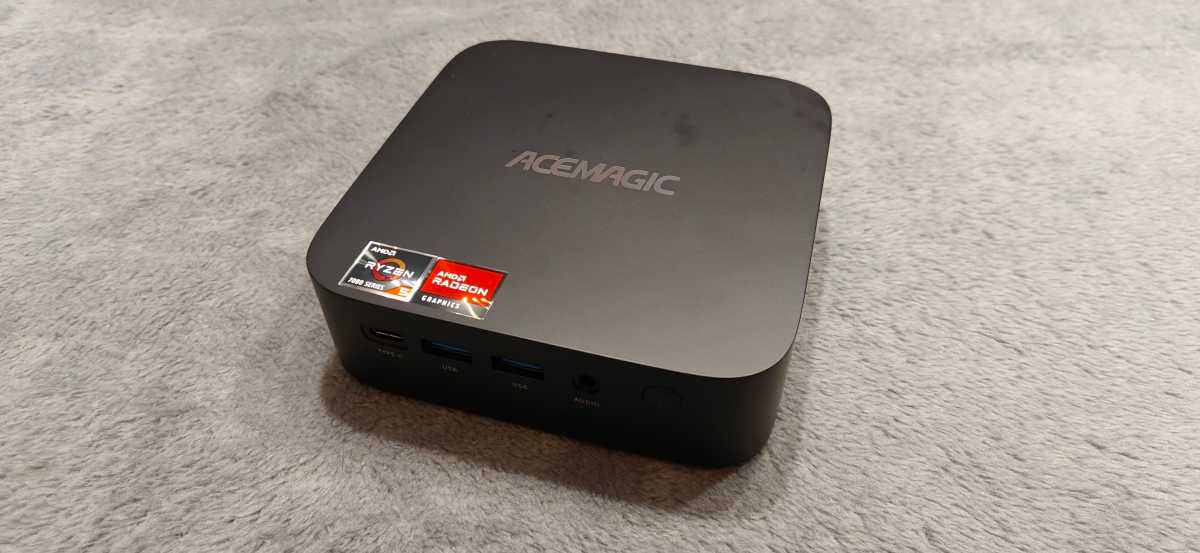
The K1 is a square block with gently rounded corners. Its dimensions of 5 x 5 x 1.6 inches result in a volume of around 22 ounces. This makes it slightly larger than the classic 4×4-inch class, such as the Geekom A5 Pro, which measures 4.4 x 4.4 x 1.4 inches. Nevertheless, it fits easily behind a monitor on a desk. A VESA mount is included.
Christoph Hoffmann
The case is made of matte plastic. It appears to be well-made, the gaps are even, and there are no sharp edges. However, you shouldn’t expect an aluminum chassis like the one on the Geekom A5 Pro in this price range. When tapped, the shell sounds hollow. At least the manufacturer has avoided a flood of stickers: Apart from the logo, there are only two stickers on the top panel, one for the processor and one for the graphics.
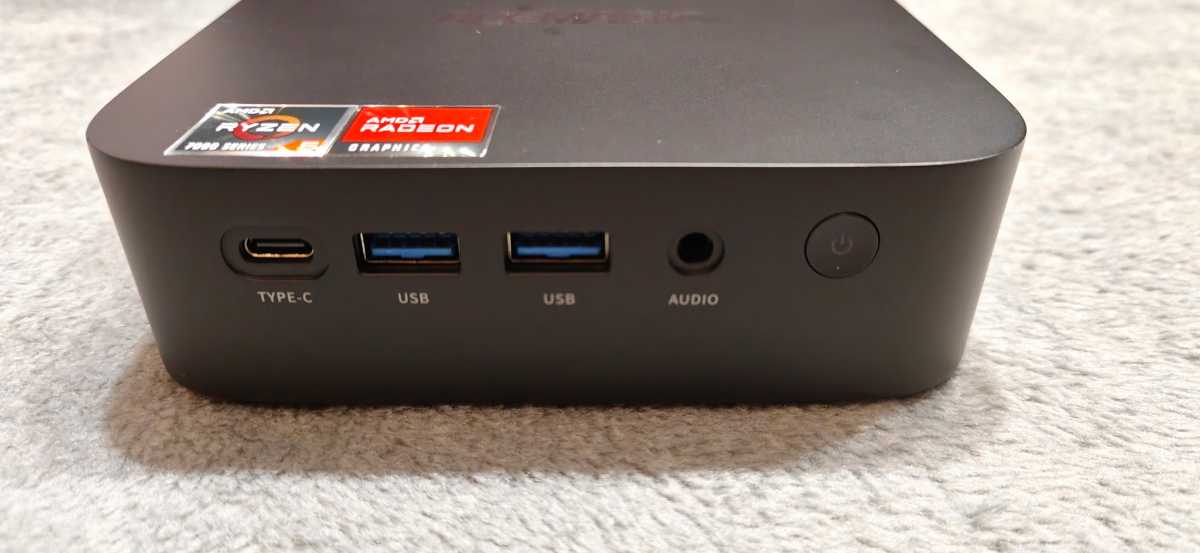
The front panel features a USB-C port, two USB-A sockets, a 3.5mm jack and the power button.
Christoph Hoffmann
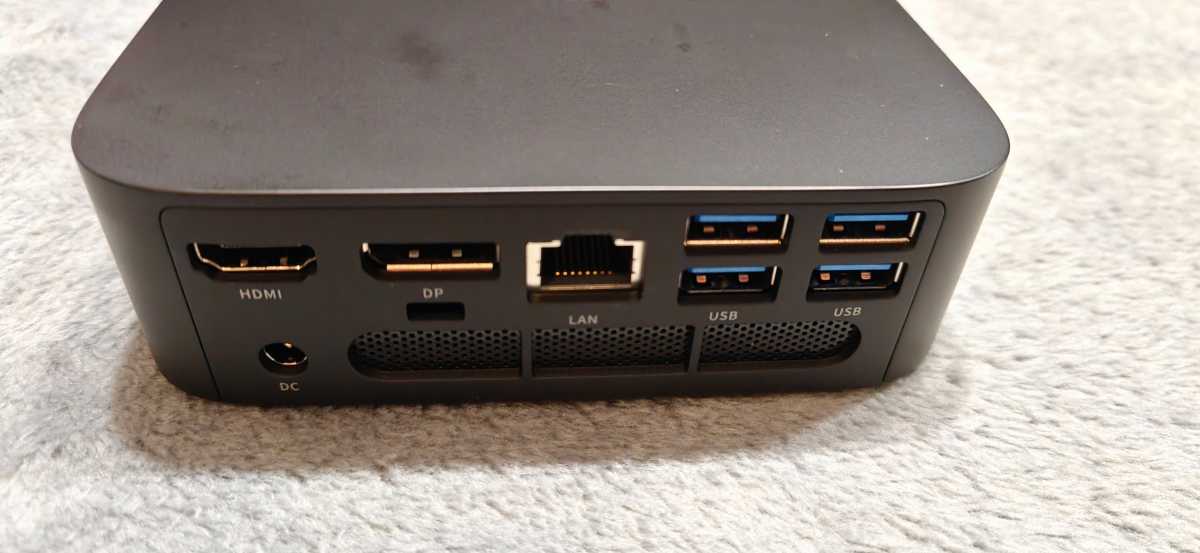
At the back are an HDMI port, a DisplayPort, the LAN port, four further USB-A sockets, and the socket for the power adapter. Ventilation grilles run across the back and sides. The dimensions are exactly the same as those of the Nipogi E3B; the case design also bears clear similarities.
Christoph Hoffmann
To access the interior, you need to peel off the adhesive rubber feet and unscrew the countersunk cross-head screws underneath. This is possible, but requires patience. The front USB sockets are also fitted so tightly into their cut-outs that thicker USB sticks can only be inserted with some force.
Specifications
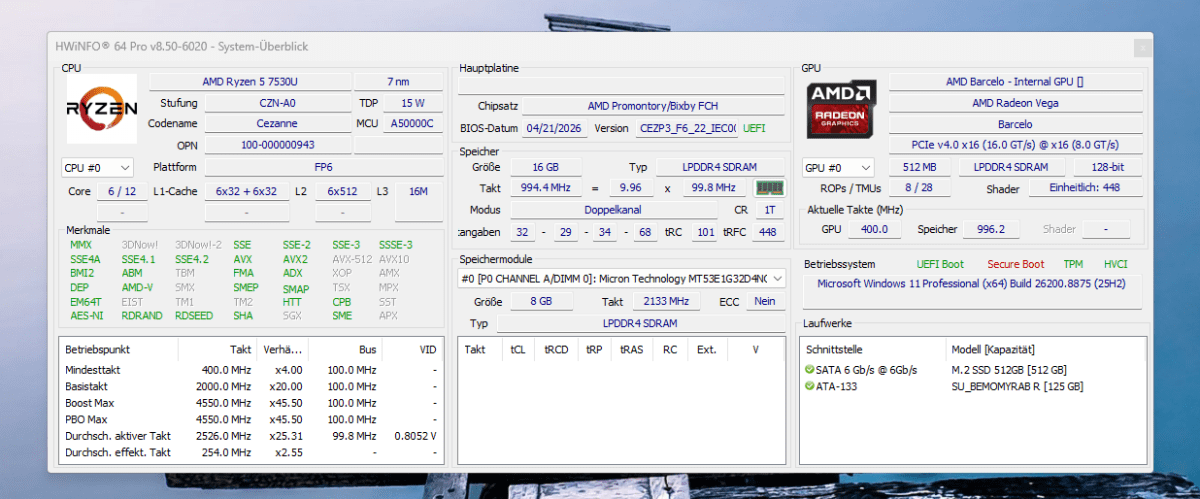
Our test unit was powered by a Ryzen 5 7530U. It belongs to the Zen 3 generation, offering six cores and 12 threads, as well as 16MB of L3 cache. The base clock is 2.0GHz, while Turbo Boost can reach up to 4.5GHz. The processor is manufactured using a 7nm process, and AMD specifies the TDP as 15 watts.
Christoph Hoffmann
Graphics are handled by the integrated AMD Radeon Graphics with seven compute units; technically, it is based on the Vega architecture. It operates at up to 2,000MHz and is more than adequate for Office tasks, video playback, and basic image editing. When it comes to gaming, however, you should stick to older or less demanding titles.
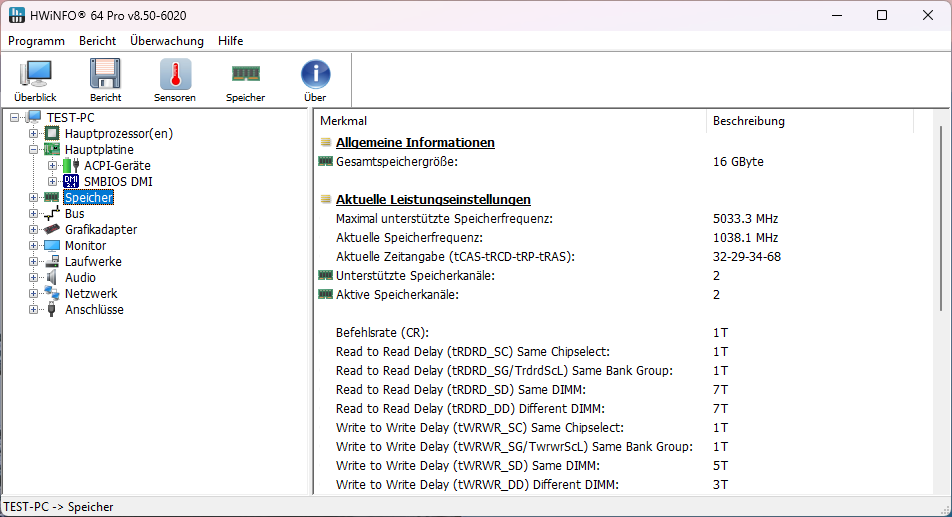
For RAM, the manufacturer has opted for 16GB of soldered-on LPDDR4X memory from Micron. It operates in dual-channel mode, which particularly benefits the integrated graphics. However, the RAM cannot be upgraded or replaced.
Christoph Hoffmann
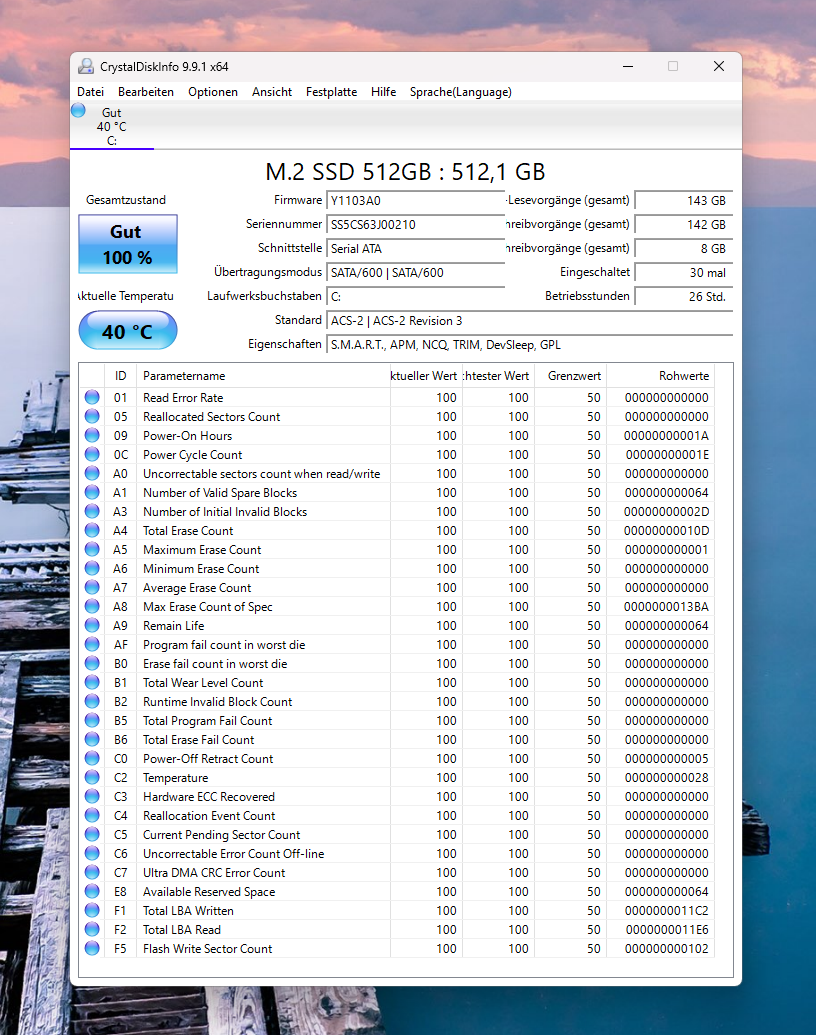
An M.2 SSD with 512GB serves as the system drive — though in our test unit, it features a SATA connection rather than NVMe. This is the biggest weakness of the hardware configuration. The K1 has two M.2-2280 slots; according to the manufacturer, one of these supports SATA and PCIe/NVMe, while the second supports SATA only. In total, up to 4TB of SSD storage is supported.
Christoph Hoffmann
The K1 is generous when it comes to ports. Six USB-A sockets and one USB-C port provide ample connectivity options for typical peripherals. HDMI 2.0, DisplayPort 1.4b, and USB-C with DP Alt Mode can drive three 4K displays at 60 hertz.
The network connection only supports Gigabit speeds; 2.5Gbit LAN, as offered by the Geekom A5 Pro, is missing. A Realtek module with Wi-Fi 6 and Bluetooth 5.2 provides wireless connectivity. The K1 does not support Wi-Fi 6E or Wi-Fi 7.
Christoph Hoffmann
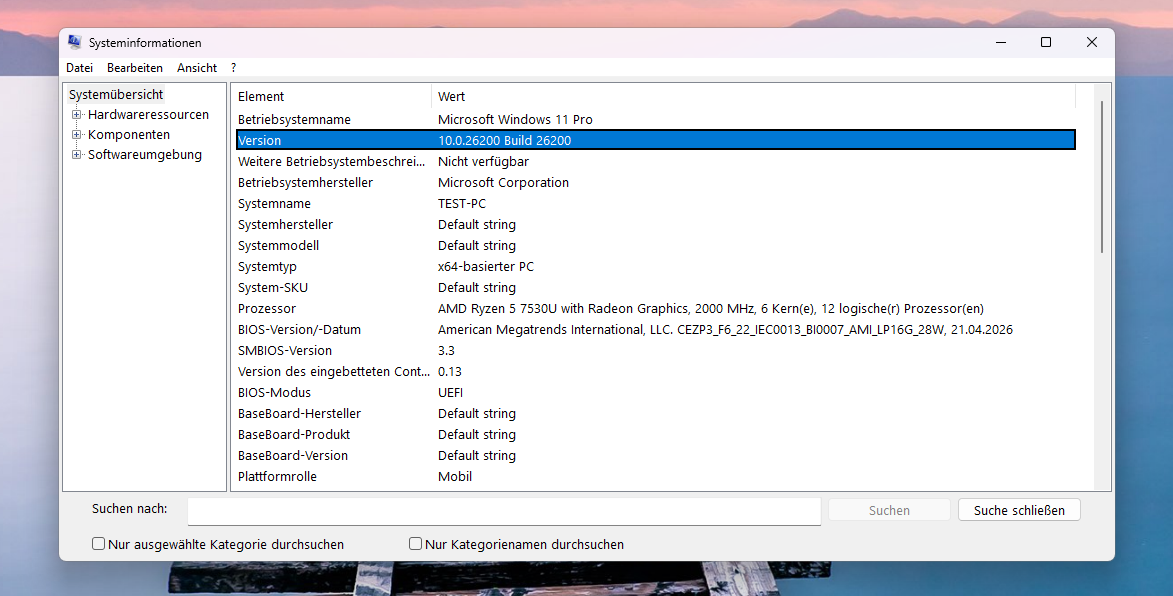
The software version stands out positively. The test unit runs Windows 11 Pro 25H2 with Build 26200; the BIOS is dated April 2026. Once set up, only a few updates are required. Many devices in this price range start out with significantly older versions and initially require several rounds of updates.
Computing performance
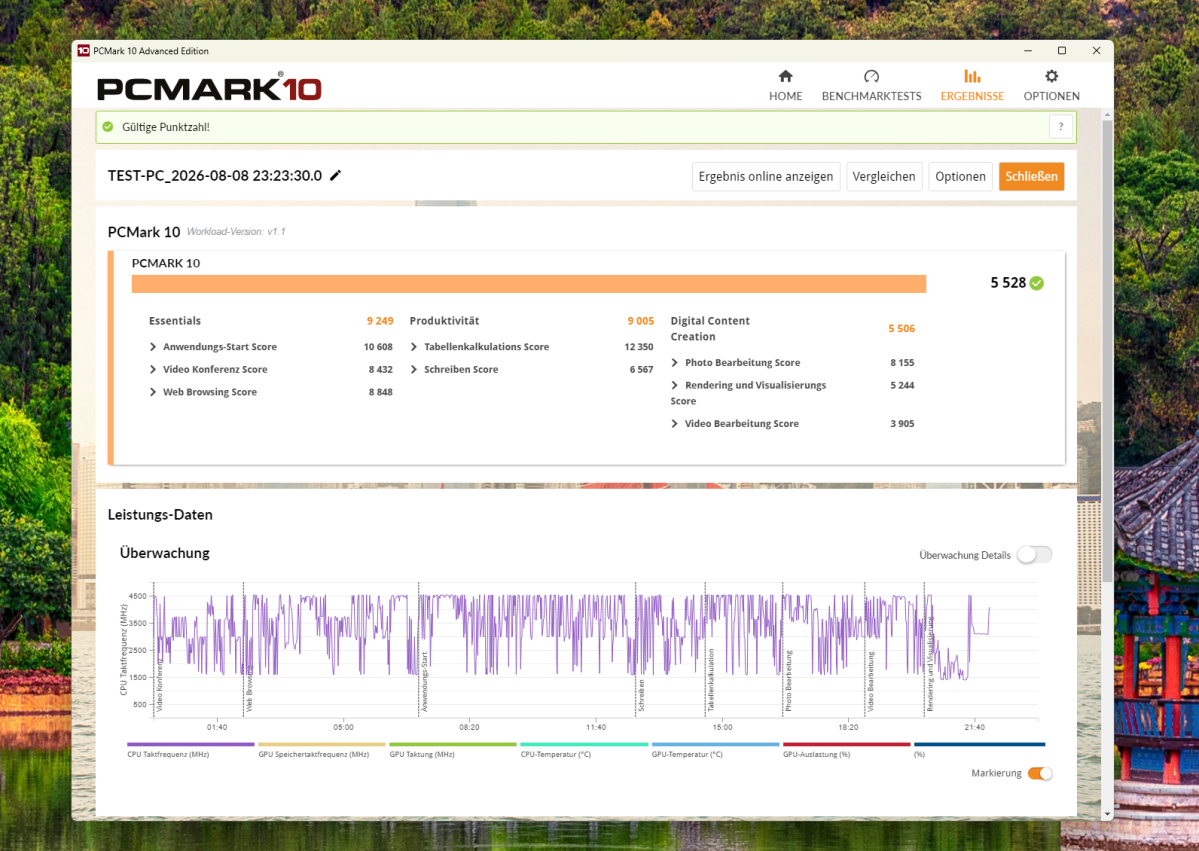
In PCMark 10, the K1 scores 5,528 points. This is sufficient for smooth operation, but places it in the lower mid-range. A look at the sub-scores is revealing. The Essentials category — comprising app launch, video conferencing, and web browsing — scores 9,249 points, putting it on a par with the Geekom A5 Pro (9,529 points), which uses the same processor. In the Productivity category, however, the K1 lags far behind with 9,005 points: The A5 Pro scores 14,748 points there. In Digital Content Creation, the K1 is again just ahead of the A5 Pro, with 5,506 points to 5,371.
Christoph Hoffmann
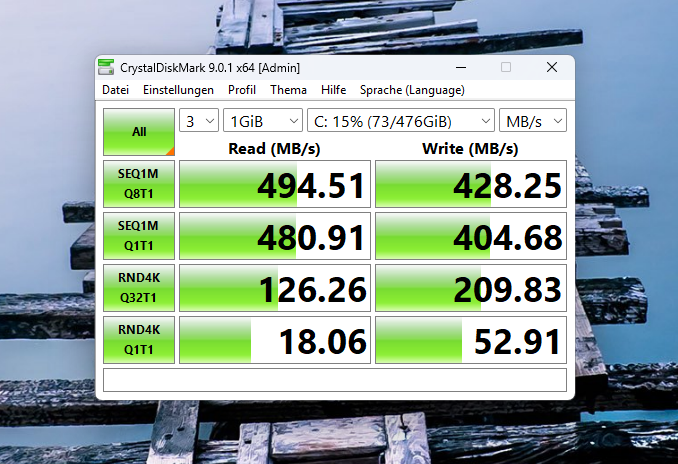
The explanation lies in the mass storage results. In CrystalDiskMark, the built-in SSD reads sequentially at 494.5MB/s and writes at 428.3MB/s. These are typical SATA figures. The NVMe SSD in the Geekom A5 Pro achieves 3,752MB/s read speed — more than seven times as fast. The gap becomes even more pronounced with small-file accesses: 18.1MB/s in the 4K read test with a queue is a poor result. Such small, random accesses affect, amongst other things, the responsiveness of Windows and applications. The result in the PCMark 10 storage benchmark also reflects the limited SSD performance.
Christoph Hoffmann
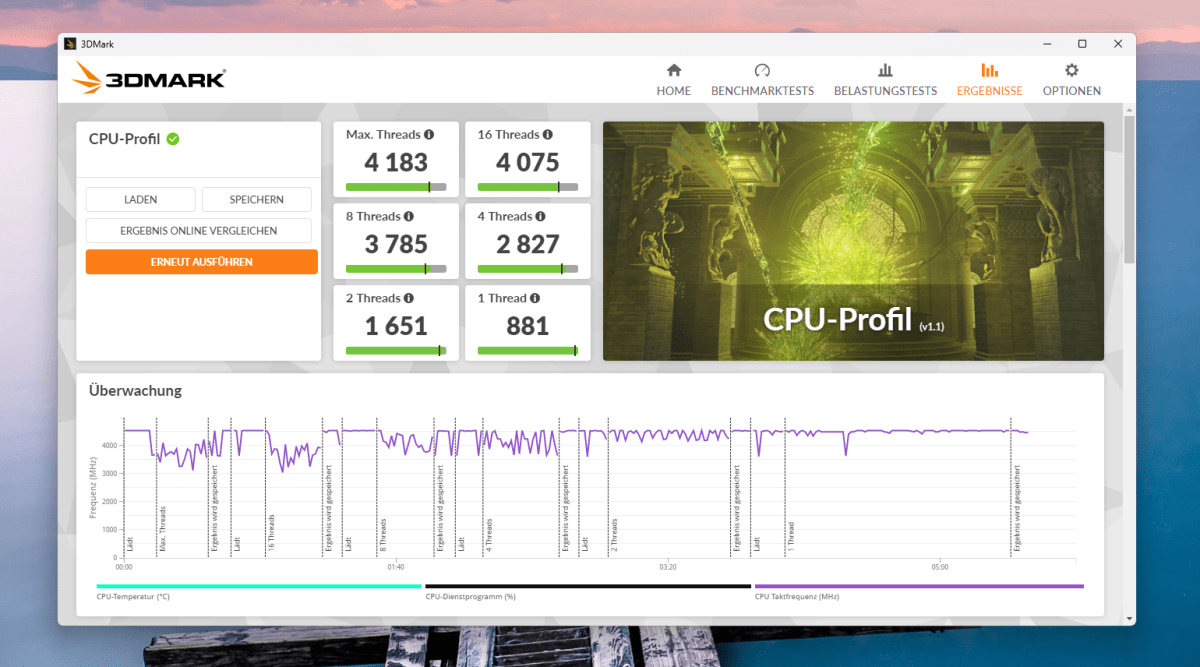
CPU performance, by contrast, is unremarkable. In the 3DMark CPU profile, the K1 scores 4,183 points at maximum thread utilisation, 4,075 points with 16 threads, 3,785 with eight threads and 881 points in the single-thread test. This puts it ahead of the Geekom A5 Pro (3,977 and 867 points) and the Nipogi E3B with its embedded eight-core processor (4,042 and 719 points). The CPU thus delivers the expected computing power. Under the tested load, the CPU clock speed we measured remained at around 4.4GHz. The system is held back elsewhere.
Christoph Hoffmann
In terms of graphics performance, the K1 performs at the expected Vega level. The 1,186 points in 3DMark Time Spy comprise 1,044 graphics points and 5,177 CPU points. The Steel Nomad Light achieves 930 points and 6.89 frames per second. By way of comparison: The Geekom A5 Pro scores 1,181 and 960 points, while the Nipogi E3B scores 749 points. Systems with a Radeon 780M or 890M score several times higher.
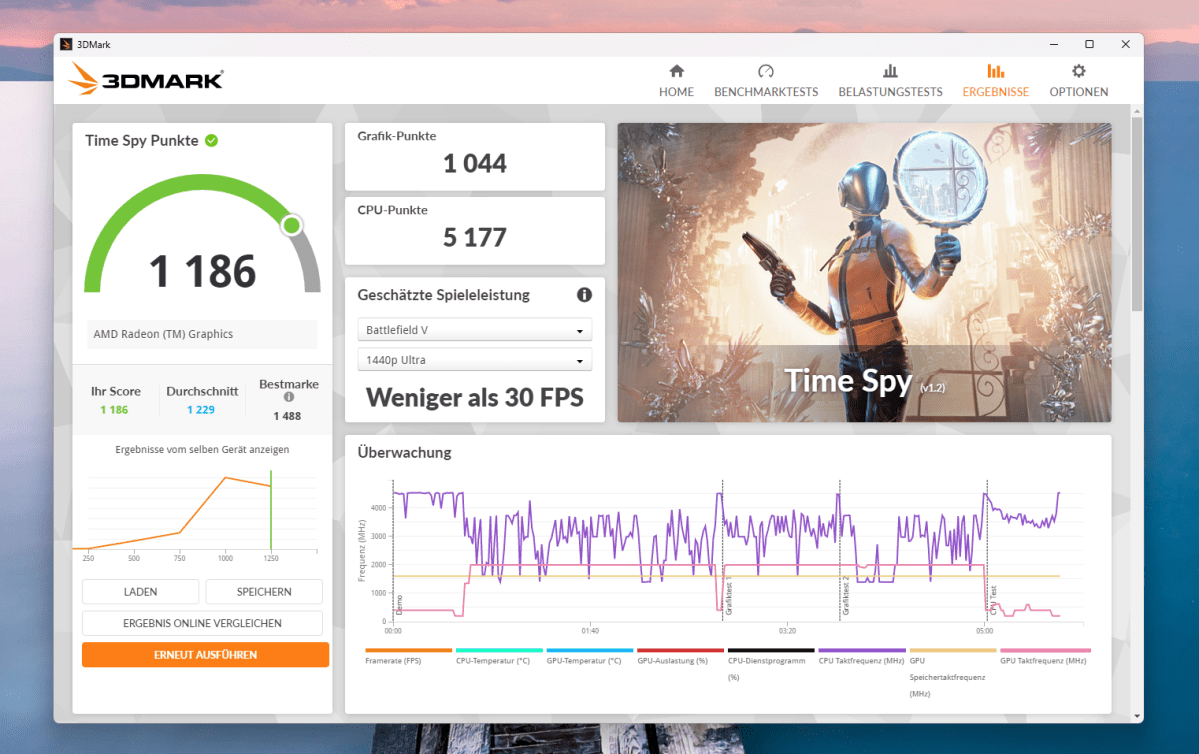
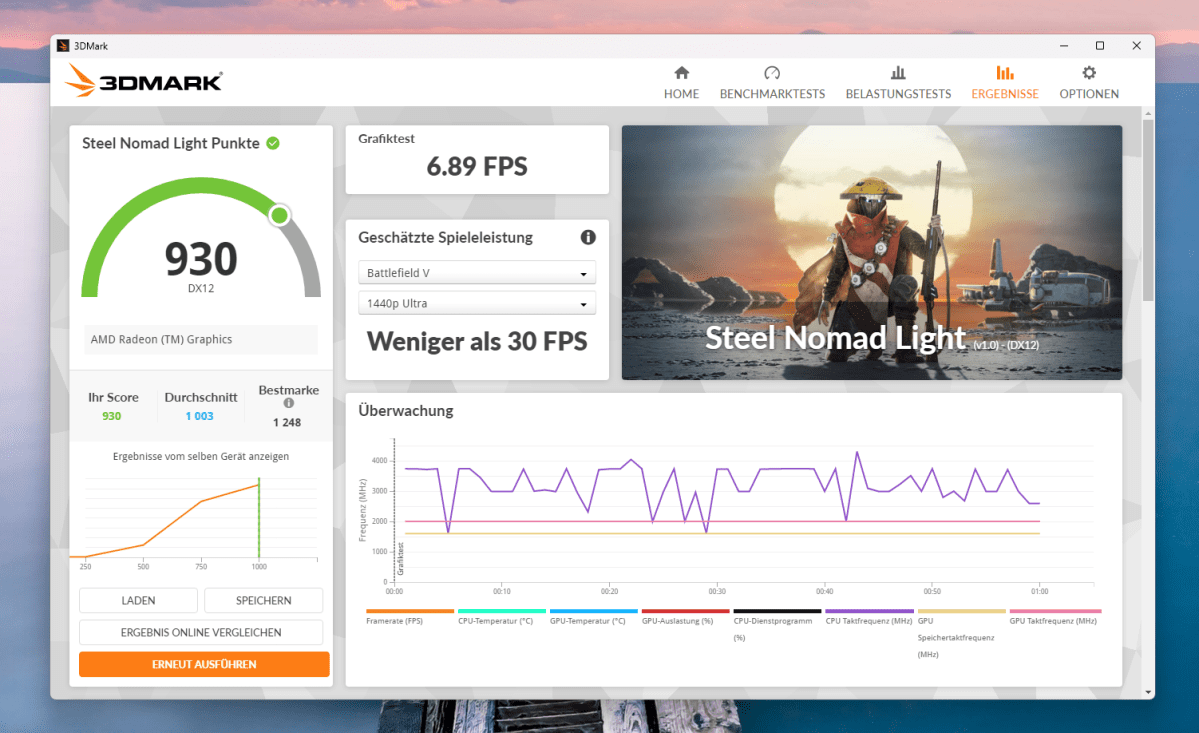
This performance is barely sufficient for the latest graphically demanding games. Older titles and esports games run smoothly at 1080p with reduced detail.
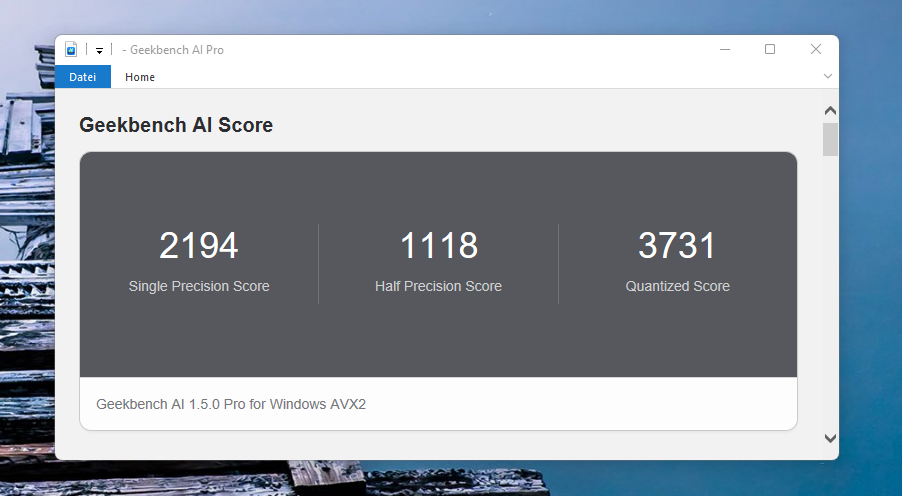
The mini PC also performs modestly in AI tasks. Geekbench AI reports 2,194 points in single precision, 1,118 in half precision and 3,731 in the quantized test. The Geekom A5 Pro is virtually on a par, with 2,364, 1,156, and 3,757 points. Small quantized models can generally be run locally; however, specialized AI hardware is required for larger AI models and high inference speeds.
Christoph Hoffmann
The pattern is therefore clear. The CPU’s raw performance is in line with the price, but the peripherals do not keep up. Replacing the SATA SSD with an NVMe model should speed up storage-dependent tasks in particular.
Noise and power consumption
When idle, the K1 draws just 4.7 to 5.3 watts from the mains. This low idle power consumption makes the K1 an attractive option for energy-efficient continuous operation, for example as a media centre or a small home server. Under typical office use, power consumption settles between 12 and 18 watts. Even at full load, we measured only around 38 watts. The included 65-watt power supply has plenty of headroom.
In terms of noise, the mini PC is less discreet. When idle, the fan remains discreetly in the background at around 28dB. Even under moderate load, it becomes audibly louder and then runs continuously at around 35dB. The noise is reminiscent of an optical drive in operation and is noticeable in a quiet room. Under full load, the noise level is around 40dB. A Geekom A5 Pro operates noticeably more quietly in comparable situations.
Should you buy the Acemagic K1?
The Acemagic K1 is a serviceable office computer with clear limitations. The Ryzen 5 delivers solid multi-core performance and, in the 3DMark CPU Profile, even narrowly outperforms the Geekom A5 Pro, which has an identical processor. Its low power consumption and three display outputs are also points in its favor.
The main drawbacks are the SATA SSD and the soldered-in RAM. Under load, the clearly audible fan also becomes a factor. Anyone opting for this model should plan for a fast NVMe SSD as a potential upgrade and bear in mind the awkward access to the interior. Once these considerations are taken into account, the K1 is a well-rounded machine for the office, home office, and living room.
Those who prioritize a metal chassis, upgradeable storage, and 2.5Gbit LAN will find the Geekom A5 Pro offers the more well-rounded package. Anyone requiring significantly more graphics or AI performance should opt for a mini PC with a more up-to-date integrated GPU, a powerful NPU, or dedicated graphics. That being said, at its current street price of $340, this mini PC becomes particularly interesting for its value.
Technical specifications
- Processor: AMD Ryzen 5 7530U, 6 cores/12 threads, Zen 3 (Barcelo R), 7 nm, 2.0GHz base clock, boost up to 4.5GHz, 16MB L3 cache, 15 Watt TDP
- Graphics: Integrated AMD Radeon Graphics (Vega), 7 compute units, up to 2,000MHz
- RAM: 16GB LPDDR4X, dual-channel, soldered (Micron), not upgradeable
- Storage: 512GB M.2-2280 SSD with SATA 6Gbit/s interface
- Expansion: One free M.2-2280 slot with NVMe/SATA support
- Display outputs: HDMI 2.0 (4K/60 Hz), DisplayPort 1.4b (4K/60 Hz), USB-C 3.2 Gen 2 with DP Alt Mode (4K/60 Hz), triple-display support
- Front USB ports: 2 × USB-A 3.2 Gen 2 (10Gbit/s), 1 × USB-C 3.2 Gen 2 with display and PD functionality
- Rear USB ports: 4 × USB-A 3.2 Gen 1 (5Gbit/s)
- Network: Gigabit LAN (Realtek RTL8168/8111), Wi-Fi 6 (Realtek RTL8852BE), Bluetooth 5.2
- Audio: 3.5 mm combo jack on the front, additional output via HDMI, DisplayPort, and USB-C
- Operating system: Windows 11 Pro, Build 26200 (25H2), UEFI with Secure Boot, and TPM
- Power supply: 19 V/3.42 A, 65-watt power adaptor, 5.5 × 2.1mm barrel plug
- Dimensions: 128 × 128 × 41mm
- Weight: approx. 400 grams
- Contents: Mini PC, power supply unit with cable, HDMI cable, VESA mount, screws, manual