
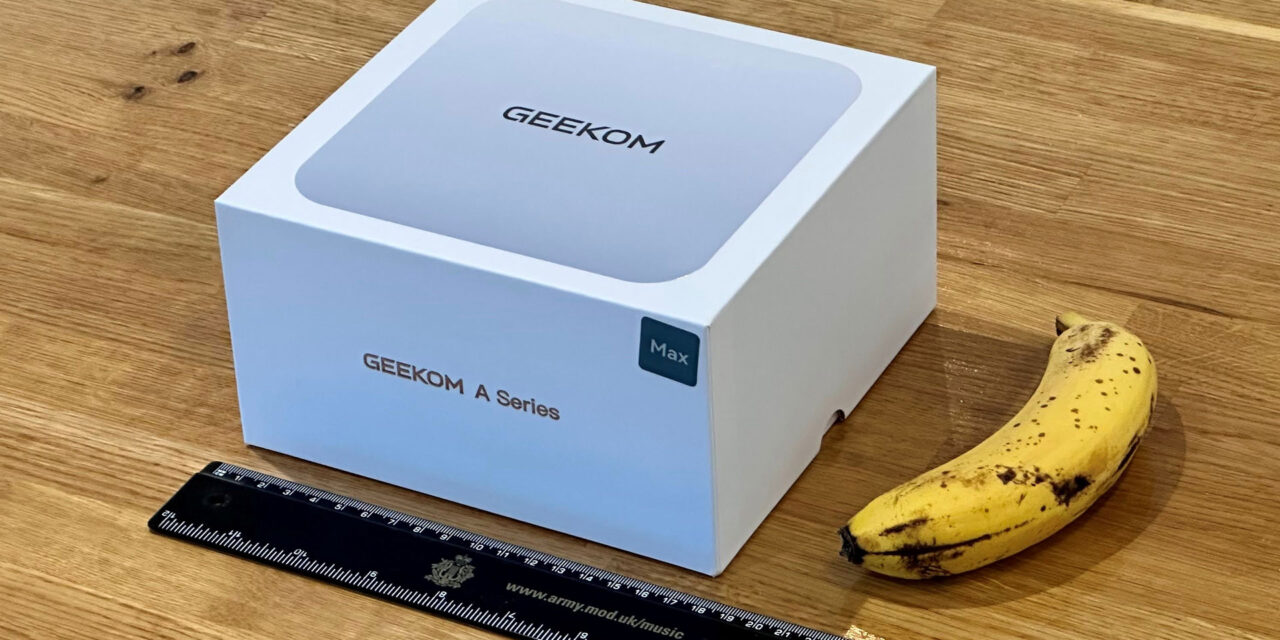
Geekom A9 Max 2026 review: Gorgon Point in a compact Mini PC
AMD introduced its mid-cycle Ryzen AI 400 chips for laptops at the beginning of the year. Predictably, mini PC makers have decided to update their Ryzen AI 300 designs from last year with the newest generation processors. While the gains from the new silicon might be politely described as incremental, Geekom here has also taken the opportunity to upgrade the cooling system.
The firm also decided to go with a single 32GB DDR5-5600 SODIMM configuration here. Considering the ongoing RAM shortages, it says it decided to do so to allow for less wasteful upgrades down the line. However, AMD iGPUs like the Radeon 890M here, are heavily impacted by the reduced bandwidth of using single-channel system RAM.
Nevertheless, the 32GB/2TB device configuration supplied looks like a relatively generous offering in the current climate.
Design of the Geekom A9 Max 2026
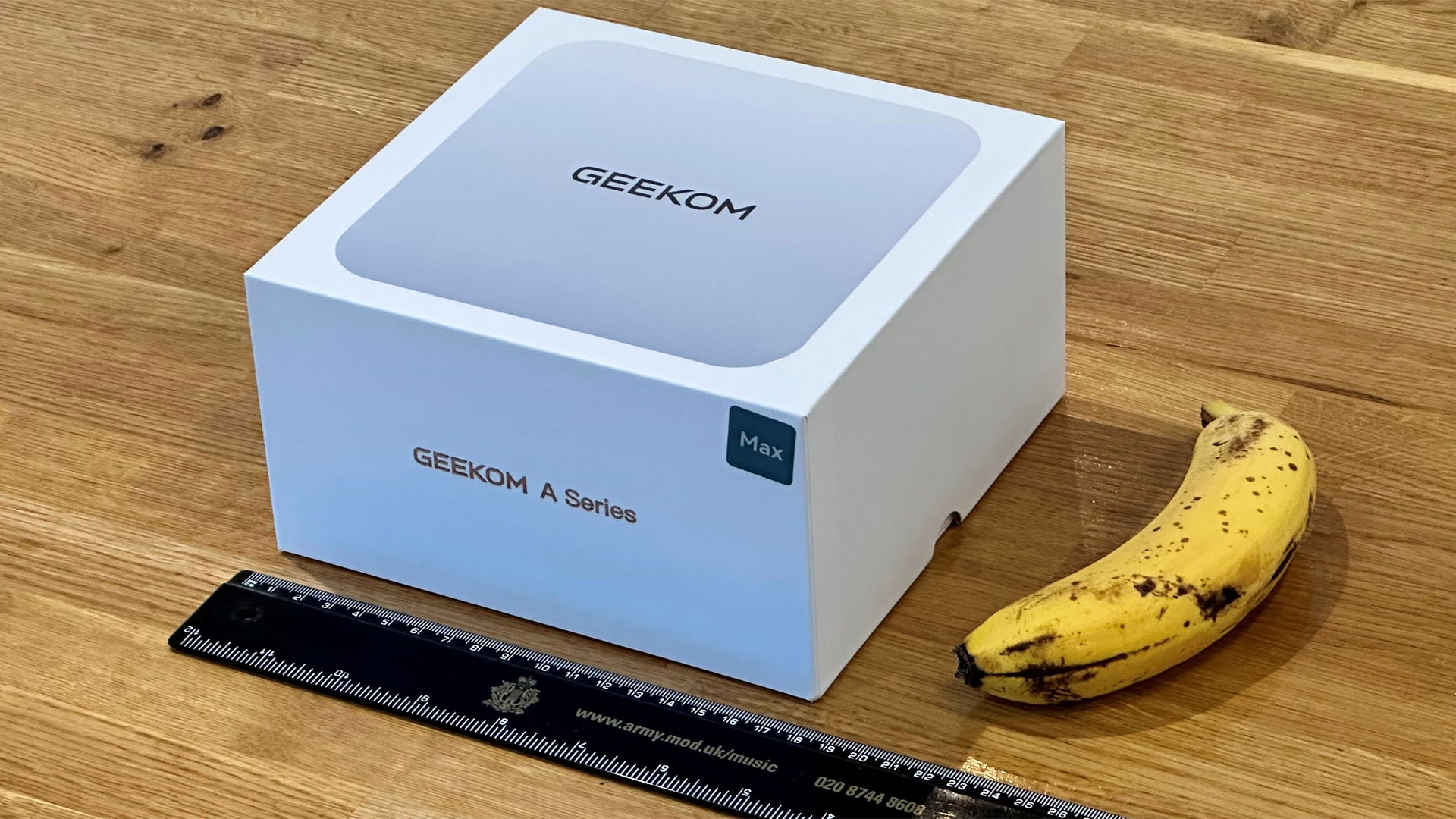
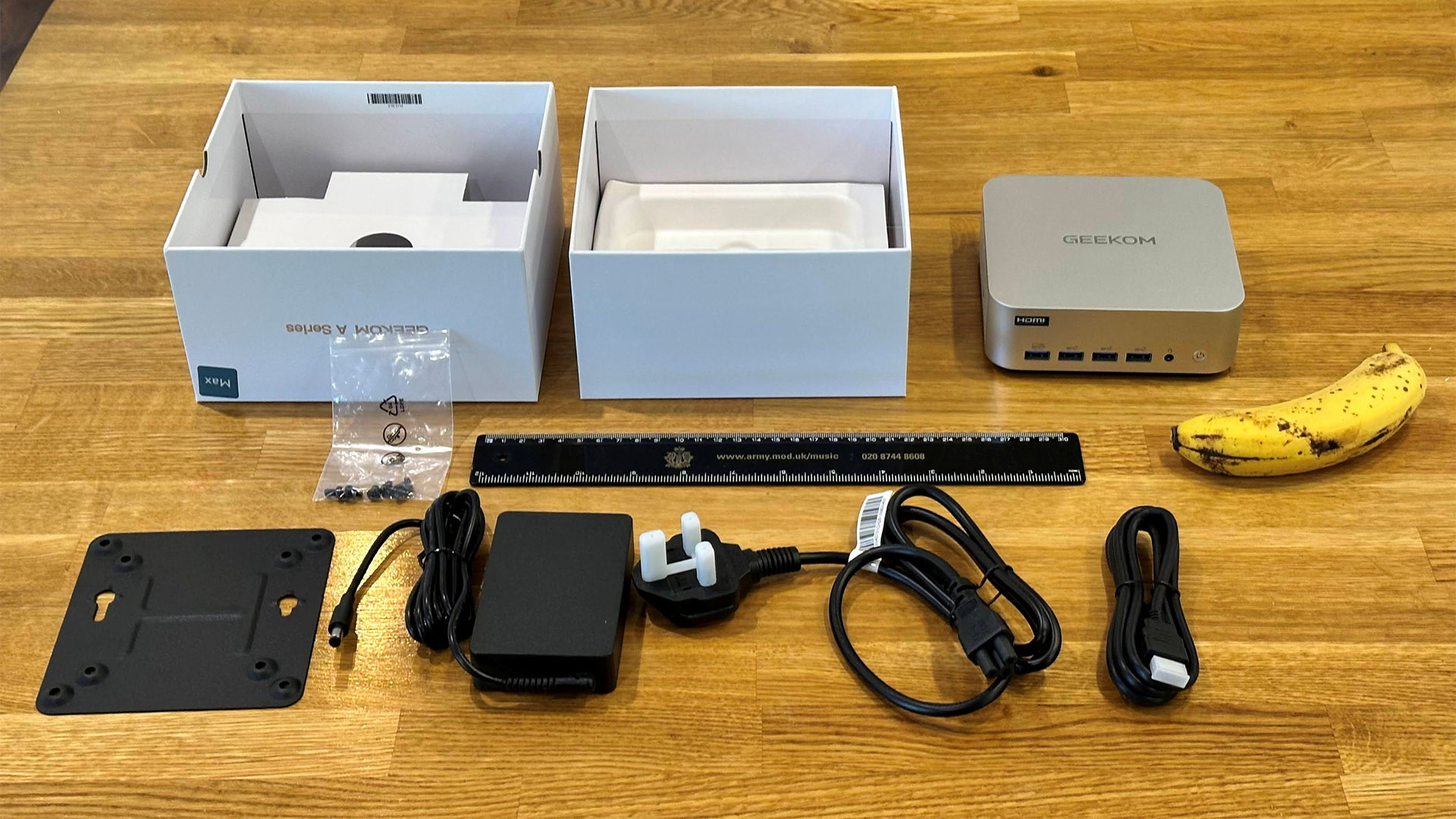
Geekom basically sticks to the classic 5×5-inch NUC design with its anodized silvery metal Mini PC. If you’ve seen a Geekom A-series Mini PC before, it will be immediately familiar, and it offers appealing, though derivative (NUC x Mac Mini), stylishness.
The A9 Max 2026’s dimensions are officially listed as 135 x 132 x 46.9mm (5.3 x 5.2 x 1.9-inches). Geekom’s spec didn’t mention the weight of the device, but it tipped our scales at 705g (~1 pound and nine ounces). These weights and measurements don’t include the external PSU or VESA mounting bracket supplied. Other bits in the box include a region-appropriate cloverleaf plug and cable for the PSU, screws for that mounting bracket, and an HDMI cable.
We’ve already mentioned the metal shell of this Mini PC, which has a UV coating to make it more durable. Geekom says that there is also an inner metal frame, and removing the black plastic bottom reveals a metal bottom layer. It suggests its selection of construction materials and techniques makes the A9 Max “extremely sturdy [and] it can withstand up to 200Kg of pressure.”
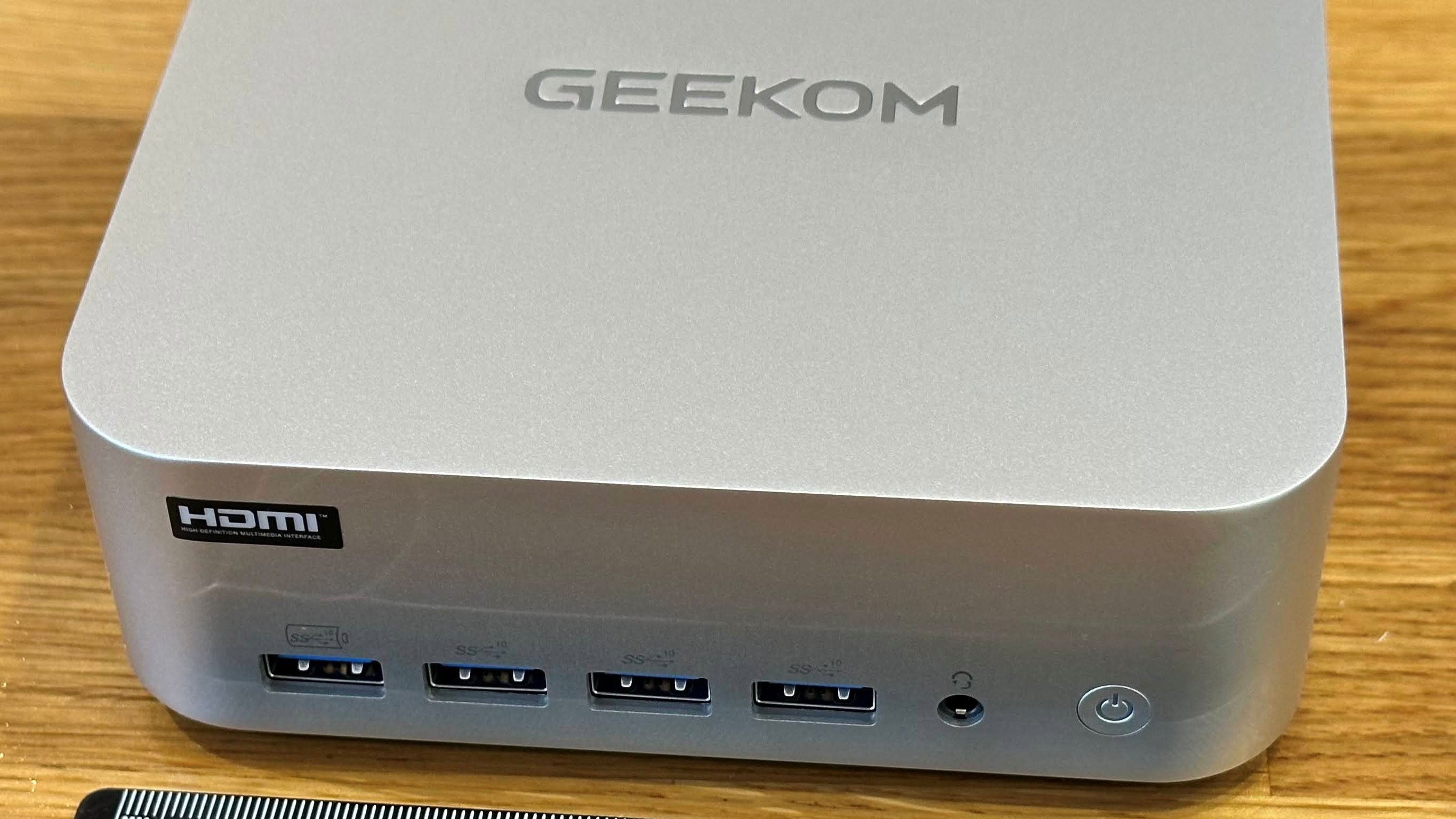
You power up the Geekom A9 Max with its front-mounted power button. It’s a simple button, which lights up to indicate power. There’s no built-in biometric sensor, and no Copilot button, either.
Geekom A9 Max 2026 Mini PC Specifications
|
Processor |
AMD Ryzen AI 9 HX 470 (12C / 24T: 4x Zen 5 , 8x Zen 5c), up to 5.2 GHz |
|
Graphics |
Radeon 890M (RDNA 3.5, 16 CUs, up to 3.1 GHz) |
|
AI Acceleration |
XDNA 2 NPU + CPU + GPU, up to ~80–86 TOPS combined |
|
RAM |
1x 32GB DDR5‑5600 SODIMM (2 slots, up to 128GB total) |
|
Storage |
2TB PCIe 4.0 NVMe SSD (M.2 2280) + 1x M.2 2230 slot for expansion |
|
Physical Ports |
2x USB4 (40 Gbps, DP Alt‑Mode, eGPU‑ready), 5x USB‑A 3.2 Gen 2, 1x USB‑A 2.0, 2x HDMI 2.1, 2x 2.5 GbE LAN, SD 4.0 card reader, 3.5 mm audio, DC‑in, Kensington lock |
|
Wireless |
Wi‑Fi 7 + Bluetooth 5.4 (on an M.2 2230 module) |
|
Cooling |
IceBlast 3.0 copper base, dual heatpipes, dense fin stack, high‑pressure fan |
|
Dimensions |
135 × 132 × 45.6mm (5.3 x 5.2 x 1.9-inches) <0.9 L chassis, 1.2 pounds / 0.55 kg) |
|
OS Installed |
Windows 11 24H2 Pro |
|
Price (as configured) |
$1,599 |
Ports and Upgradeability
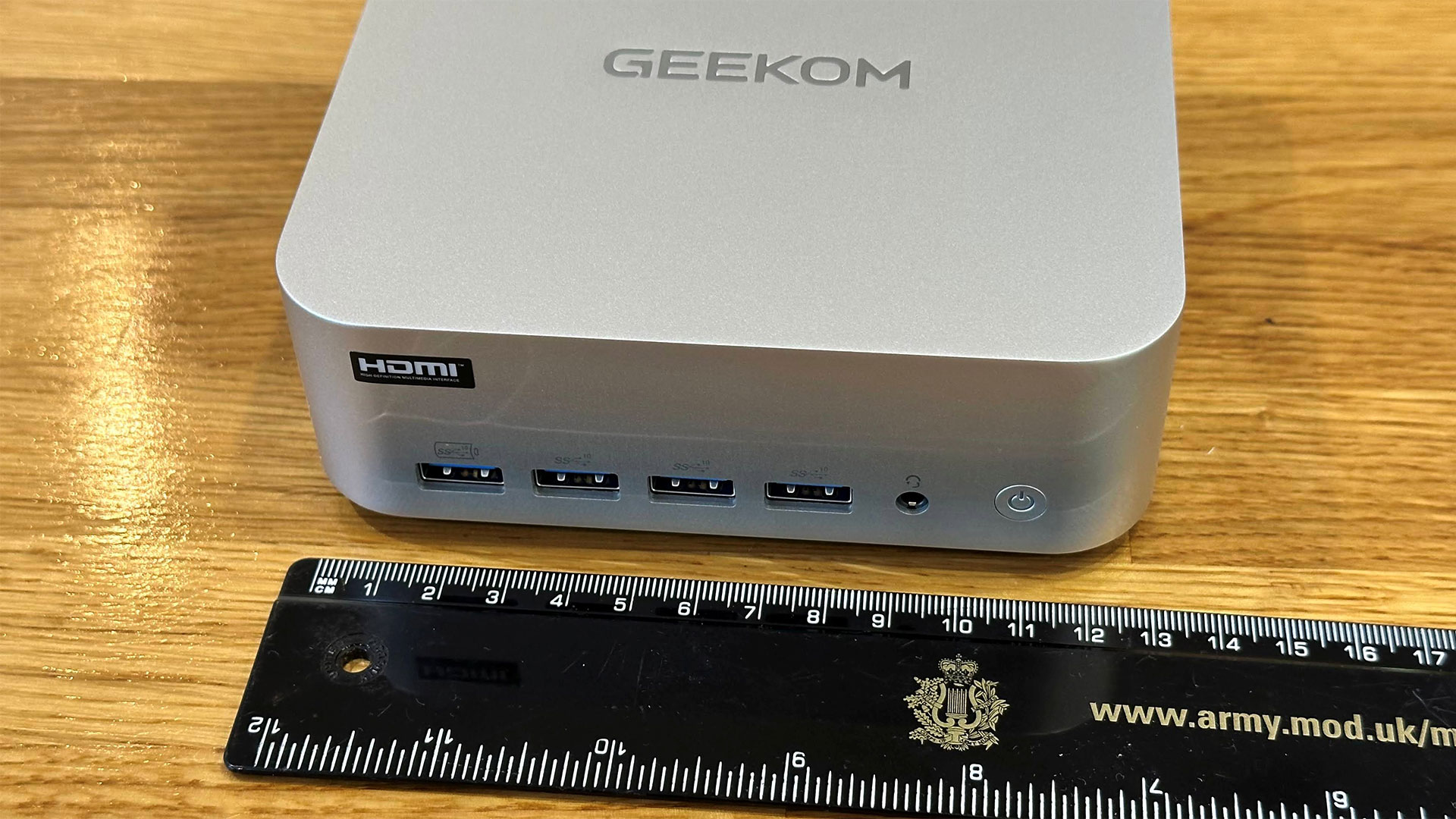
Starting from the front, Geekom has chosen to put four USB‑A 3.2 Gen 2 (10 Gbps) on the front panel, one of which is configured for fast charging any connected smart devices. To the right of these is a 3.5mm audio jack, and then there’s the flush and slightly convex power button.
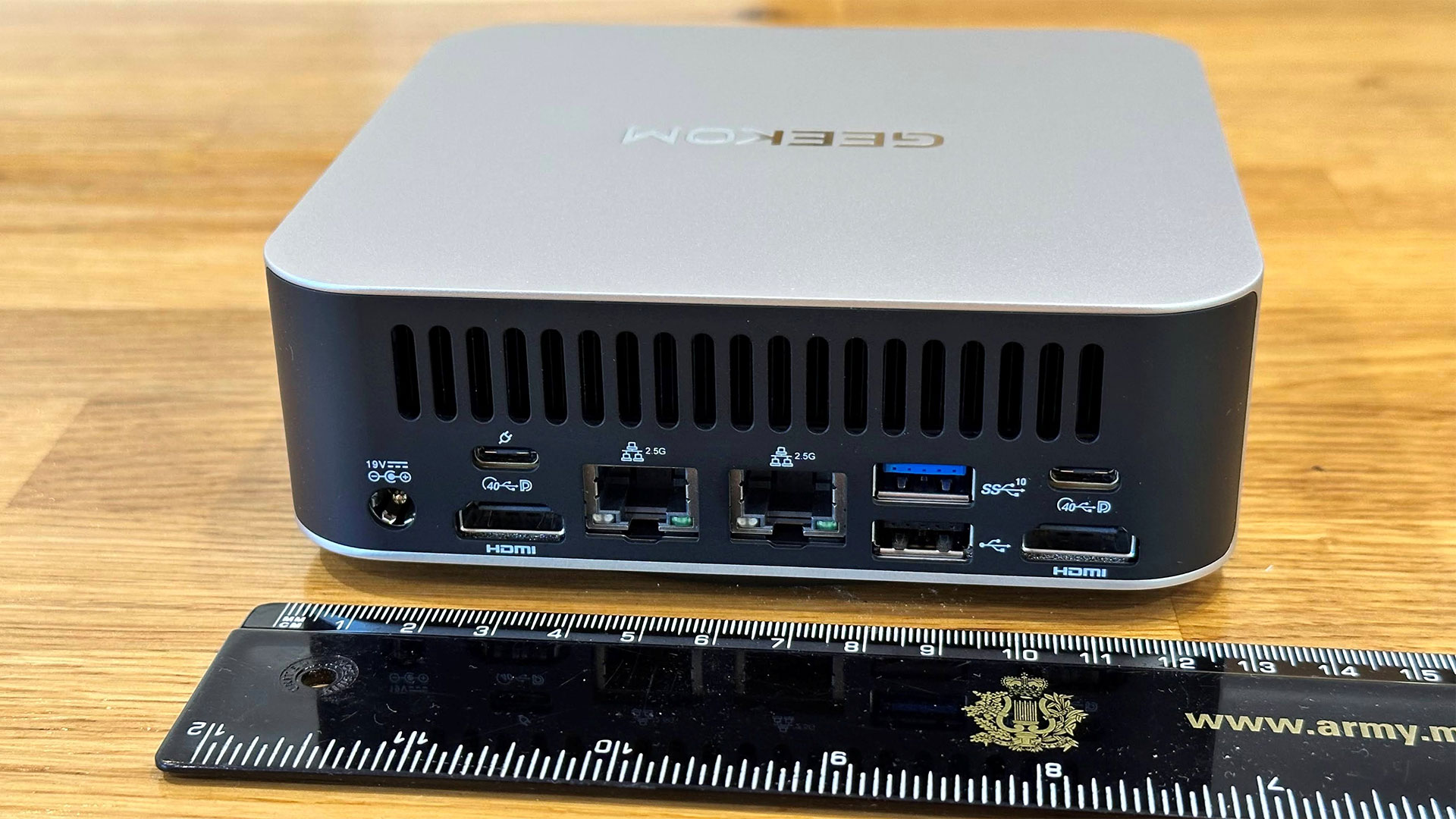
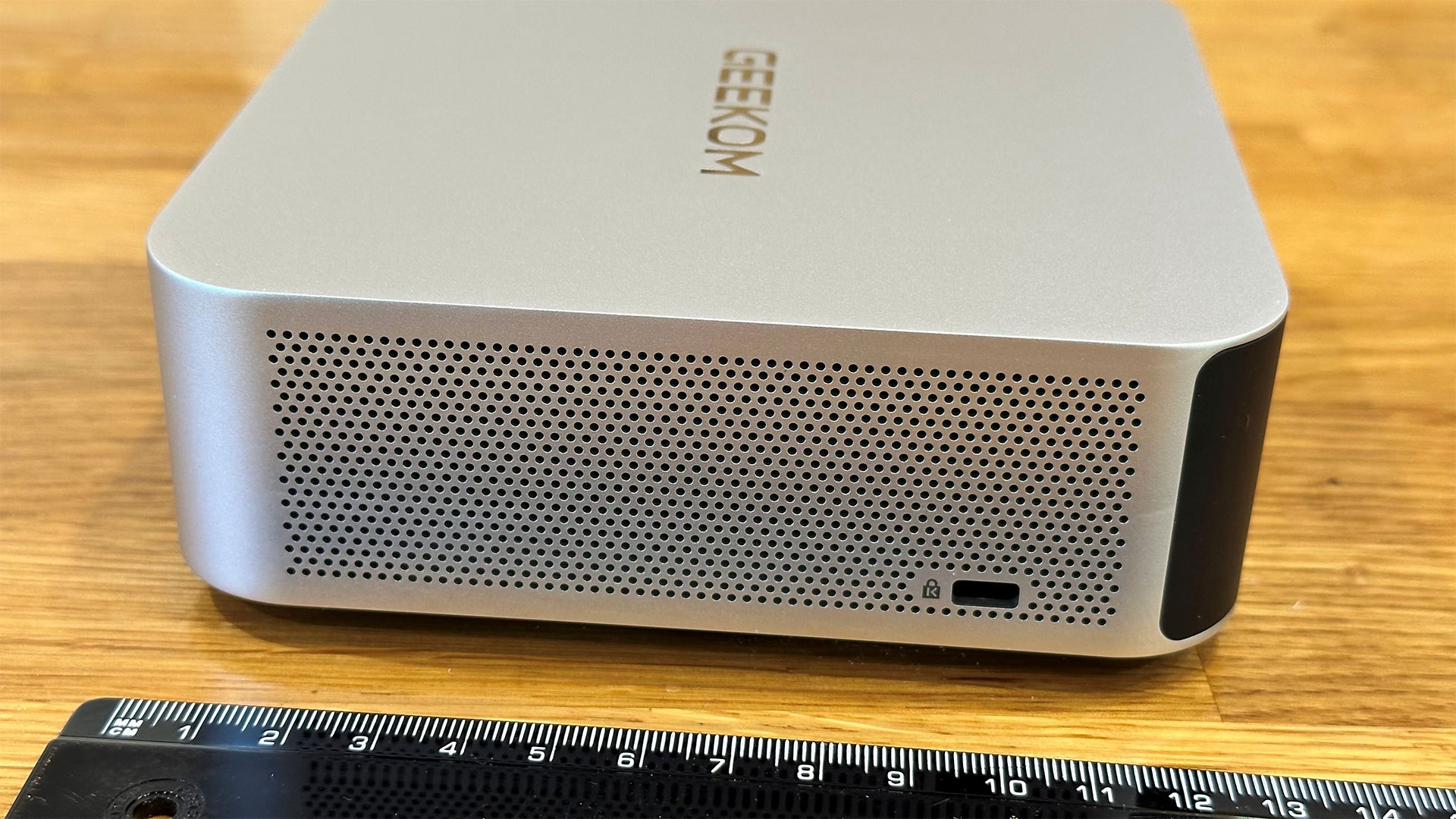
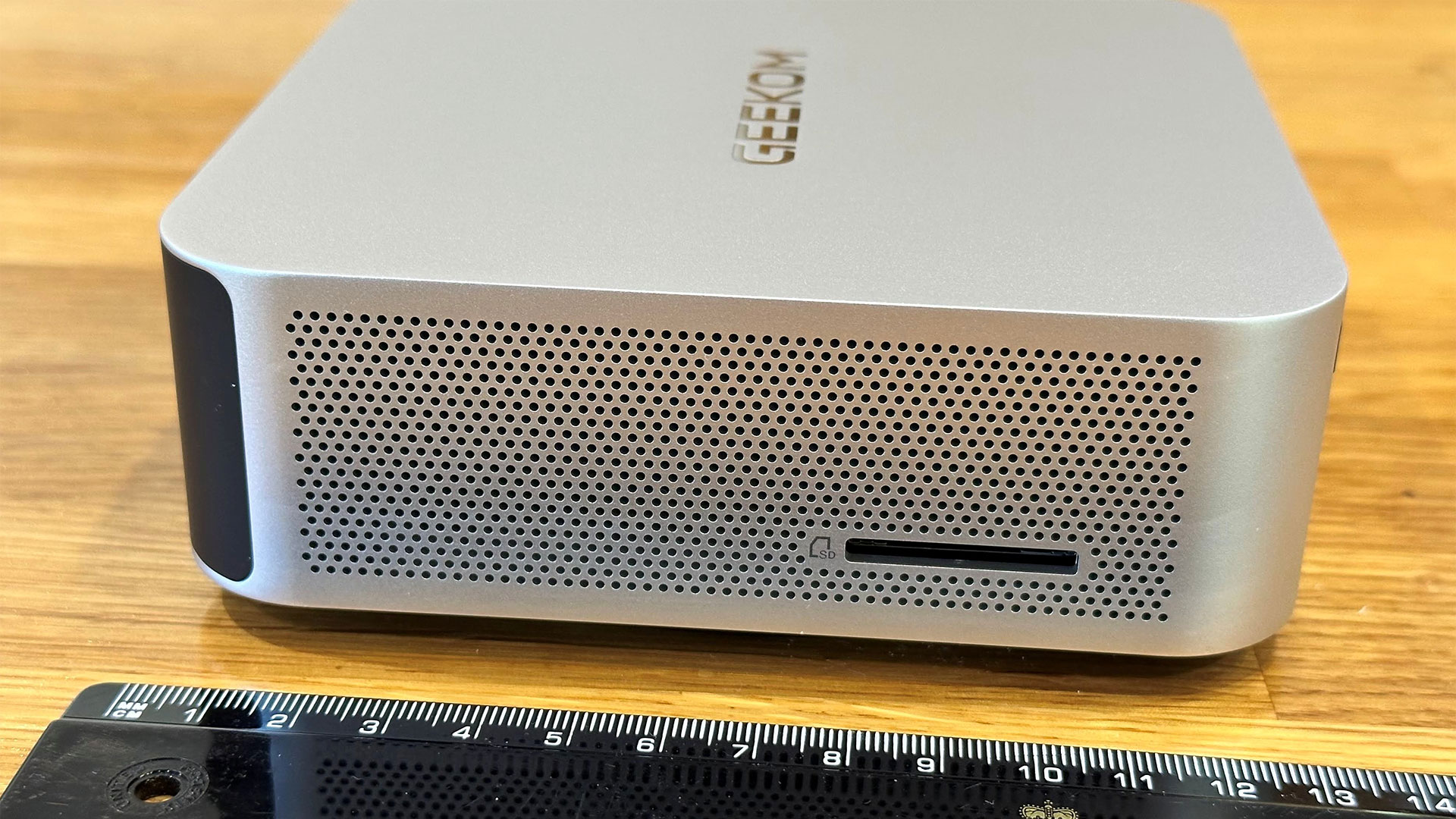
Turn the unit clockwise, and you see the Kensington slot as the sole user port interrupting the neatly perforated metal vista. The rear is black plastic with sizable vents at the top. Below the vents are a DC barrel jack, twin HDMI ports, twin 2.5G Ethernet ports, twin USB4 ports (with DP-Alt support), another USB‑A 3.2 Gen 2 (10 Gbps) port, and a USB 2.0 port. The other perforated side of the device features the SD 4.0 card reader slot.
There’s nothing else on the top of the Mini PC but the Geekom logo. On the bottom, there are VESA mounting screws and four rubber feet, which have to be removed to access the inside.
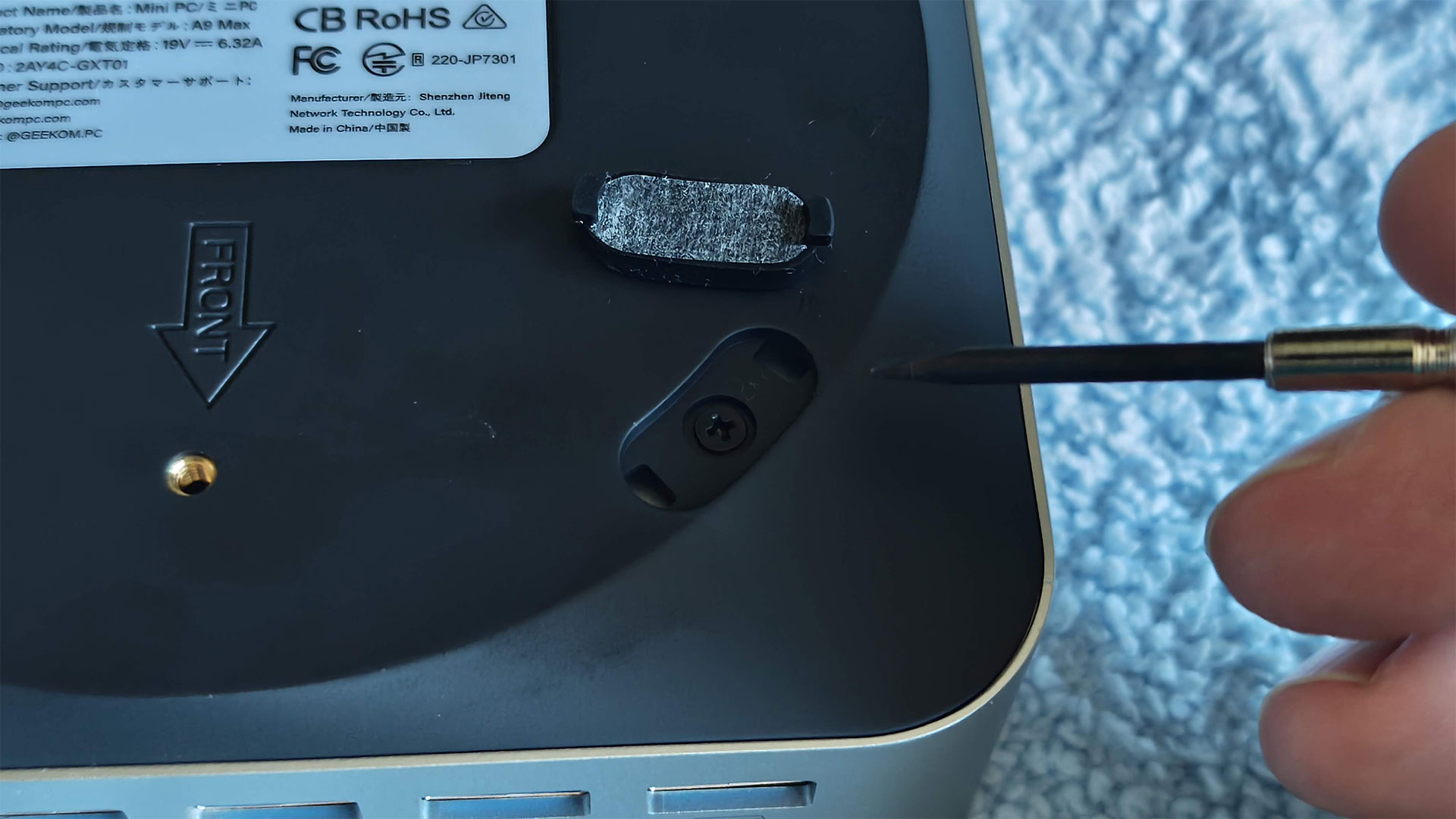
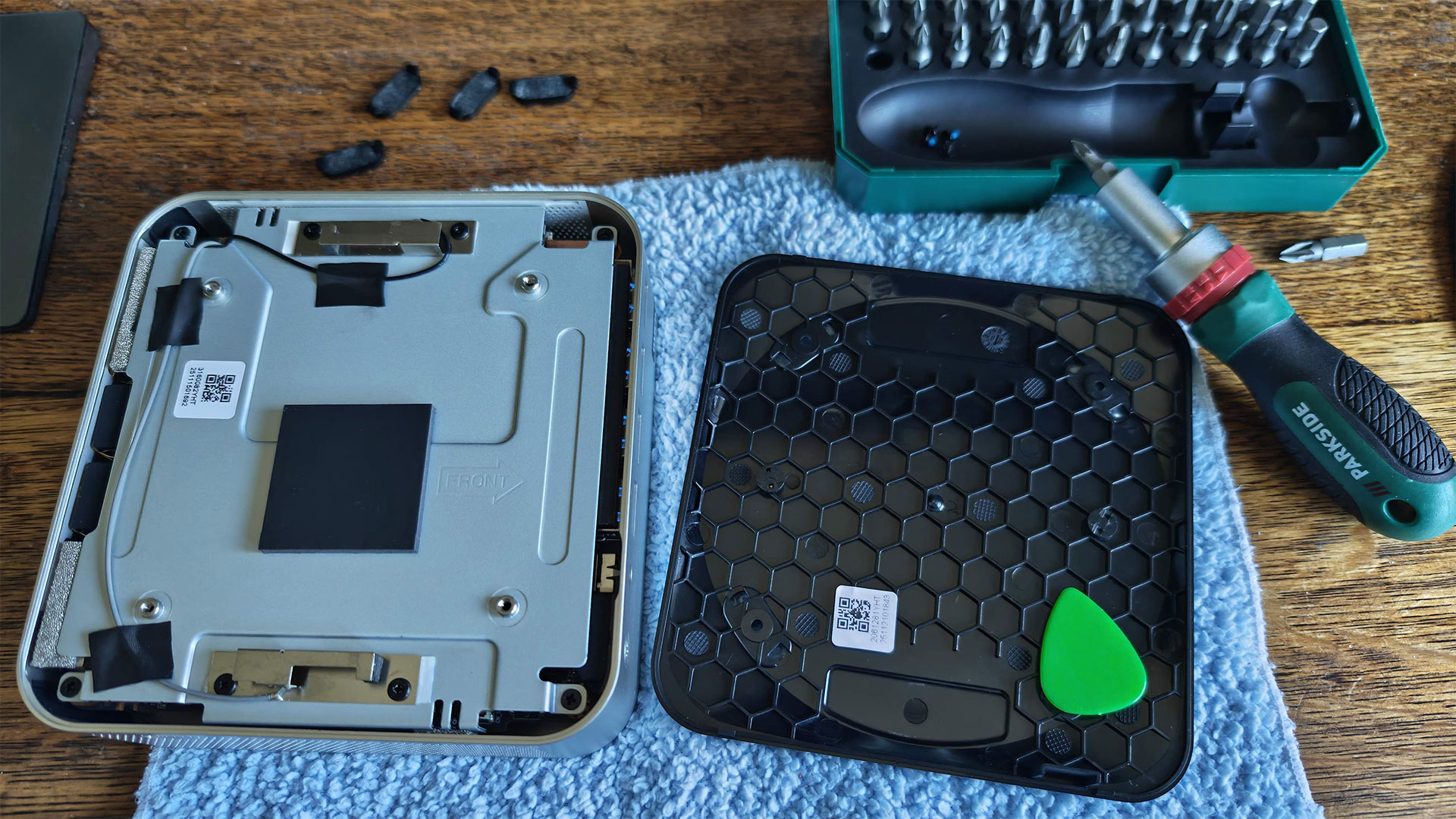
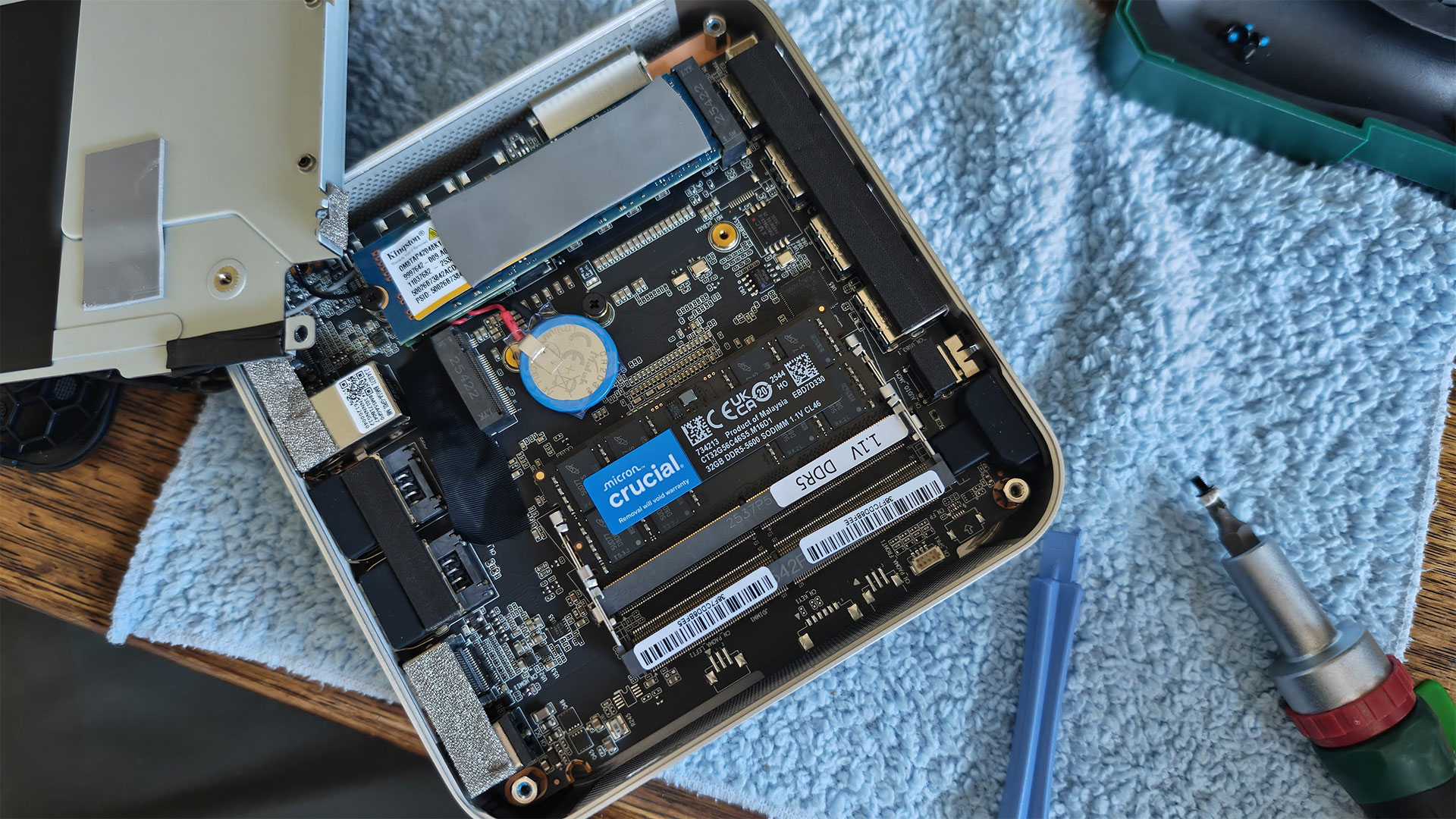
Once you pry the sticky feet off, there are four crosshead screws to remove. Then I used a guitar plectrum to flip the bottom off. The bottom comes away without any attached wiring. However, you can’t do much yet, as four more screws need to be removed so the metal shielding layer on the bottom can be removed. Rather than untaping all the antenna wires, which partly fix the inner metal underside to the rest of the inner components, I managed to open it up like a door.
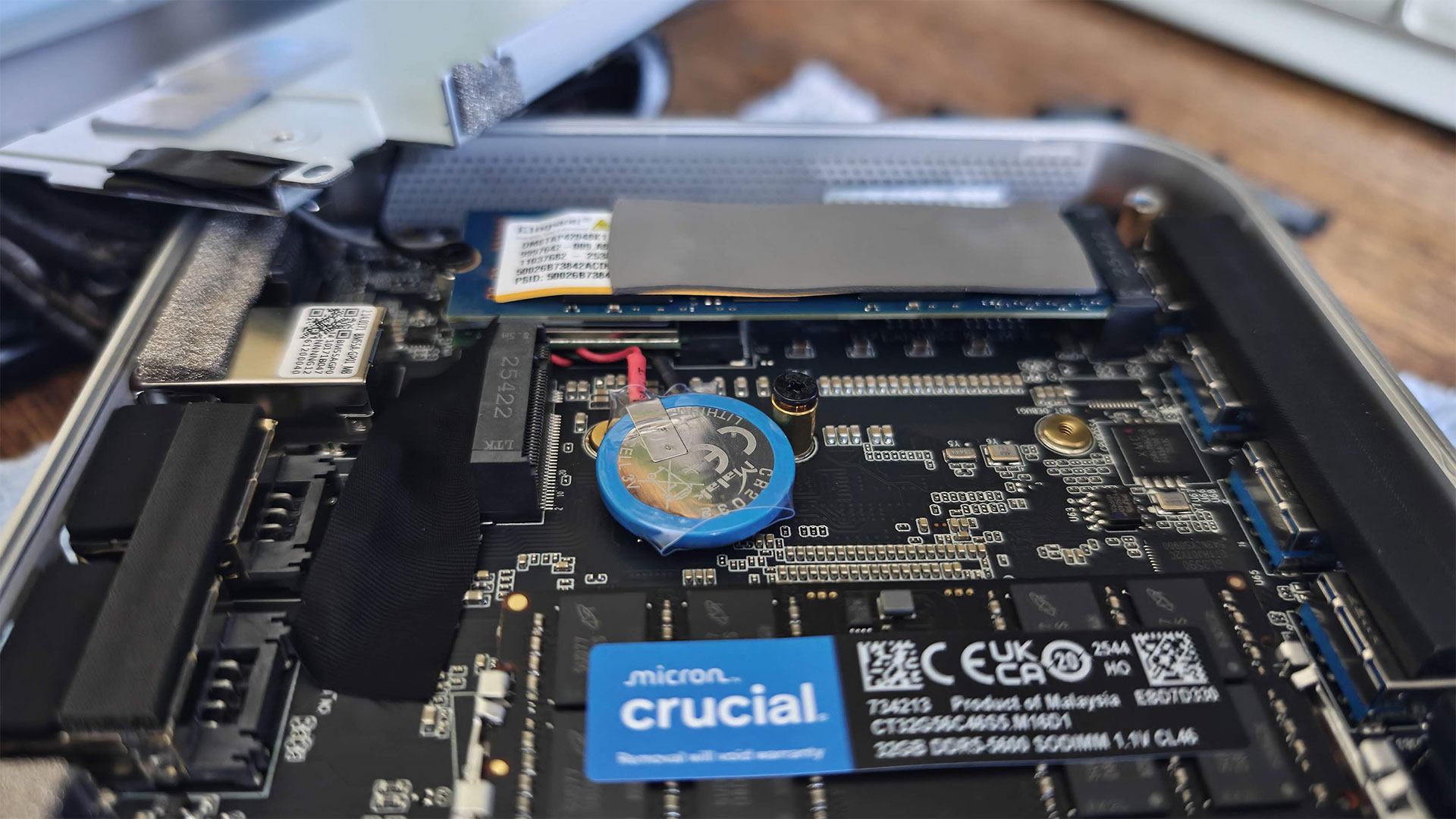
With eight screws removed, I had access to the SSD and RAM slots. The Geekom A9 Max has two M.2 SSD slots. The 2280 slot was populated with a Kingston branded 2TB drive with a thermal pad on top. You can just about see that underneath it is the M.2 Wi-Fi 7 and Bluetooth 5.4 card. To the side of this 2280 SSD is another slot, which it is claimed is usable for drives in the 2230 form factor. I noted a thermal pad was already stuck on the metal shell, which would run the length of a 2230 drive if installed and the unit screwed back together, that’s nice attention to detail.
More user-configuration options provided by this tiny motherboard were provided by the pair of SODIMM slots. Geekom had fitted a single Micron 32GB DDR5-5600 module, so one slot was left free. The decision to sell this device in a single-channel configuration was “mainly to provide better long-term upgrade flexibility,” I was told in an email. “Since the A9 Max only has two memory slots, a factory-installed 2×16GB setup would require users to replace both modules when upgrading to 64GB or 128GB in the future. With a single 32GB module, users can simply add another 32GB stick later to achieve 64GB dual-channel memory more easily and cost-effectively.”
I’d agree more with this idea if the Mini PC had 16GB of RAM in total, but I fear it will be a long time before buyers of machines of this type will be able to justify purchasing another 32GB SODIMM – to unleash rather than constrain the Radeon 890M. More on that later.
Test System Setup
|
System |
CPU |
(i)GPU |
Memory |
Chassis |
|
GMK EVO-T2 |
Intel Core Ultra X7 358H (16C/16T: 4P + 8E + 4 LPE), up to 4.8 GHz |
Intel Arc B390 (Xe3, 12 cores, up to 2.5 GHz) |
2x 32GB LPDDR5X-8533 soldered |
Dual-fan,1.72 liters |
|
MSI Cubi NUC AI+ 3MG |
Intel Core Ultra 9 386H (16C/16T: 6P + 8E + 2LPE), up to 4.9 GHz |
Intel Graphics (Xe3, 4 Cores, up to 2.5 GHz) |
2x 16GB DDR5-5600 Sodimm |
Single fan, 0.52 liters |
|
Geekom A9 Max 2026 |
AMD Ryzen AI 9 HX 470 (12C / 24T: 4x Zen 5, 8x Zen 5c), up to 5.2 GHz |
Radeon 890M (RDNA 3.5, 16 CUs, up to 3.1 MHz) |
1x 32GB DDR5-5600 Sodimm |
Single fan, 0.82 liters |
|
Arctic Senza AI 370 |
AMD Ryzen AI 9 HX 370 (12C / 24T: 4x Zen 5, 8x Zen 5c), up to 5.1 GHz |
Radeon 890M (RDNA 3.5, 16 CUs, up to 2.9 MHz) |
2x 16GB LPDDR5X‑8000 soldered |
Passive, 4.82 liters |
|
Beelink SER10 MAX |
AMD Ryzen AI 9 HX 470 (12C / 24T: 4x Zen 5, 8x Zen 5c), up to 5.2 GHz |
Radeon 890M (RDNA 3.5, 16 CUs, up to 3.1 MHz) |
2x 32GB DDR5-5600 Sodimm |
Single fan, 0.81 liters |
Productivity Performance on the Geekom A9 Max 2026
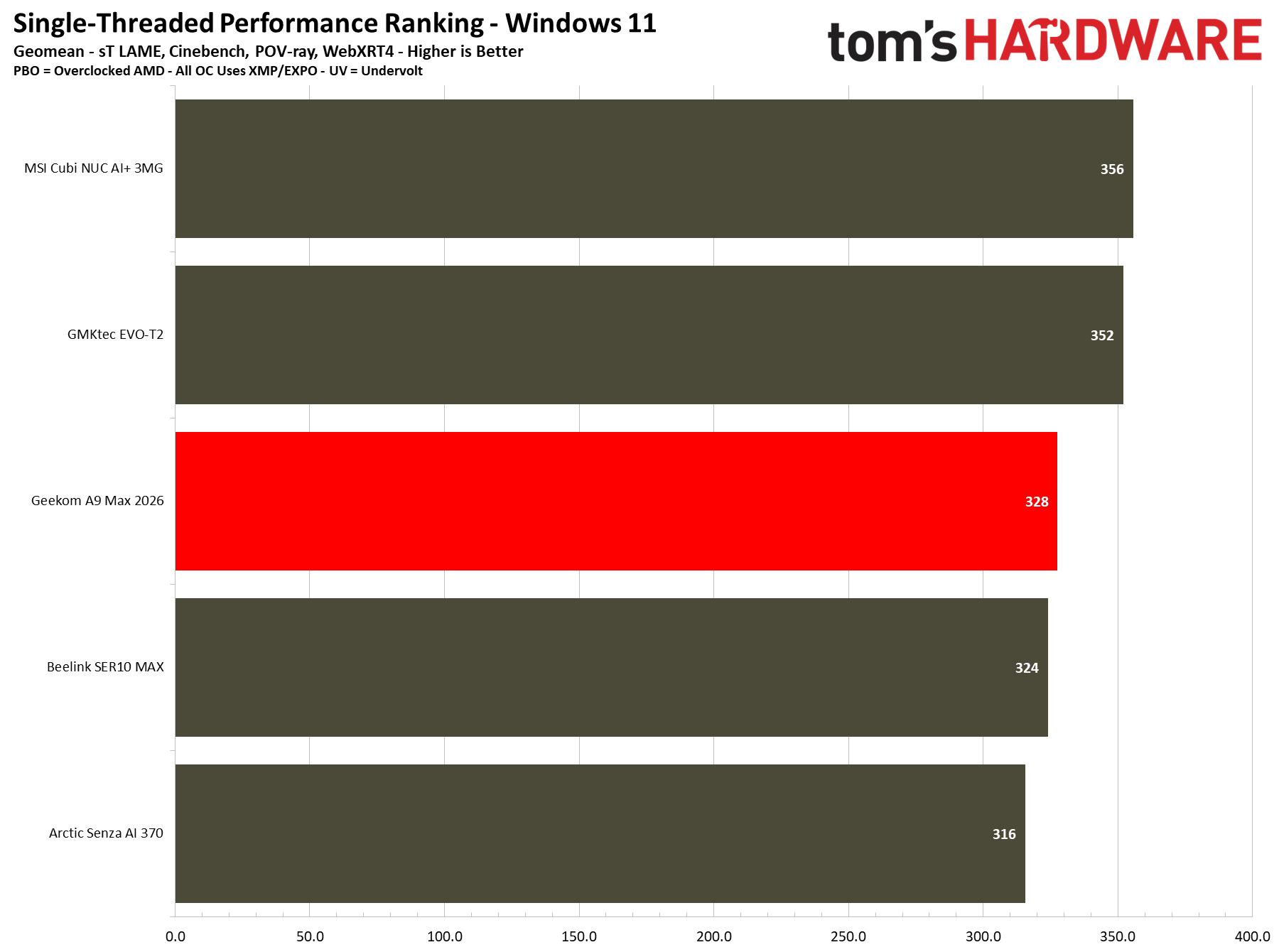
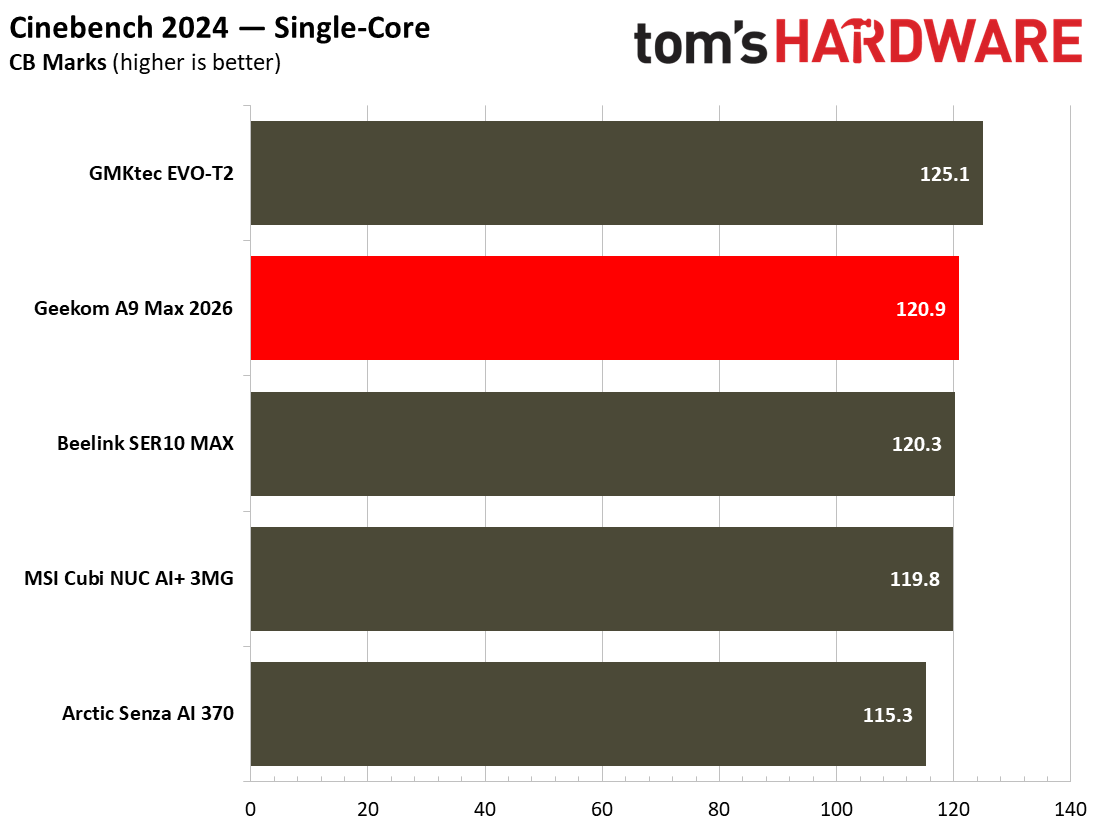
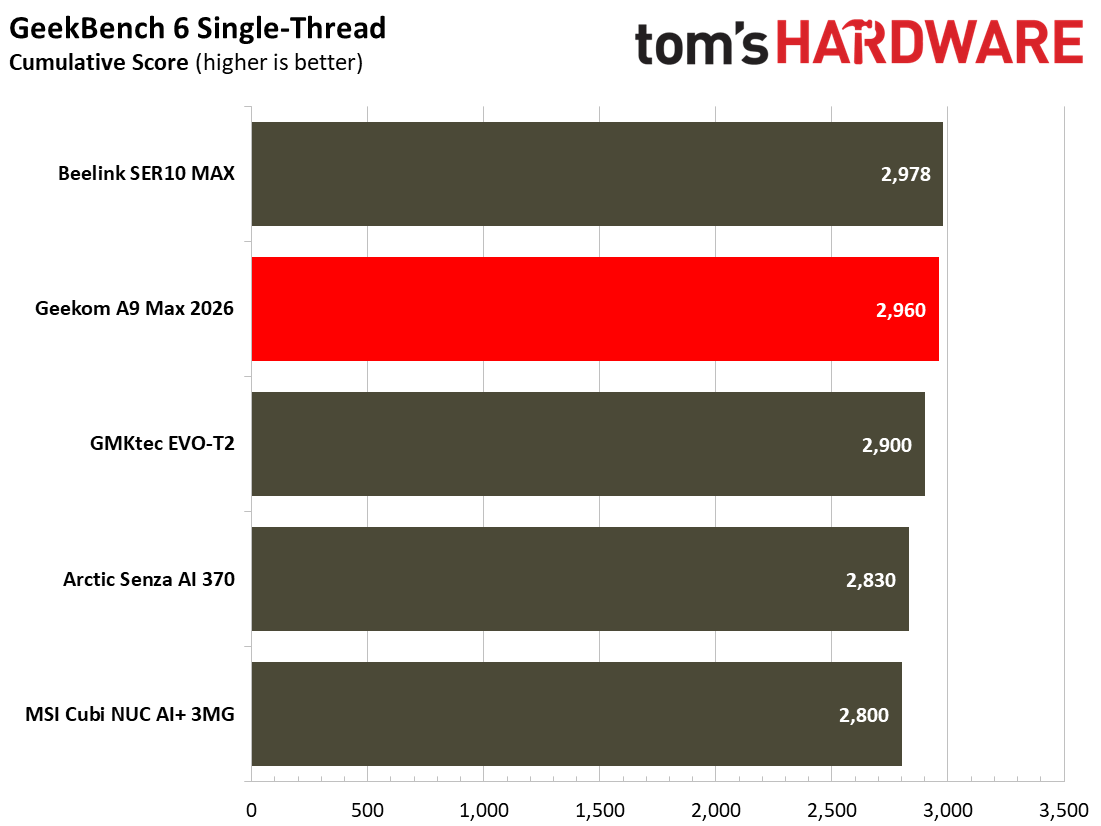
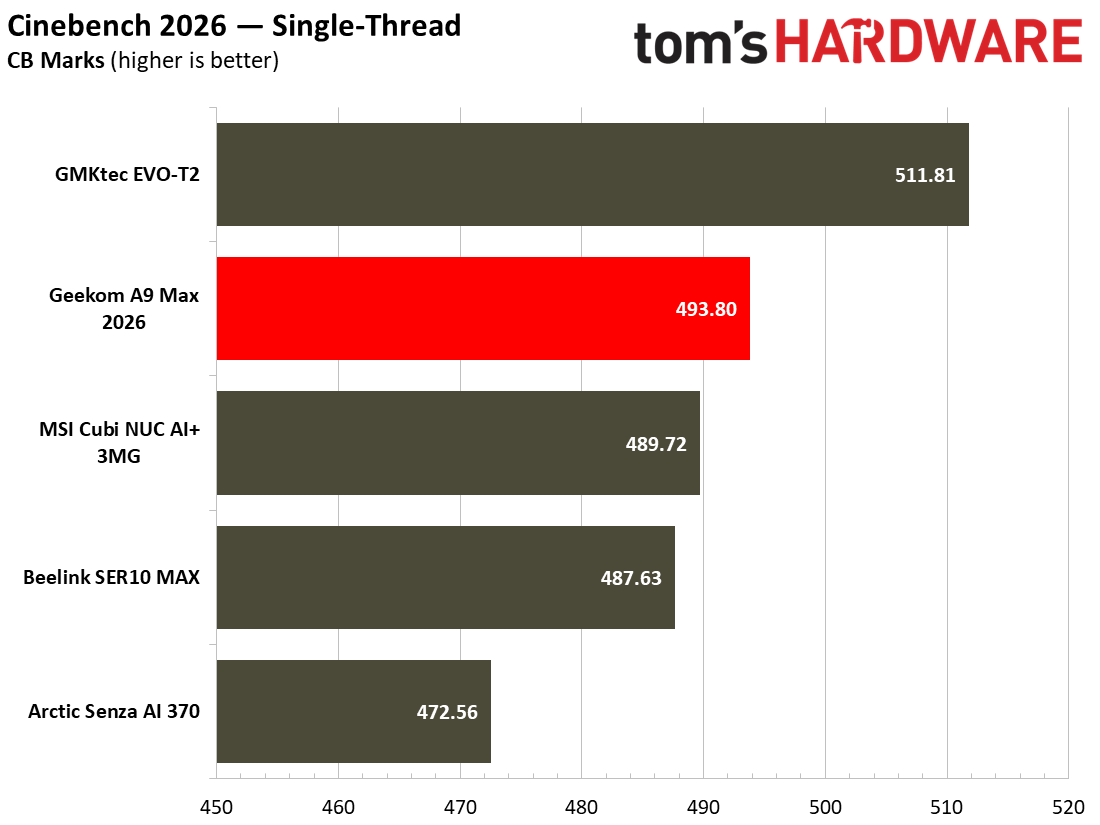
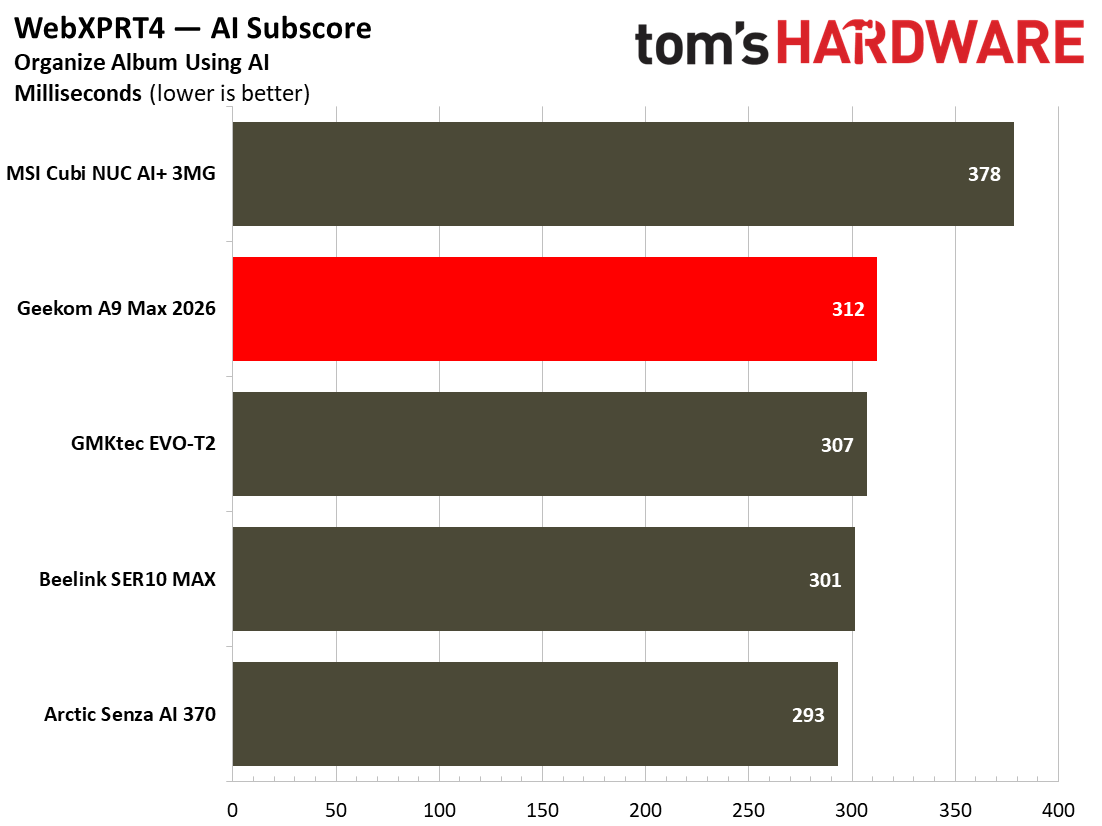
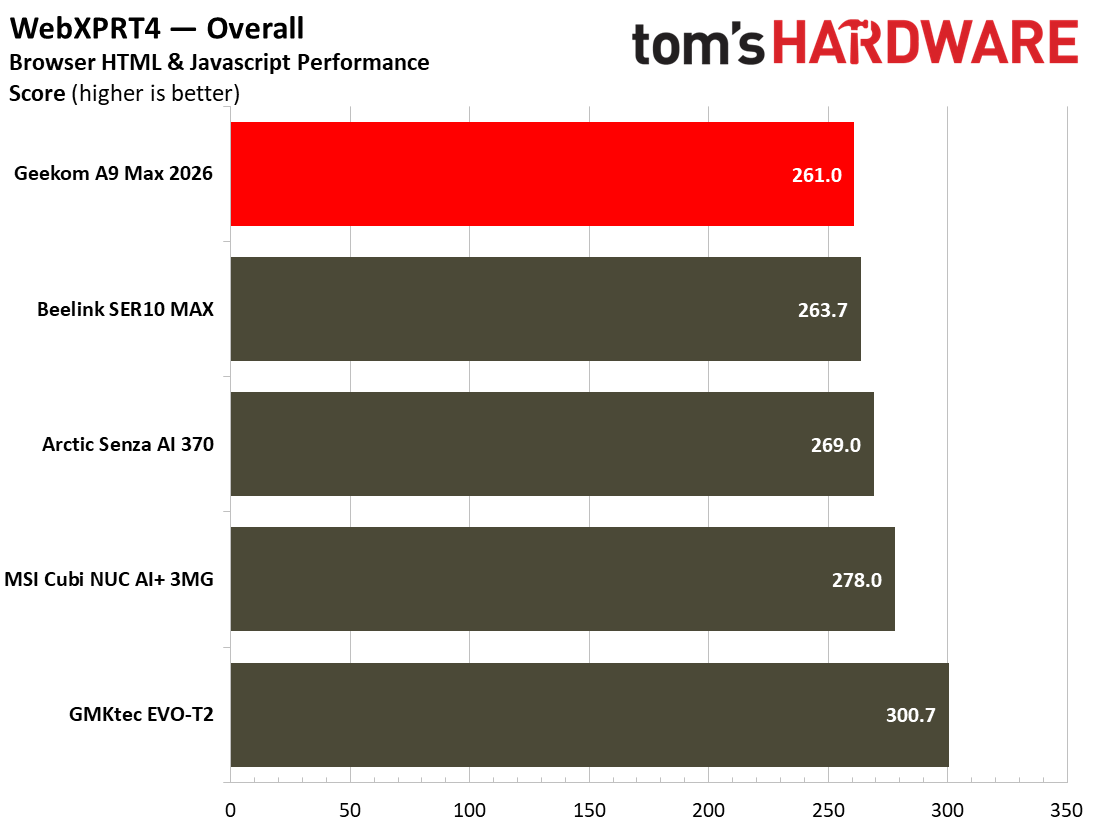
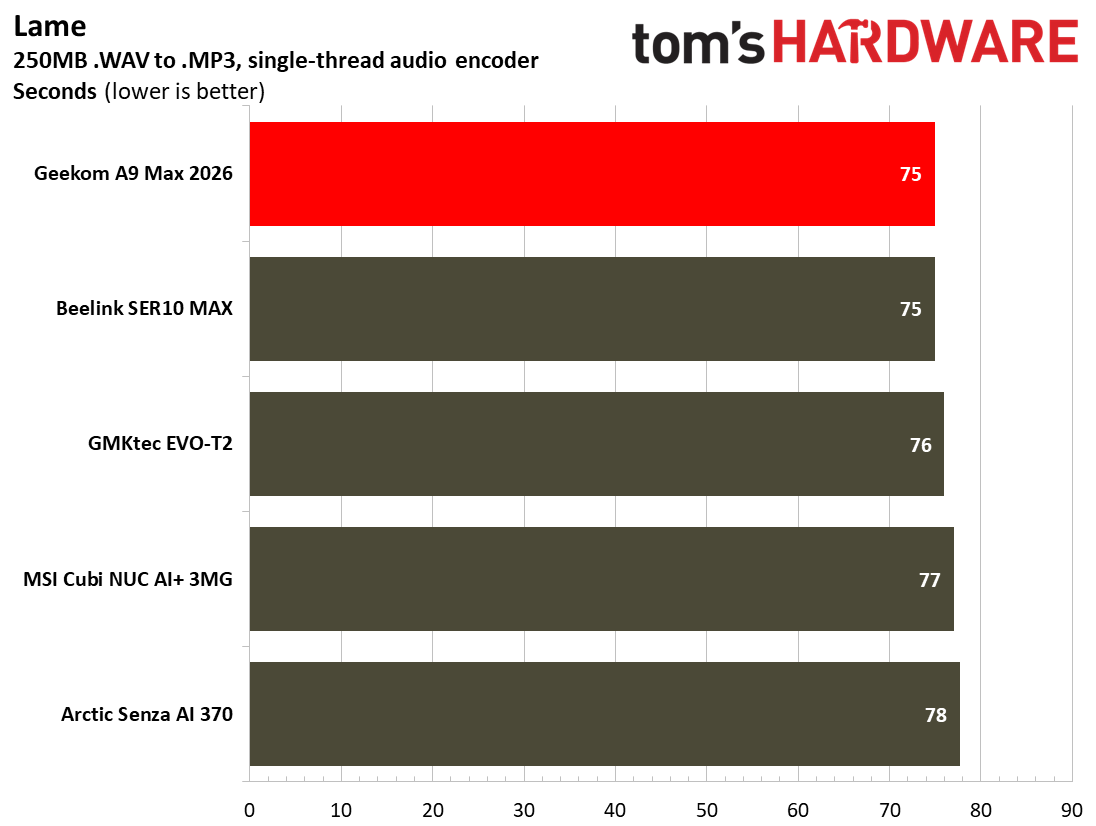
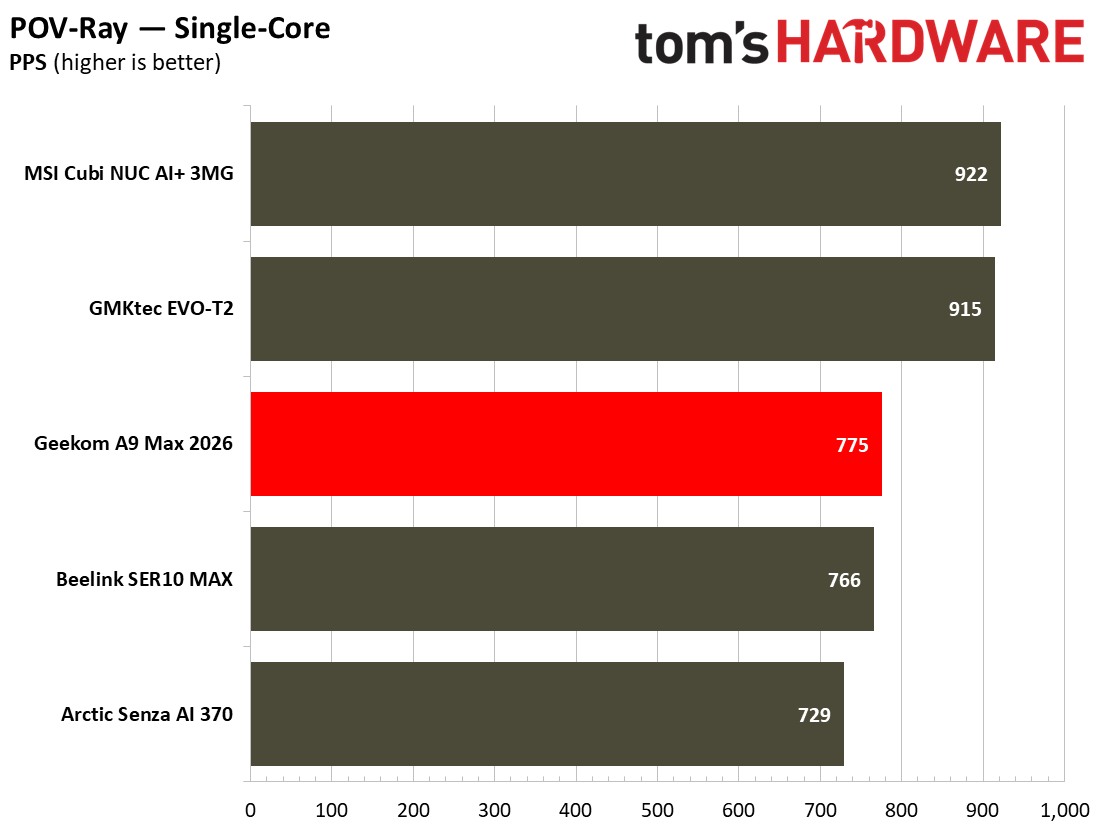
AMD’s Ryzen AI 9 HX 470, with its Zen 5 CPU architecture and 24 threads running at up to 5.2 GHz, won’t be holding anyone back in office productivity, general computing, and similar day-to-day tasks. It also has a great reputation for efficiency, inheriting the mantle of its predecessor, the Ryzen AI 9 HX 370, which gathered many design wins for AMD. Here, the CPU is fed by an ample 32GB of system RAM, and the 2TB PCIe Gen4 x4 SSD storage equipped is pretty fast too, with read/write transfer speeds of up to 6,139 MB/s and 5,499 MB/s, respectively, according to CrystalDiskMark.
Single-Threaded
Multi-Threaded
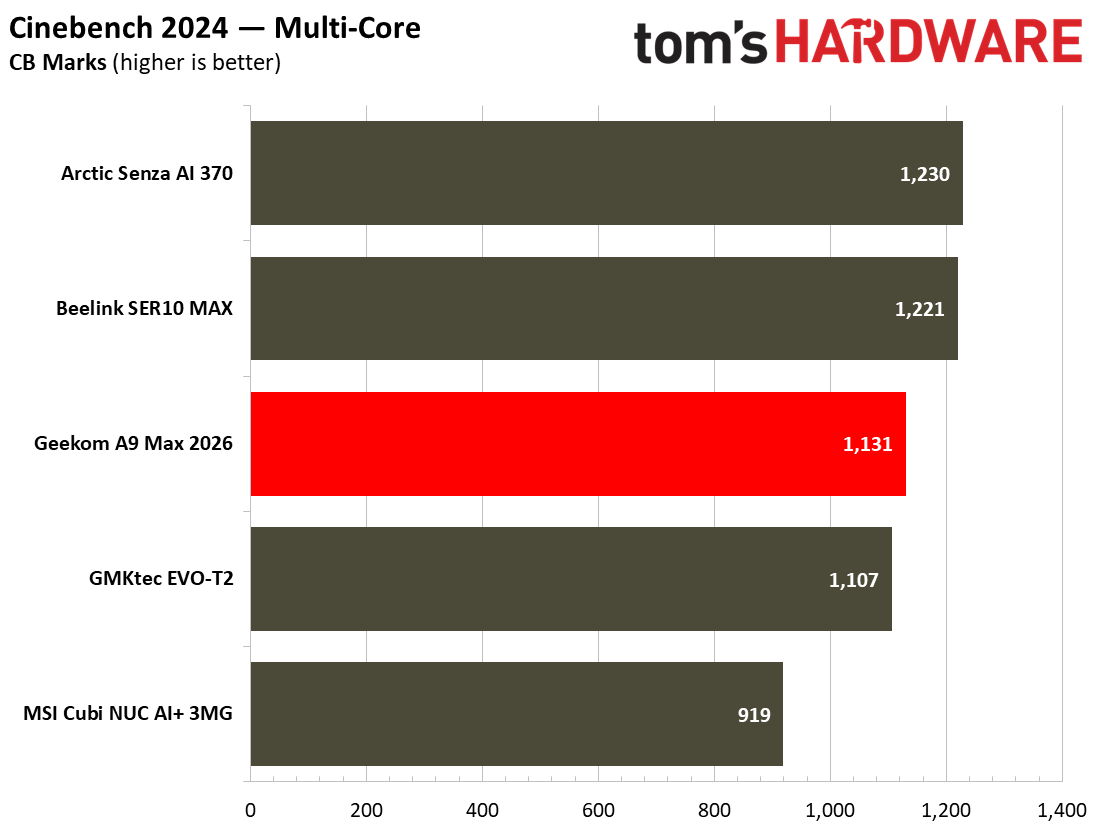
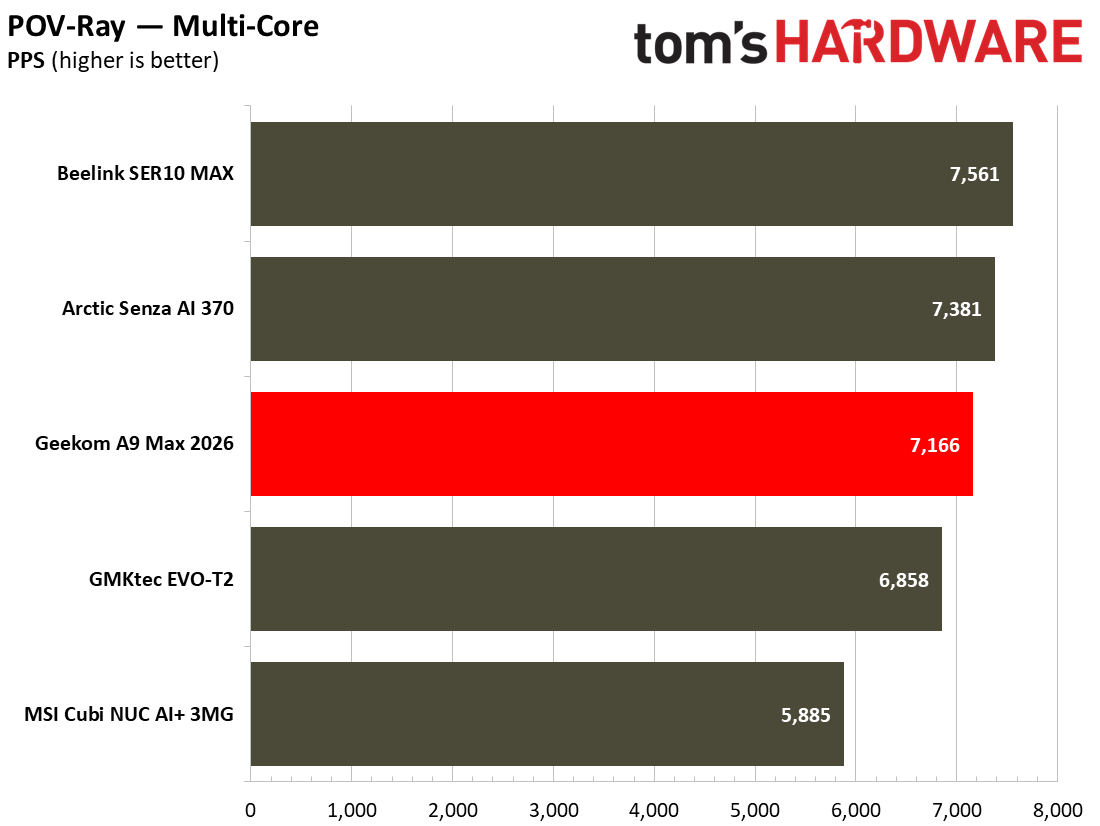
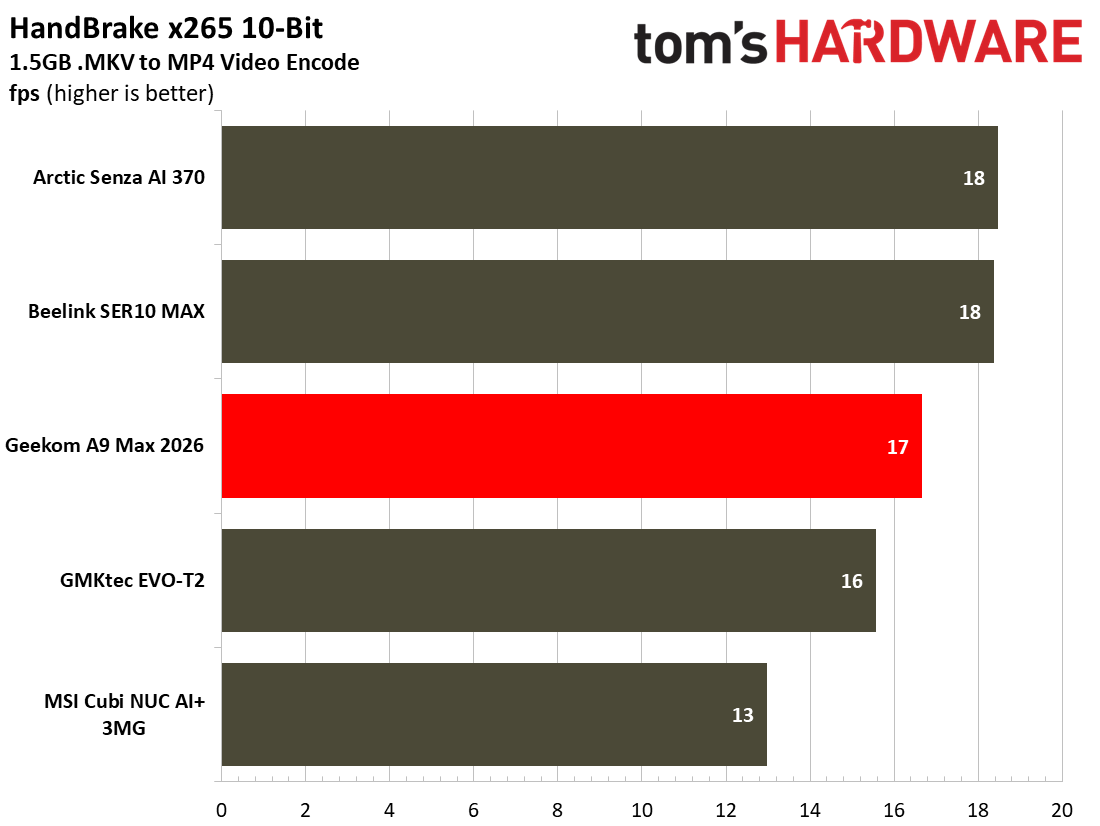
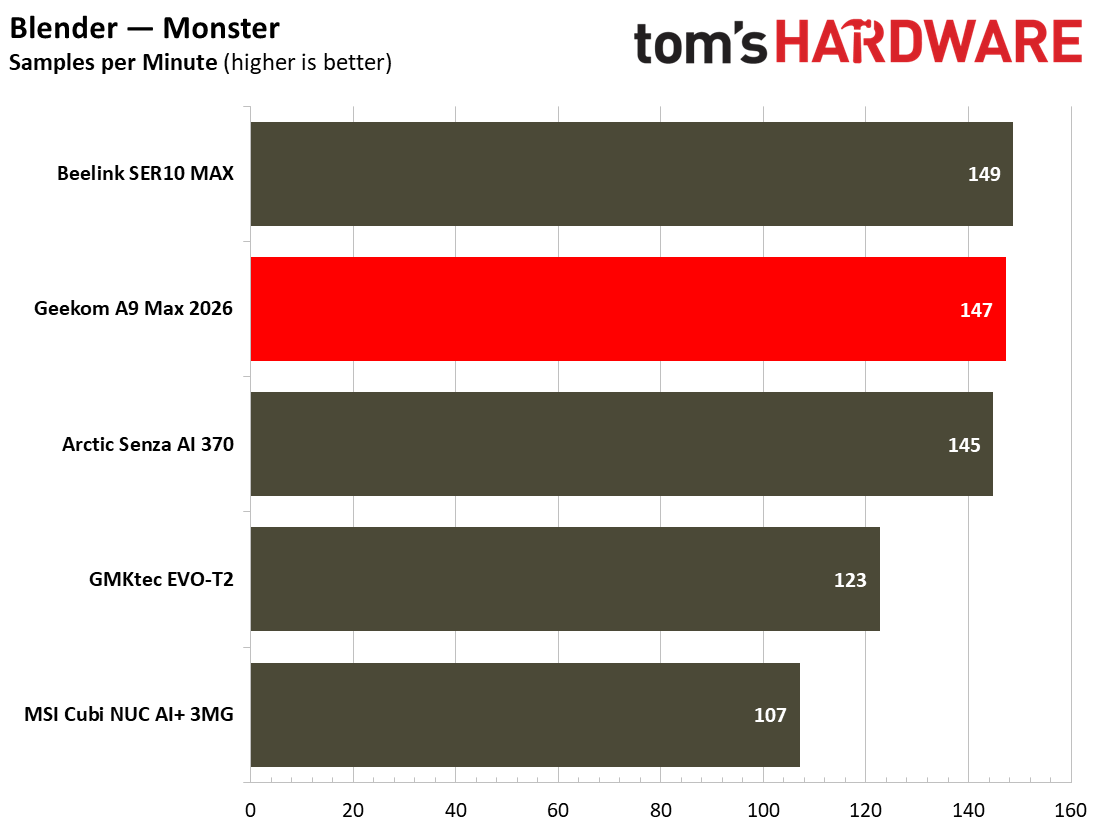
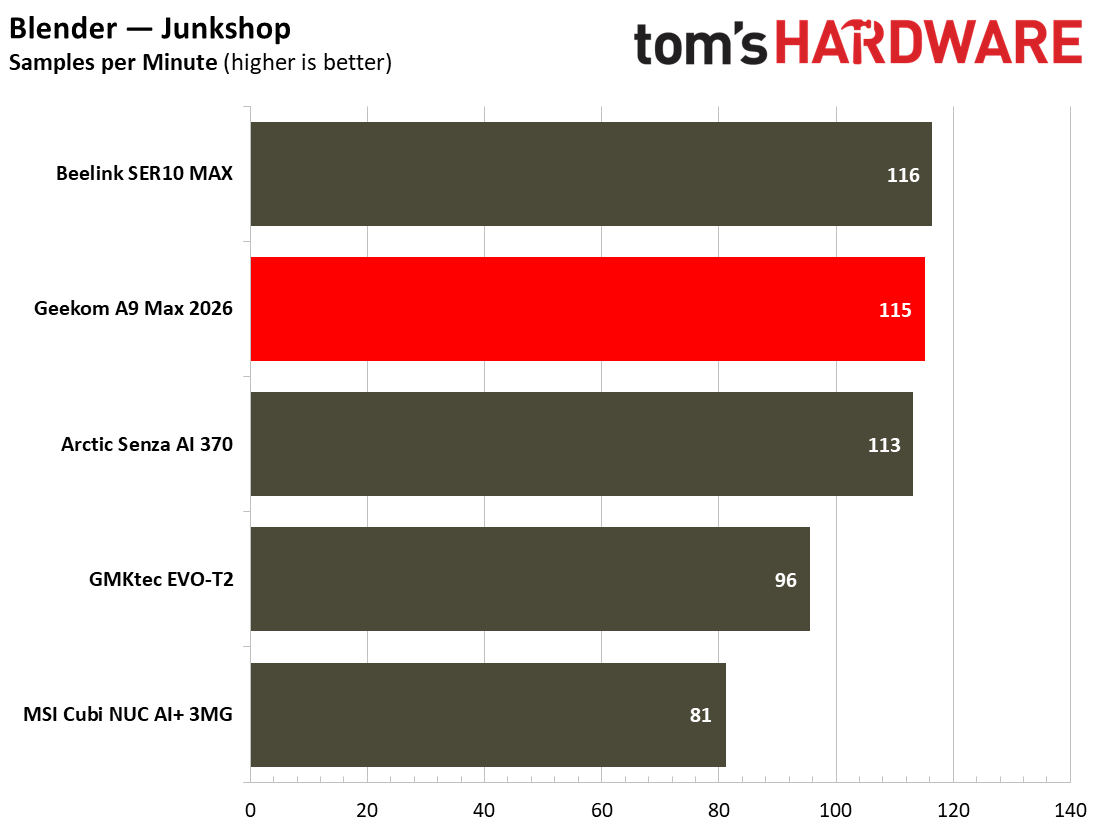
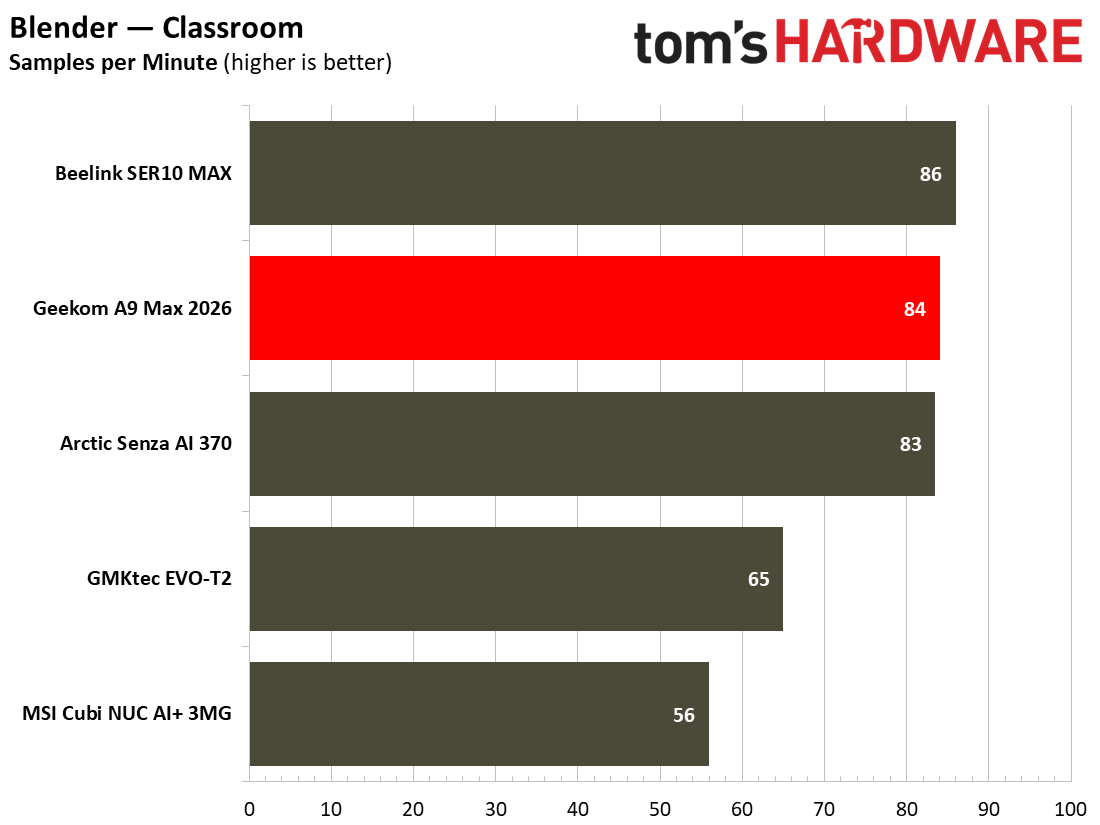
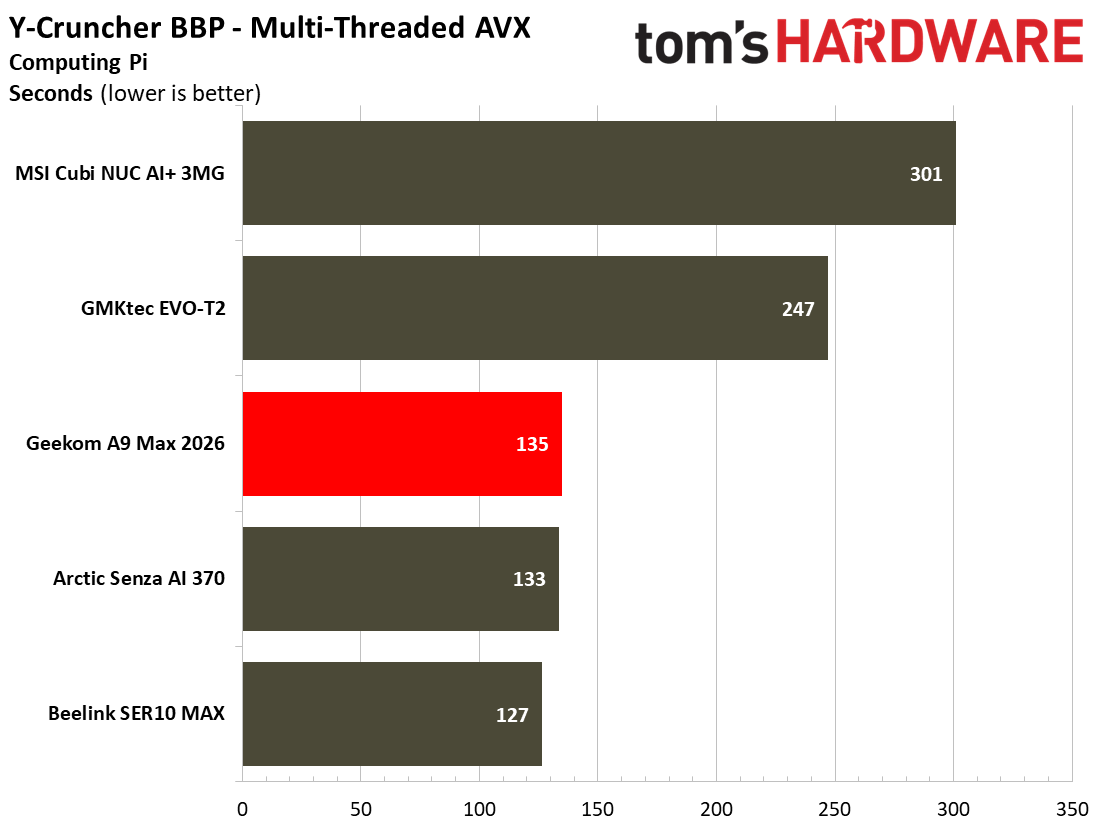
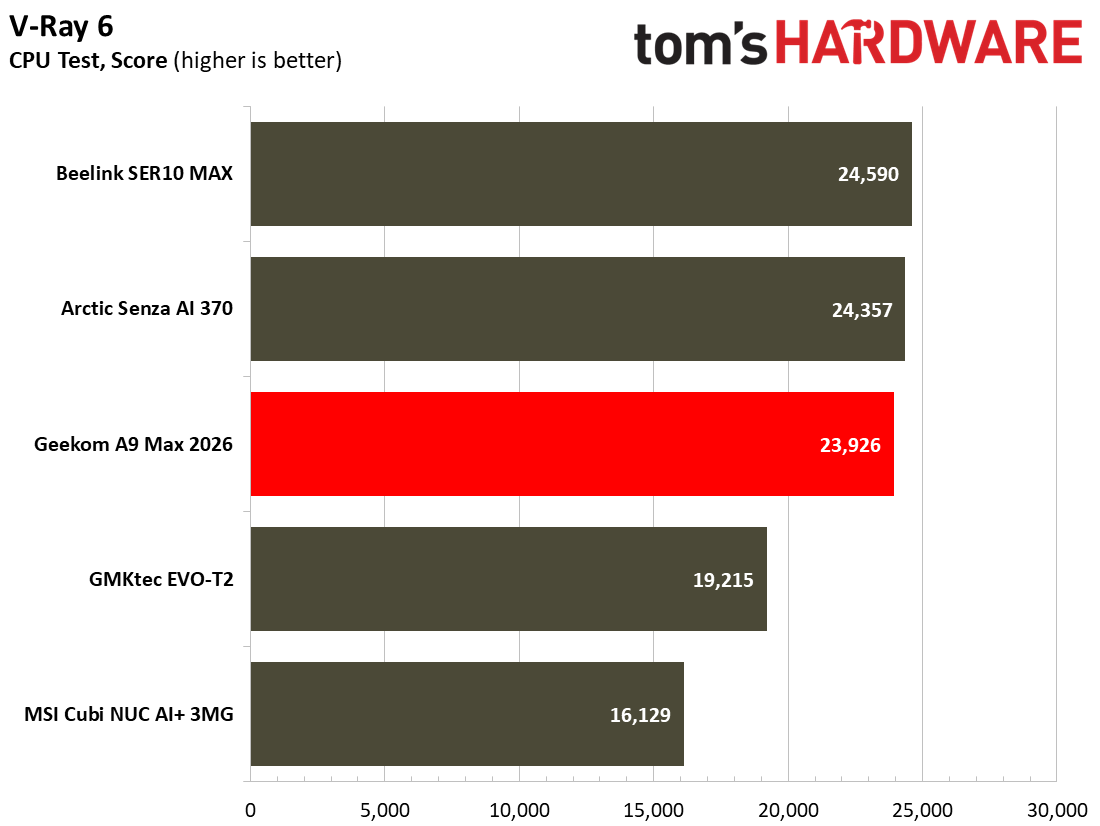
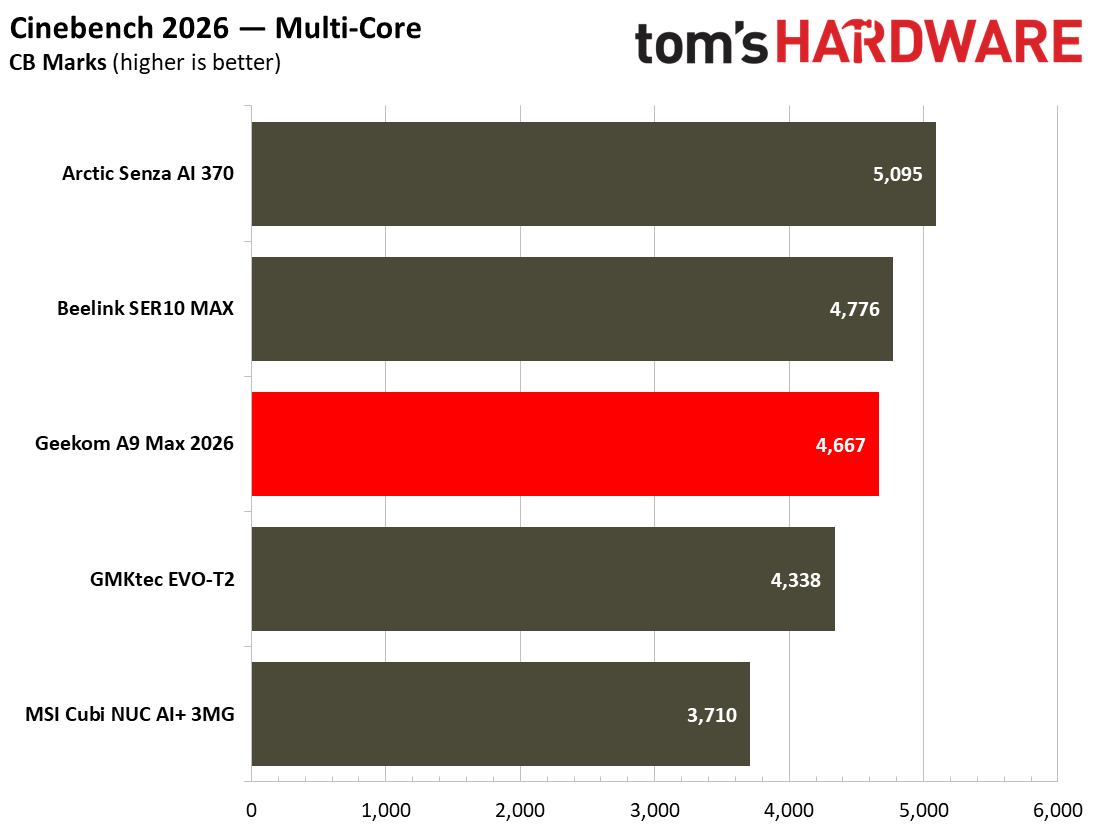
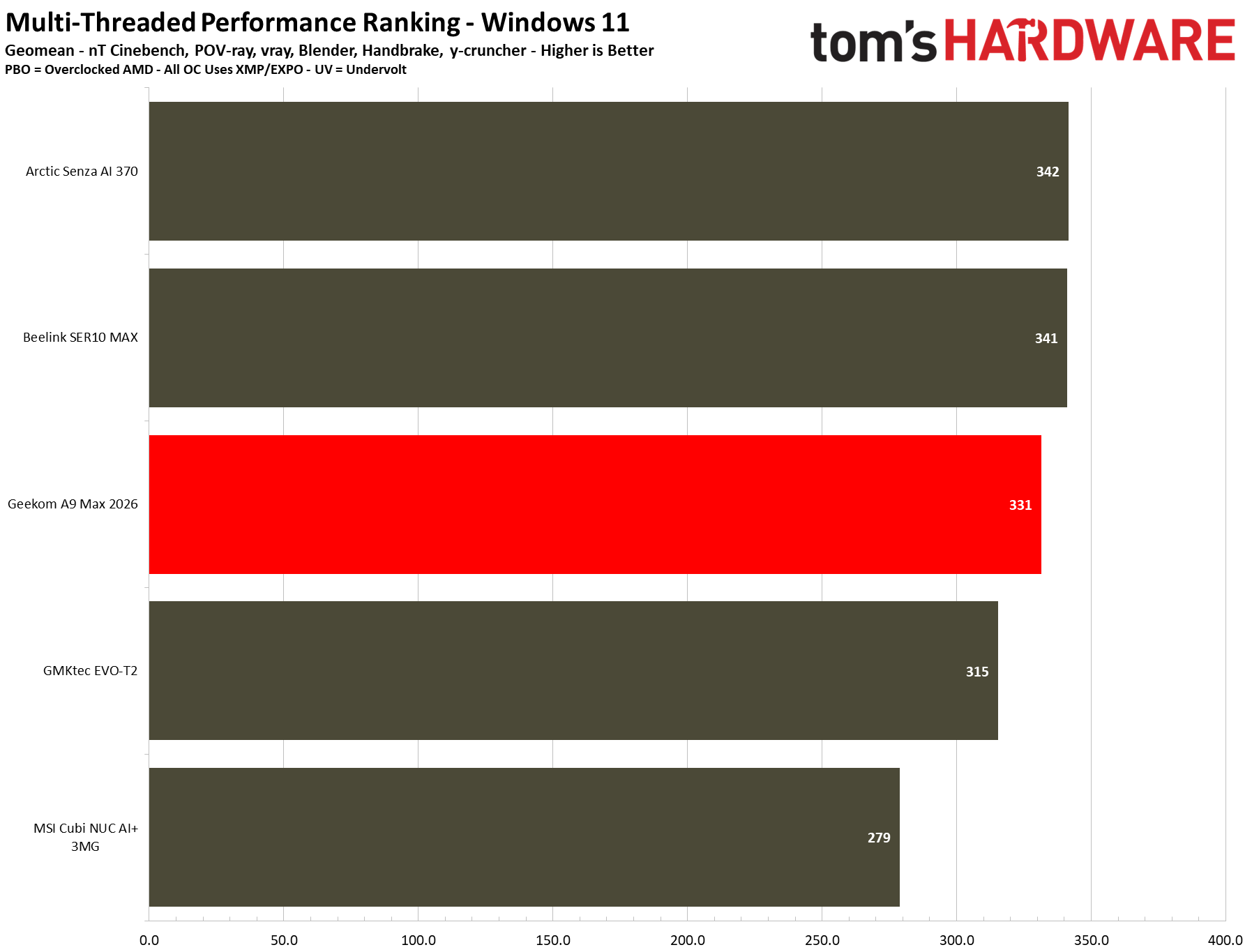
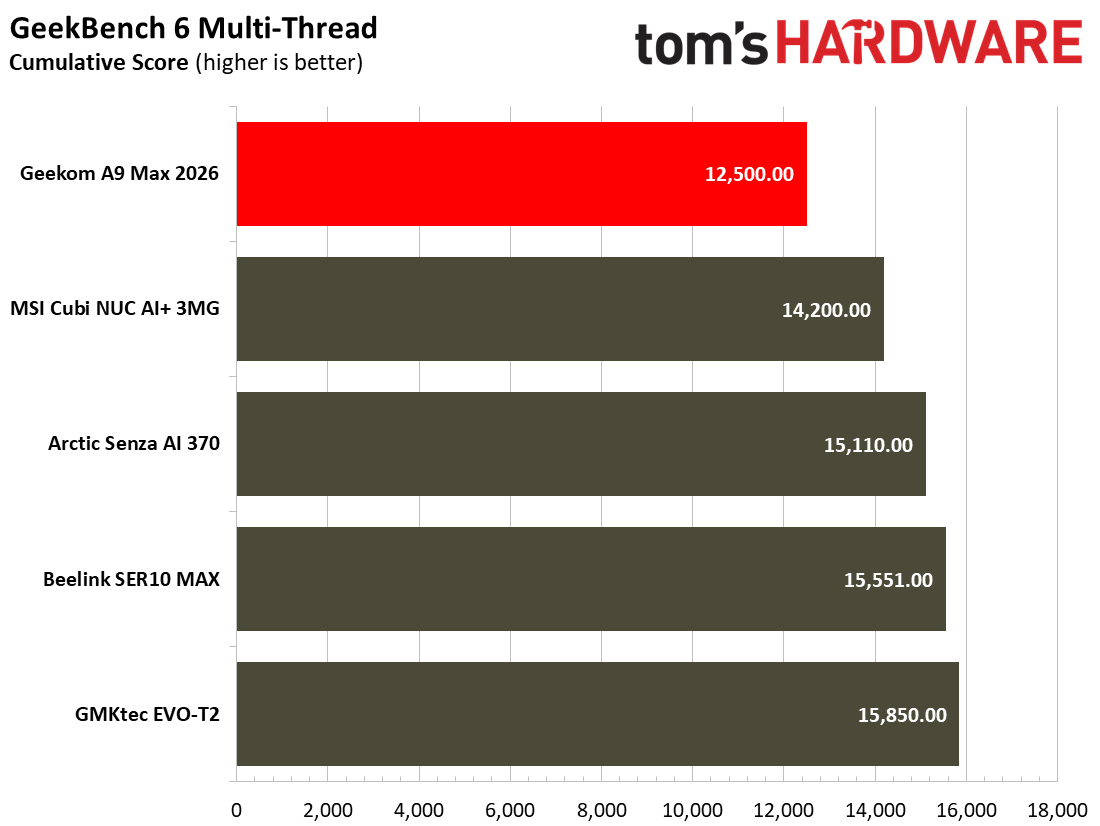
In Cinebench 2026, the A9 Max 2026 scored 4,667 points in the multi-core test. That’s very similar to the Beelink SER10 MAX with the exact same processor. No surprise. However, the Beelink has dual-channel RAM, which doesn’t make a lot of difference in this kind of CPU-heavy rendering workload, as you can see. In the HandBrake video encoding test we see a similar story, with the Geekom middle of the pack, outpacing the Intel competition, but a smidgen behind its AMD brethren.
During our demanding tests, the Geekom A9 Max 2026 stayed admirably cool, but its peak noise level might make you want to move it to a less prominent area of the desk, or use the VESA mounting option to hide it behind your monitor.
Gaming and Graphics on the Geekom A9 Max 2026
In its marketing materials, Geekom pitches the new A9 Max as a computer for all niches, mentioning its CPU and AI compute power, as well as indeed gaming and being able to “conquer AAA titles with ease” thanks to the “Radeon 890M integrated graphics, clocked at a high frequency of 3.1GHz.” So, without further ado, let’s run through our standard set of synthetic 3D engine and gaming tests.
Before beginning the games benchmarking proper, I felt like firing up the old-but-gold Far Cry 5 for a bit of mayhem in Montana. After trying a few preset settings, I settled on 1080p Medium. The High preset was just a bit too slow, and Low settings seemed barely any faster. With Medium settings chosen as the sweet spot for this configuration, I adventured through the attractive wilderness and enjoyed eliminating a few crazy cult members. The average FPS of just above 30 FPS, with a minimum of 26 FPS (according to the built-in benchmark) was enough to enjoy the single-player game without being too distracted by performance issues. I am accustomed to 1440p gaming in this title with a higher quality level and a better frame rate. But it wasn’t insufferable on the A9 Max configuration we tested.
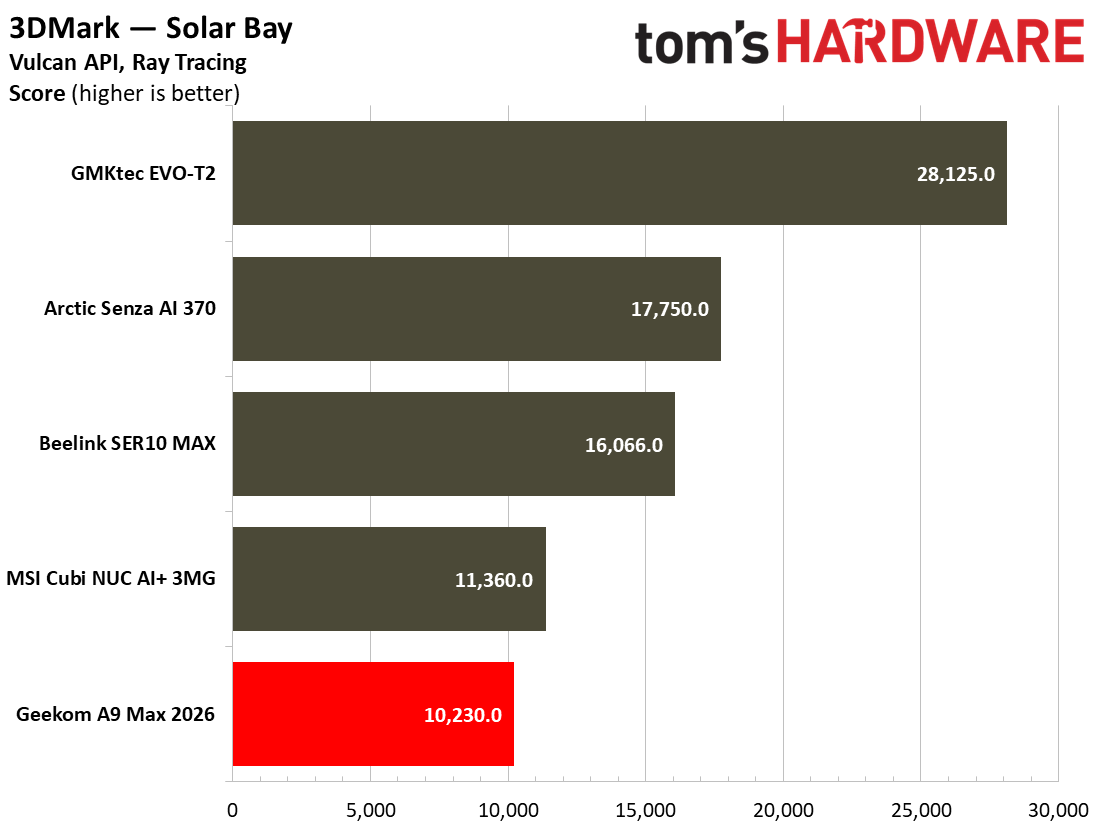
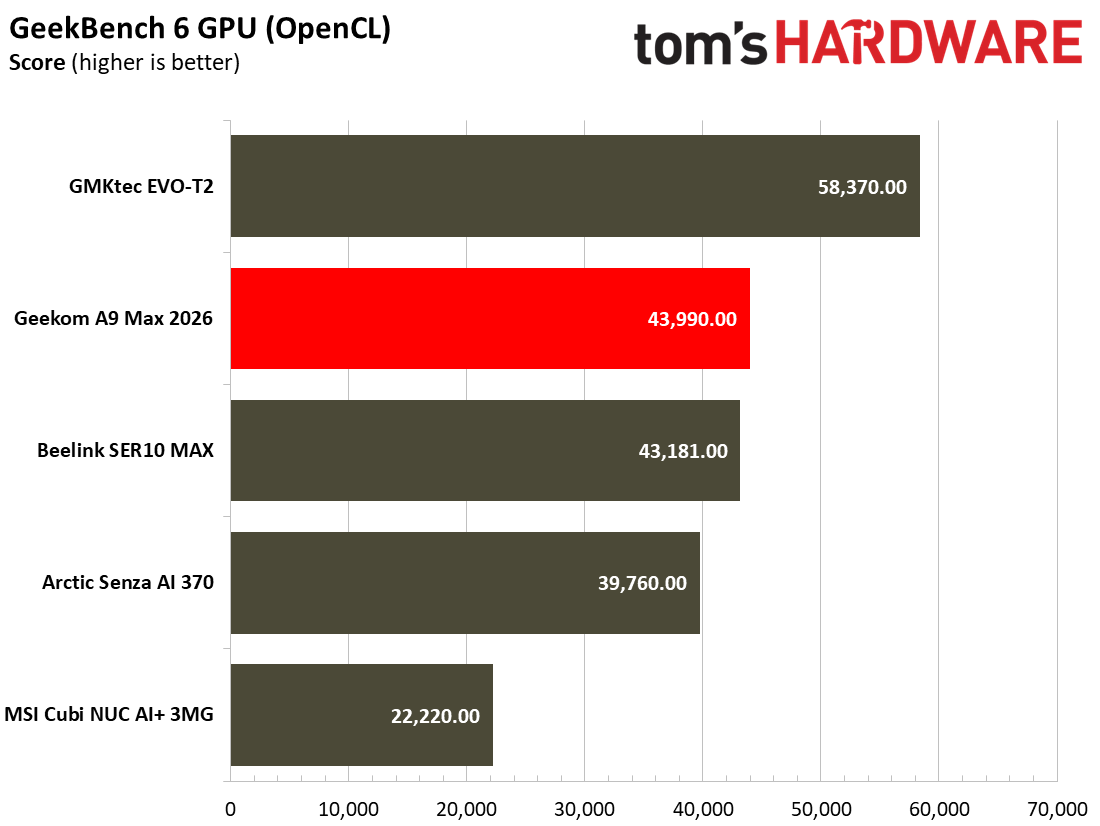
Our benchmarks included a trio of 3DMark synthetics and two PC gaming standards. 3DMark Solar Bay is a great way to frame and compare cross-platform iGPU performance. Meanwhile, Steel Nomad turns to screws on raw graphics performance with its heavy modern GPU load, and will be better for comparisons when we start testing the higher-end mini PCs. Last and definitely not least, Speed Way is a 2025 benchmark from UL that uses DirectX Raytracing tier 1.1 for real-time global illumination and real-time ray-traced reflections.
3DMark Solar Bay tests seem like the best fit for this iGPU, with frame rates smooth enough that it doesn’t hurt your eyes to watch. Sadly for the Geekom, it placed last in the pack in this test, even behind the office productivity targeted MSI Cubi NUC AI+ 3MG.
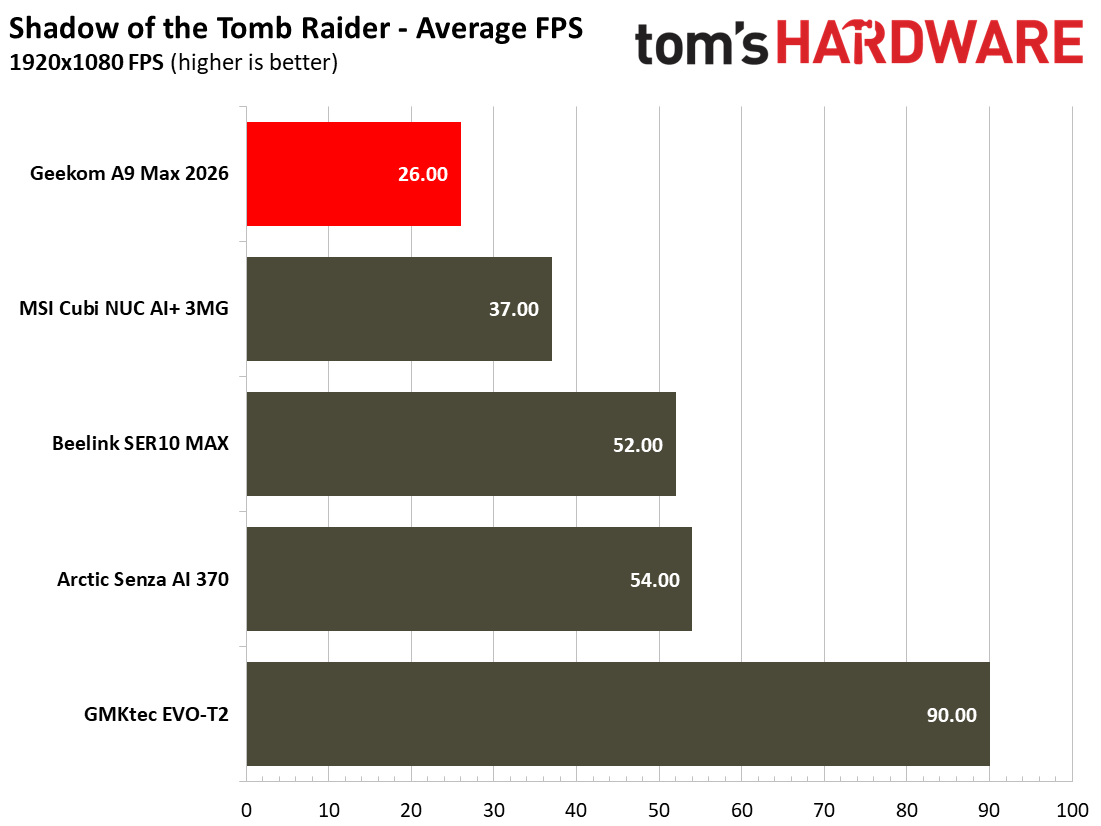
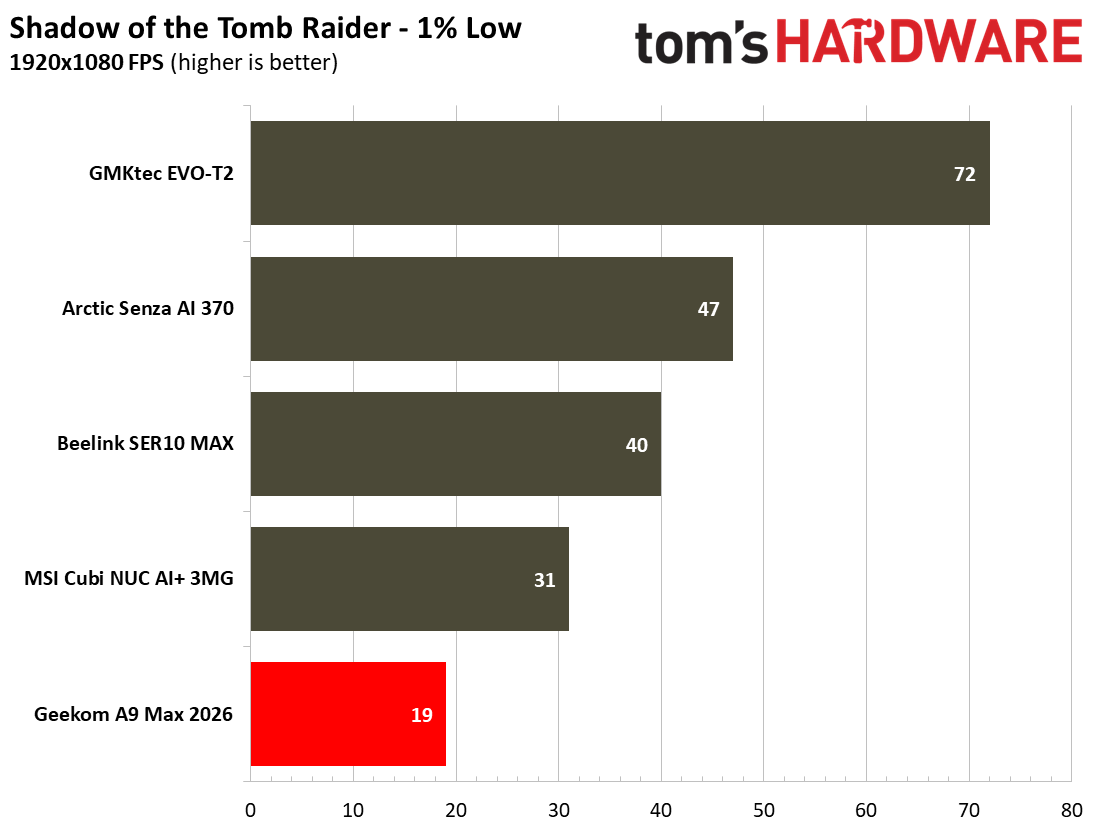
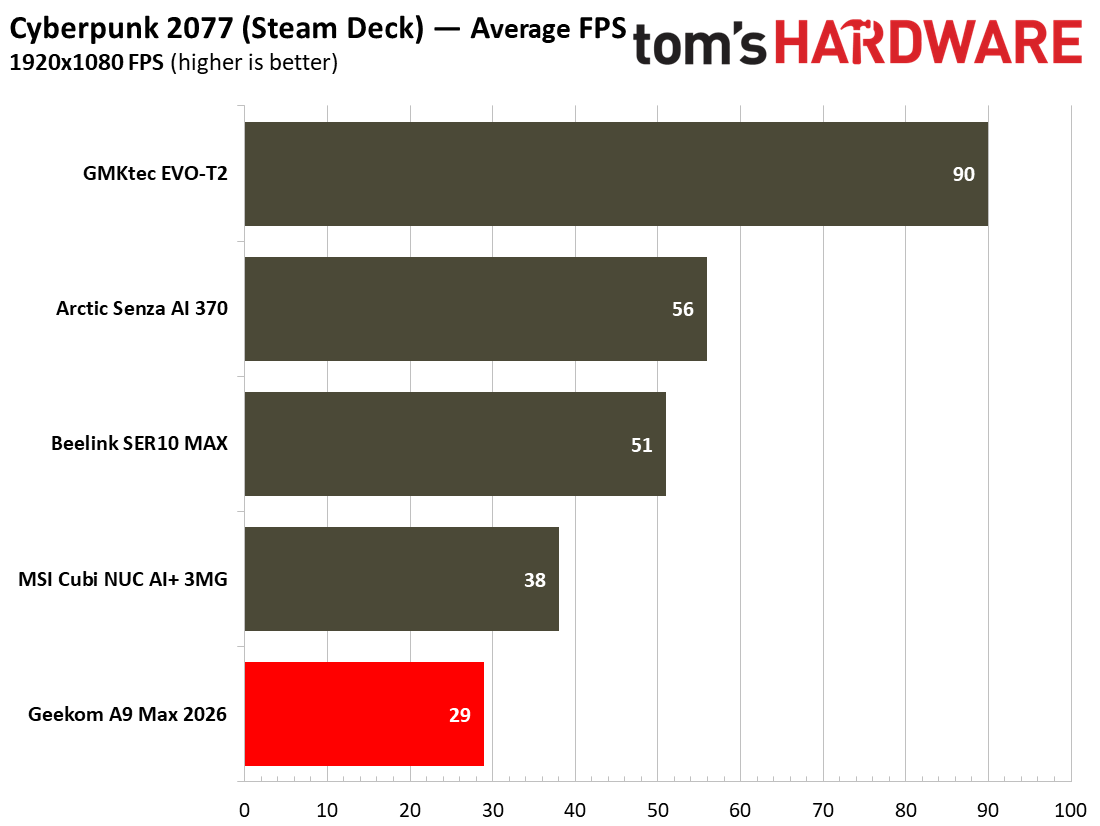
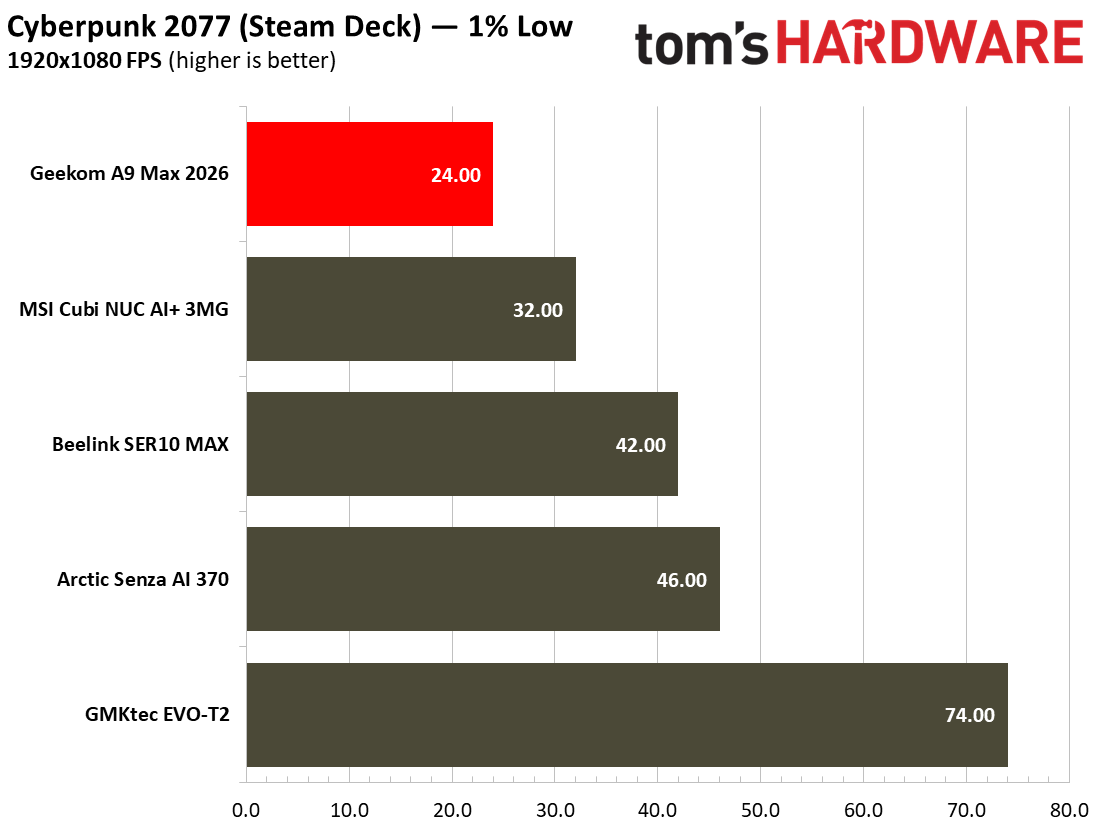
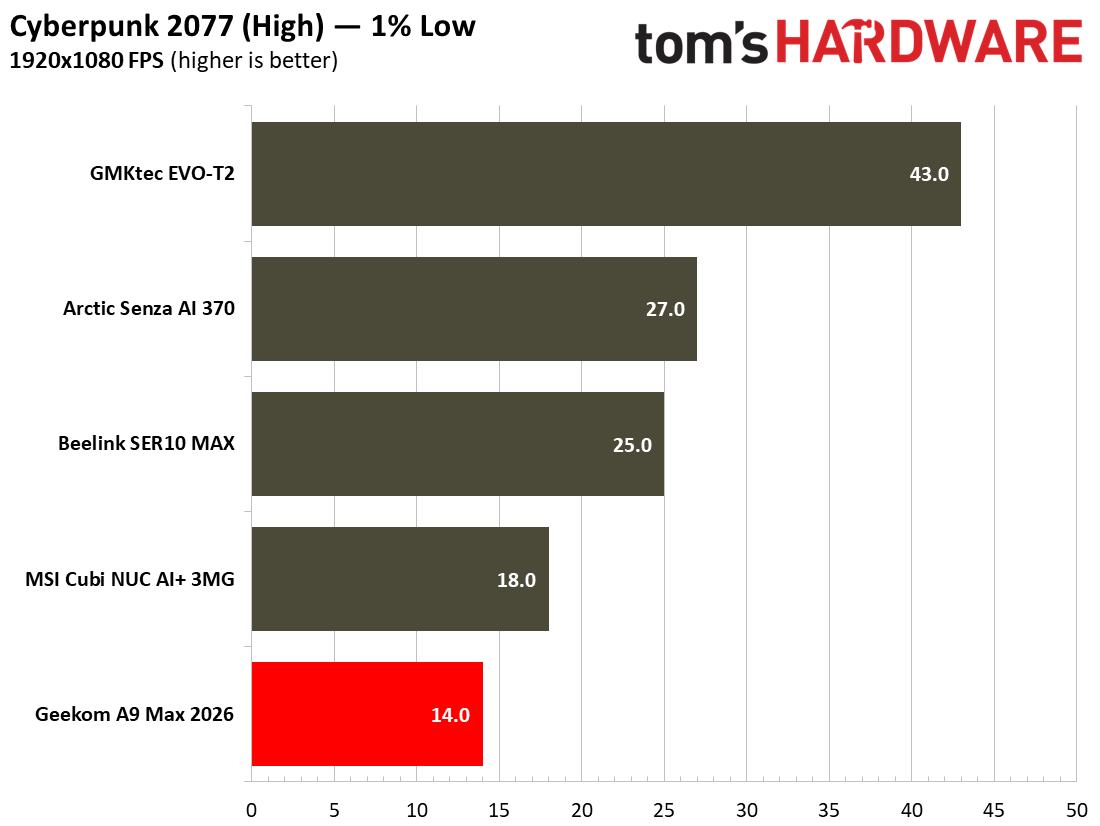
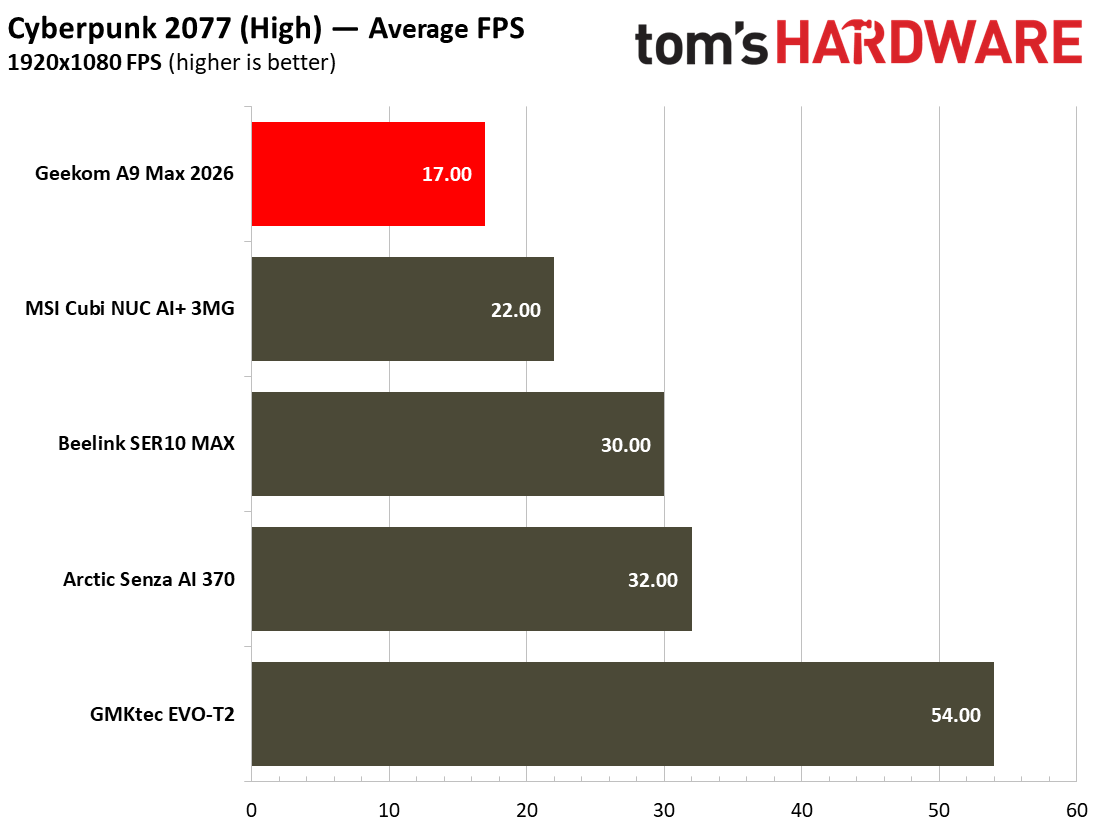
Next up, built-in real game benchmarks courtesy of Shadow of the Tomb Raider and Cyberpunk 2077. The former scales well with processor resources and can still often look and run great on humble iGPUs. As for Cyberpunk 2077, it can really push and tax even the strongest modern GPUs, so here we’ve used two settings to show how the little A9 Max 2026 can – and can’t – play this game. High settings in this game resulted in a grating 17 FPS. Using the Steam Deck preset resulted in a far more playable 29 FPS.
Moving over to Shadow of the Tomb Raider (SOTTR), and the A9 Max 2026 as configured managed just a 26 FPS average. If you have no other avenues to enjoy this game, you’ll have to nudge settings lower to get above a consistent 30 FPS. Opting for 720p visuals could also help, if you were willing to do so.
We had a similarly disappointing gaming experience during the Minisforum X1 AI Pro 470 review, which also combined this exact AMD Zen 5 mobile processor with a single 32GB stick of DDR5-5600. Check the details of that article to learn exactly the difference reconfiguring the DDR5 to dual-channel can make (spoiler: equipping dual-channel memory made a very big difference in our 3D gaming performance tests). In our newest mini PC tests, the Beelink SER10 MAX comes with the same AMD Ryzen AI 9 HX 470 processor but is kitted out with dual-channel RAM and can hit a far smoother 54 FPS in the SOTTR High preset.
Power, Heat, and Noise when using the Geekom A9 Max 2026
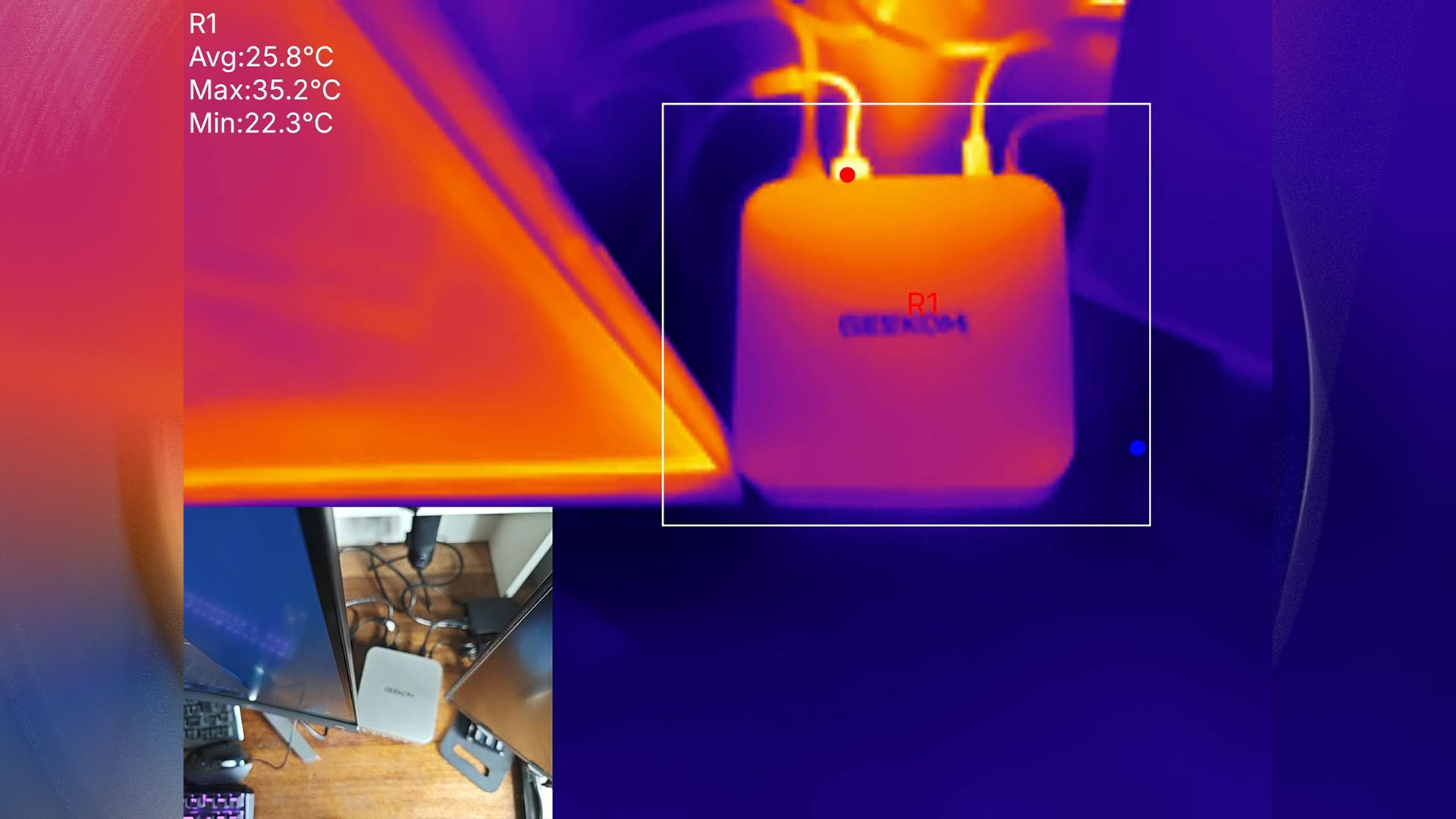
This little computer was pleasingly thrifty when it came to power use. Measured at the wall, I observed a mere 7W of power was being pulled by the system when idling in Windows 11. Under the heaviest loads I could muster, the system power consumption rose to about 79W. System tools showed that the idle / stress CPU temperatures were around 34C and 79C, respectively. Perhaps Geekom could quiet the IceBlast 3.0 fans, then? Or, if you buy this, you’d have latitude to slow the fan profiles in the BIOS.
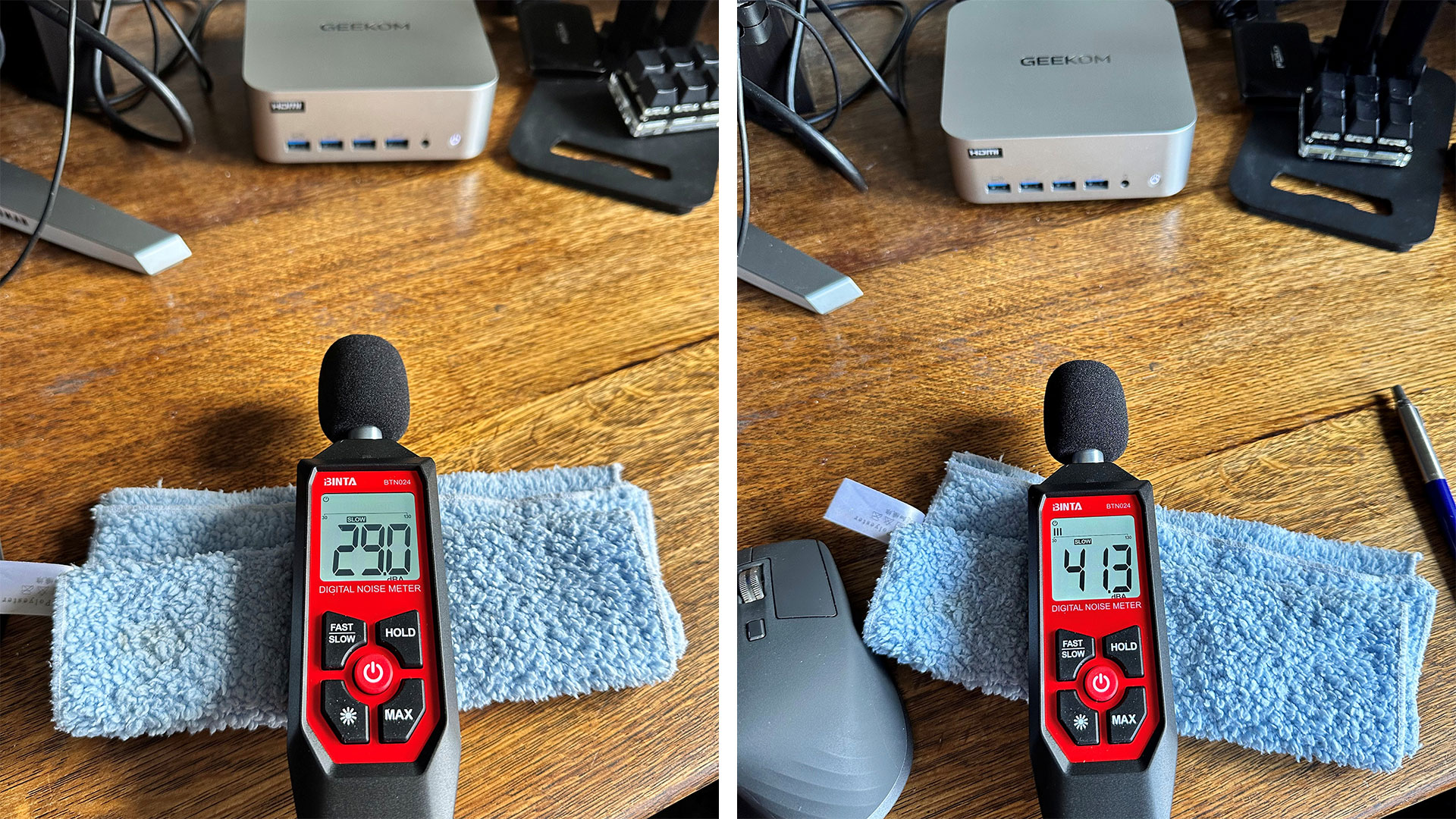
Geekom’s A9 Max 2026 was quiet at idle, with my readings showing it made about 29 to 30dB noise. The loudest it got was around 41dB, when I was trying to stress the system by running CPU and GPU benchmark tests simultaneously.
Geekom boasts about its new IceBlast 3.0 system here. I found that it works well enough as shipped, but it isn’t the quietest under load and may benefit from user tweaks. There’s no software for these kinds of adjustments, though, so it is a BIOS tweak / reboot process you’ll have to work through.
Software and Warranty on the Geekom A9 Max 2026
Geekom ships the A9 Max 2026 with no custom software at all. It’s just clean Windows 11 Pro, as supplied. Also, we note that the marketing material boasts the system fully supports both Windows 11 and Linux. At the time of writing, there is only one fully populated option for would-be buyers of the A9 Max 2026 – identical to our test unit – so you can’t potentially save money by going barebone / Linux.
A 3-year warranty is provided with the A9 Max 2026.
Configurations of the Geekom A9 Max 2026
At the time of writing, there is only one configuration of the Geekom A9 Max 2026 is available, and that is precisely the one tested with a Ryzen AI 9 HX 470, 32GB / 2TB, and Windows 11 Pro pre-installed. Amazon currently has this machine on a ‘limited time deal’ with 10% off reducing the price from $1,599 to a more reasonable $1,439.
On some stores, you may still be able to find last year’s model, with an HX 370.
Bottom Line
Geekom’s A9 Max 2026 is a handsome, durable, and performant all-arounder. However, we will say again that its Radeon 890M iGPU is seriously hamstrung by the single-channel RAM configuration it is sold with. This lack of bandwidth becomes painfully obvious when 3D gaming.
Pondering the A9 Max 2026’s pricing more carefully suggests that mini PC desktops like this are no longer the bargains they used to be. The very modest uplift provided by AMD’s AI 400 Gorgon Point chips doesn’t really make a strong case for the 2026 refresh models.
This updated 2026 release competes with Geekom’s own older editions, as mentioned in the above Configurations section. However, the Minisforum AI X1 Pro 470 which we reviewed in March seems to offer more expandability (3x M.2 SSD slots, OCuLink), a fingerprint reader, Copilot button, and is a little quieter under load. You can still grab that Minisforum Mini PC with a similar build but slightly larger footprint for $759 barebones, or 32GB/2TB + Windows 11 Pro for $1,399.
If you want to dabble in games like Shadow of the Tomb Raider with pleasing graphic details and reasonably smooth 30FPS+ frame rates, please budget to add a matching 32GB DDR5-5600 SODIMM to the retail configuration, or wait and see if there’s a barebones model arriving. A cheaper barebones model would allow buyers to source their own dual-channel memory kit (we’d go for at least a pair of DDR6-5600 16GB modules), and M.2 SSD – and don’t forget an OS.

