

Google Earth’s flight simulator now works right in your browser
Google sometimes releases fun bonus features for its products and services. Recently, Google Earth gained a kind of flight simulator.
Google has long been working with maps, satellite and aerial images, and street views—these are packaged in various ways. Google Maps is the most widely used service, but there’s also another popular option in Google Earth. With it, you can do everything from viewing the Earth from above to zooming all the way down to street level.
But the most recent feature is a simple flight simulator. You can’t make any advanced technical adjustments to your aircraft in the way that’s possible in something like Microsoft Flight Simulator. Instead, it’s simply a way to fly around and view the Earth from the skies.
While the built-in flight simulator was previously only available in the desktop version of Google Earth, it’s now accessible via web browser. Here’s how to start using it:
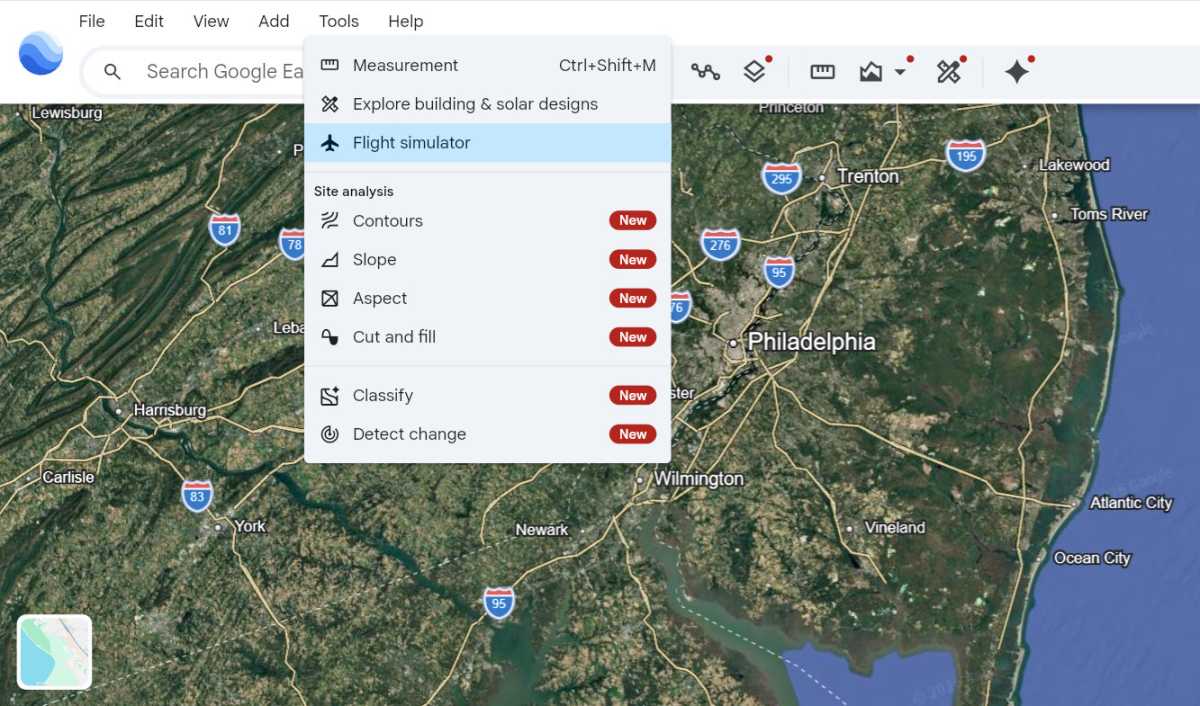
Joel Lee / Foundry
Go to earth.google.com, then click the “Explore Earth” button at the top. You might be prompted to pay for a premium subscription, but you can ignore this. There’s no need to log in either.
Go to the location where you want to start your flight. You can do this using the “Search Google Earth” bar at the top left or by manually zooming and panning around the Earth view.
Once you’re ready, click on Tools → Flight simulator in the menu. Your flight will now begin and you can control your airplane using the arrow keys or mouse to turn and the Page Up and Page Down keys to increase or decrease the throttle, respectively.

