

HP OmniBook X Flip 14 review: A luxurious 2-in-1 held back by aging graphics
At a glance
Expert’s Rating
Pros
- Good build quality and attractive “deep espresso” color option
- 360-degree hinge design makes laptop and tablet use convenient
- Attractive OLED touchscreen
- Good mix of USB-A and USB-C connectivity
Cons
- CPU performance doesn’t stand out
- Integrated Radeon GPU is behind Intel Arc
- Moderate battery life
Our Verdict
The HP OmniBook X Flip 14 isn’t the most portable or powerful 14-inch 2-in-1, but it provides a luxurious experience and lots of connectivity.
Price When Reviewed
This value will show the geolocated pricing text for product undefined
Best Pricing Today
Best Prices Today: HP OmniBook X Flip 14

Price comparison from over 24,000 stores worldwide
Price comparison from Backmarket
There was once a time, just after the reveal of the iPad, when every laptop maker seemed a bit ashamed to be selling laptops instead of tablets. That time has long passed, and the OmniBook X Flip 14 is the evidence. Though technically a 2-in-1, it focuses so much on the laptop experience that it’s easy to forget the tablet mode even exists. This decision ultimately works to the Flip’s advantage.
HP OmniBook X Flip 14 2-in-1: Specs and features as-tested
The HP OmniBook X Flip 14 2-in-1 is available in a variety of configurations that stretch from entry-level models with AMD Ryzen AI 5 and 16GB of memory to high-end configurations with AMD Ryzen AI 9 and 32GB of memory. The model I reviewed was a high-end configuration with almost every option, though it did lack an optional upgrade to a 2880×1800 OLED display.
- CPU: AMD Ryzen AI 9 465
- Memory: 32GB LPDDR5x-8533
- Graphics/GPU: AMD Radeon 880M
- NPU: AMD Ryzen AI NPU up to 50 TOPS
- Display: 14-inch 1920×1200 60Hz OLED touchscreen
- Storage: 2TB PCIe Gen 4.0 NVMe M.2 SSD
- Webcam and microphones: 5MP IR webcam with HDR, dual microphone array
- Connectivity: 2x USB-C 40Gbps with Power Delivery and DisplayPort 2.1, 2x USB-A with 10Gbps data, 1x HDMI 2.1, 1x 3.5mm combo audio
- Networking: Wi-Fi 7, Bluetooth 6.0
- Biometrics: Windows Hello facial recognition
- Audio: Downward-firing speakers with HP Audio Boost
- Battery capacity: 59 watt-hours
- Dimensions: 12.25 x 8.6 x 0.57 inches
- Weight: 3.09 pounds
- Operating System: Windows 11 Pro
- Price: $2,529.99 MSRP as configured
While an entry-level model has an MSRP of $1,299.99, the model I reviewed was quite a bit more expensive at $2,529.99. With that said, sale pricing is frequent and can offer significant discounts. The model I reviewed is currently available on sale at $2,279.99 and entry-level configurations can dip below $1,000.
HP OmniBook X Flip 14 2-in-1: Design and build quality
Foundry / Matthew Smith
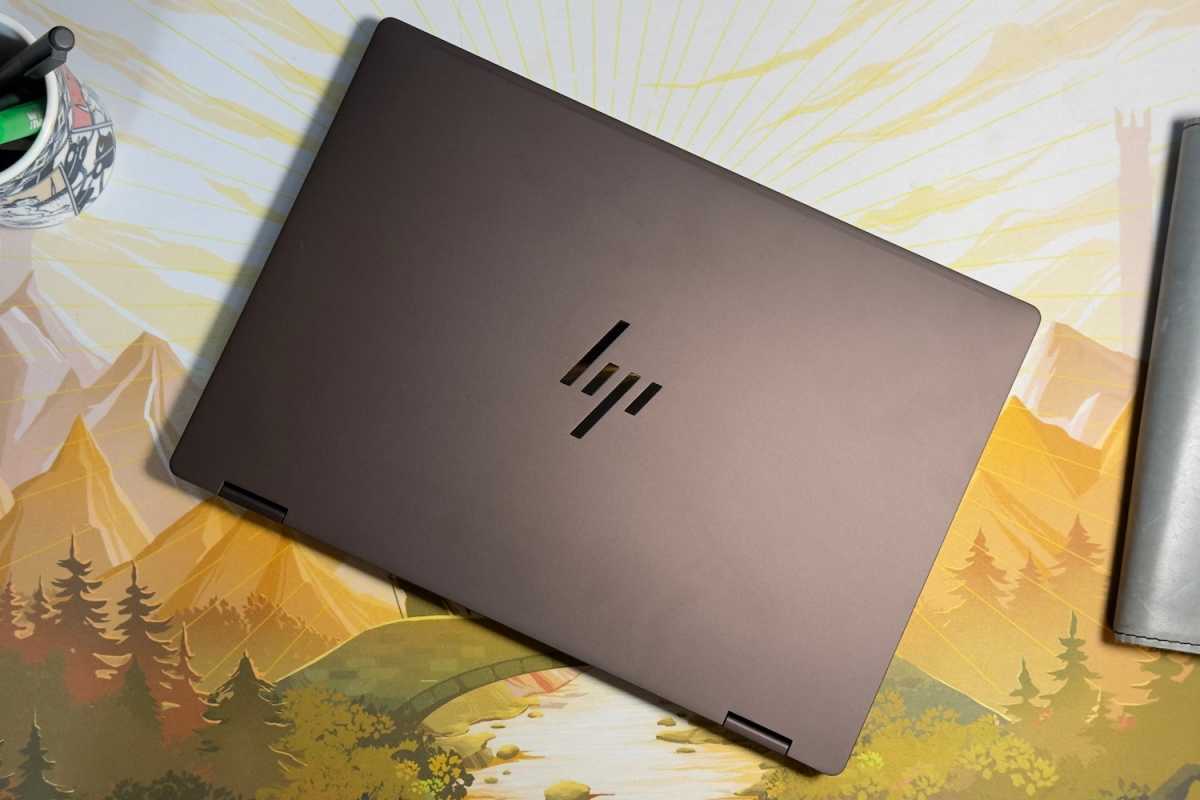
The most notable aspect of the HP OmniBook X Flip 14 I reviewed was obvious from the moment I took it out of the box. It’s brown—or, to be more specific, “Deep Espresso.” I must say, I quite like it. This sort of deep chocolate-coffee hue is uncommon among laptops from any manufacturer. It helps the laptop look unique while remaining professional. HP also provides an “Atmospheric Blue” colorway which, from photos, also looks attractive but is more conventional.
Aside from the color, the OmniBook X Flip 14 is a simple but attractive laptop. The exterior is made of aluminum and feels sturdy, yet the laptop is still reasonably light at just 3.09 pounds. I saw little flex when opening the laptop or picking it up from one corner. The hinge is nicely tuned, too. The laptop can be opened with a single finger, yet it remains firmly closed in a bag.
The HP OmniBook X Flip 14 is an attractive, luxurious 2-in-1 that is mostly meant for laptop use.
The OmniBook X Flip 14 is a 2-in-1 with a 360-degree hinge. That means the display folds all the way back, effectively turning the laptop into a tablet. The Flip 14 is both too large and too heavy to be used exactly like a dedicated tablet, but the versatility is helpful and makes it useful in a wide variety of situations. HP also offers an active stylus, though it’s optional and wasn’t included with my review sample.
Importantly, the OmniBook X Flip 14 offers its 2-in-1 versatility with absolutely zero downside. It otherwise looks and feels exactly like a conventional laptop. It doesn’t even try to squeeze power or volume buttons on the sides, a move that some 2-in-1s make in an effort to enhance the tablet mode, but which can cause accidental activation when plugging in peripherals.
I think the focus on laptop mode is the right call. The tablet mode is a nice bonus, but not how the OmniBook X Flip 14 is meant to be used most of the time.
HP OmniBook X Flip 14 2-in-1: Keyboard, touchpad
Foundry / Matthew Smith
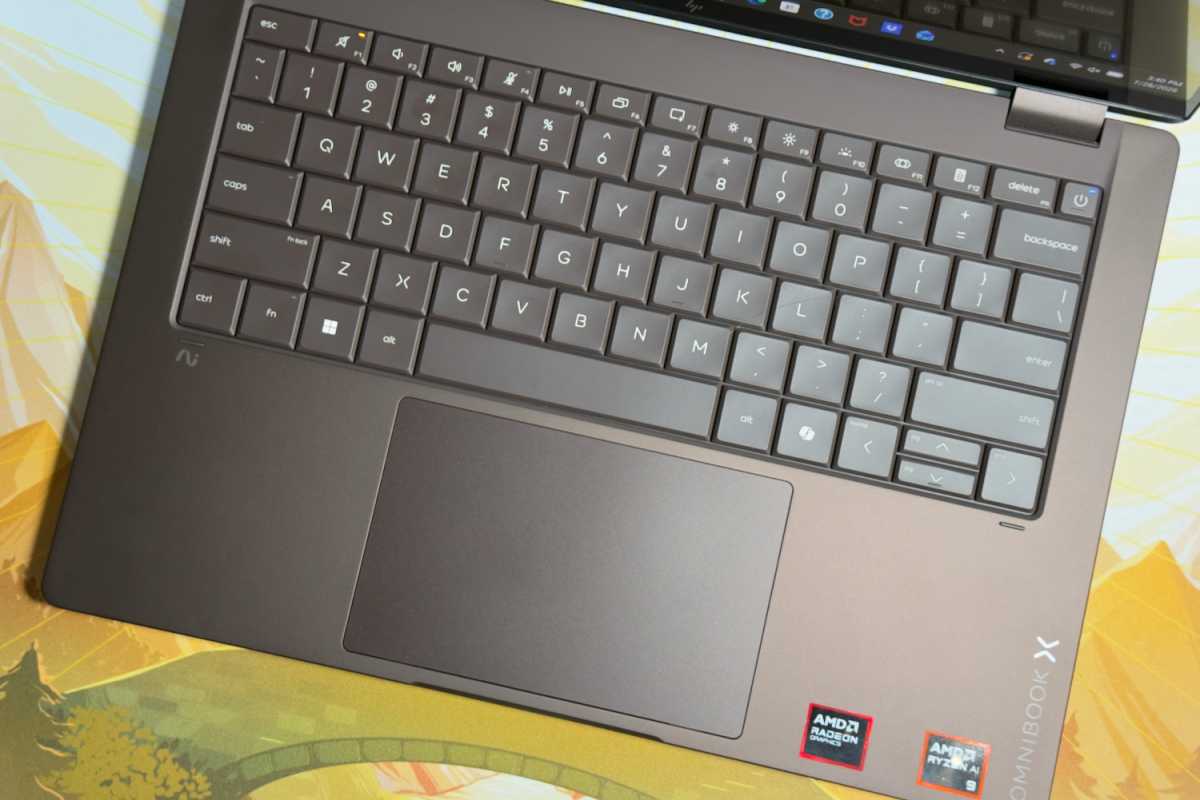
A spacious keyboard can be found in the HP OmniBook X Flip 14’s interior. Most keys are large. However, a few keys, like the left-side Control key, the Alt keys, and the Tab key, are slightly smaller than usual. On the other hand, the primary alphanumeric keys are large, and I like the beveled keycap design.
Key feel is good, as keys provide significant travel and bottom out with a firm action. There’s a slightly hollow sound to the keyboard which I don’t love, but that’s a minor point. The keyboard also benefits from significant palm rest space that will comfortably accommodate most users.
Below the keyboard is a typical touchpad that measures about five inches wide and a little over three inches deep. This is a typical size for a 14-inch laptop touchpad and generally offers enough room for multi-touch gestures, though swiping can feel tight at times. The touchpad doesn’t have a glass surface or other premium texture and also lacks haptics, though it does offer a shallow physical click action.
HP OmniBook X Flip 14 2-in-1: Display
Foundry / Matthew Smith
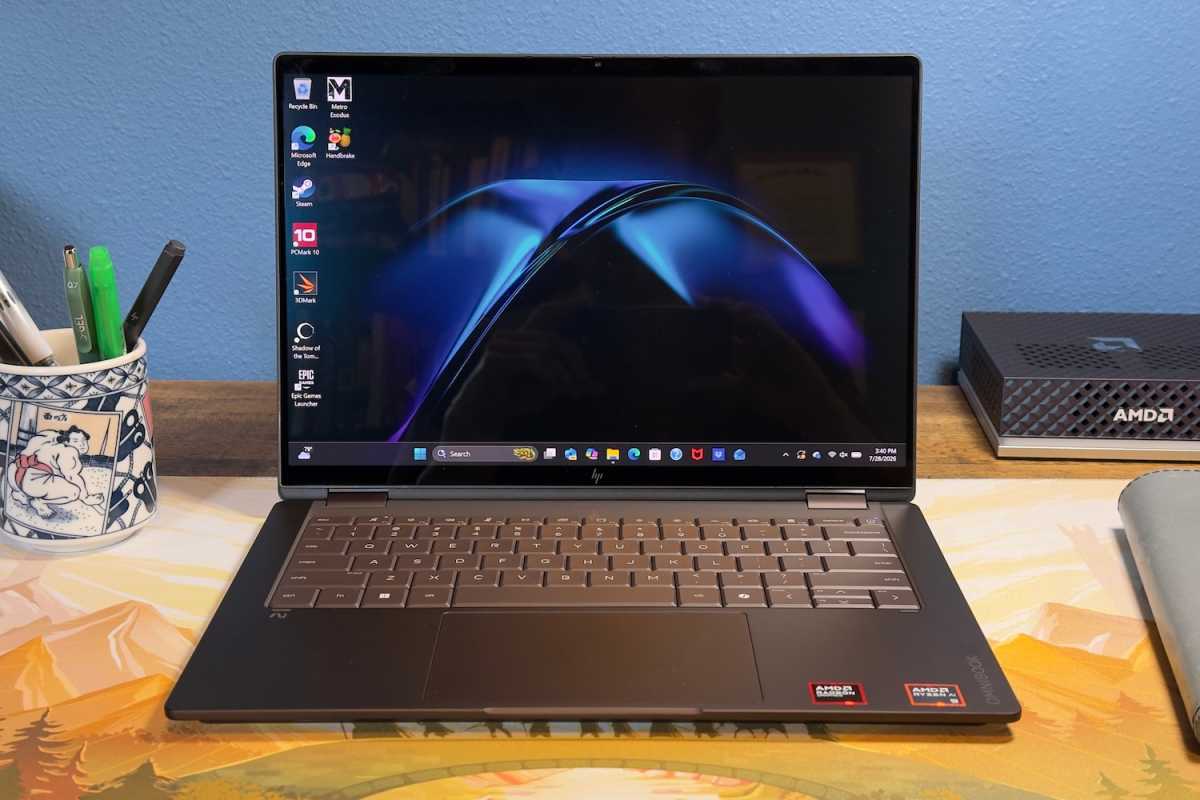
HP offers three display options for the OmniBook X Flip 14: a 1920×1200 IPS-LCD, a 1920×1200 60Hz OLED, and a 2880×1800 120Hz OLED. All three are touchscreens. My review unit had the middle option, a 1920×1200 60Hz OLED touchscreen.
HP quotes a maximum brightness of 300 nits, and while the display reached a little above that in testing, it’s not a bright display and often loses the fight with glare caused by the reflective panel coating. It’s also not an impressive display for the price in terms of resolution and refresh rate.
On the plus side, however, it benefits from the rich contrast and superb color gamut that most OLED displays share. Movies, photos, and games have a vivid, alluring look. And while the resolution of 1920×1200 isn’t incredible for the price, it’s still very sharp when spread across a compact 14-inch screen.
It’s worth mentioning that the display upgrades are affordable. Upgrading from the IPS-LCD to OLED is just $50, and upgrading from the 1920×1200 OLED to the 2880×1800 panel adds $130 more. That’s not nothing, but in a world where you can expect to pay through the nose for any memory or storage upgrade, you may find that choosing a display upgrade delivers more bang for your buck.
HP OmniBook X Flip 14 2-in-1: Audio
The HP OmniBook X Flip’s maximum volume is sufficient for use in a home office and audio clarity is good. The OmniBook X Flip doesn’t deliver the dynamism and passable low-end performance that you can find from an Apple MacBook and most Lenovo Yoga 9i alternatives, but the speakers are fine for listening to music at low volumes or enjoying a podcast.
HP OmniBook X Flip 14 2-in-1: Webcam, microphone, biometrics
The HP OmniBook X Flip 14 has a 5MP webcam and a dual microphone array. This is a typical arrangement for a Windows laptop at nearly any price point, and it delivers typical performance. A physical privacy shutter is included and can fully obstruct the webcam when it’s not in use.
Video quality is sharp in good light and benefits from good color reproduction, but it can look grainy in darker situations. The microphone picks up crisp, loud audio but also sounds hollow and distant. Overall, it’s a usable combination that works well for video calls and conferences.
Biometric login is supported through an IR camera and Windows Hello facial recognition. A fingerprint reader was not included.
HP OmniBook X Flip 14 2-in-1: Connectivity
Foundry / Matthew Smith
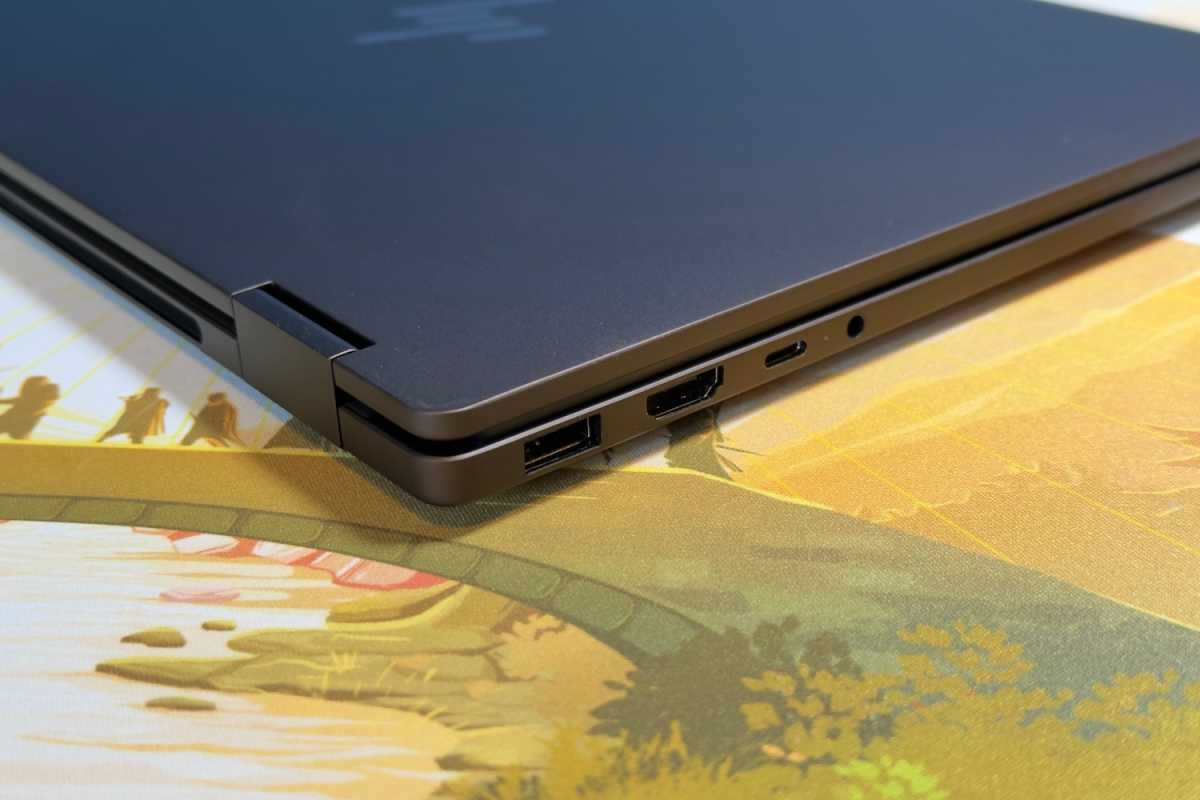
The star of the HP OmniBook X Flip 14’s connectivity is its pair of USB-C ports with 40Gbps of data bandwidth, power delivery, and DisplayPort 2.1. These are great modern ports and provide a lot of options for connecting docks, displays, and high-speed external storage.
There’s more good news on connectivity, as the laptop also has two USB-A ports that promise 10Gbps of data bandwidth. The inclusion of both USB-C and USB-A offers a wide variety of options for connecting devices.
Additional physical connectivity includes HDMI 2.1 and a 3.5mm combo audio jack. The only port that might be considered missing is Ethernet, but it’s very rare to see any modern 14-inch laptop offer Ethernet. That ship has sailed.
To make up for that, the HP OmniBook X Flip 14 provides modern wireless connectivity in the form of Wi-Fi 7 and Bluetooth 6.0. This is about as good as wireless connectivity gets, and I had no problems with the laptop’s wireless networking performance during my time with it.
HP OmniBook X Flip 14 2-in-1: Performance
The HP OmniBook X Flip 14 covers a wide variety of price points. To do that, it offers a wide variety of AMD hardware. The model I reviewed, though, is a fully equipped configuration with an AMD Ryzen AI 9 465 CPU that has 10 cores and 20 threads. It’s paired with 32GB of RAM and 2TB of solid-state storage. This is the top-end hardware configuration. The only option not included in the model I reviewed is the 2880×1800 120Hz OLED display.
Foundry / Matthew Smith
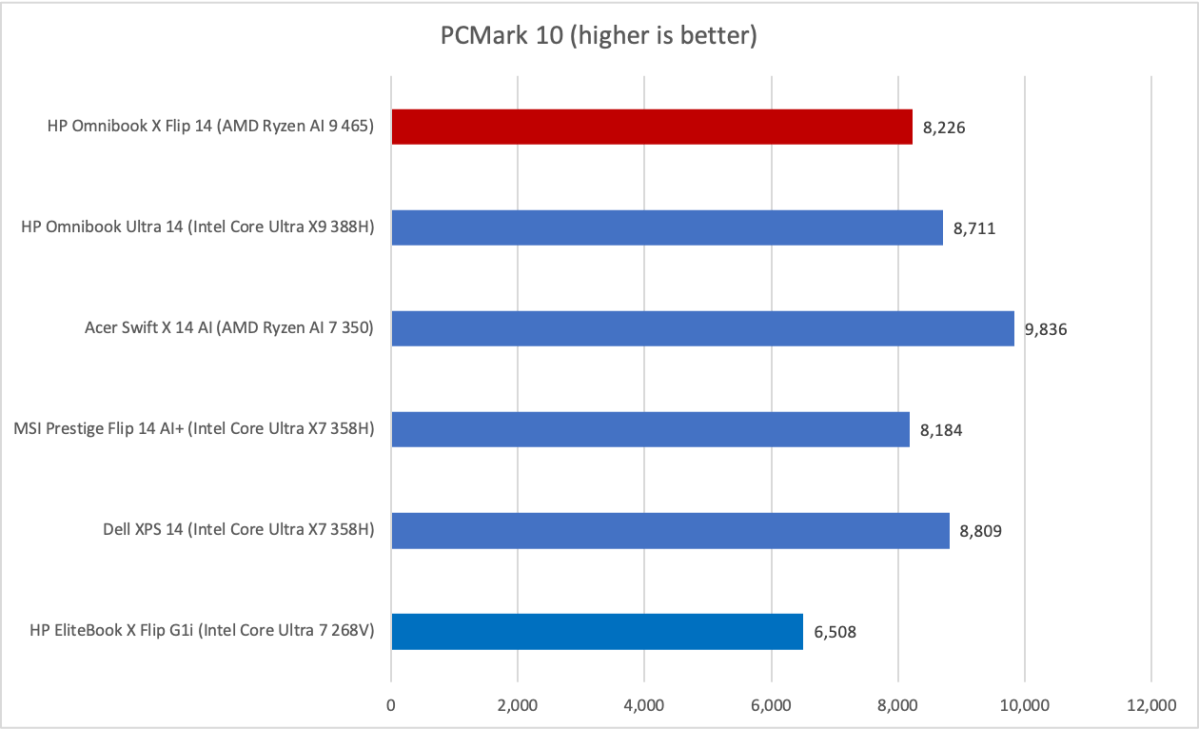
Let’s start with PCMark 10, a holistic system benchmark. Here we see the HP OmniBook X Flip 14 provides a mid-range result of 8,226. That wedges it between the OmniBook Ultra 14 and the MSI Prestige Flip 14 AI+.
If the Acer Swift X 14 AI’s result has you scratching your head, there’s a reason for it. The Swift X 14 AI has an Nvidia GeForce RTX 5060, which helps boost the result. That’s because this test includes graphics benchmarks.
Foundry / Matthew Smith
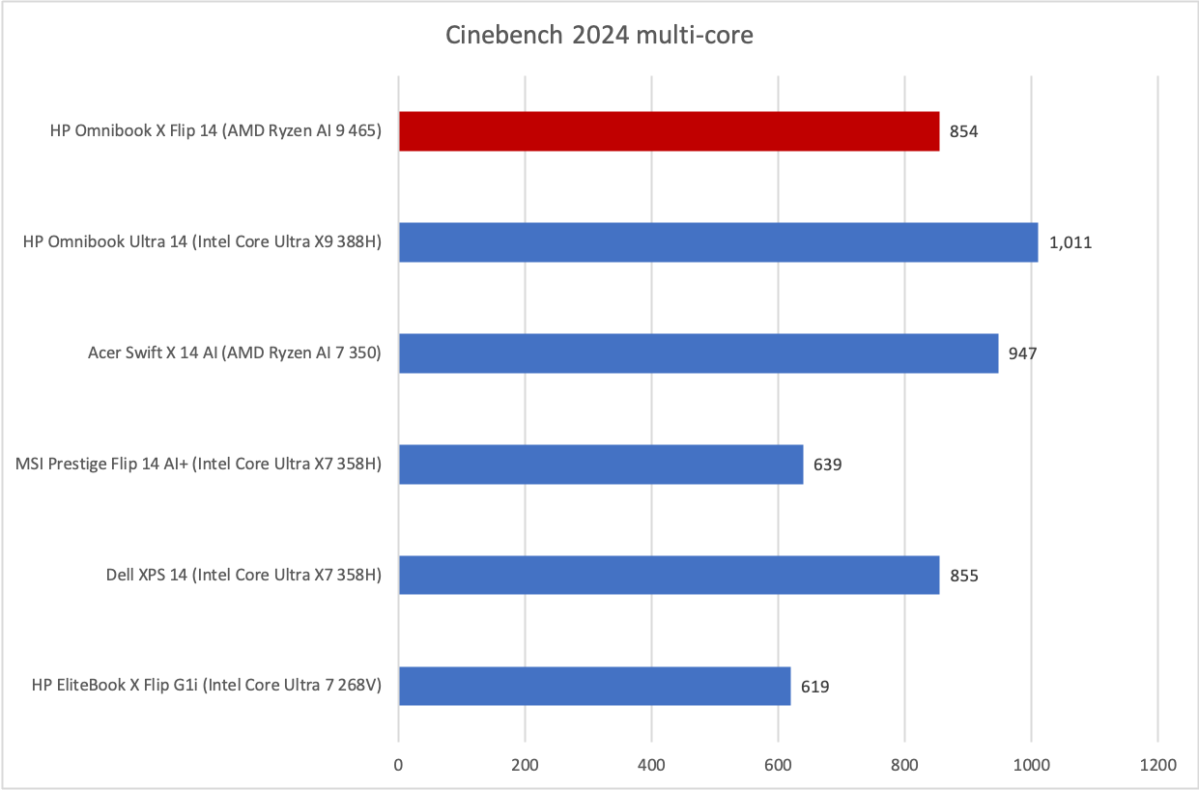
Cinebench 2024 is a heavily multi-threaded CPU benchmark. The AMD Ryzen AI 9 465 in the HP OmniBook X Flip provides healthy, but not incredible, results in this benchmark. It’s able to defeat some Intel Core Ultra X7 laptops, but it falls behind the HP OmniBook Ultra 14 with an Intel Core Ultra X9 388H.
It’s also interesting to see the AMD Ryzen AI 7 350 in the Acer Swift X 14 AI take a win, too. That laptop has a larger power adapter, and it seems to take advantage of that to deliver more power to the CPU, resulting in better performance.
Foundry / Matthew Smith
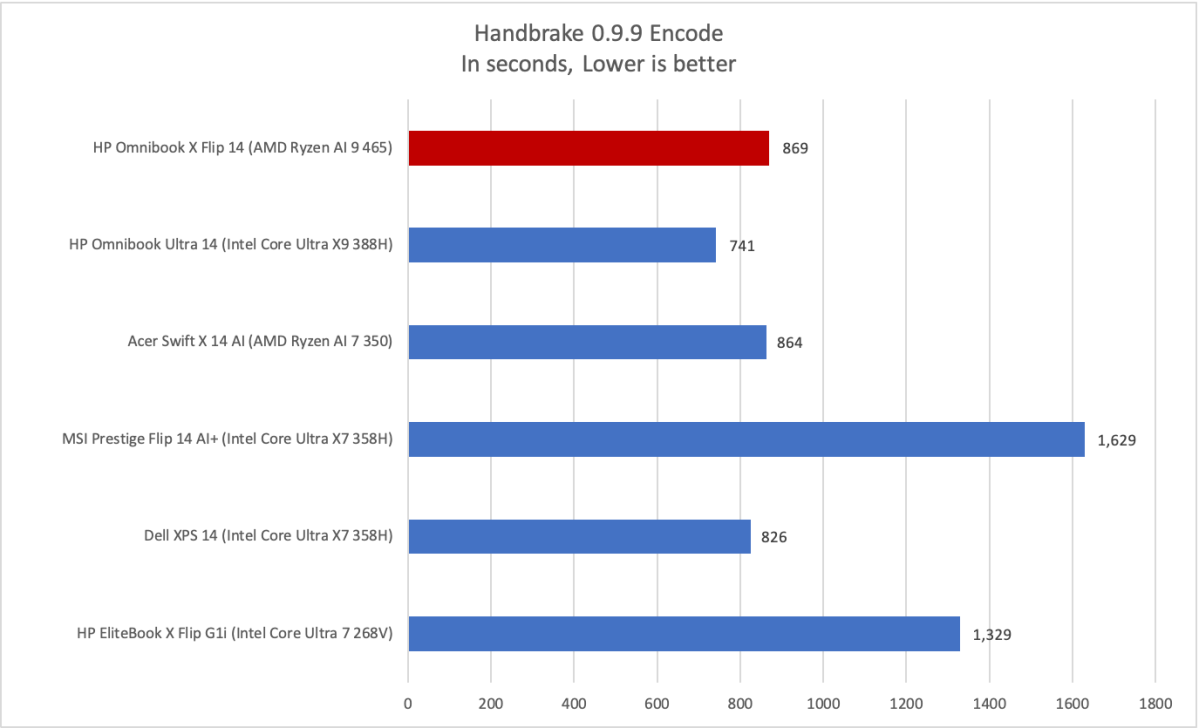
Handbrake is another heavier multi-threaded test and, once again, the HP OmniBook X Flip 14 provides a solid yet unsurprising result. The AMD Ryzen AI 9 465 ends up a bit behind the Core Ultra X9 388H—at least as it exists in the similar HP OmniBook Ultra 14. On the whole, the AMD Ryzen AI 9 465 doesn’t look all that strong here, but its performance is adequate at the least.
Foundry / Matthew Smith
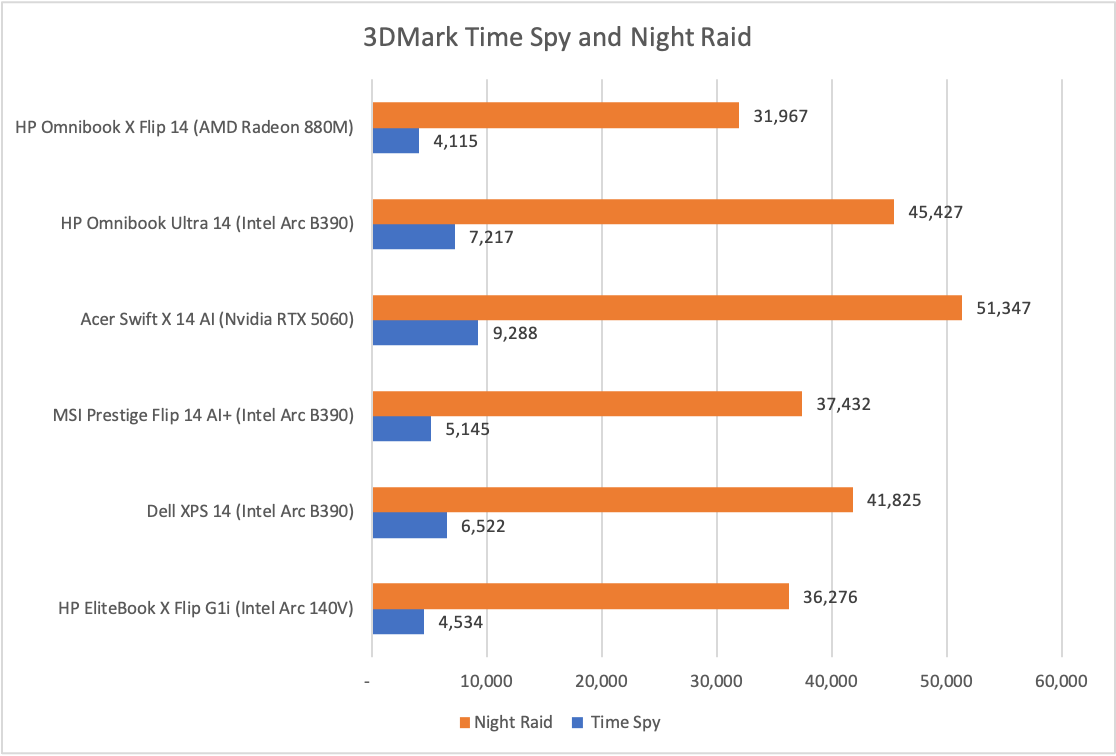
GPU performance, as it turns out, is the HP OmniBook X Flip 14’s weakness. That’s because it relies on AMD’s Radeon 880M integrated graphics, which was great when it debuted a couple years ago but is now less competitive against Intel’s new Arc graphics.
The difference isn’t small, either. Compared to the Intel Core Ultra Series 3 alternatives with Intel Arc B390 graphics, the OmniBook X Flip 14 with Radeon 880M is roughly 15 to 40 percent behind the Intel competition. That’s enough to be extremely noticeable in real-world use.
HP OmniBook X Flip 14 2-in-1: Battery life and portability
Most HP OmniBook X Flip 14 configurations, including the one I reviewed, ship with a 59 watt-hour battery. A 70 watt-hour battery is available, but only with the 2880×1800 OLED display.
Foundry / Matthew Smith
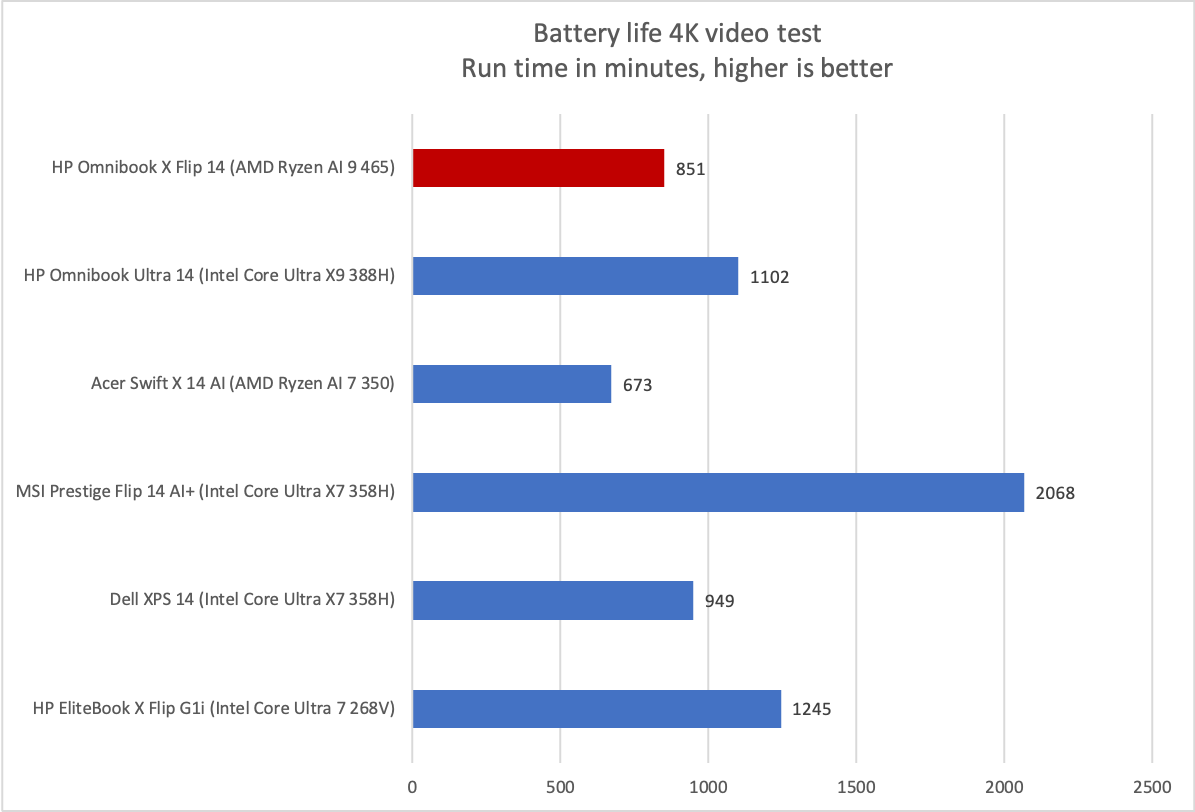
A 59 watt-hour battery is toward the lower end for this category of laptop, and the graph shows that it does have an impact.
However, I think the real boat anchor dragging down the laptop’s battery life is the AMD Ryzen AI 9 chip. AMD’s Ryzen 300 and 400 series chips have generally failed to match Intel Core Ultra Series 3 and Qualcomm Snapdragon alternatives on battery life. The HP OmniBook X Flip 14 is no exception.
Yet it would be wrong to call the OmniBook X Flip 14’s battery life bad or short. It still endured over 14 hours in our standard video playback test. This, as the graph shows, is not exceptional—but 14 hours is still a respectable result and the OmniBook X Flip 14’s battery life will be enough to get most people through an eight-hour workday.
HP OmniBook X Flip 14 2-in-1: Conclusion
The HP OmniBook X Flip 14 is an attractive, luxurious 2-in-1 that is mostly meant for laptop use. It provides a sturdy chassis, nice keyboard, lots of connectivity, and respectable all-around performance—though the aging Radeon 880M integrated GPU ends up the weak link. Battery life is also unimpressive, though it remains adequate.
HP prices the model I reviewed at an MSRP of $2,529.99. That’s not inexpensive, but in 2026, with escalating memory and storage pricing, I think it’s a reasonable value for what the laptop offers. However, the real value is arguably found in the less expensive configurations. While these won’t perform as well, they will retain key traits including the 2-in-1’s attractive design.

