
Lenovo LOQ Essentials 15 Gen 11 Review: A good display meets a low-power RTX 5060
The Lenovo LOQ Essentials 15 Gen 11 has the right idea to compete with the best budget gaming laptops: skip the flashy design extras and focus on the hardware that matters. Its RTX 5060 graphics, 144 Hz IPS display, solid keyboard, and generous internal upgrade options give budget-strapped gamers plenty to like on paper. The reality is that this configuration is compromised in the area that matters most: gaming performance. Its RTX 5060 is held back by a 65W power limit and the CPU is several generations old, allowing rival machines in the same price range to post stronger results. The LOQ is usable and practical, but at this price, it needs stronger performance to stand out.
Design of the Lenovo LOQ Essentials 15 Gen 11
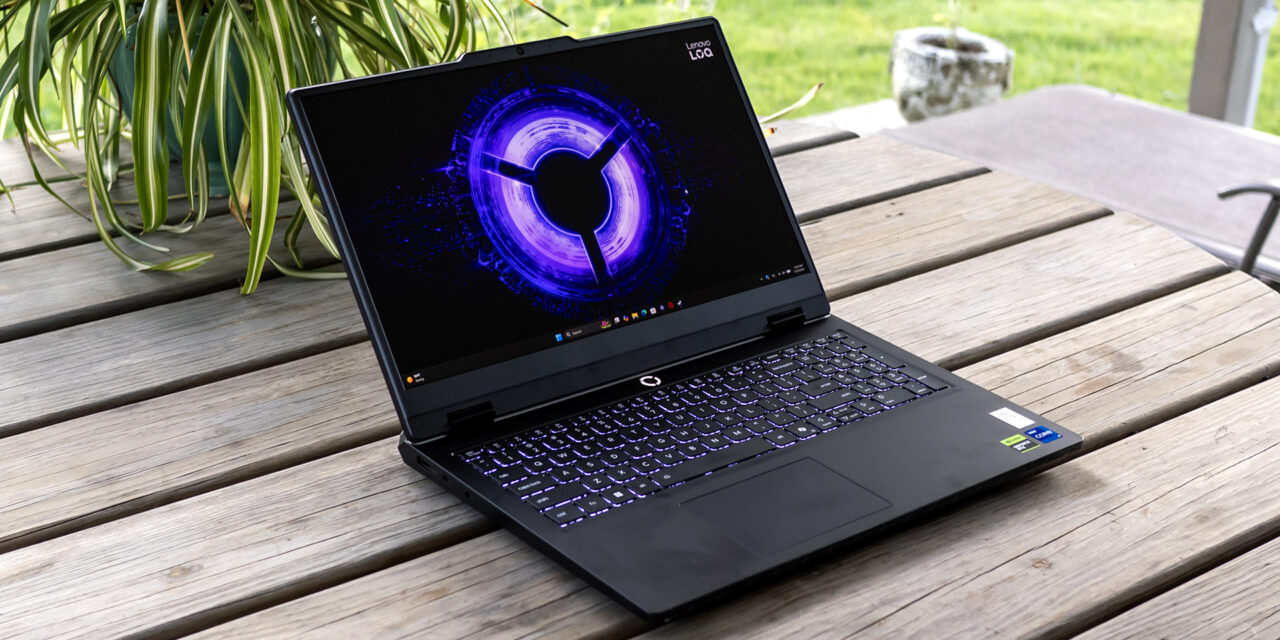
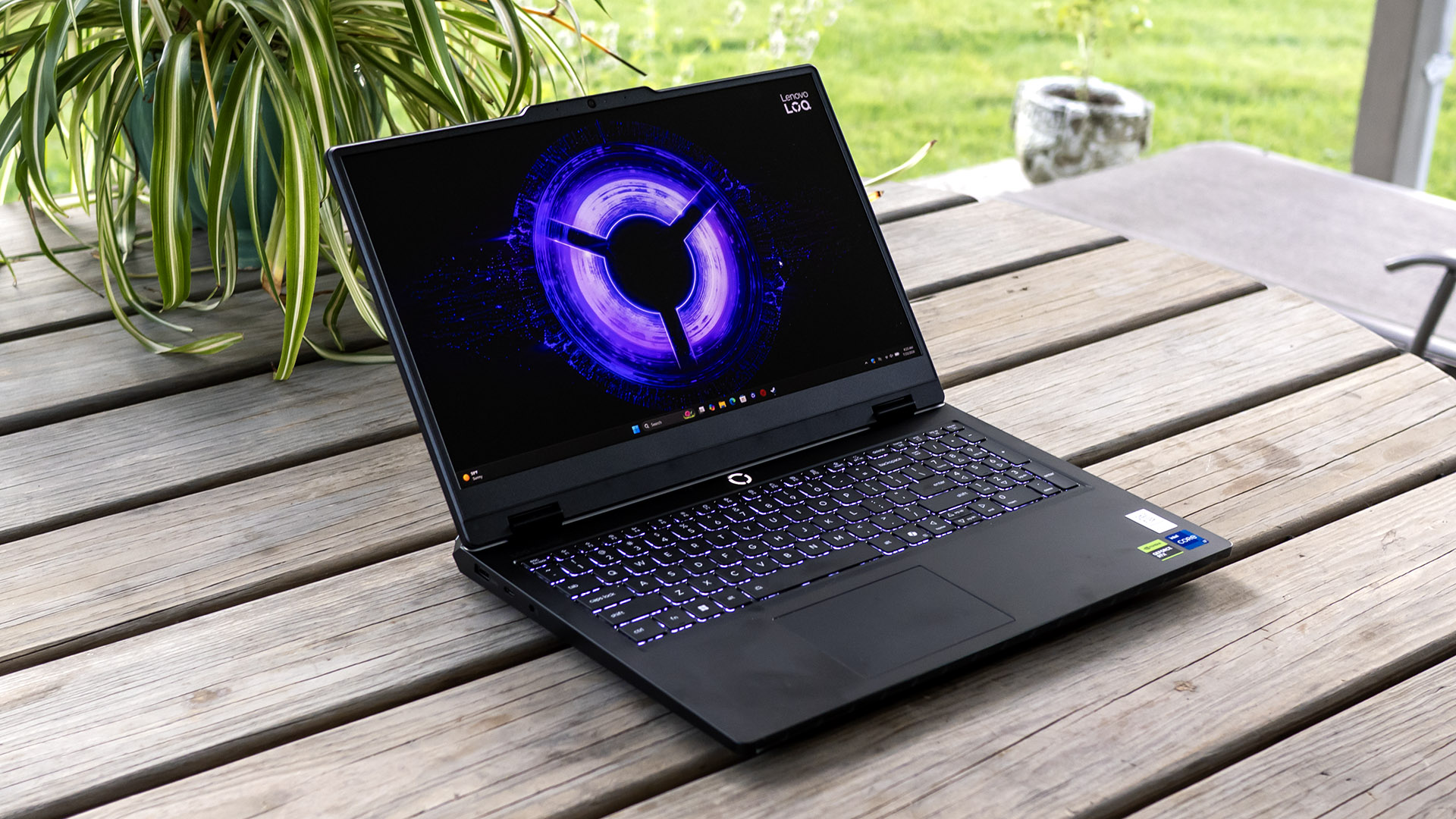
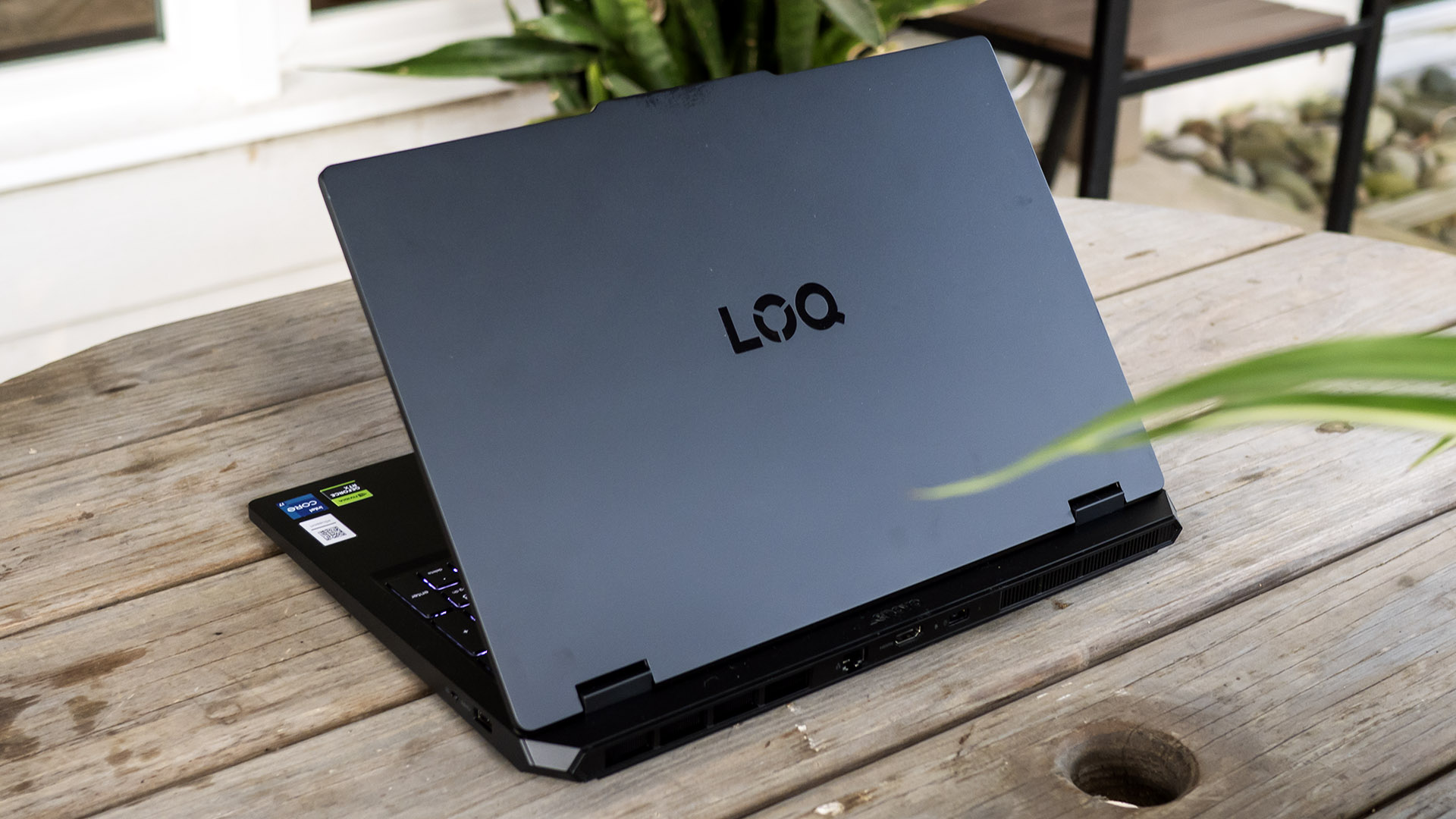
Aptly named, the LOQ Essentials 15 embraces a no-frills design. Aside from LOQ branding on the lid, there’s little here meant to catch the eye, which is fitting for a laptop that’s intended to deliver performance at the lowest possible cost. Lenovo reserves premium materials and styling for its Legion gaming laptops.
Fortunately, the budget considerations are mostly aesthetic, as the LOQ’s plastic chassis feels solid and has the durability you’d expect for daily home or school use. Its 0.97-inch thick profile and 5.07-pound weight don’t make it a great traveling companion are in line with competing laptops like Acer’s Nitro V 16S AI, Asus’ TUF Gaming F16, and MSI’s Cyborg 15. The latter is the lightest in the group, at 4.36 pounds.
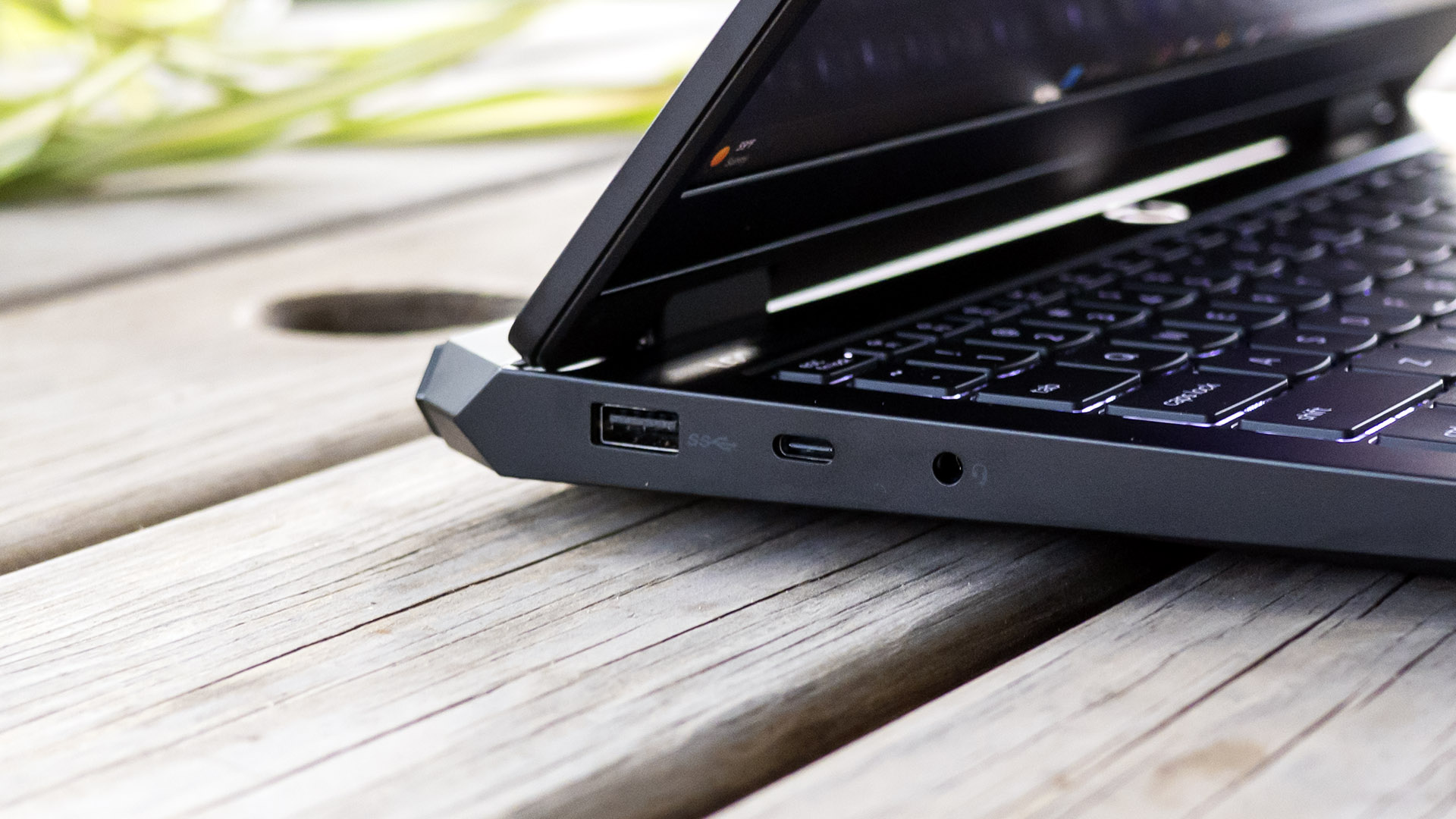
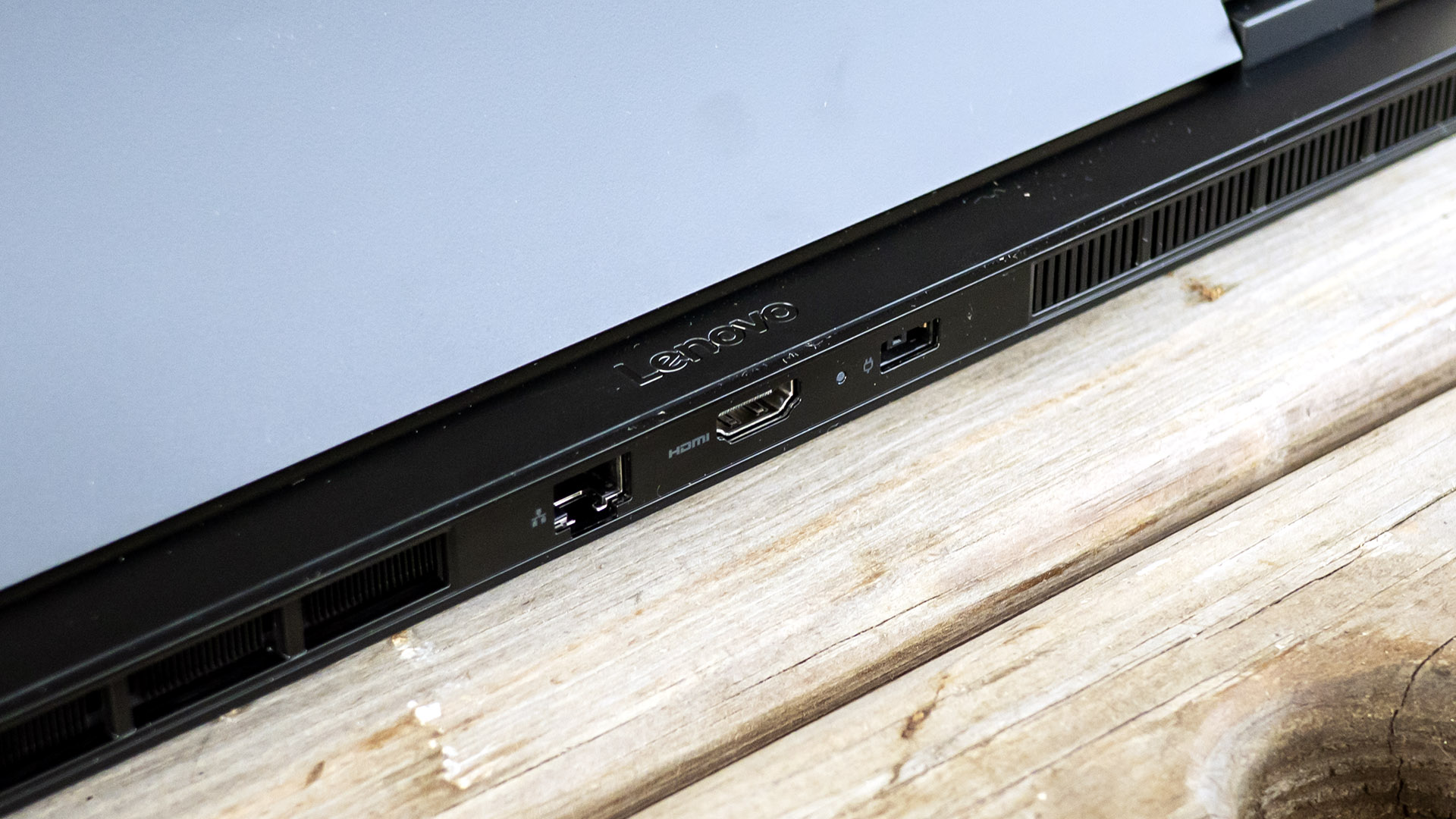
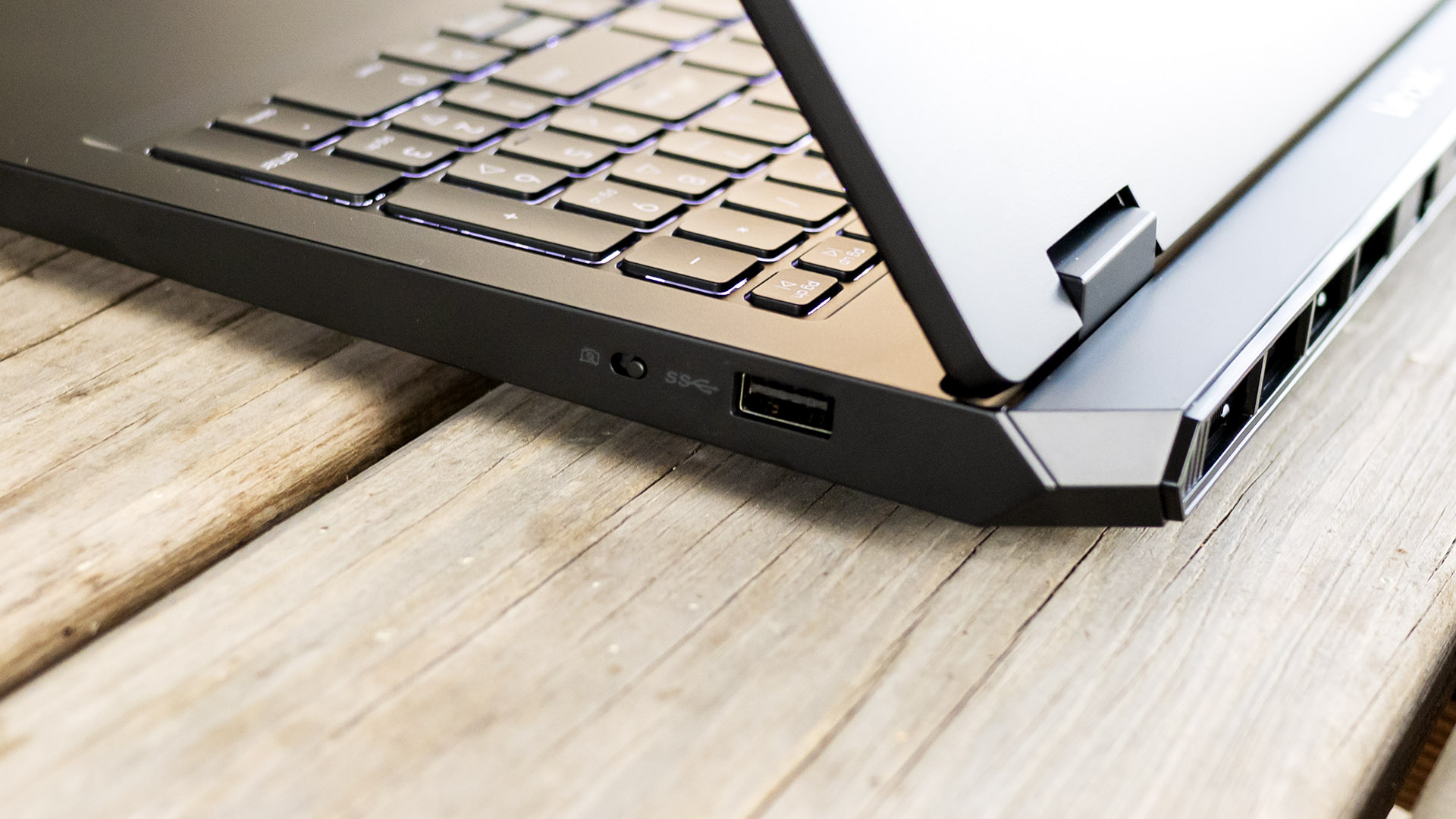
Lenovo’s port selection is practical: one USB-C port (10 Gbps), two USB-A ports (5 Gbps), an audio jack, Ethernet, and HDMI. You won’t get truly high-speed ports like USB4/Thunderbolt 4 at this price. The Intel AX203 Wi-Fi 6 card is another example of this laptop’s economical focus, though it shouldn’t hold users back.
Lenovo LOQ Essentials 15 Gen 11 Specifications
|
CPU |
Intel Core i7-13650HX |
|
Graphics |
Nvidia RTX 5060 (8GB GDDR7, 1,455 MHz boost, 65 W maximum graphics power) |
|
Memory |
16GB DDR5-4800 RAM (1x 16GB) |
|
Storage |
512GB SSD (WD PC SN5000S) |
|
Display |
15.6-inch, 1920 x 1080, IPS, anti-glare, 144 Hz |
|
Networking |
Intel Wi-Fi 6 AX203, Bluetooth 5.4 |
|
Ports |
USB-C (10 Gbps), 2x USB-A (5 Gbps), audio, Ethernet, HDMI |
|
Camera |
720p |
|
Battery |
60 Wh |
|
Power Adapter |
135 W (barrel connector) |
|
Operating System |
Windows 11 Home |
|
Dimensions (WxDxH) |
14.22 x 10.06 x 0.97 inches (361 x 256 x 25 mm) |
|
Weight |
5.07 pounds (2.3 kg) |
|
Price (as configured) |
$1,269.99 |
Gaming and Graphics on the Lenovo LOQ Essentials 15 Gen 11
We evaluated the LOQ Essentials 15 Gen 11 with a Core i7-13650HX processor, RTX 5060 graphics (65W), and 16GB of single-channel DDR5-4800 RAM. The processor is several years old though still packs a punch, with six Performance cores.
Playing 007 First Light at 1080p with medium lighting settings, post effects on, and DLSS set to balanced, the LOQ produced playable frame rates, ranging from the mid-50s to low-70s FPS depending on the scene. The experience was never poor, but it lacked the fluidity I expected from a laptop carrying Nvidia’s latest midrange GPU.
Our benchmark comparison lineup consists of Acer’s Nitro V 16S AI (Ryzen 7 260, RTX 5060 85W, $1,299.99 when tested), Asus’ TUF Gaming F16 (Core i7-14650HX, RTX 5050 115W, $1,199.99), and MSI’s Cyborg 15 C13WE (Core i5-13420H, RTX 5050 70W, $1,219.99).
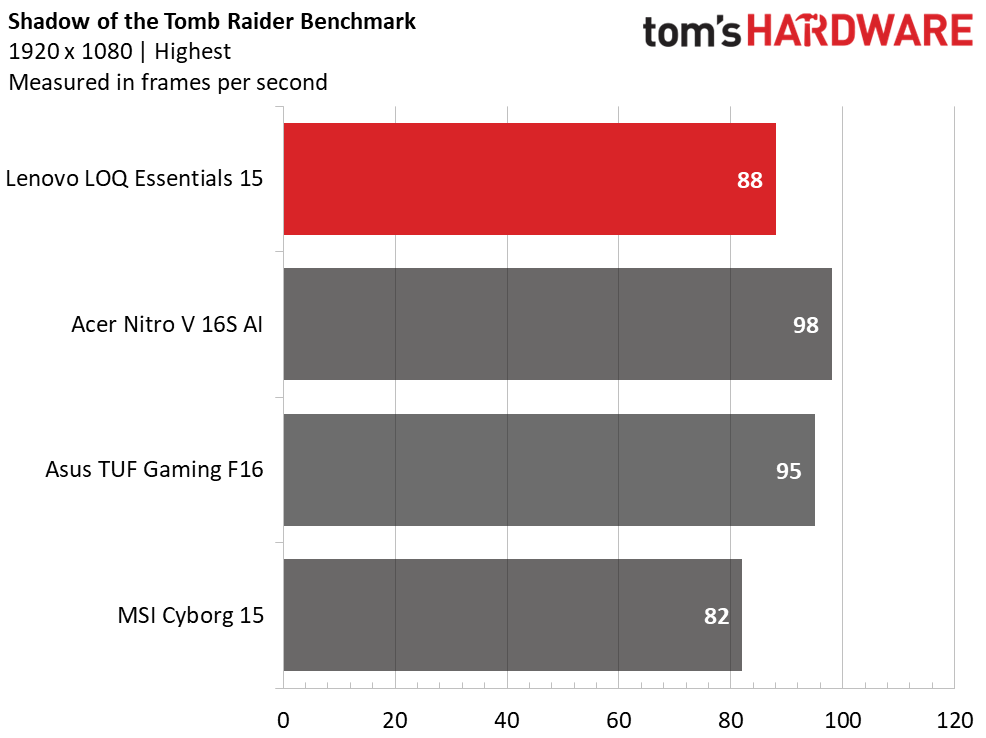
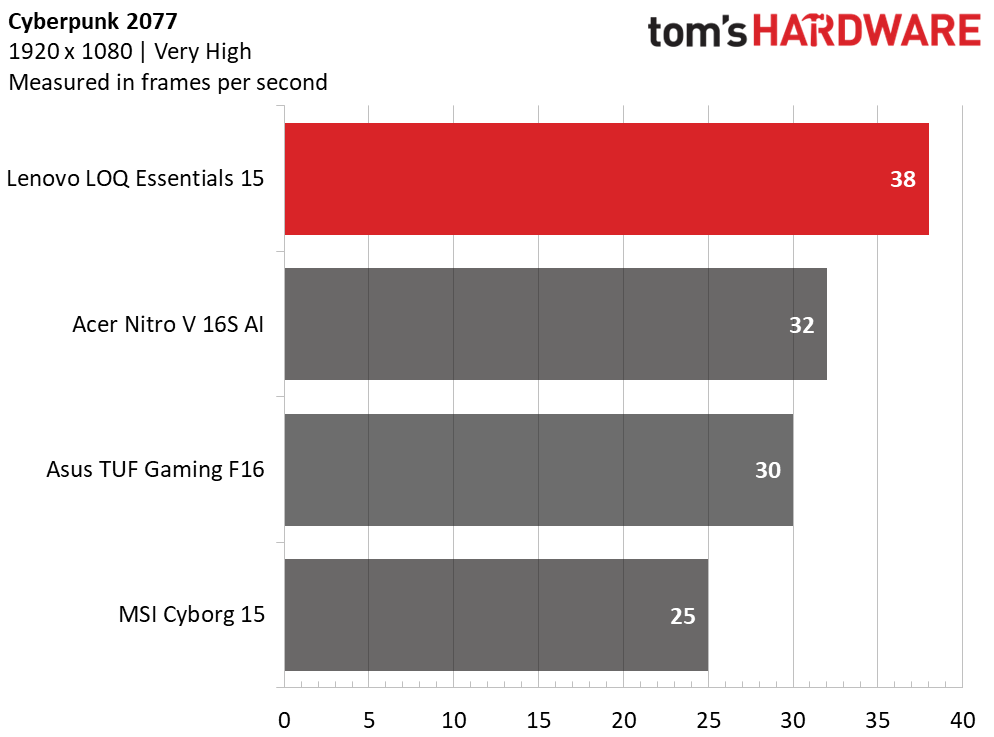
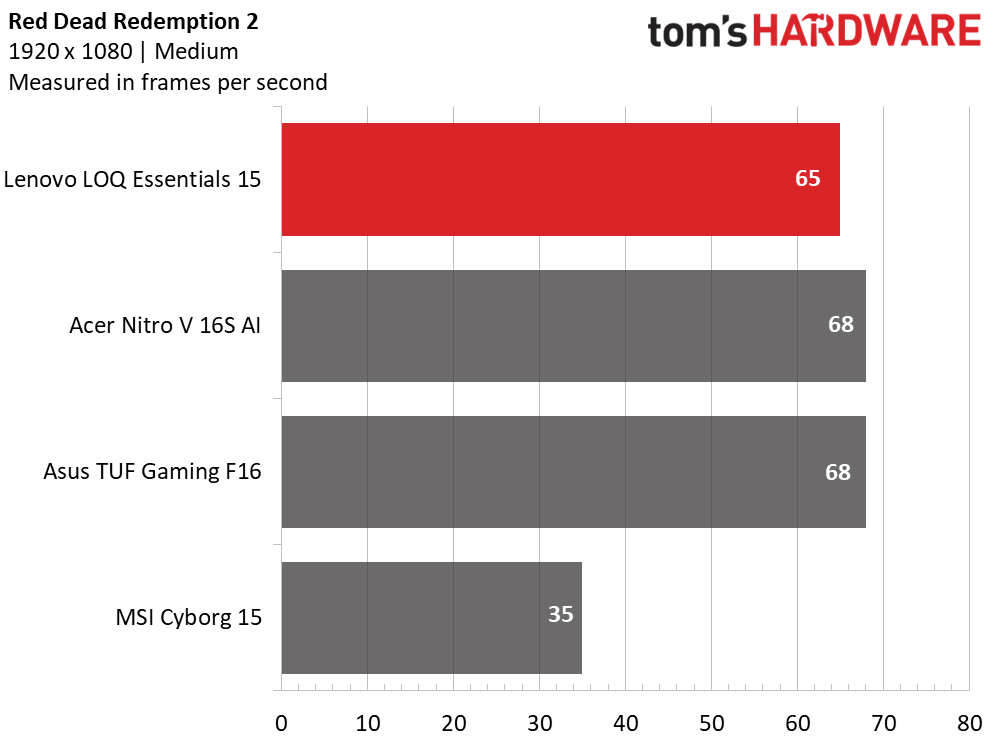
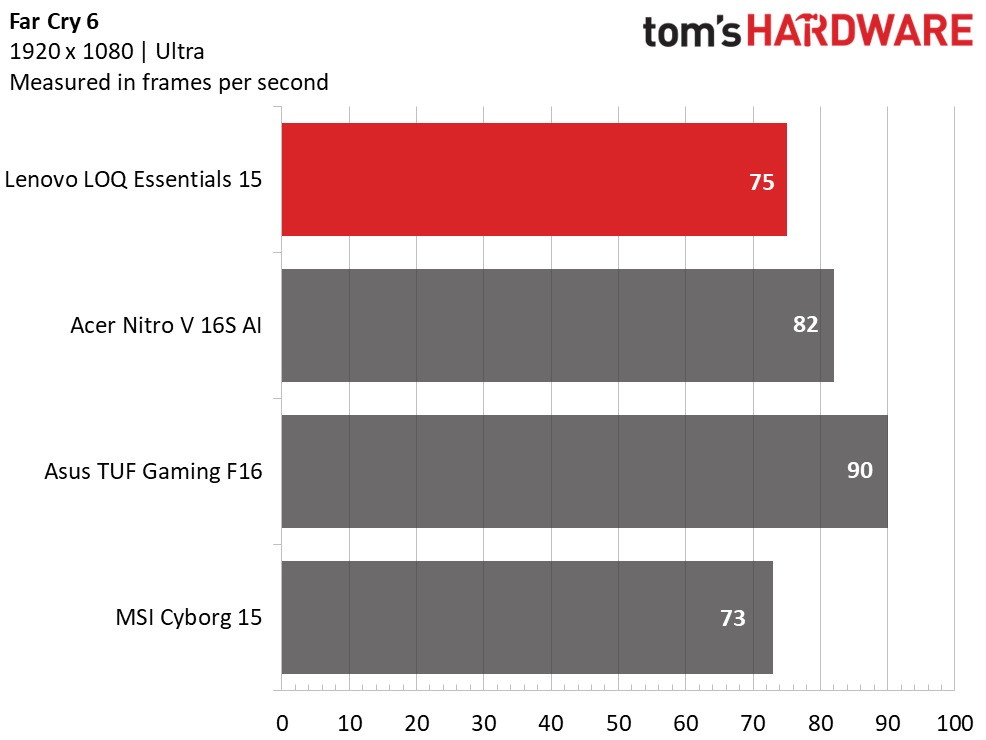
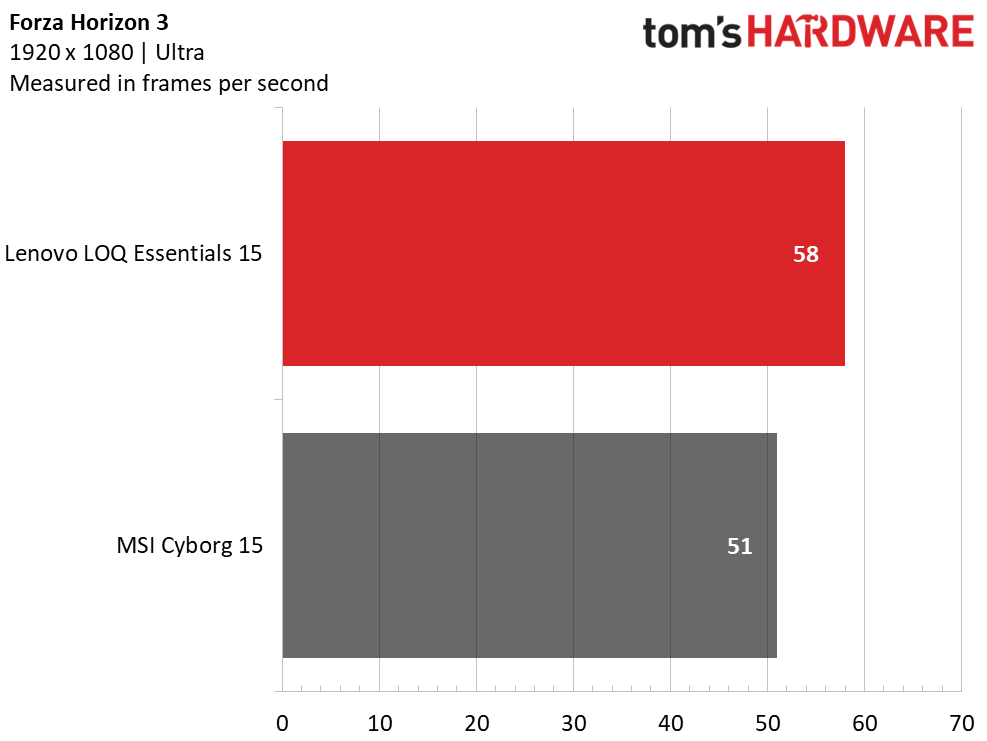
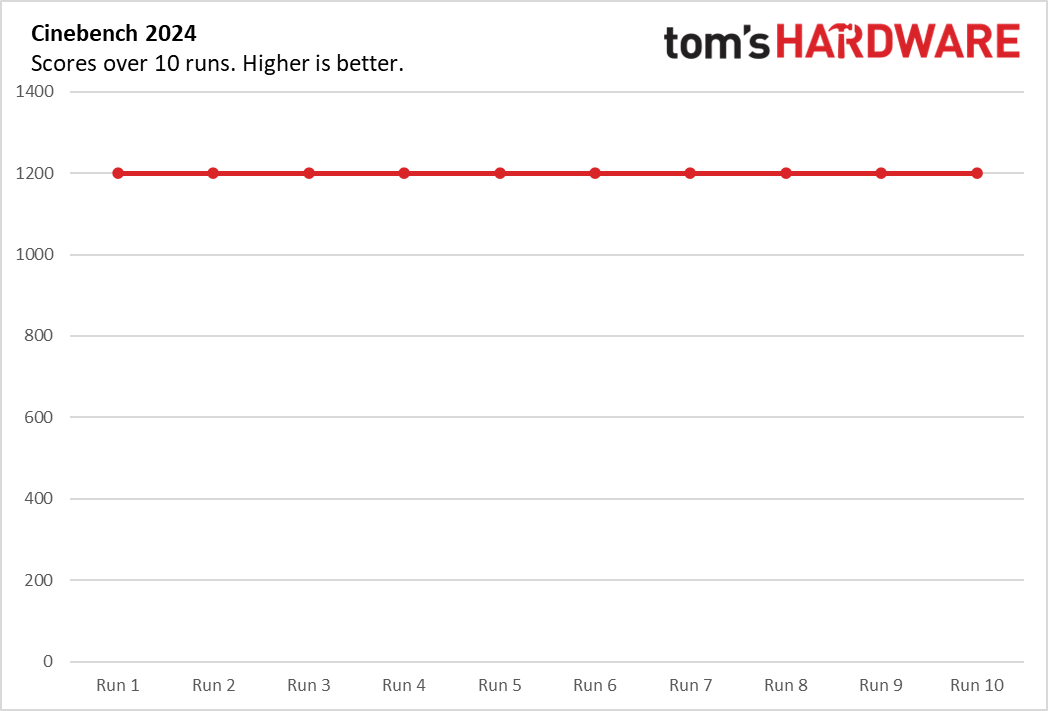
Overall, the LOQ’s results were disappointing. With a 65W power limit, its RTX 5060 simply doesn’t deliver the level of performance buyers might expect from the badge. It was routinely outperformed by the TUF Gaming F16 using an RTX 5050, while Acer’s higher-powered RTX 5060 laptop also finished comfortably ahead. The result is a gaming laptop that works well enough but struggles to justify its price when similarly priced alternatives make better use of comparable hardware.
In Shadow of the Tomb Raider at the Highest detail preset, the LOQ’s 88 FPS only outpaced the Cyborg (82 FPS), while the Asus (95 FPS) and Acer (98 FPS) both pulled ahead. This story repeated in Far Cry 6 – with 75 FPS, the LOQ trailed Acer (82 FPS) and Asus (90 FPS), though it was within a few FPS of those units in Red Dead Redemption 2. The LOQ’s only real victory was Cyberpunk 2077, where it achieved 38 FPS, with the Acer (32 FPS) trailing. The LOQ was one of two laptops tested with Forza Horizon 3, where it predictably had no trouble outgunning the Cyborg, 58 FPS to 51 FPS.
To stress-test gaming laptops, we run 15 loops of the Metro Exodus stress test at RTX settings to simulate half an hour of gaming. The LOQ demonstrated stable performance throughout the test, averaging 59.79 FPS without a variance of more than one FPS across runs. During the test, the Core i7-13650HX ran at an average frequency of 2.73 GHz while the RTX 5060 averaged 1,919 MHz.
Productivity Performance on the Lenovo LOQ Essentials 15 Gen 11
Our LOQ Essentials 15 Gen 11 is built around a Core i7-13650HX, 16GB of RAM, and a 512GB SSD.
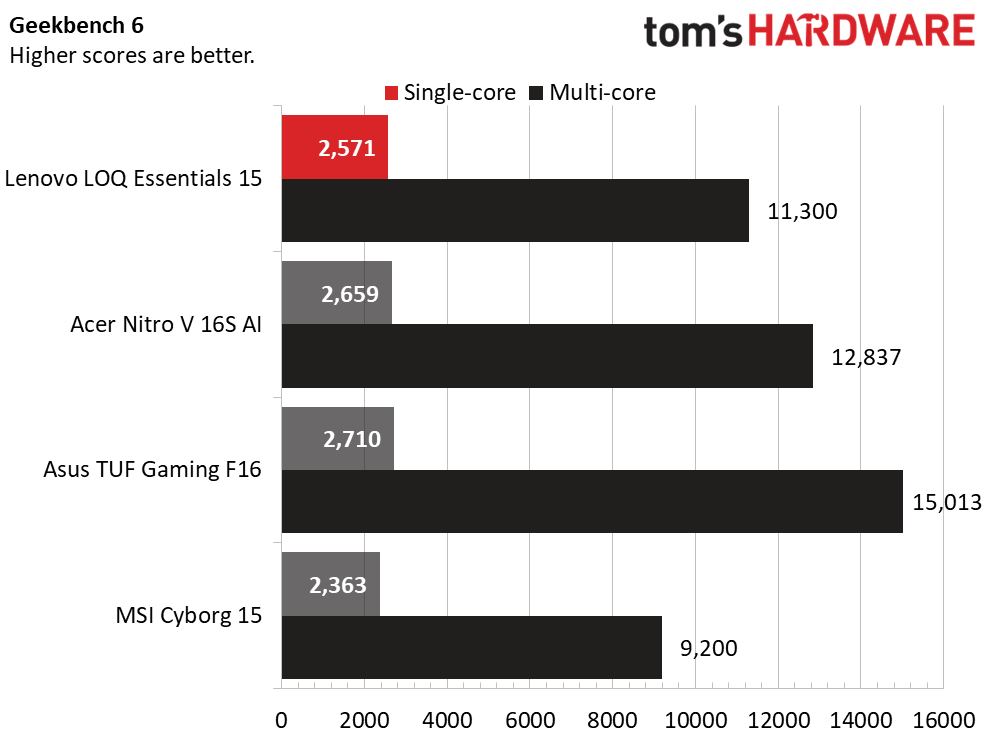
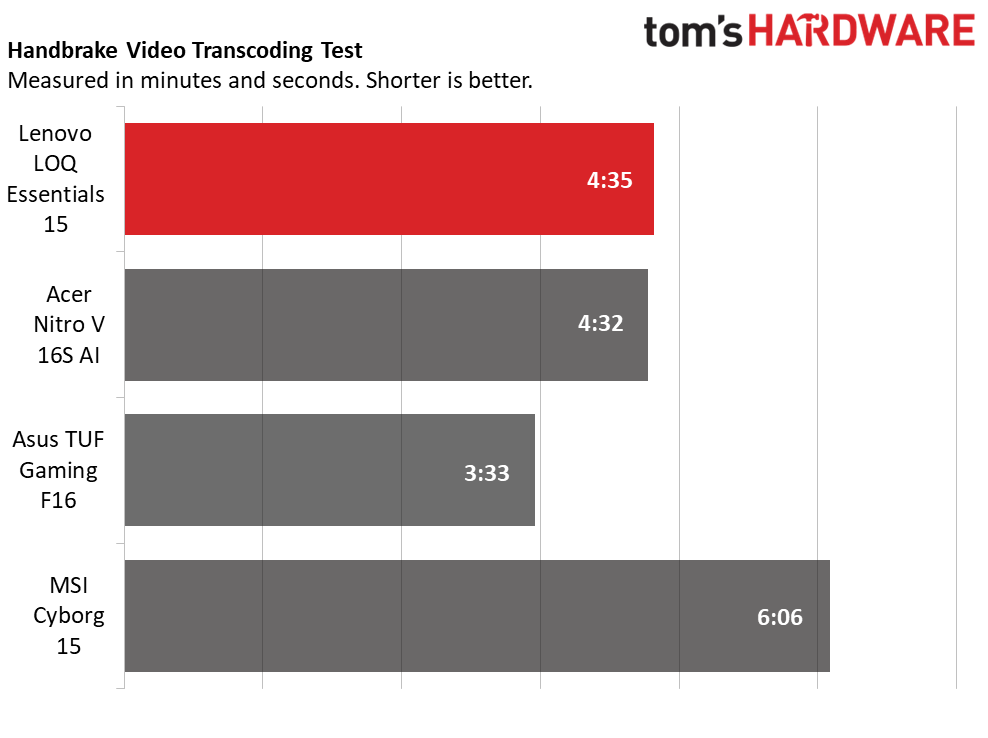
Throughout our testing, the LOQ’s outdated CPU struggled against the newer silicon in the competition, only consistently outpacing the Cyborg with its equally dated Core i5-13420H. In the multi-core portion of Geekbench, the LOQ’s score of 11,300 was well behind the Ryzen 7 260-powered Acer (12,837) and couldn’t touch the Core i7-14650HX-powered Asus (15,013). The Asus also dominated Handbrake, completing that test in 3 minutes and 33 seconds compared to the LOQ’s 4:35.
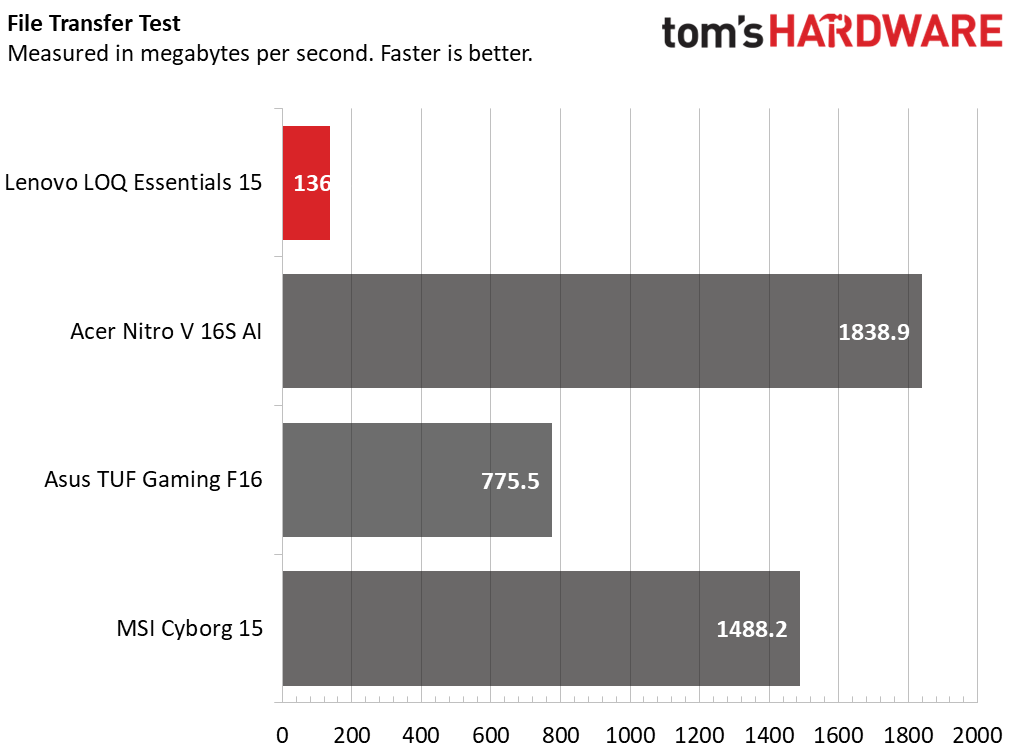
The LOQ’s average speed of 136 MBps in our 25GB file transfer is abnormal, but it also occurred on other drive benchmarks, though I never noticed any issues in loading games. The drive is a WD PC SN5000S using QLC.
Display on the Lenovo LOQ Essentials 15 Gen 11
Lenovo didn’t cut too many corners with the LOQ’s display. The 15.6-inch IPS panel pairs a smooth 144 Hz refresh rate with an anti-glare finish that minimizes reflections. While the 1920 x 1080 resolution isn’t especially sharp by 2026 standards, it isn’t too hard for the RTX 5060 to drive in today’s games.
Watching X2: X-Men United and playing 007 First Light, the LOQ’s display stood out as one that’s better than typical budget laptop fare. Colors have enough punch to make game environments feel lively, and enough contrast to give darker scenes reasonable depth. Brightness is just adequate – the panel is best suited for indoor use and can’t compete with the significantly brighter screen in Acer’s Nitro V 16S AI. Still, for gaming, streaming, and everyday use, the LOQ’s display is one of its better attributes.
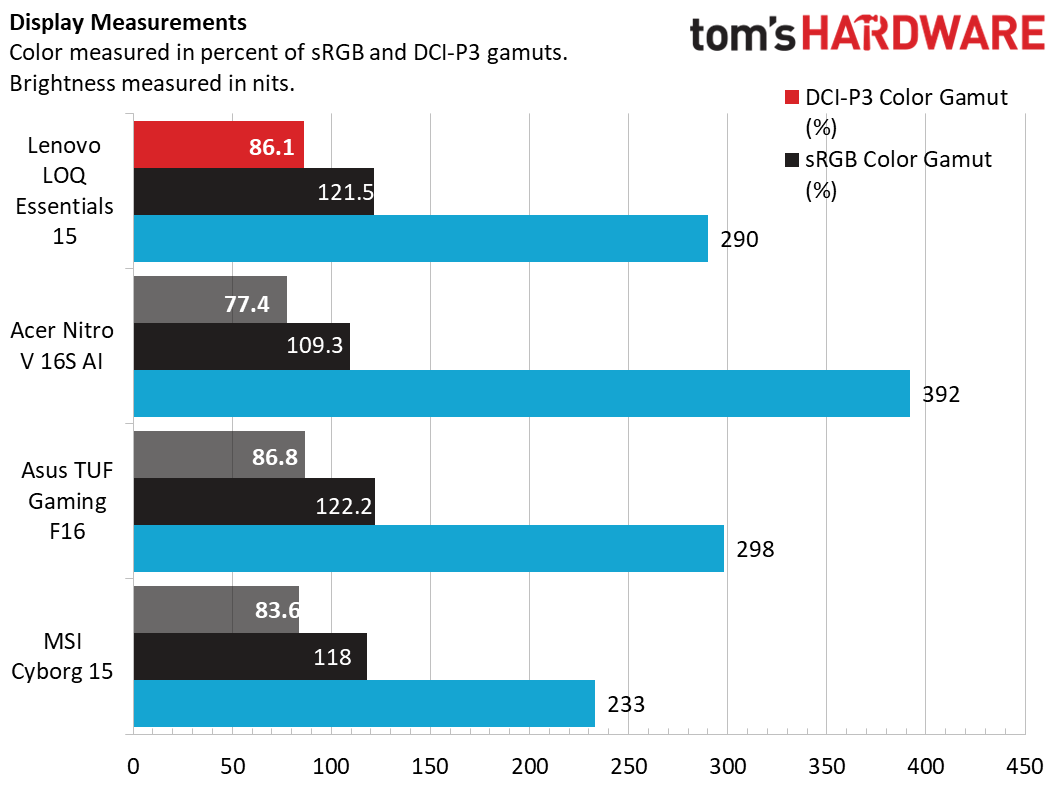
Covering 86.1% of DCI-P3, the LOQ’s display proved more colorful than the Acer (77.4%) and effectively tied the others. Its 290-nit peak brightness was on par with the Asus (298 nits) and brighter than the MSI (233 nits) but not nearly as bright as the Acer (392 nits).
Keyboard and Touchpad on the Lenovo LOQ Essentials 15 Gen 11
Lenovo’s keyboard offers an ample 1.3 mm of travel for comfortable typing sessions. Its two-level white backlighting provides excellent visibility in low light. The number pad isn’t quite full-size but offers the expected layout. In MonkeyType, I reached 122 words per minute with 99% accuracy on the first try.
The touchpad is also well-designed, with a comfortably-sized surface and quiet physical clicks.

Audio on the Lenovo LOQ Essentials 15 Gen 11
The LOQ’s twin 2W speakers produce acceptable sound for a laptop. Bass is lacking, but the sound is clear enough to pick out footsteps and shell cases dropping in games. Overall, the setup works for casual gaming.
The included Nahimic app is essential for sound quality – without it, the speakers are tinny and dull. The Music preset with bass and treble boost works well all around. The Smart preset also gets the job done; my ears didn’t detect much of a difference versus the Music preset. The Movie preset’s virtual surround adds a hollowness that I find unnatural.
Upgradeability of the Lenovo LOQ Essentials 15 Gen 11
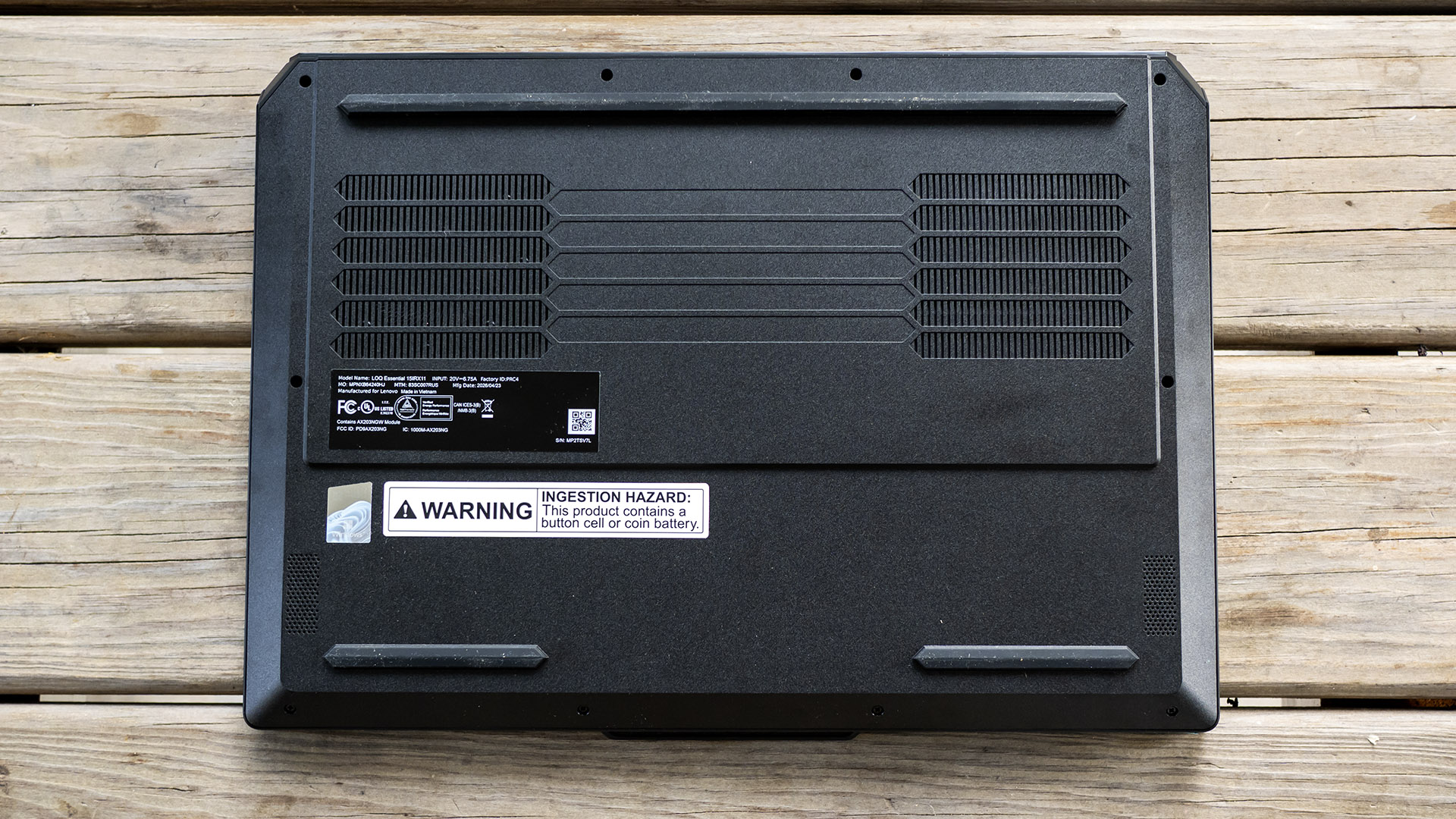
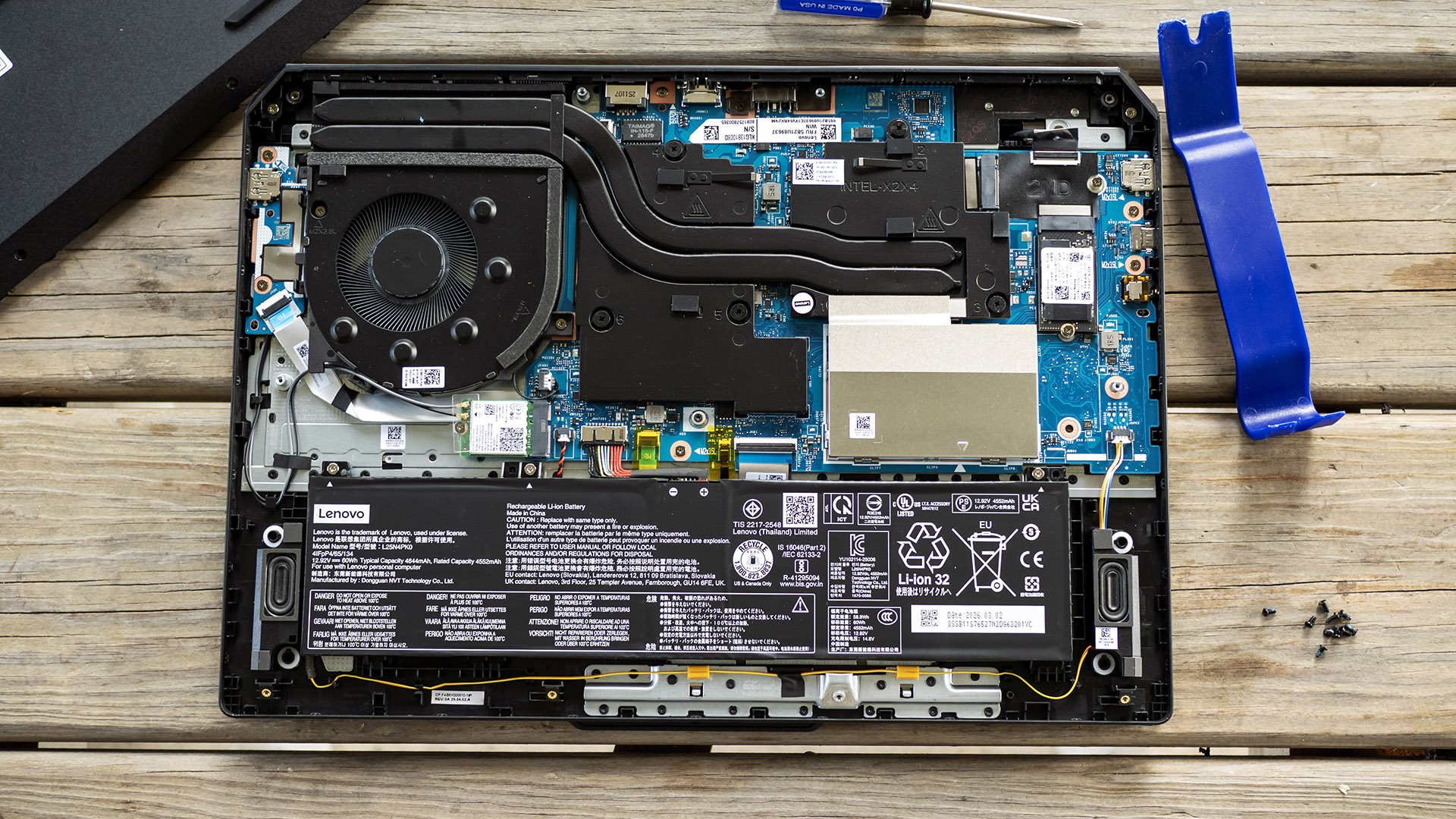
Getting inside the LOQ is somewhat tricky. Removing the Philips-head screws is straightforward – they’re fortunately all the same size – but the bottom panel sits flush with the chassis edges, with no obvious entry points. I created one using my thumb to push in one of the rear chassis corners, which created a gap for my plastic pry tool.
Upgrade prospects are excellent, with two DDR5 SODIMM slots and two SSD slots, one M.2 2280 and one M.2 2242. The 512GB SSD in our model is M.2 2242 format and installed in the M.2 2280 slot. The M.2 2230 wireless card and the battery are also replaceable.
Battery Life on the Lenovo LOQ Essentials 15 Gen 11
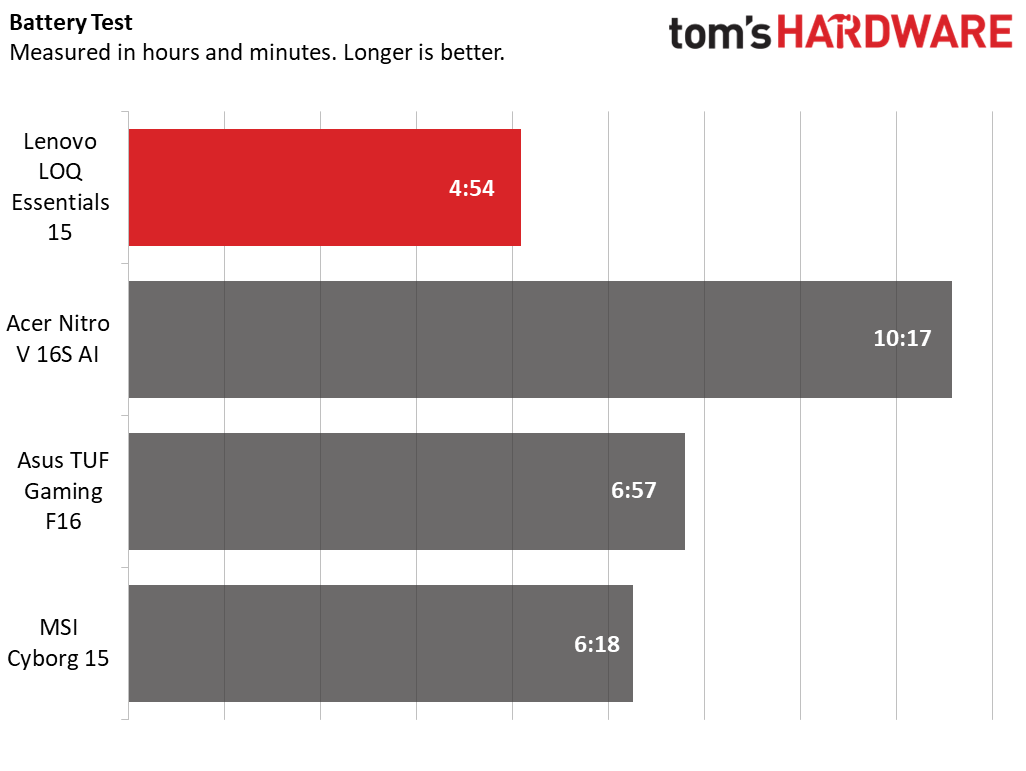
Our battery testing consists of web browsing, running OpenGL tests, and streaming videos with the screen at 150 nits while connected to Wi-Fi. The LOQ’s runtime of 4 hours and 54 minutes is short even for a gaming laptop, with the Asus lasting about two hours longer. Acer’s Nitro completely outclassed it, lasting 10 hours and 17 minutes.
Heat on the Lenovo LOQ Essentials 15 Gen 11
We measure laptop surface temperatures while running the Metro Exodus stress test. The LOQ’s peak temperatures were 108 degrees Fahrenheit (F) between the G and H keys while the touchpad was 79 F. The highest temperature was 112 F on the bottom near the cooling fan exhaust. Internally, the Core i7-13650HX measured 70 degrees Celsius (C) while the RTX 5060 was 66 C.
The LOQ’s fan noise is noticeable while gaming, but is no louder than other entry-level gaming laptops I’ve tested. Its speakers are easily loud enough to be heard over the fans.
Webcam on the Lenovo LOQ Essentials 15 Gen 11
Lenovo’s webcam is a basic 720p model with a soft focus. It handles lighting reasonably well – a lamp behind me wasn’t blown out – but detail is lacking and there’s considerable grain. There’s no physical shutter, but you’ll find an e-shutter switch on the right edge.
Software and Warranty on the Lenovo LOQ Essentials 15 Gen 11
The LOQ includes two main apps. Legion Space shows component readouts like CPU speed and temperature, plus power profile toggles between Performance, Quiet, Balanced, and Custom. The app can also auto-disable the Windows key and auto-close specified apps when games are launched, and prioritize network traffic to apps you specify. An aim assist feature puts a crosshair in the center of the screen. The app also provides access to the Lenovo community and can be a game library.
The Vantage app is familiar across Lenovo laptops for support services, troubleshooting utilities, and system updates. System settings include battery smart charging (limits charge to 80% to extend battery lifespan). The app also has a security advisor that verifies anti-virus and firewalls are active and tells you if a Wi-Fi network is safe. The app contains upsells for Lenovo’s identity protection, system recovery, and performance tuneup subscription services.
Lenovo backs the LOQ with a one-year warranty.
Lenovo LOQ Essentials 15 Gen 11 Configurations
We tested the LOQ equipped with a Core i7-13650HX processor, RTX 5060 graphics card, 16GB of DDR5-4800 single-channel RAM, and a 512GB SSD, retailing for $1,269.99 at Best Buy. It was not yet available directly from Lenovo at the time of this review.
An even more basic spec with a Core i5-13450HX and RTX 5050 is listed on Lenovo’s site as “coming soon” but wasn’t at the time of publishing. All configurations include a 1920 x 1080 IPS display with a 144 Hz refresh rate and Windows 11 Home.
Bottom Line
Lenovo’s LOQ Essentials 15 Gen 11 is a reminder that spec sheets don’t tell the whole story. While it delivers an RTX 5060 and a 144 Hz display for a competitive price, its conservative GPU power limits and older platform leave it trailing rivals in real-world performance. Though it gets many fundamentals right — its display, keyboard, and upgradeability are all solid – it’s ultimately a serviceable gaming laptop rather than a competitive one. At this price, Acer’s Nitro V 16S AI is a stronger value.

