
Lenovo ThinkPad X1 Carbon Gen 14 Aura Edition review: A masterclass in mobility and usability
Lenovo’s ThinkPad X1 Carbon Gen 14 (starts at $2,032; $2,217.30 as tested) enters the laptop market with the poise of a veteran. This series has spent years at the top of the ultralight business stack and shows no sign of slowing down. Light and refined as ever with Intel’s “Panther Lake” silicon and equipped with a class-leading keyboard, OLED display, and enterprise-ready tech, it’s every bit the flagship it’s intended to be. That said, consumer models like Dell’s XPS 14 have also raised the bar, so whether the ThinkPad X1 Carbon’s refinements keep it ahead of the pack remains to be seen.
Design of the Lenovo ThinkPad X1 Carbon Gen 14
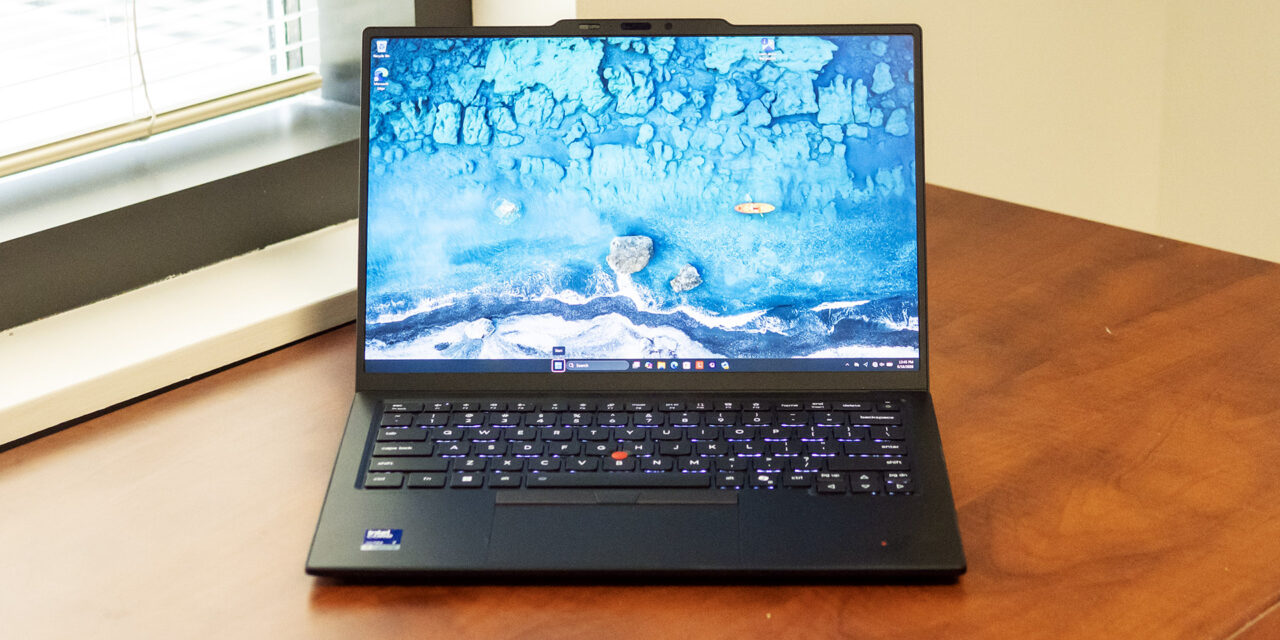
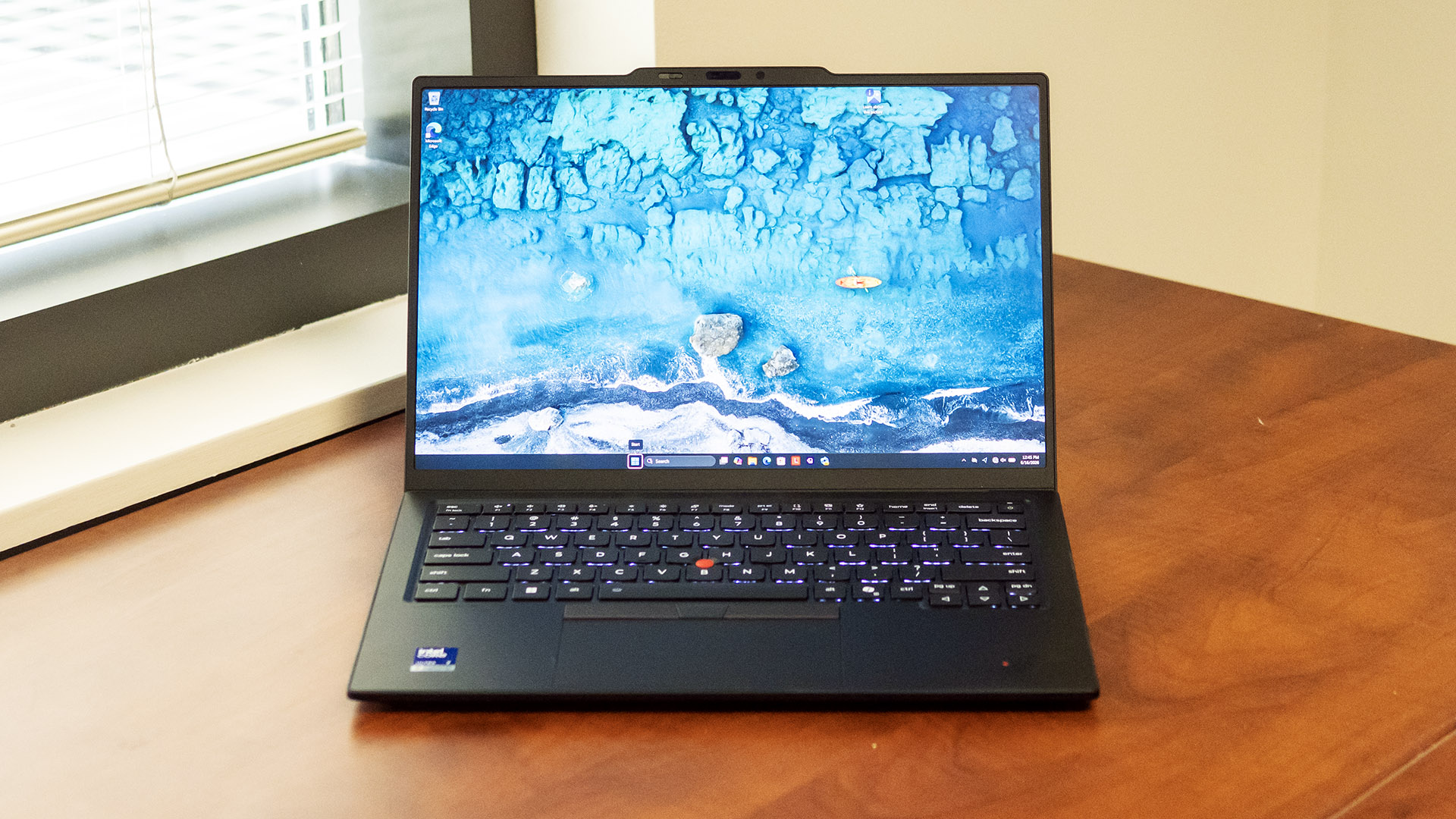
The ThinkPad X1 Carbon Gen 14 may have received a refresh, but its design principles remain unmistakable. Squared edges, matte black surfaces, and functional lines keep it faithful to the lineage that IBM established long ago. The webcam notch is the quickest visual cue that this is a current-generation model. Lenovo’s only real design flourish is the colorful X1 badge on the lid for this flagship; lesser ThinkPads simply have the brand name.
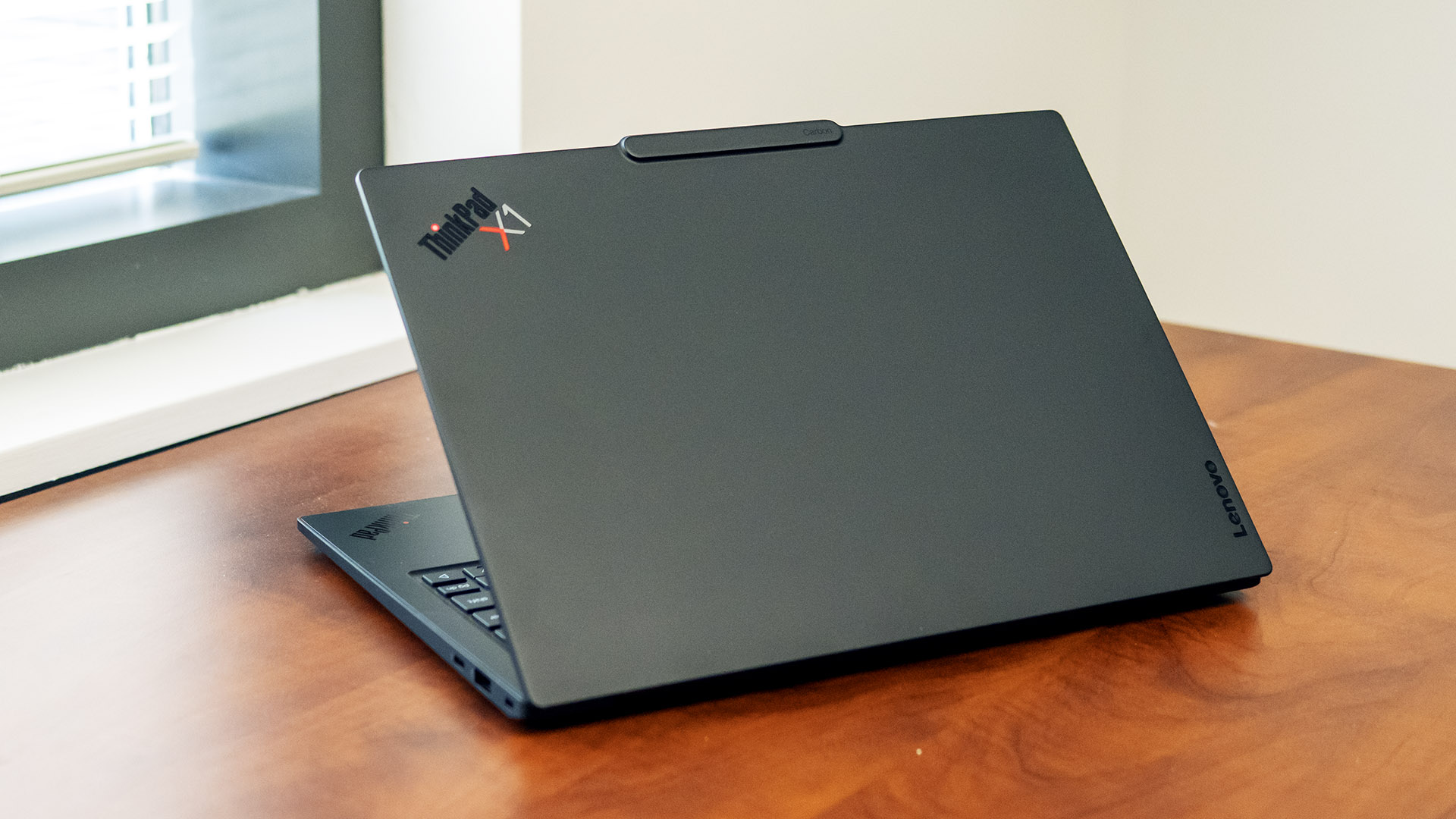
At just 2.15 pounds, the ThinkPad X1 Carbon feels unrealistically light, to the point that I wondered if the unit I received was hollow. Rest assured, there’s a real computer inside, and the build quality is excellent. The outsides are made mostly of lightweight magnesium, with precise fitment and a premium feel. True to the product name, carbon fiber is used, mainly in the lid cover and its internal frame. Rigidity is just average, though; the palm rest and surrounding deck feel solid, but the chassis flexes more than I expected. The lid, however, is impressively stiff, and the hinges are precisely tuned for one-handed opening.
Measuring 12.3 x 8.49 x 0.6 inches, the ThinkPad X1 Carbon has a similar footprint but is much lighter than the 3.4-pound Apple MacBook Pro 14-inch and the three-pound Dell XPS 14.
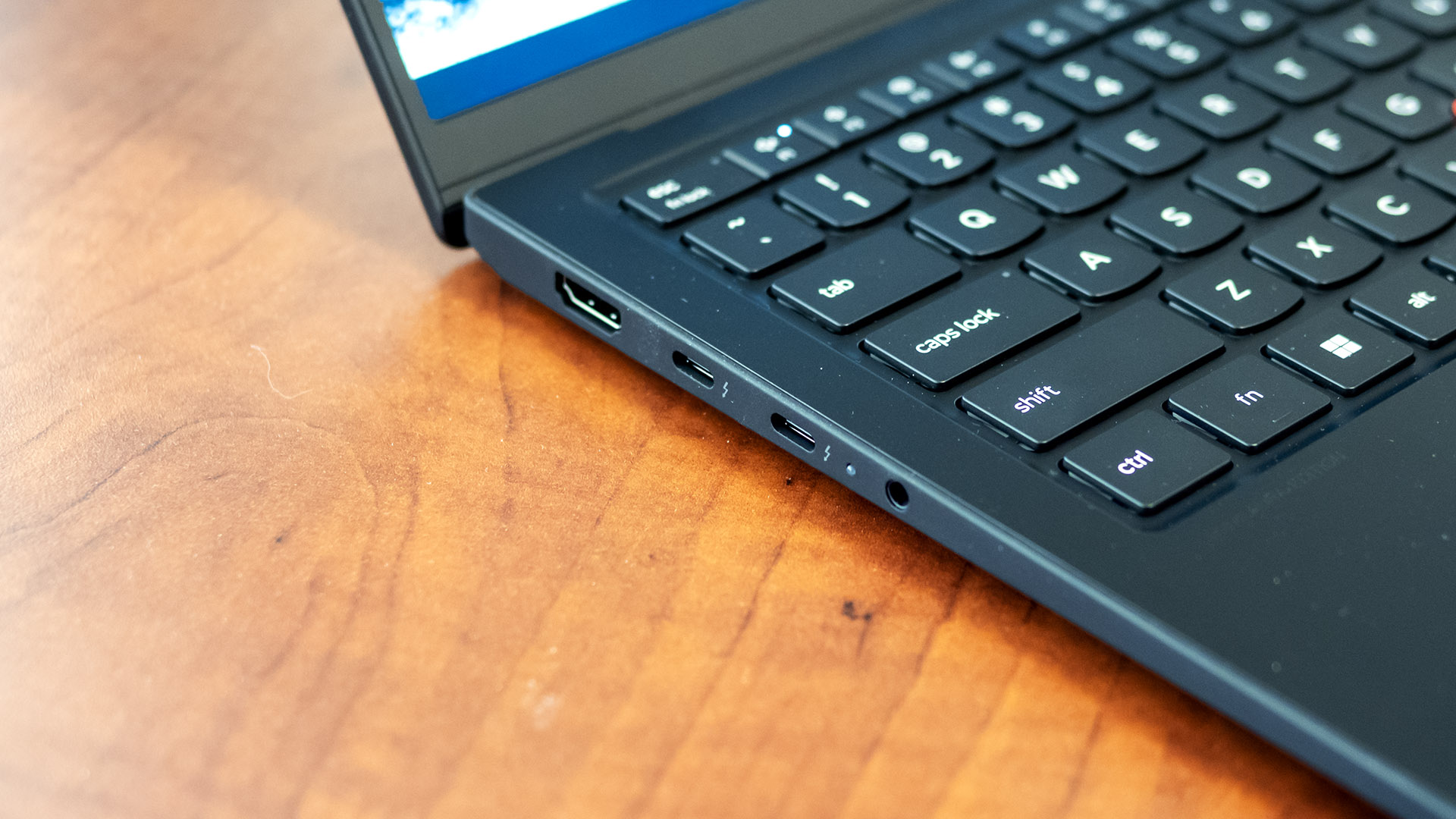
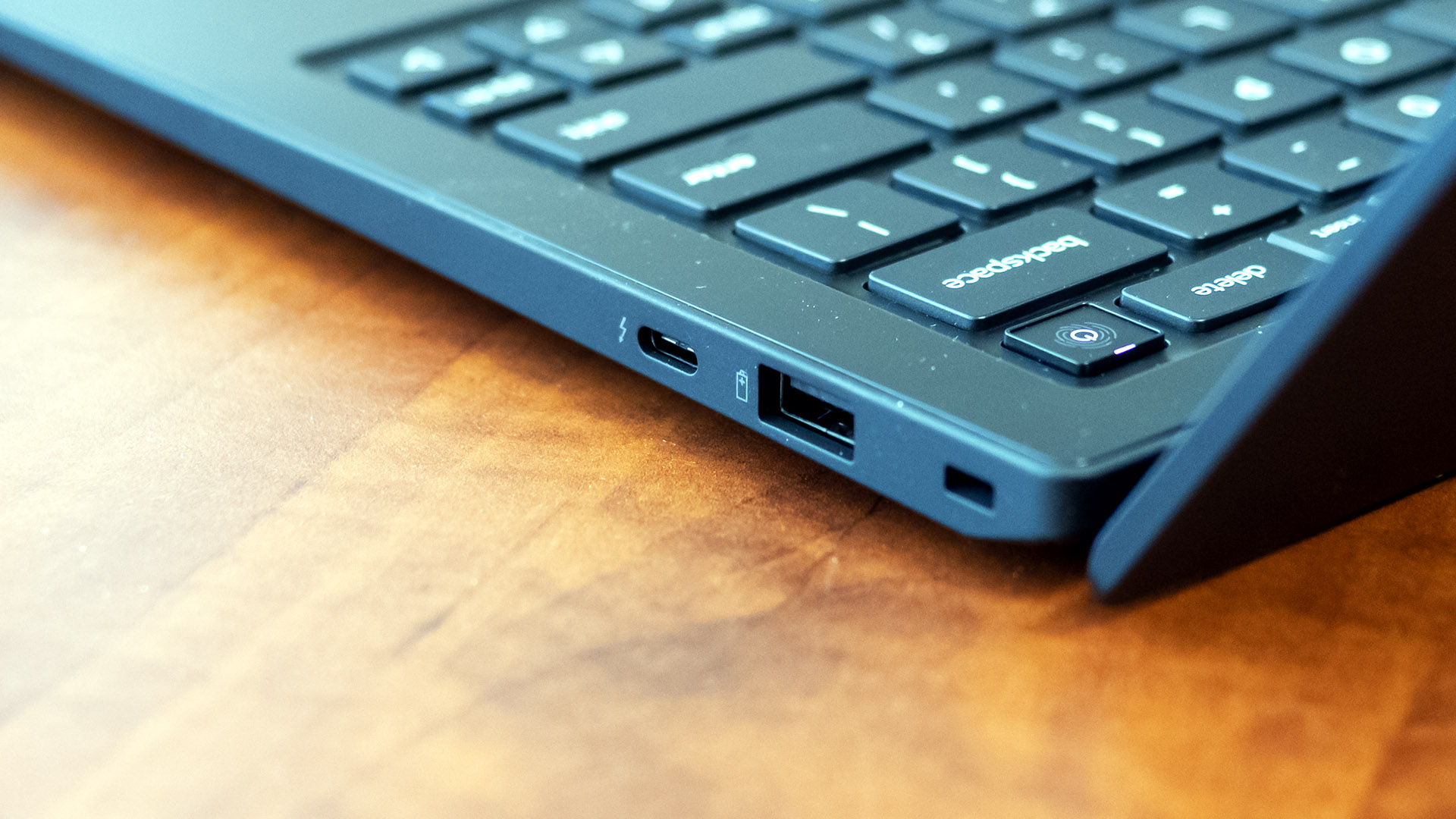
Port selection is decent for an ultraportable, with HDMI 2.1, two Thunderbolt 4 (USB-C), and a headphone jack on the left and another Thunderbolt 4 and a USB-A port on the right. Intel wireless networking provides Wi-Fi 7 and Bluetooth 5.4. Cellular WAN is available.
Lenovo ThinkPad X1 Carbon Gen 14 Specifications
|
CPU |
Intel Core Ultra 7 355 |
|
Graphics |
Intel Graphics |
|
Memory |
32GB LPDDR5X-7467 |
|
Storage |
512GB PCIe 4.0 SSD |
|
Display |
14-inch, 2880 x 1800, OLED, non-touch, 120 Hz VRR |
|
Networking |
Intel BE201 Wi-Fi 7, Bluetooth 5.4 |
|
Ports |
3x Thunderbolt 4 (USB-C), USB-A, HDMI 2.1, headphone |
|
Camera |
5MP IR |
|
Battery |
58 Whr |
|
Power Adapter |
65 W, Type-C |
|
Operating System |
Windows 11 Pro |
|
Dimensions (WxDxH) |
12.3 x 8.49 x 0.6 inches (313 x 216 x 15 mm) |
|
Weight |
2.15 pounds (0.98 kg) |
|
Price (as configured) |
$2,217.30 |
Productivity Performance on the Lenovo ThinkPad X1 Carbon Gen 14
We tested the ThinkPad X1 with a Core Ultra 7 355 processor, 32GB of RAM, and a 512GB PCIe 4.0 SSD. This “Panther Lake” processor features four Performance and four Low Power Efficiency (LPE).
For performance comparison, we included the Apple MacBook Pro (14-inch, 10-core M5; $2,349 as tested), Asus Zenbook Duo (Core Ultra X9 388H; $2,299.99), and the Dell XPS 14 (Core Ultra 7 355; $1,699.99). These are all premium systems that you might consider if you’re cross-shopping consumer models. The Apple and Asus use significantly stronger processors, though the ThinkPad X1 Carbon and the XPS 14 can be equipped with the Core Ultra X-series to compete in that tier if you’re willing to spend even more.
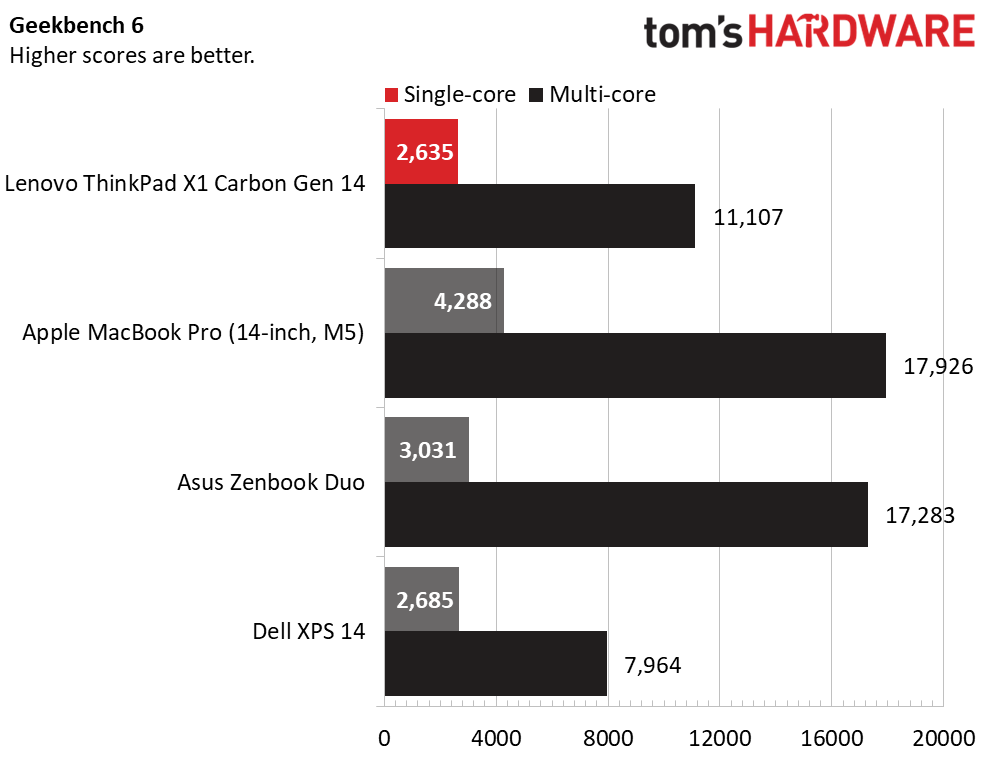
On the cross-platform Geekbench 6 benchmark, the ThinkPad X1 Carbon’s single-core score of 2,635 points matched the XPS 14, an expected result considering they both use the Core Ultra 7 355, but the ThinkPad trounced it in multi-core, with 11,107 points to Dell’s 7,964. Neither machine proved a match for Apple’s M5, particularly in single-core. With both Apple and Asus scoring over 17,000 points in the multi-core portion, their processors are clearly in a different league.
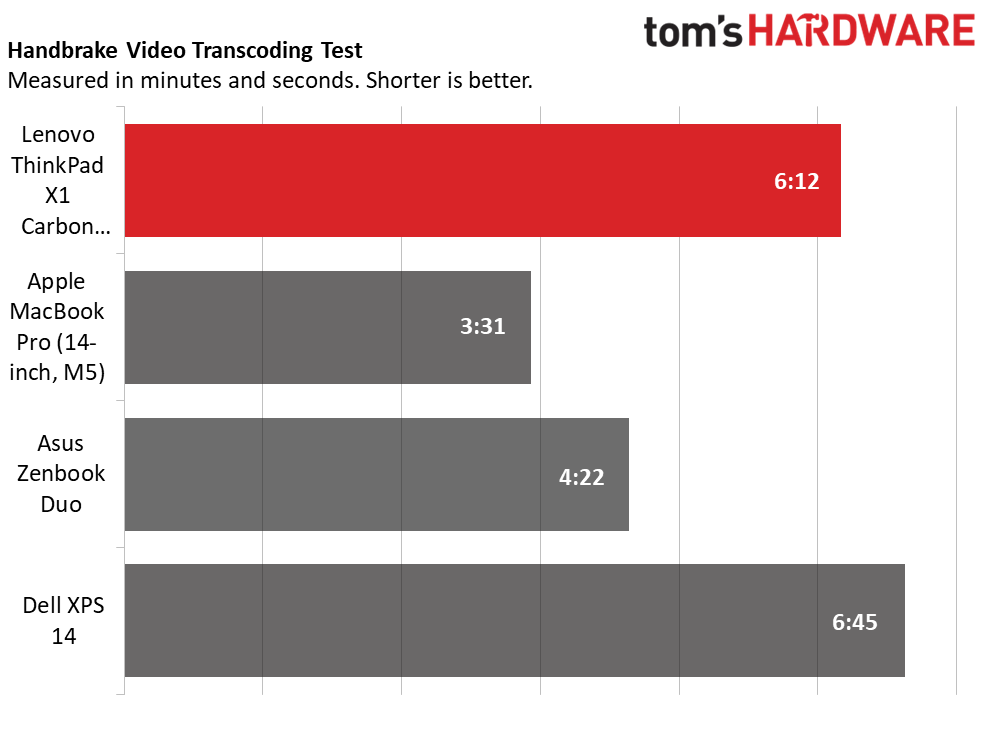
The ThinkPad X1 Carbon finished our 4K-to-1080p video transcoding test in 6 minutes and 12 seconds, more than 30 seconds quicker than the XPS 14 but not competitive with the Asus (4:22) and MacBook Pro (3:31).
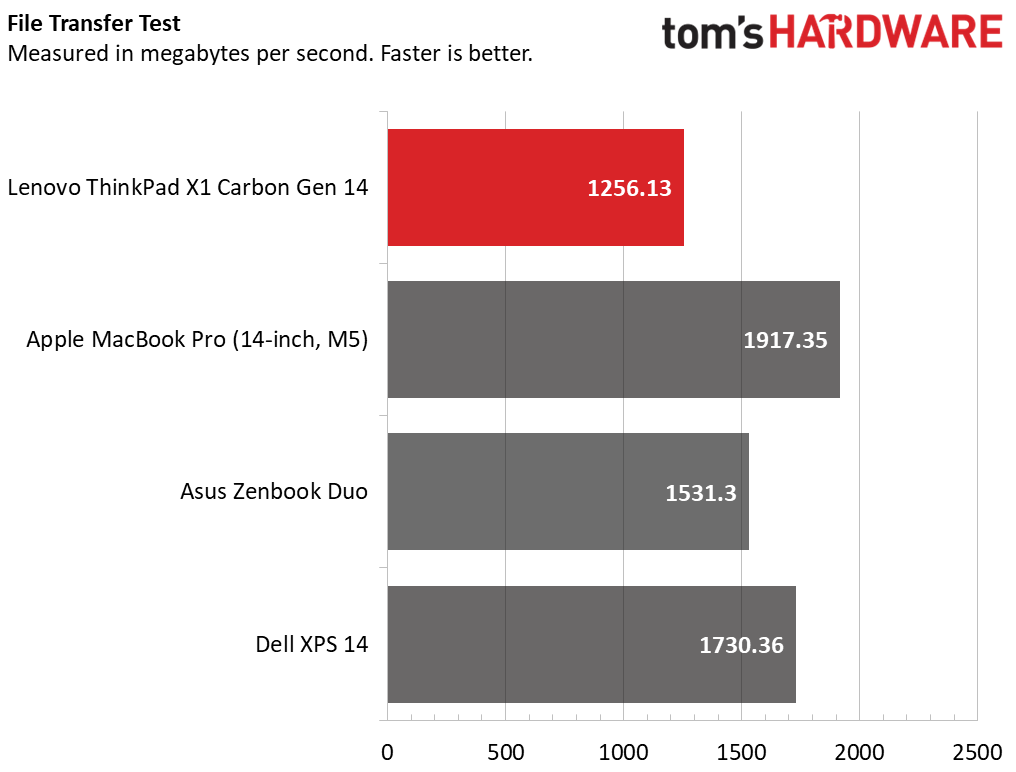
Last, the ThinkPad X1 Carbon completed our 25GB file transfer test with an average transfer rate of 1,256.31 MBps, well behind the Asus’ 1,531.3 MBps and not anywhere close to the MacBook Pro’s leading 1,917.35 MBps.
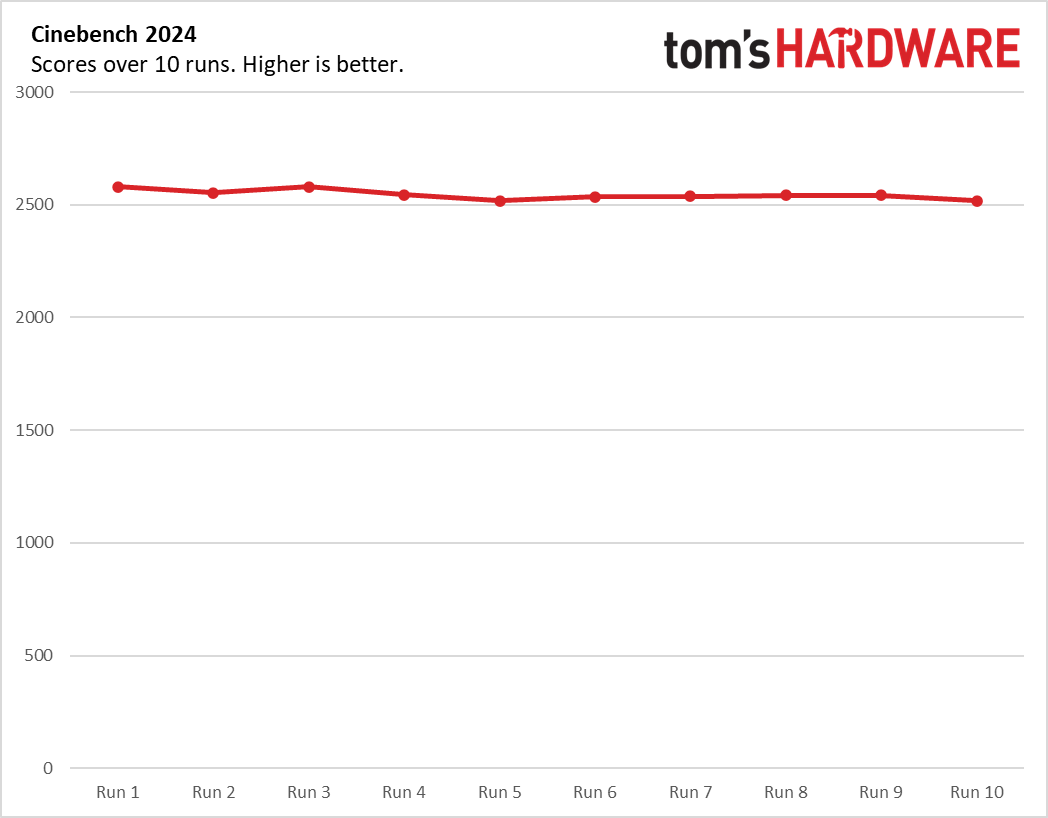
To stress test productivity laptops, we run 10 loops of Cinebench 2026. The ThinkPad X1 Carbon scored 2,581 points in the first loop and stayed within the 2,500-to-2,600-point range for the remaining loops, demonstrating stable performance. The P-cores ran at an average clock of 3.73 GHz while the LPE-cores ran at 3.46 GHz.
Graphics on the Lenovo ThinkPad X1 Carbon Gen 14
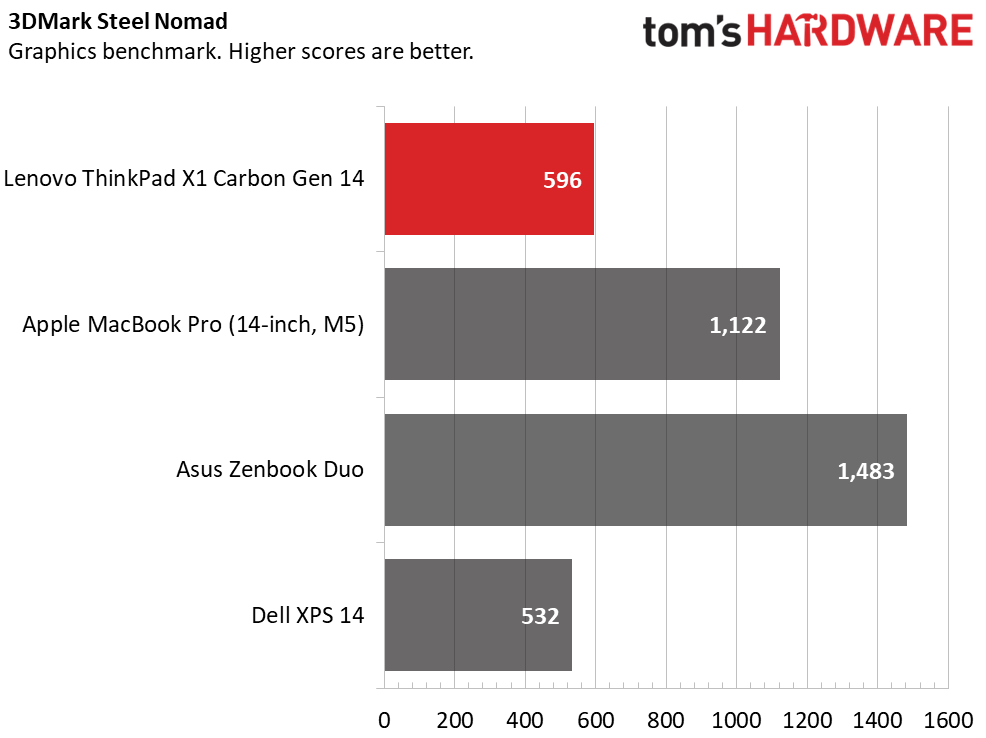
We run 3DMark Steel Nomad to gauge raw graphics horsepower. Scoring 596 points, the Intel Graphics inside the ThinkPad X1 Carbon are adequate for basic use but little else. The Arc B390 integrated chip in the Asus’ Core Ultra X9 proved far more robust, leading the group with 1,483 points, followed by the MacBook Pro with 1,122 points.
Display on the Lenovo ThinkPad X1 Carbon Gen 14
Our ThinkPad X1 Carbon uses the 2880 x 1800 OLED panel, an upgrade over the base 1920 x 1200 IPS screen. It produces memorable visuals no matter what you’re viewing. In Dune: Part One, I noted the brilliant white sands of the desert and the inky depths of space. Disney’s Zootopia showed its deep, vibrant color that kept me watching longer than I intended. The anti-glare surface does a commendable job of reducing glare. This panel doesn’t support touch, but you can option touch versions of both the 1920 x 1200 IPS and OLED panels.
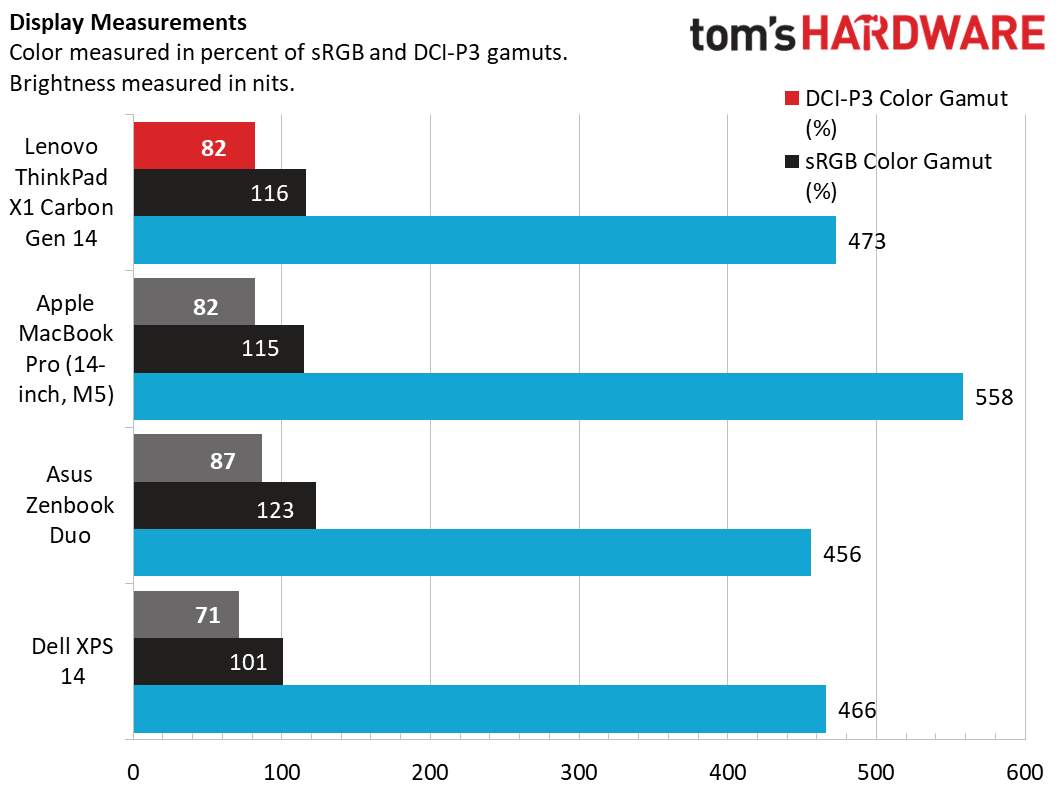
The ThinkPad X1 Carbon’s numbers leave little doubt that it has an excellent display. Its color coverage – 82% of DCI-P3 and 115% of sRGB – were within a percentage point of the MacBook’s, just shy of Asus’ 87% and 123%, and ahead of the Dell’s 71% and 101%. Its 473-nit peak brightness is impressive considering it uses an OLED panel, which are often close to or just shy of 400 nits.
Keyboard and Touchpad on the Lenovo ThinkPad X1 Carbon Gen 14
The ThinkPad X1 Carbon maintains Lenovo’s standard for excellent input devices. The keyboard feels more cushioned than my older ThinkPad X13 yet still provides plenty of key travel for engaging feedback – my fingers intuitively knew when I reached the top and bottom of the keystroke. Keystrokes sound slightly rubbery, with less clack than my older ThinkPad, but still pleasant. The keyboard deck is rock solid and doesn’t flex. Highly visible white backlighting makes typing in the dark a breeze.
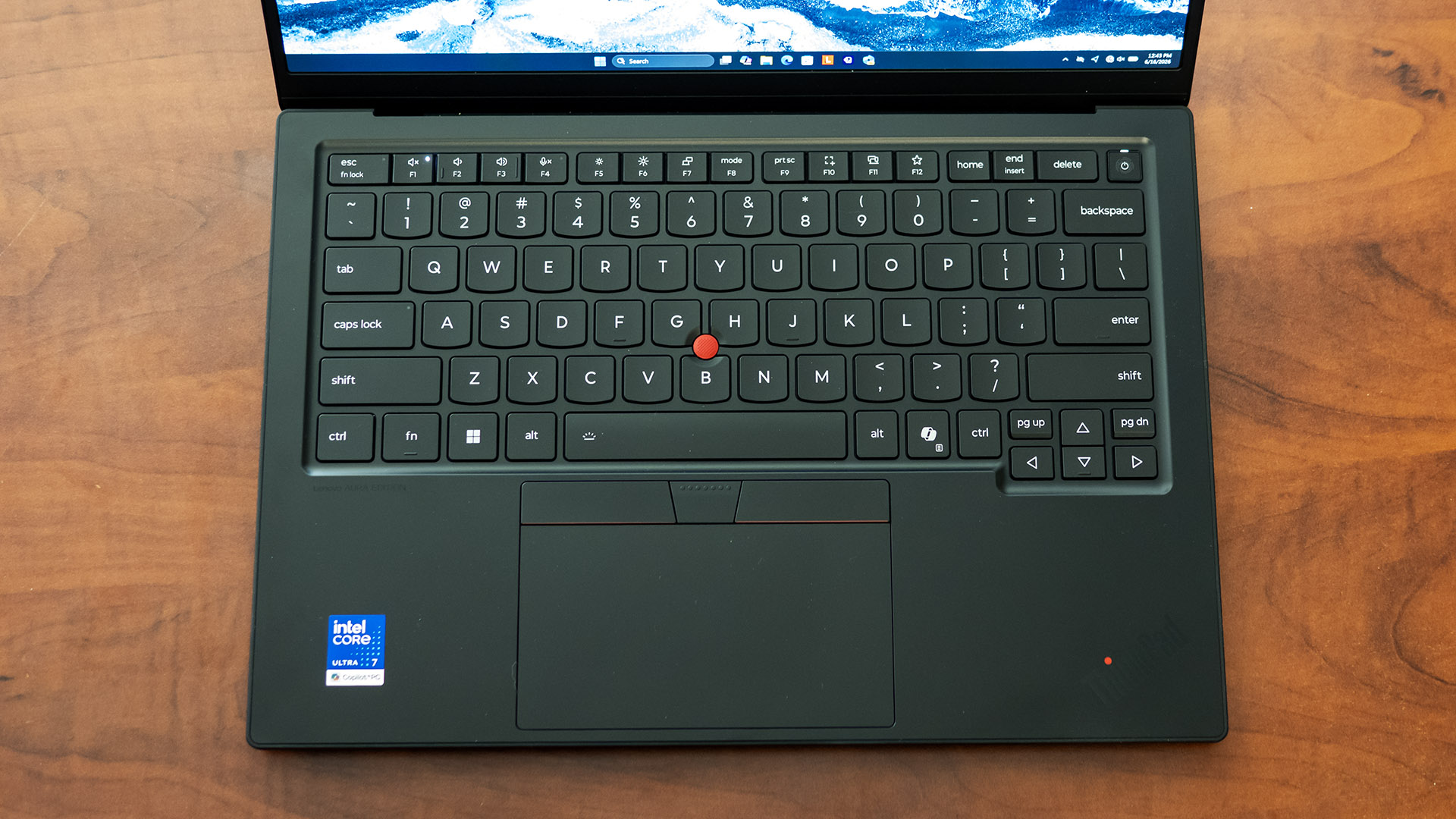
The layout is highly intuitive, with an inverted-T arrow cluster, dedicated Home/Page Up/Page Down/End/Delete keys, and a programmable F12 shortcut key. The power button at top right is also a fingerprint reader. Classic ThinkPad users will notice Lenovo switched to the mainstream left Ctrl and Fn key arrangement, but they can be swapped in the Vantage app.
The ThinkPad X1 Carbon touchpad that we tested is mechanical, but a haptic version is available as a no-cost option on customized models. The pad’s top-hinged design works reliably and delivers a firm, satisfying click. The three buttons above the pad couple with the classic TrackPoint pointing solution in the middle of the keyboard. ThinkPads are the only laptops that have them anymore.
Audio on the Lenovo ThinkPad X1 Carbon Gen 14
I listened to my test audio tracks multiple times on the ThinkPad X1 Carbon since the speakers sounded that good – who would have thought a business laptop could so easily double for entertainment?
In William Black & Luka’s “Bleed 4 U”, I heard crisp vocals, well-separated instruments, and detailed, impactful bass — this setup didn’t skip a beat or distort in any way when the drops hit.
The Atmos Detailed preset in the Dolby Access app (its default setting) evened out the soundstage for a clearer tone. I switched to the Detailed preset to sharpen the drum hits and vocals in a vinyl rip of “Shattered Dreams” by Johnny Hates Jazz, which also didn’t show any distortion even at maximum volume. The realistic volume limit is around 80%, after which the setup doesn’t get audibly louder. This setup is easily loud enough for personal listening.
Upgradeability of the Lenovo ThinkPad X1 Carbon Gen 14
User-upgradeable components in the ThinkPad X1 Carbon are limited to its M.2 2280 SSD and battery pack; models with WAN can also have that module upgraded. Access through the bottom panel is straightforward – four captive Philips-head screws loosen it, then the clips need to be popped along the back edge, which were snugger than I thought. Lenovo maintains an excellent hardware maintenance manual and even provides a video walkthrough on YouTube.
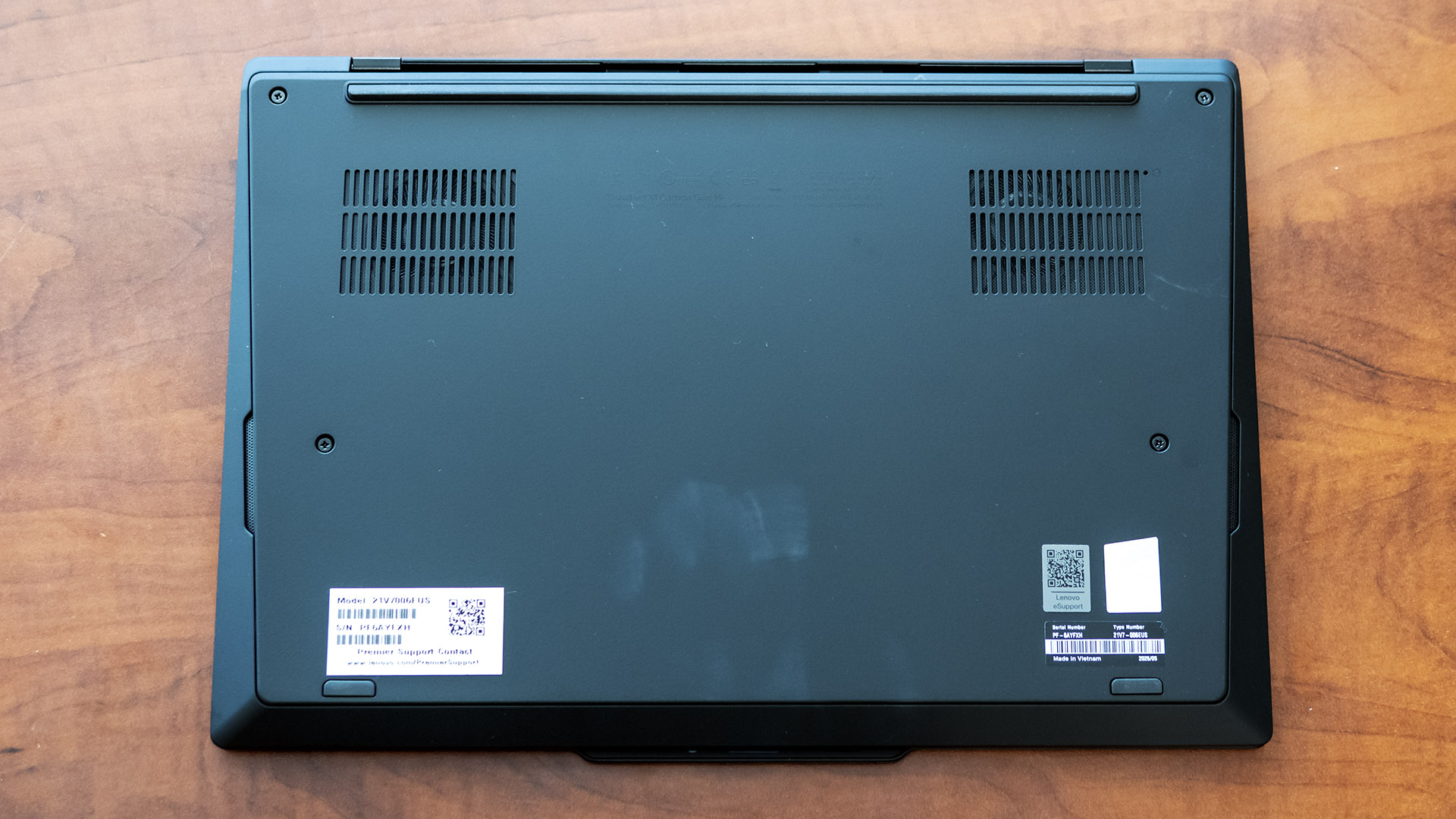
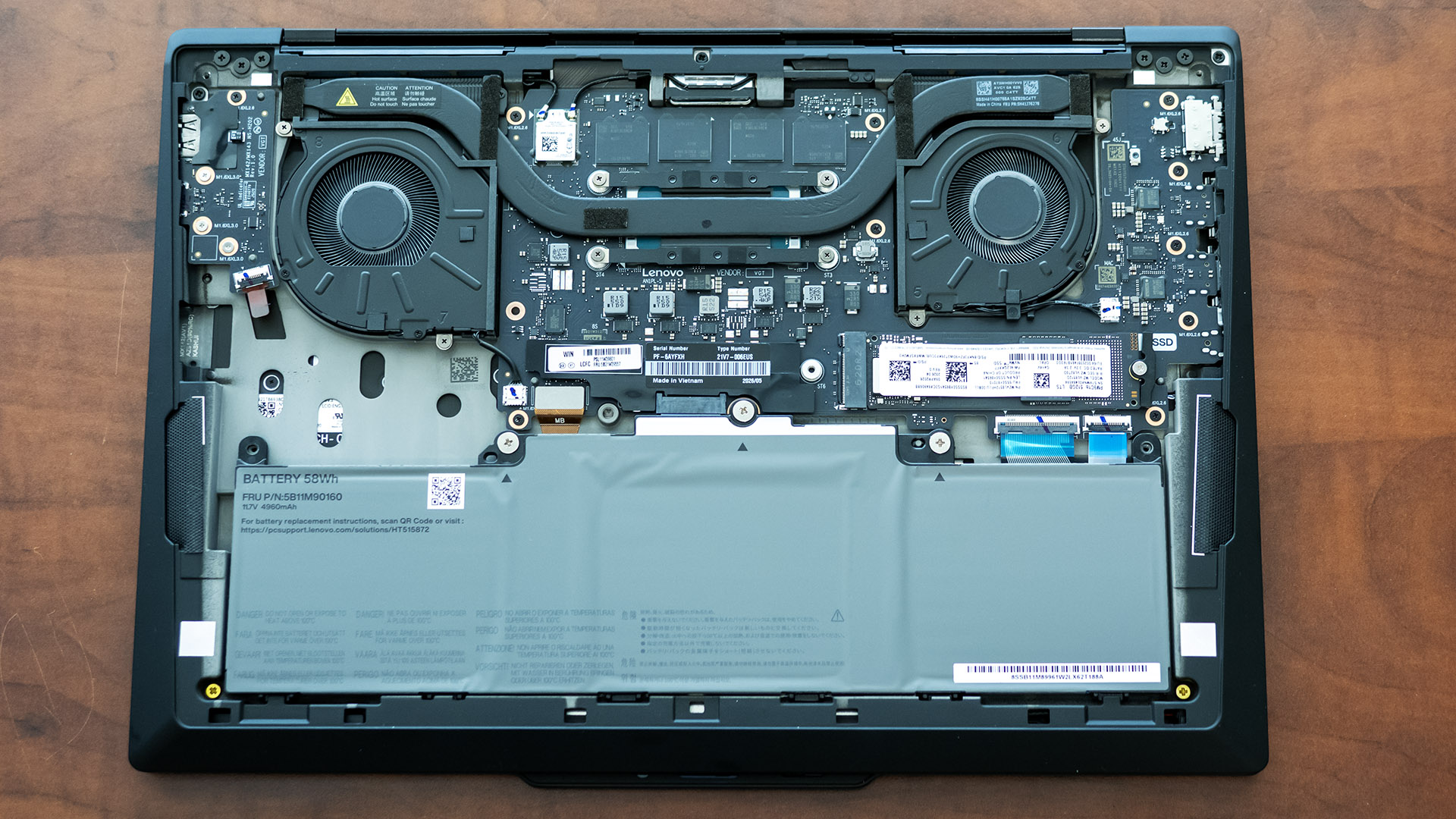
Lenovo advertised a 9/10 iFixIt score, citing that the keyboard, daughter I/O board, and USB-C ports are also customer replaceable.
Battery Life on the Lenovo ThinkPad X1 Carbon Gen 14
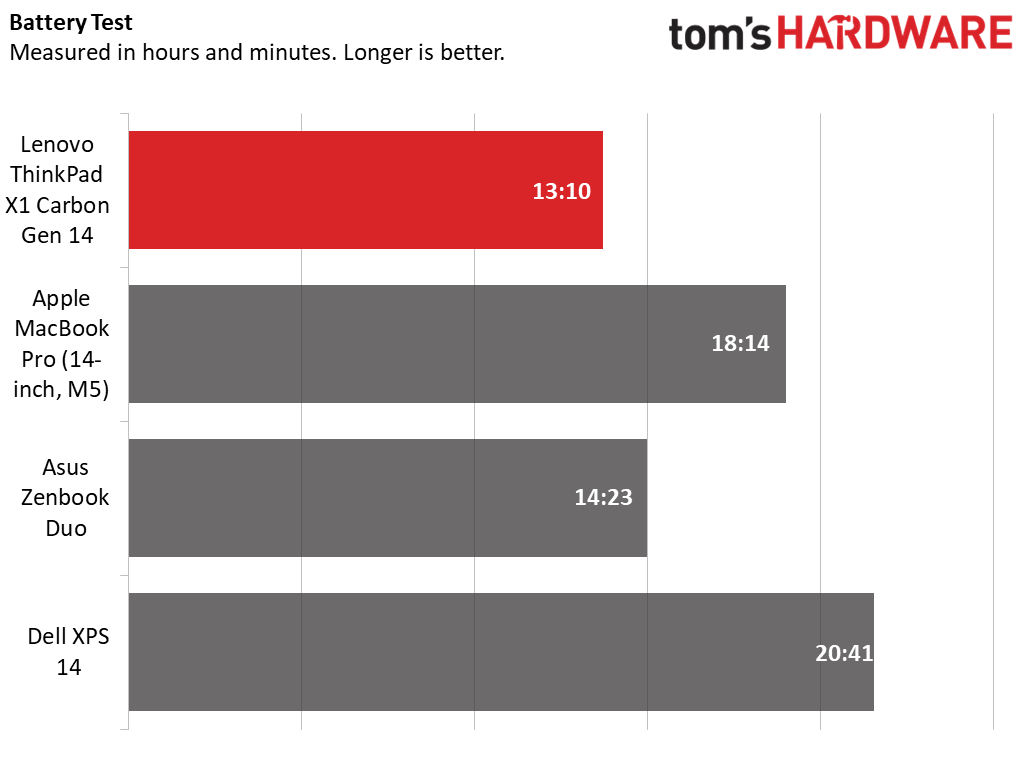
The ThinkPad X1 Carbon lasted 13 minutes and 10 seconds in our battery test, which consists of web browsing, running OpenGL tests, and streaming videos with the screen at 150 nits while connected to Wi-Fi.
Though not a leading time – the Zenbook Duo lasted 14:23 with one screen active while the MacBook Pro went for 18:14 – it’s still an impressive showing considering it uses an OLED panel. Dell’s XPS 14 lasted an astounding 20:41, but that’s with the IPS screen; equipped with an OLED screen and more powerful processor, it lasted only 12:23 (not shown in the charts), and that’s with a 70 Wh battery whereas the ThinkPad X1 Carbon’s is rated for just 58 Wh.
Heat on the Lenovo ThinkPad X1 Carbon Gen 14
During our 10-loop Cinebench 2026 stress test, the ThinkPad X1 Carbon’s surface temperatures peaked at 72 degrees Fahrenheit on the touchpad, 94 degrees between the G and H keys, and 106 degrees on the underside. Internally, the Core Ultra 7 355 averaged 91 degrees Celsius across all cores.
Webcam on the Lenovo ThinkPad X1 Carbon Gen 14
This ThinkPad’s 1440p webcam produces an impressively sharp and well-lit picture. I could make out the wood grain on a door about 10 feet away and even the individual hairs on my cat who was looking over my shoulder. Bright lights, like windows and lamps, were properly exposed, and didn’t cause my person to be underexposed. The webcam includes an IR sensor for facial recognition and the security of a sliding privacy shutter.
Software and Warranty on the Lenovo ThinkPad X1 Carbon Gen 14
Lenovo’s main app is Commercial Vantage, a hub for support access, system updates, and user settings. Those settings include battery smart charging, OLED power settings (taskbar, background, and display dimming), Fn/Ctrl key swap, F12 user shortcut key configuration, and keyboard backlighting brightness. Some settings have moved out of this app into Windows Settings, such as presence detection and display color temperature.
Vantage also provides access to the Aura Edition’s special Smart Modes: Working, Gaming, Creating, Entertainment, Meeting, and Learning. The system automatically switches between the modes depending on the user’s activity. These modes are a combination of settings, some of which are or aren’t enabled for a given mode: auto-prompt VPN (launches a configured VPN client), attention timer (a time limit where notifications are silenced, with a default of 30 minutes), distracting domains (automatically blocks popular social media sites), Wi-Fi fencing (only connects to wireless networks that you designate “safe”), Dolby Audio (sets the mode to Voice, Movie, Music, and so on), and microphone noise canceling mode and listening range. If you move between different environments, like an office to a crowded café, you could tweak the settings and get some usefulness out of this, though I wouldn’t consider it an essential selling point.
As for other apps, Lenovo Smart Share lets you share content from your phone, such as photos, and assists connecting Bluetooth devices.
The ThinkPad X1 Carbon comes with a one-year minimum warranty with mail-in service, though preconfigured models often include three years with onsite coverage. Coverage and service plans are available up to five years with accidental damage protection.
Lenovo ThinkPad X1 Carbon Gen 14 Configurations
We tested a midrange ThinkPad X1 Carbon Gen 14 Aura Edition with a Core Ultra 7 355 processor, Intel Graphics, 32GB of memory, a 512GB SSD, and a non-touch OLED display, retailing for $2,217.30.
The starting model is $2,032 at this writing, though Lenovo’s frequent sales can change the price. CPU options begin with the Core Ultra 5 335 and top out with the vPro-enabled Core Ultra 7 365. Models with the Core Ultra X7 are also supposed to be available but I didn’t see them on Lenovo’s site at the time of writing. Memory is available in 16GB, 32GB, or 64GB configurations depending on the processor. The base 1920 x 1200 IPS display can be upgraded to a 2880 x 1800 OLED panel, with either panel available with touch, though only OLED offers a 120 Hz refresh rate. A privacy screen option only comes in 1920 x 1200 display.
Bottom Line
Lenovo’s ThinkPad X1 Carbon Gen 14 delivers everything that a flagship ultraportable should. Its featherweight chassis, best-in-class keyboard, vibrant OLED display, and competent everyday performance make it an ideal fit for professionals or prosumers who take their work with them. It even doubles as a surprisingly capable entertainment machine thanks to its impressive speakers.
While consumer rivals like Dell’s XPS 14 offer similar performance, the ThinkPad X1 Carbon remains the productivity go-to because of its superior keyboard, broader port selection, and enterprise-ready options like vPro and WAN availability. For those willing to accept a thicker and heavier machine and use macOS, Apple’s 14-inch MacBook Pro remains the performance benchmark in this category.
Overall, the ThinkPad X1 Carbon Gen 14 remains an impeccable blend of portability, polish, and practicality, a mix that earns it a place among our recommendations.