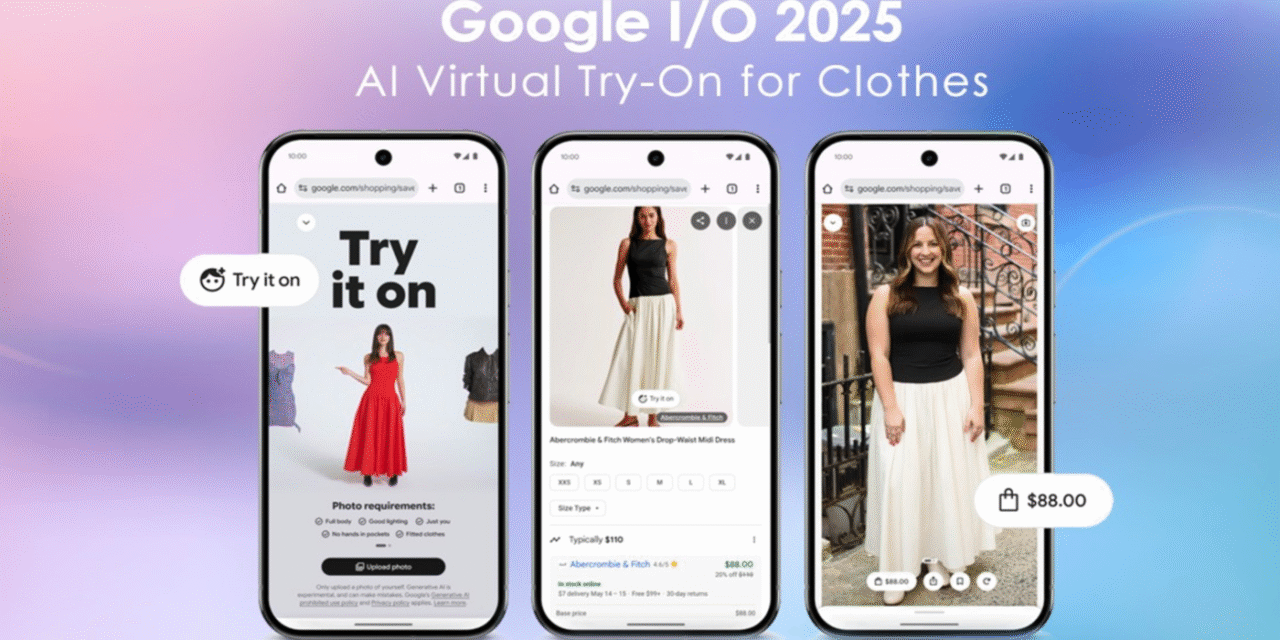
Google has rolled out a major update to AI Mode that makes results far more visual and easier to refine in conversation. Inspiration queries and shopping get image grids, product tiles, and richer context, while the back-and-forth flow reduces the need to rewrite your query. Below is a clean, premium brief you can publish—structured, readable, and optimized for your Tech category.
What changed (in plain English)
Google’s AI Mode now shows, not just tells. For queries where pictures matter—ideas, styles, products—you’ll see collages and tappable tiles that update as you ask follow-ups. The assistant keeps context across turns, so “make it under $150,” “prefer minimalist,” or “show similar with better battery life” instantly reshapes the results. The net effect is less pogo-sticking through links and more guided exploration directly in the results.
How the new flow works
You start with a broad intent (“set up a compact home office with hidden cable management”) and AI Mode builds an image-rich canvas you can steer conversationally. Each follow-up behaves like a constraint or style tweak, narrowing brands, prices, specs, or aesthetics without losing context. When you’re close to a decision, AI Mode can surface specs, reviews highlights, and availability cues, shortening the path from browsing to taking action.
Why this matters for shopping and inspiration
Traditional search makes you translate a fuzzy idea into precise keywords; the update lets you describe the vibe and refine visually. For shopping, product tiles and attribute filters reduce the cognitive load of parsing long lists and irrelevant links. For inspiration—decor, fashion, setups, travel ideas—the iterative, visual approach helps you converge on taste faster, especially when you don’t know the right words yet.
Availability and rollout
The upgrade is live in the U.S. (English) inside the Google app and mobile web, with staged expansion typical of Google feature launches. Desktop experiences are improving in parallel, but the best version right now appears on mobile where touch and swiping pair naturally with image-led results. As with other AI features, markets and languages will roll out gradually based on quality, safety, and local compliance.
Practical examples you can try today
Ask for a “quiet, low-profile mechanical keyboard for typing all day” and refine with “under $120,” “hot-swappable,” or “no RGB.” Brainstorm “compact desk setups for a 14-inch laptop” then add “wood finish,” “VESA arm,” or “hide cables.” For lifestyle, try “running shoes for flat feet, daily 5K” and adjust with “neutral colors,” “wide toe box,” or “on sale.” In each case, the results shift visually while AI Mode keeps the constraints in mind.
Differences from Voice Search, Lens, and classic results
Voice Search is one-shot; Lens identifies things from a still; classic results are link-first. The new AI Mode blends them: conversational refinement plus persistent visual context. You still get links for depth, but the first screen is now a working board of images and options, not just ten blue links. That makes it particularly strong for multi-step decisions where you’d otherwise bounce between tabs.
Publisher & SEO implications (what to fix this week)
If you sell or review products, this update raises the bar on images and structured data. Use clean, high-resolution imagery (multiple angles), compress responsibly, and add descriptive alt text. Ensure Product schema is complete (price, availability, ratings, brand, GTIN where relevant) and keep feeds fresh; stale inventory erodes trust. For editorial, comparison tables and visual summaries (charts, swatches, annotated photos) tend to surface better in image-led contexts.
Privacy, controls, and safety
The experience follows Google’s standard Search policies and protections. You can opt out of personalized results where applicable, and sensitive categories still route to authoritative sources with careful phrasing. Visual-heavy answers prioritize useful, safe imagery; for topics where pictures add little value, AI Mode falls back to text-forward summaries and links.
Limitations and caveats
Availability is not yet global, and some verticals won’t show the full image-led treatment until coverage and data quality mature. Network quality and device performance affect responsiveness, especially on older phones with heavy image grids. Finally, while results are more decision-oriented, complex research still benefits from opening sources—use the visuals to narrow, then click through for depth.
What to watch next
Expect tighter integration with Search Live (voice + camera) so inspiration and shopping can pivot into real-time guidance. For merchants, watch for deeper Merchant Center hooks, richer variant handling (size, color), and more granular review snippets. For publishers, Google will likely reward pages that pair strong visuals with structured facts, so investing in image pipelines is now a ranking as well as a UX move.
Bottom line
AI Mode’s visual upgrade turns many searches into a conversation you can see. It’s faster for fuzzy intents, smarter for shopping, and friendlier to users who think in pictures before words. For brands and publishers, the message is clear: great images + clean data are no longer nice-to-haves—they’re your ticket onto the first screen.