
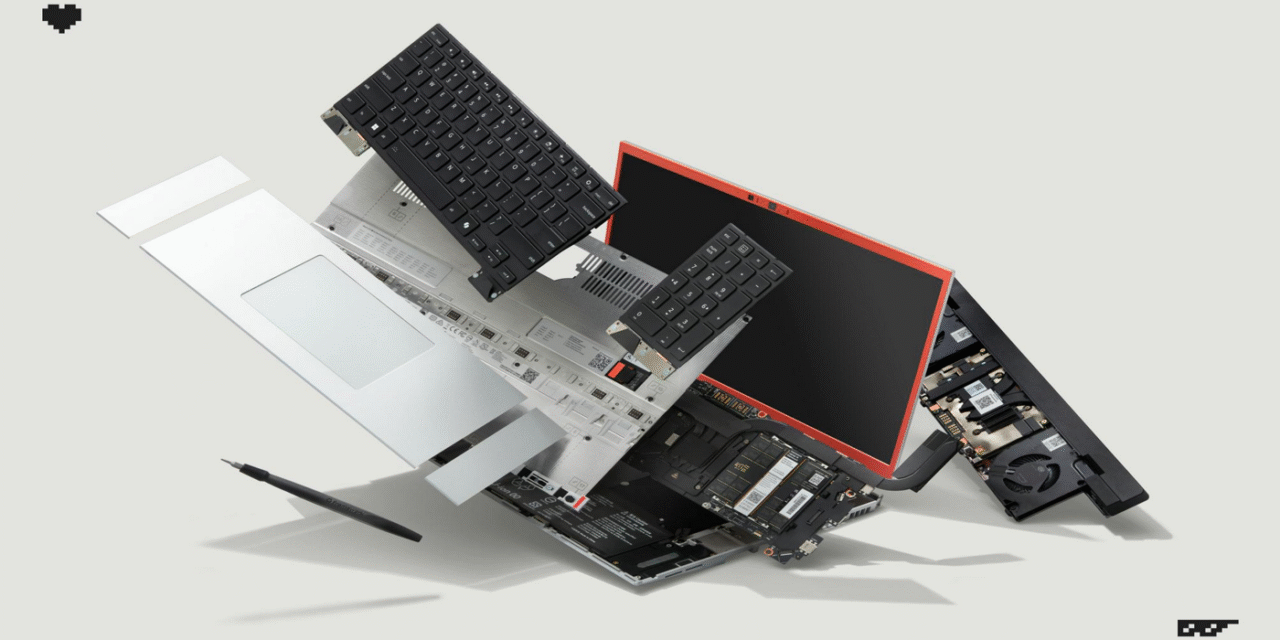
Framework has refreshed the Laptop 16 with a swappable NVIDIA GeForce RTX 5070 Laptop GPU module (8GB GDDR7, up to 100W TGP) and an industry-first, standards-compliant 240W USB-C PD 3.1 power brick. There’s also a new Ryzen AI 300-series mainboard option, cooling tweaks, and quality-of-life improvements. This is the most substantial step yet toward desktop-like upgradeability in a thin laptop—and it’s finally practical for creators and gamers who want to keep a machine for years rather than buy a whole new one.
What’s actually new (and why it matters)
Framework’s headliner is the Graphics Module with an RTX 5070 Laptop GPU that you can install at home in minutes. That alone is a milestone: previous-gen FW16 units shipped with a Radeon 7700S, but swapping the entire GPU in a modern laptop used to be a fantasy outside of rare, bulky systems. The company also rolled out a 240W USB-C PD 3.1 GaN adapter, eliminating the proprietary barrel jack problem and letting the laptop draw full power and still charge under load.
The Graphics Module, explained
The new module slots into the FW16’s rear bay and brings 8GB of GDDR7, up to 100W TGP, and a rear USB-C port on the module itself. That port supports DisplayPort Alt Mode and power input, so you can run a monitor straight off the GPU and even charge through the GPU’s USB-C when it’s convenient. Framework says the module adds a bit of size and mass (a small increase in depth/height and around +0.3 kg), which is the trade-off for real cooling and I/O on a swappable GPU.
Performance & thermals
Framework is quoting a 30–40% uplift over the Radeon 7700S module in gaming framerates, while holding the same 100W TGP envelope. That’s the right kind of improvement for a drop-in upgrade: you get a generational bump without blowing out heat or noise. The refresh also includes thermal system tweaks—think larger vapor chamber/fin changes and material improvements—that help sustain clocks longer under creator and gaming workloads.
CPUs, mainboards, and the platform story
Alongside the GPU, the 2025 configuration brings AMD Ryzen AI 300-series processors (Zen 5 era) on a new mainboard. For buyers, the mainboard is replaceable just like other Framework parts, so you can jump CPUs years later without discarding the chassis, screen, or keyboard. The bigger narrative is platform longevity: CPU, GPU, storage, ports, and even input modules keep evolving, but the shell doesn’t—saving cost and e-waste.
Power: true 240W over USB-C
The new 240W USB-C PD 3.1 power brick is a big deal for high-draw laptops. It’s standards-compliant, meaning fewer weird cables and better compatibility across your gear, and it can sustain full system load without dipping into the battery. For creators tethered to wall power or gamers pushing the GPU, this is the moment USB-C finally catches up to the realities of mobile performance machines.
Display & I/O quality-of-life upgrades
The FW16 remains a 16-inch, high-refresh canvas aimed at both gaming and creative work, with the refresh bringing 165Hz options and firmware support for smoother sync behavior. The new GPU module’s rear USB-C simplifies desk setups—fewer dongles if your monitor supports USB-C or DP Alt Mode. Around the chassis, subtle durability and webcam updates round things out for daily use, especially if your laptop doubles as a camera/mic for streaming or calls.
Backward compatibility & the upgrade path
If you already own a Laptop 16, the RTX 5070 module is designed to be backward-compatible—you don’t need a new machine to get the gains. Framework even includes the interposer you need in the box, so you’re not chasing extra parts. The trade-offs are transparent: a little extra thickness at the back, a slight bump in weight, and a higher power budget—reasonable asks if you want a real GPU swap.
Pricing, preorders, and availability
The updated Laptop 16 line starts around the mid-$1,000s for base configs, with the RTX 5070 Graphics Module offered as an add-on or upgrade. Framework has opened preorders and is staging shipments through the coming weeks, while the GPU module is also sold standalone for existing owners. There’s a 240W USB-C GaN charger in the catalog if you want the full PD 3.1 experience from day one.
Who should upgrade vs. buy new
If you already own an FW16 with Radeon graphics and you mostly game or render, the GPU module is the one change that will be felt immediately in fps and export times. If you also do heavy CPU tasks, the new Ryzen AI 300 mainboard is the better first step—and you can add the GPU later. New buyers who value ownership longevity will appreciate that they can start modest and scale up over time, instead of over-buying on day one.
Caveats & open questions
The 8GB VRAM on this RTX 5070 Laptop GPU will be fine for 1440p esports and most creator pipelines, but some AAA titles and AI/3D workflows benefit from more. The 100W TGP and thin-and-light thermals mean you’re aiming for efficient performance, not desktop-class brute force. On software, Windows support is straightforward; Linux users should check kernel/driver notes around hybrid graphics and power management before switching over a production system.
Bottom line
Framework’s 2025 refresh for the Laptop 16 delivers on the brand’s core promise: real upgrades, in your hands, without buying a new machine. A home-swappable RTX 5070 and true 240W USB-C finally make the modular vision compelling for performance users, not just tinkerers. If you want a laptop you can grow—instead of replace—this is the strongest argument Framework has made yet.