Acer TravelMate P2 14 AI review: A capable laptop that’s priced too high
At a glance
Expert’s Rating
Pros
- 120Hz refresh rate
- Plenty of connectivity
- Good security features
Cons
- Touchpad takes some getting used to
- Battery life isn’t class-leading
- Priced a little too high
Our Verdict
The Acer TravelMate P2 14 AI is a good laptop. But there’s cheaper laptops out there that can deliver better performance, battery life, and value.
Price When Reviewed
This value will show the geolocated pricing text for product undefined
Best Pricing Today
Best Prices Today: Acer TravelMate P2 14 AI

Price comparison from over 24,000 stores worldwide
Price comparison from Backmarket
The Acer TravelMate P2 14 AI isn’t a bad laptop. Far from it, actually.
It runs cool. It delivers solid productivity performance. It’s got a versatile selection of ports, too. Other laptops just offer slightly more for a bit less and that’s putting the TravelMate P2 14 AI in an odd spot. With prices rising due to the RAM and storage shortages, the goalpost looks different now. A laptop needs to be more than “just good enough” to justify the price. Weird times.
Acer TravelMate P2 14 AI: Specs
- CPU: Intel Core Ultra 5 322
- Graphics: Intel Arc Graphics
- Memory: 16GB DDR5
- Storage: 512GB PCIe Gen 4 SSD
- Display: 14-inch IPS, 1920×1200, 120Hz
- Webcam: 5MP IR camera with privacy shutter
- Connectivity: Wi-Fi 7, Bluetooth 5.4
- Ports: 2 x Thunderbolt 4/USB4 USB-C, 2 x USB-A, HDMI 2.1, RJ-45 Ethernet, microSD, SmartCard reader, 3.5mm audio
- Weight: 2.85 pounds
- Operating system: Windows 11 Pro
- Price: $1,699 (MSRP)
Acer TravelMate P2 14 AI: Security features
Security is one area where the TravelMate P2 14 AI stands out. My review unit came with a TPM, Windows Hello facial recognition via the IR camera, a fingerprint reader, a physical webcam privacy shutter, and Acer ProShield Plus security software. The fingerprint reader isn’t a standard feature on every model, though.
Most home users probably won’t care about most of those features, but businesses might dig it. That’s TravelMate’s bread and butter.
Acer TravelMate P2 14 AI: Build quality, design
Foundry / Ashley Biancuzzo
I was a little surprised when I took the TravelMate P2 14 AI out of the box for the first time.
Wait, aren’t these supposed to be like air? I thought to myself.
That’s not to say it’s a heavy laptop at 2.85 pounds. It most definitely isn’t. But compared to other TravelMate laptops like the 2.29 pound TravelMate P6 14 AI, there’s a difference.
Foundry / Ashley Biancuzzo
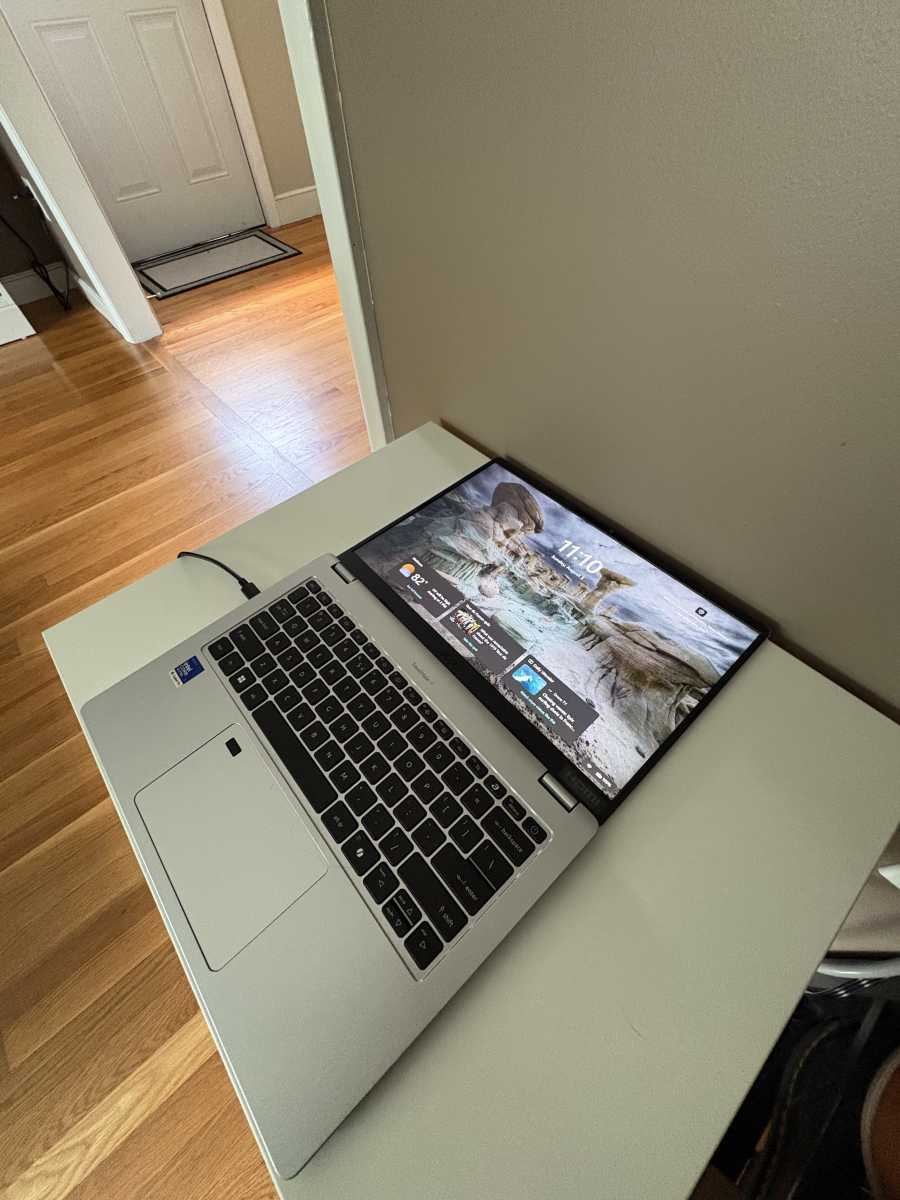
The exterior has more of a plastic feel, which I didn’t love, especially at $1,699 MSRP. At this price point, I expected a stronger build, but that’s not the world we live in anymore. It’s just not the TravelMate P6’s magnesium-alloy chassis. That said, I wouldn’t say Acer has totally thrown the notion of durability out the window.
Acer says the hinge has been tested for 20,000 open-and-close cycles, so I’m fairly confident it’ll withstand lighter knocks. I can’t speak to how it’ll hold up after years of use, though.
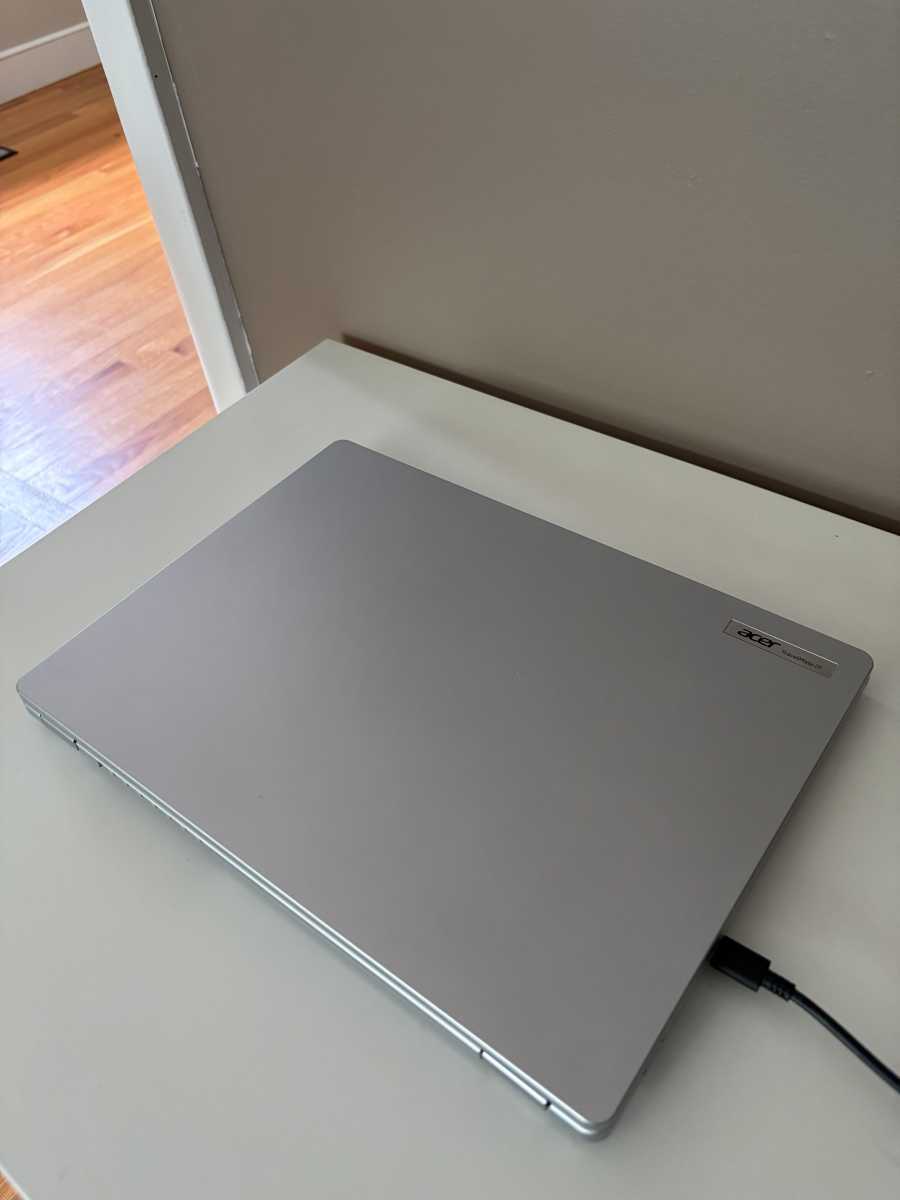
As for the design, it’s about as utilitarian as it gets–just a light grey rectangle. Nothing more. Nothing less. Even the Acer logo is pretty small. It sits on the right corner of the lid like a child in time-out.
Acer TravelMate P2 14 AI: Keyboard, trackpad
Foundry / Ashley Biancuzzo
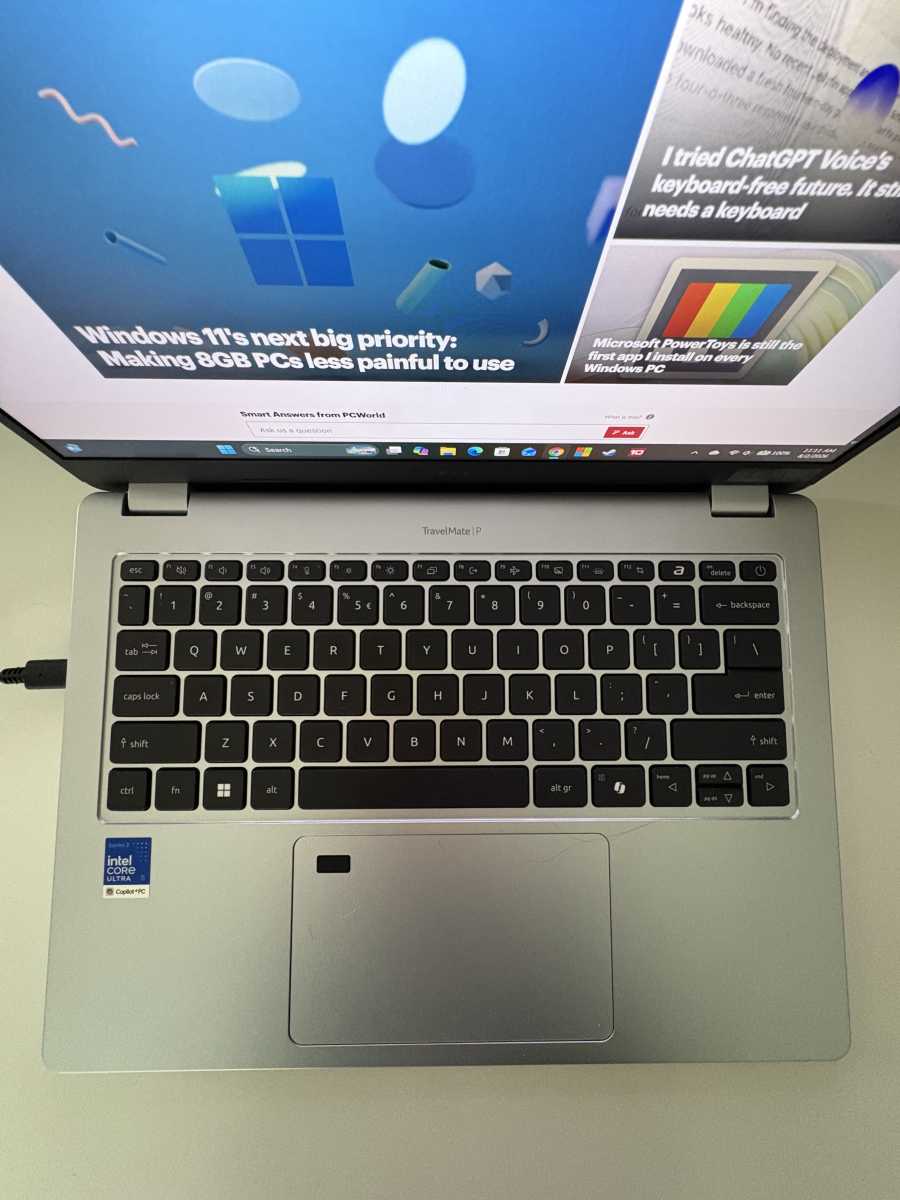
The keyboard is easy to get accustomed to. My fingers were flying across the keys with minimal mistakes within the first hour of use. The only thing I was less thrilled about were the small function keys at the top of the keyboard. I don’t use those keys very often, so it’s definitely not a make or break buying decision for me. Still, everyone’s entitled to a personal preference and mine just happens to be bigger keys.
I struggled more with the trackpad than the keyboard. Acer uses an OceanGlass Microsoft Precision touchpad. It tracks fine, but it’s very sensitive. I had to drop the sensitivity setting all the way down because I kept sending the cursor flying across the screen.
Acer TravelMate P2 14 AI: Display, audio
Foundry / Ashley Biancuzzo
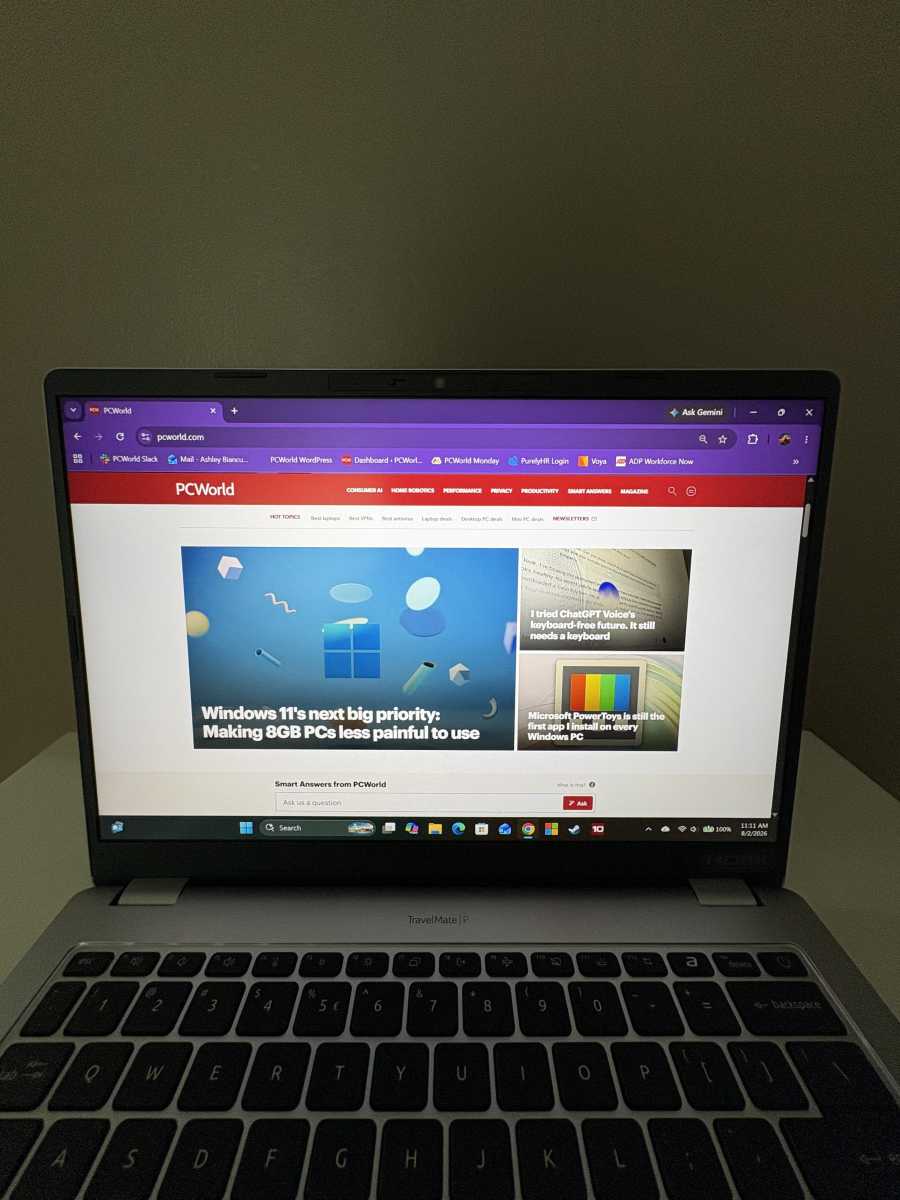
The 14-inch 1920×1200 IPS display is sharp and colorful, which is all well and good. But I think the 120Hz refresh rate is actually the bigger selling point here. You won’t notice it when you’re writing emails or plugging numbers into a spreadsheet. You’ll notice it when scrolling documents and websites–it should feel smoother.
The 16:10 aspect is another nice touch because you’re getting more vertical space. This is a pretty common thing on business-oriented laptops like this one–it just lets you see more of the content on your screen. The anti-glare ComfyView finish also helps cut down on reflections. I could comfortably look at the screen near a sunlit window without squinting or adjusting the lid. It’s summer right now, and the sunlight can be pretty powerful, especially in the afternoon.
I also watched Netflix’s documentary on the band Wham! and found George Michael’s hot pink shirt to be, well, pretty darn pink! Acer rates the panel for 100 percent sRGB color coverage. That’s good enough for light photo editing, but I wouldn’t say this is the best display for professional photographers.
The dual speakers are fine for calls and meetings, but music is a different story. I like music that surrounds, and the TravelMate P2 14 AI just didn’t deliver on that front. I found myself using headphones more often than not.
Acer TravelMate P2 14 AI: Ports
Foundry / Ashley Biancuzzo
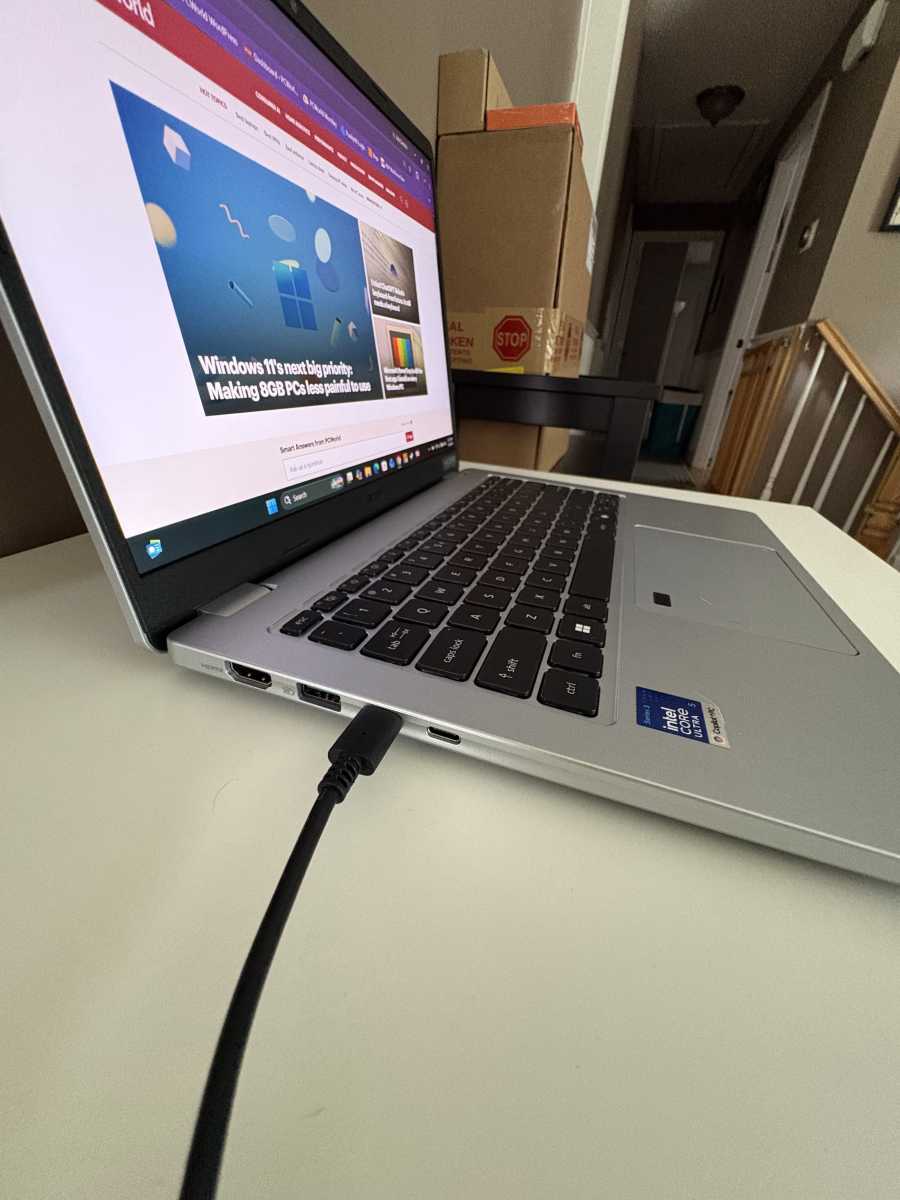
You won’t be needing a dongle, that’s for sure.
The TravelMate P2 14 AI comes locked and loaded. It’s got two USB-A, two USB-C with Thunderbolt 4 and USB4 support, HDMI 2.1, Ethernet, a microSD card reader, a SmartCard reader, and a headphone jack. That’s a generous offering, especially for a laptop that’s under three pounds.
My only nitpick is that USB-C charging is limited to one side. Being able to plug in from either side would’ve been more convenient. (We have strong feelings about this here at PCWorld.)
Acer TravelMate P2 14 AI: Performance
The TravelMate P2 14 AI ran cool and quiet, which I was pleased to see. I had this laptop on my lap for hours and not once did it roast my thighs.
My workload is light, though. Most of my day consists of writing articles in Google Docs, editing articles in a CMS system, or yapping away with coworkers on Slack. It might get hotter depending on what you’re doing on it.
For benchmarking, I tested the TravelMate P2 14 AI using the Balanced performance profile. I then compared the results against four different laptops, which I’ll list below:
- Lenovo ThinkPad X13 Gen 6 (likely the closest competitor in terms of hardware)
- Acer TravelMate X4 14 AI (a newer AI-focused business laptop)
- Dell XPS 14 (a higher-end Intel configuration)
- HP OmniBook X Flip 14 (an AMD AI competitor)
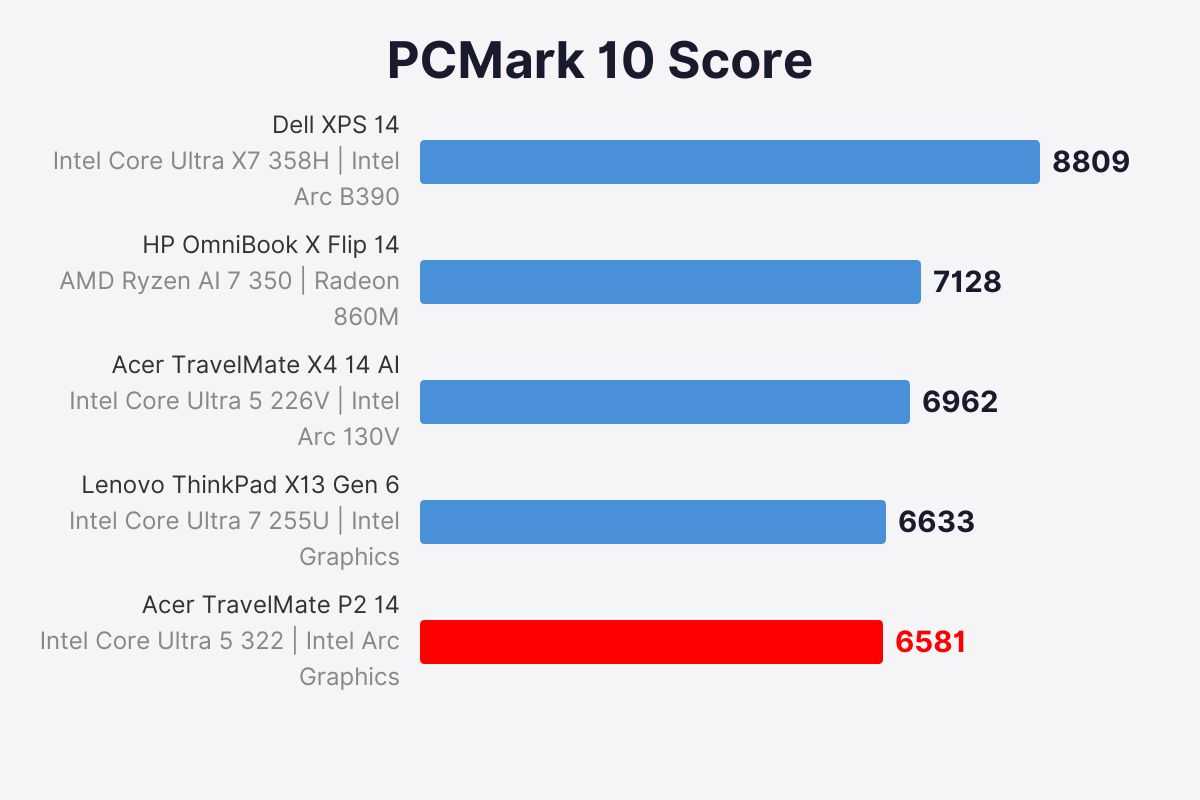
First, let’s check out the PCMark 10 score. This benchmark simulates a typical workday.
Foundry / Ashley Biancuzzo
Here, the TravelMate P2 14 AI earned a PCMark 10 score of 6,581. That puts it in line with other business-focused laptops. Lenovo’s ThinkPad X13 Gen 6 scored 6,633–that’s a difference of only 52 points (less than one percent!). They’re pretty neck and neck.
And then there’s the TravelMate X4 14 AI, which uses Intel’s Core Ultra 5 226V processor (that’s from the Lunar Lake family). It pulled ahead with a score of 6,962. That’s roughly six percent faster than the TravelMate P2 14 AI. That’s not much of a difference. In fact, I’d doubt you’d notice it across machines.
The $2,259.99 Dell XPS 14 scored the highest at 8,809. That’s roughly a 34 percent advantage over the TravelMate P2 14 AI, a more noticeable gap than the other laptops.
That’s not too surprising when you take a peek at the hardware. The Dell uses a higher-tier Intel Core Ultra processor and is just a more powerful configuration overall, so it’s got the edge when it comes to more demanding workloads. The TravelMate P2 14 AI uses a lower-tier Intel Core Ultra configuration designed around efficiency and productivity.
And here’s where the story gets a little more interesting.
The $1,509 HP OmniBook X Flip 14 scored 7,128, which is about eight percent faster than the TravelMate P2 14 AI. Even though it’s got a more powerful AMD Ryzen AI 7 350 processor, the difference in everyday productivity isn’t massive. The TravelMate P2 14 AI still holds its own in general office workloads, but the HP does pull ahead.
Foundry / Ashley Biancuzzo
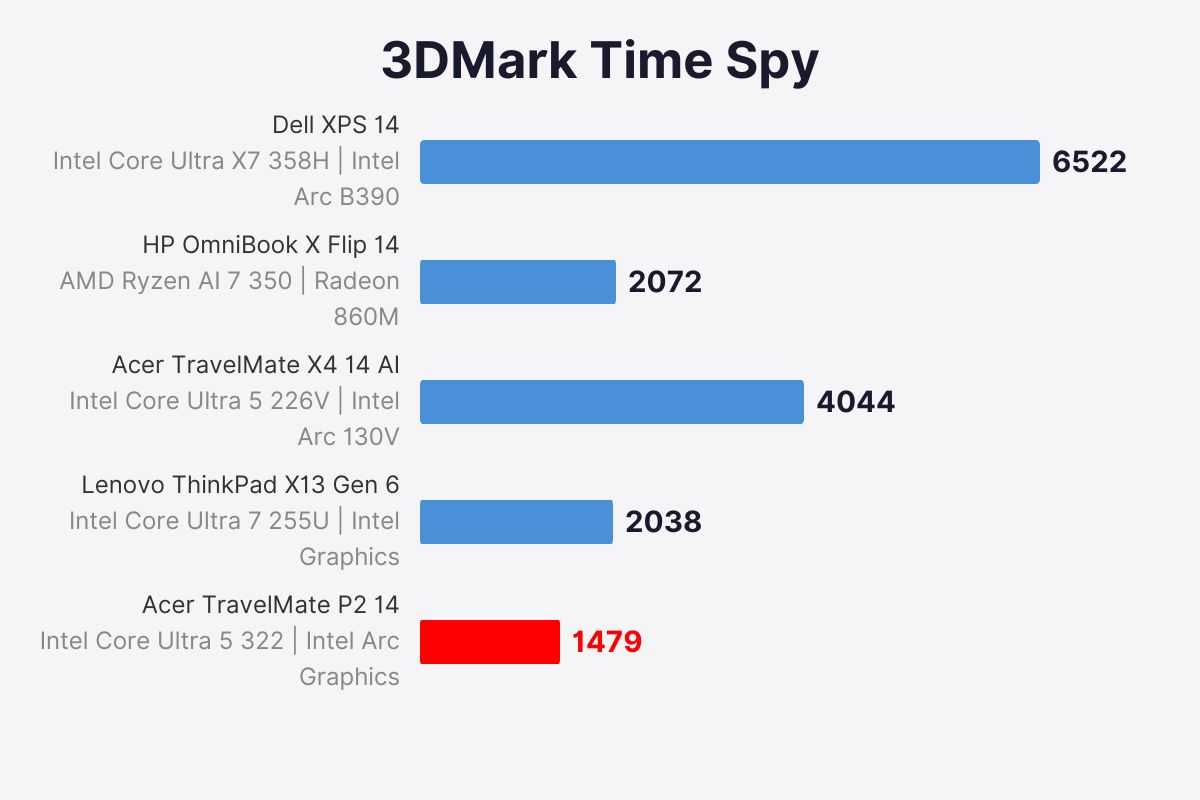
Now let’s switch gears and take a look at 3DMark’s Time Spy, which measures graphics performance.
The TravelMate P2 14 AI scored an unsurprising 1,479. A gaming rig it is not. It also falls behind newer laptops with stronger integrated GPUs.
The Acer TravelMate X4 14 AI represents a much bigger step up with a score of 4,044. Its Intel Arc 130V graphics nearly triple the performance of the TravelMate P2 14 AI in this benchmark. That’s a good result for integrated graphics. But it won’t a candle to a laptop with a discrete GPU.
Here’s my takeaway: The TravelMate P2 is a laptop that prioritizes productivity over raw performance power. It doesn’t have great graphics performance, but that’s not really the priority here. If you’re looking for graphics firepower, you’re in the wrong review.
Acer TravelMate P2 14 AI: Battery life
I used Procyon’s office productivity battery life benchmark, which cycles through Microsoft applications until the laptop gives up the goose. I also made sure the display brightness was calibrated to 200 nits with the Nits Meter app on my iPhone. It helps me find a common baseline across laptops because the built-in brightness slider cannot be trusted.
The TravelMate P2 14 AI lasted nine hours and 11 minutes on a single charge. It’s good. Respectable even! But there are laptops that last longer. Sometimes three times as long.
The Acer TravelMate X4 14 AI, for example, reached the 20 hour mark in our previous battery benchmark, which looped a 4K copy of the short film, Tears of Steel. It’s got a Lunar Lake chip. We know those chips are pretty power efficient based on our own testing. (We’ve also seen a couple of long-lasting laptops that have Panther Lake chips).
Acer TravelMate P2 14 AI: Conclusion
So… would I recommend the Acer TravelMate P2 14 AI? Not at its current MSRP of $1,699.
Taking price, performance, and battery into account, I’d argue that the more compelling option is the Acer TravelMate X4 14 AI. Not only is it less expensive than the TravelMate P2 14 AI (currently $1,290.99 at Best Buy), but it’s got better battery life (20 hours!), slightly faster productivity performance, and stronger graphics performance. For most people, the TravelMate X4 14 AI is the easier recommendation.