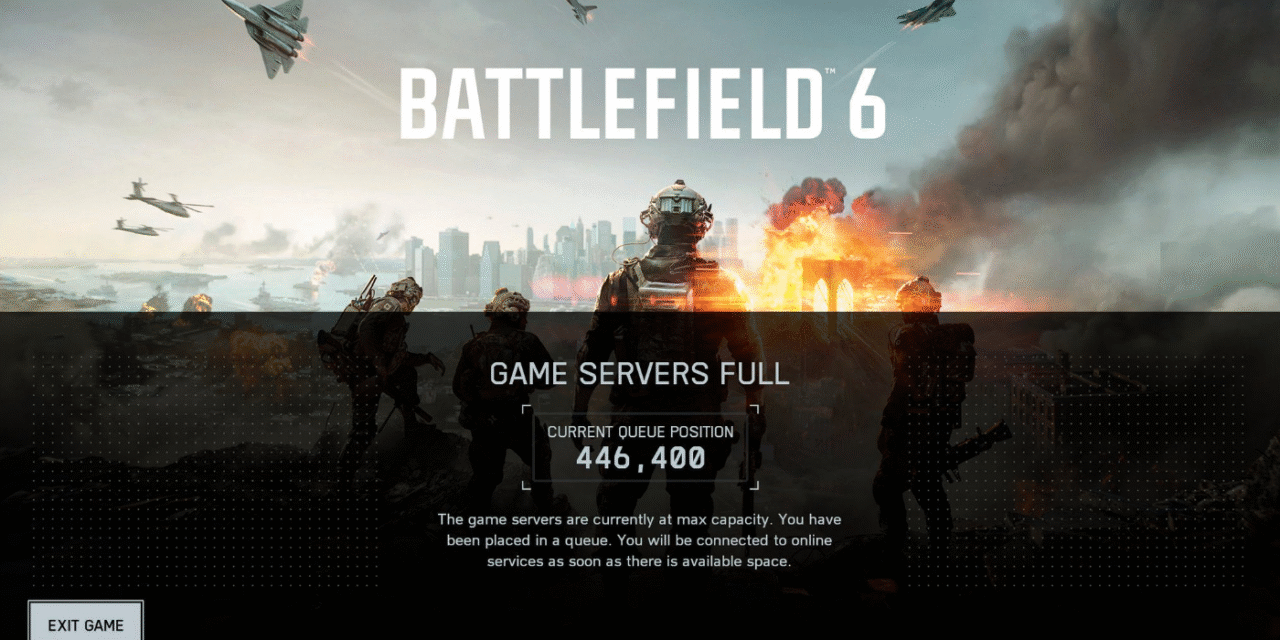
The Battlefield 6 queue system shows up when demand outruns live capacity. It meters logins and match joins so servers stay stable instead of crashing. Queues feel annoying, but they are a safety valve. They let the team add capacity, drain spikes, and keep matches fair while everyone piles in at the same time.
How the Battlefield 6 queue system works
When too many players hit the same region, the backend holds new sessions in a first-in, first-out line. That protects databases and matchmaking from overload. The system shifts you forward as instances free up and as more nodes come online. It also accounts for party size, so full squads enter together. If a region is red-hot, the system may route you to nearby data centers with similar ping. That keeps matches moving while your home region cools down.
Why queues spike at launch and prime time
Launch windows and big content drops stack players into short windows. Friends coordinate, creators go live, and regions hit prime time in waves. A single patch can send millions to re-auth at once. Without the Battlefield 6 queue system, that wave would look like a DDoS. The queue evens the flow. You feel a wait, but most players get in instead of hitting a wall of errors.
Practical ways to cut wait times
Try off-peak windows when you can. Even 15–30 minutes outside the top hour helps a lot. If your squad is large, form up first, then queue once to avoid multiple checks. On PC, keep the client open and idle rather than cycling it; each restart re-auths and can lose your place. Use Quickmatch for the first games of the evening, then switch to favorite modes when server load settles. If cross-play is on, leave it on during peaks; a wider pool reduces re-queues.
Common errors vs. true queues (don’t confuse them)
A real queue shows a position or a clear “in line” message. A licensing or entitlement error looks different and needs a client relog or account fix. If you see “purchase to play” or “content missing,” that is not the queue—fully close the launcher, re-authenticate, and confirm your platform link. Network hiccups show up as timeouts. Avoid spamming Retry; wait 60–90 seconds, then try once. If it repeats, switch region or relaunch once and settle back into the line.
Settings and setup that help stability
Wired beats Wi-Fi during peak hours. On console, use NAT Type Open/Moderate; strict NATs can fail at the hand-off from lobby to match and force a re-queue. On PC, let the game and launcher through your firewall once; duplicate prompts can interrupt the join step. Close heavy downloads on your network so packet loss does not kick you back to the menu.
What to watch next
Queues should shrink after the first two weeks, then reappear around big patches and seasonal events. Watch official channels for maintenance windows and staggered rollouts. When the team announces new regions or extra capacity, peak lines drop fast. If you still see long waits outside prime time, report your platform, region, and ISP to support; those details help the ops team tune routing.
Bottom line
The Battlefield 6 queue system is not a bug. It is the guardrail that keeps the game online when the crowd surges. Use off-peak windows, stay in one session, and treat error messages as separate from the queue. As capacity ramps and the launch rush calms, your path from menu to match gets short and smooth.