

There’s a one-click way to email an open Office file. Most people miss it
Imagine you’re working on an Excel workbook and you want to quickly email it over to a colleague or friend. There’s actually a handy little trick you can use to get it done fast—and it also works in Word and PowerPoint.
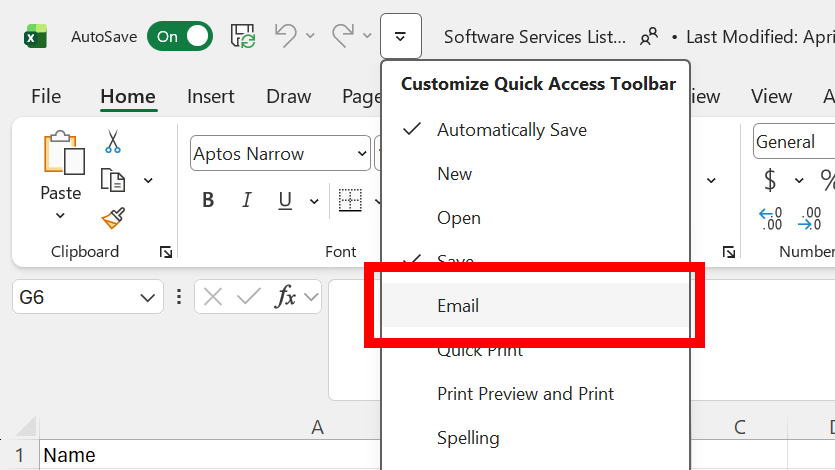
All you have to do is look at the Quick Access Toolbar and find the drop-down menu, represented by an icon with a small horizontal line and a downward-pointing arrow. Click it to open the menu of quick access actions and select Email.
Joel Lee / Foundry
By selecting Email, you’re enabling the action in the actual Quick Access Toolbar. Look to the left of the icon and you should now see an envelope icon. Clicking it will launch your system’s default email client, which is likely Outlook if you haven’t changed it—but more importantly, it’ll open with a new email draft and the Excel workbook attached.
You can repeat these steps in both Word and PowerPoint, which will launch your system’s email app with a new draft and the current Word document and PowerPoint presentation attached, respectively.
It’s such a quick and easy way to share what you’re working on with others, so be sure to add it to your Quick Access Toolbar soon.
Further reading: 18 power shortcuts every Excel user should know

