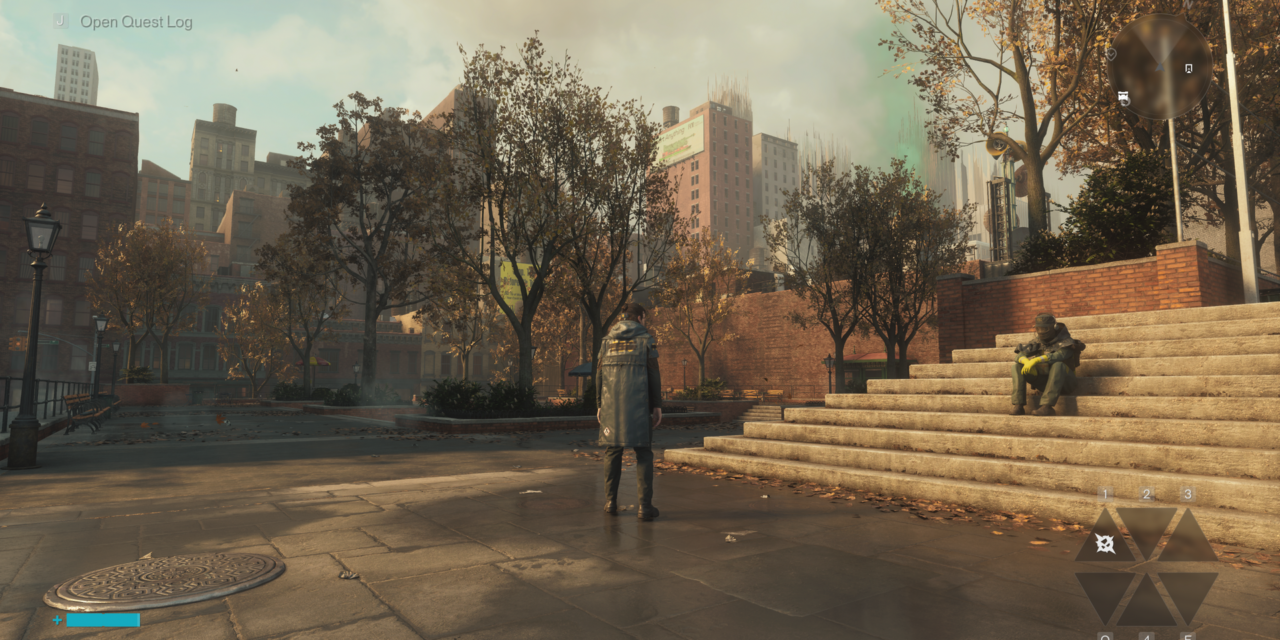
Control Resonant PC performance tested: 28 GPUs take us back to the Oldest House and a warped Manhattan cityscape
2019’s Control followed Jesse Faden into the ever-shifting, paranormally corrupted brutalist innards of the Oldest House, the headquarters of the Federal Bureau of Control, where she became the new FBC director, fought the invading forces of the Hiss, and sought the truth about the fate of her kidnapped brother Dylan.
Control Resonant marks the next chapter in the siblings’ story, as Dylan reawakens to discover that Jesse has gone missing and that the Hiss threat has escaped the Oldest House and corrupted Manhattan. Using his own powers and guided by the mysterious Board, Dylan sets out to find Jesse, combat the Hiss incursion, and uncover the mysteries of a new paranormal entity at work in the twisted Manhattan cityscape.
We’ve had access to Control Resonant for the past few days, and we’ve been exploring its performance and image quality across a range of hardware and settings.
Control was one of the first games to show off the capabilities of GeForce RTX 20-series graphics cards and their ray-tracing capabilities, and it was also one of the first titles to incorporate DLSS upscaling. It’s only fitting, then, that Resonant is a technical showcase of its own. It features path-traced lighting effects bolstered by Nvidia’s RTX Mega Geometry tech, as well as support for the full suite of DLSS 4.5 features: Super Resolution (aka upscaling), Ray Reconstruction, and Multi Frame Generation.
With that extensive spread of cutting-edge rendering tech at its disposal, I expected Resonant to look incredible, as both Control and Alan Wake II did before it.
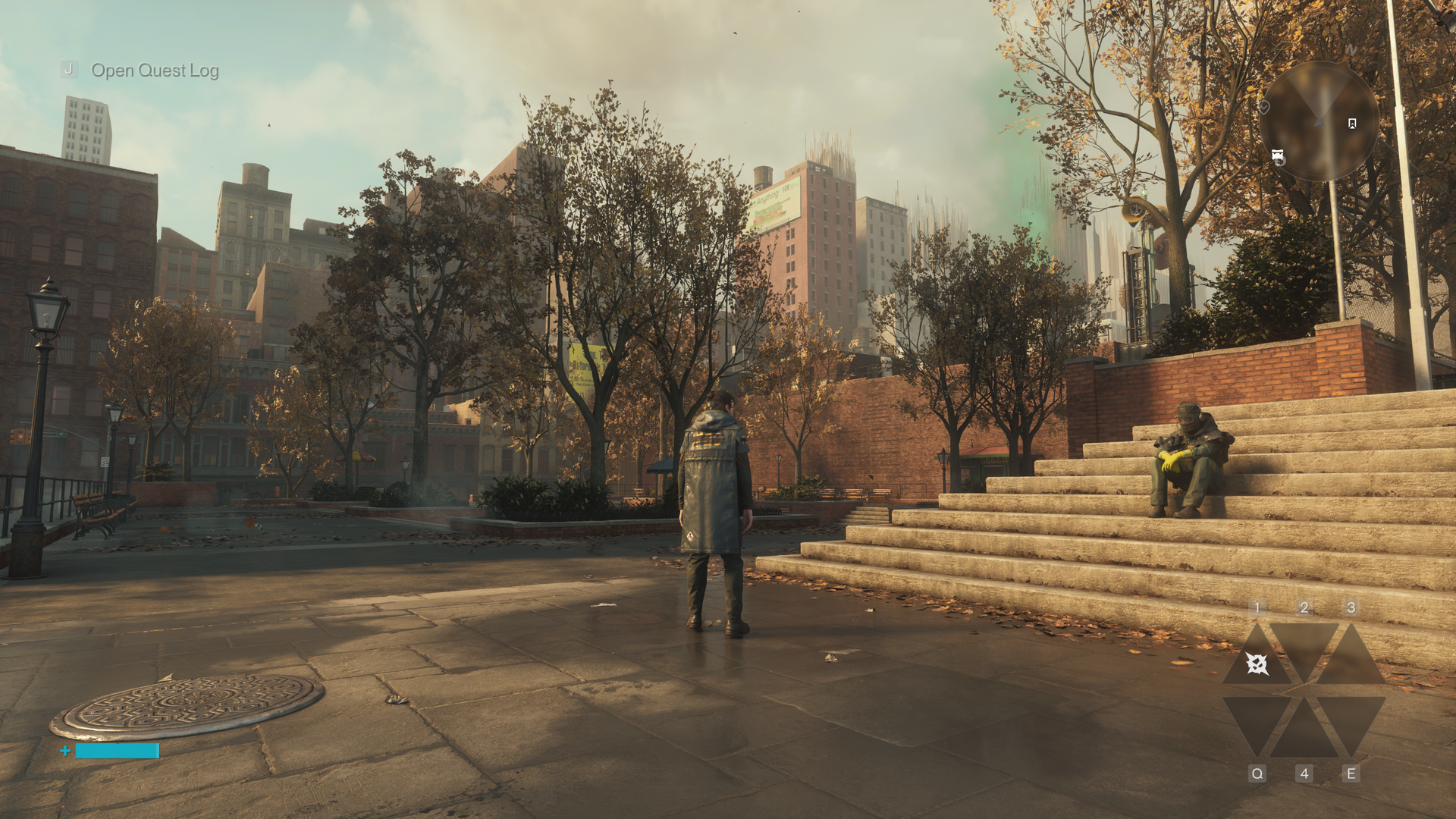
Even without ray tracing or path tracing and DLSS Ray Reconstruction, Control Resonant already looks good, as we’ve come to expect from Remedy games. If performance is a priority, you certainly won’t make the game bad by leaving RT off.
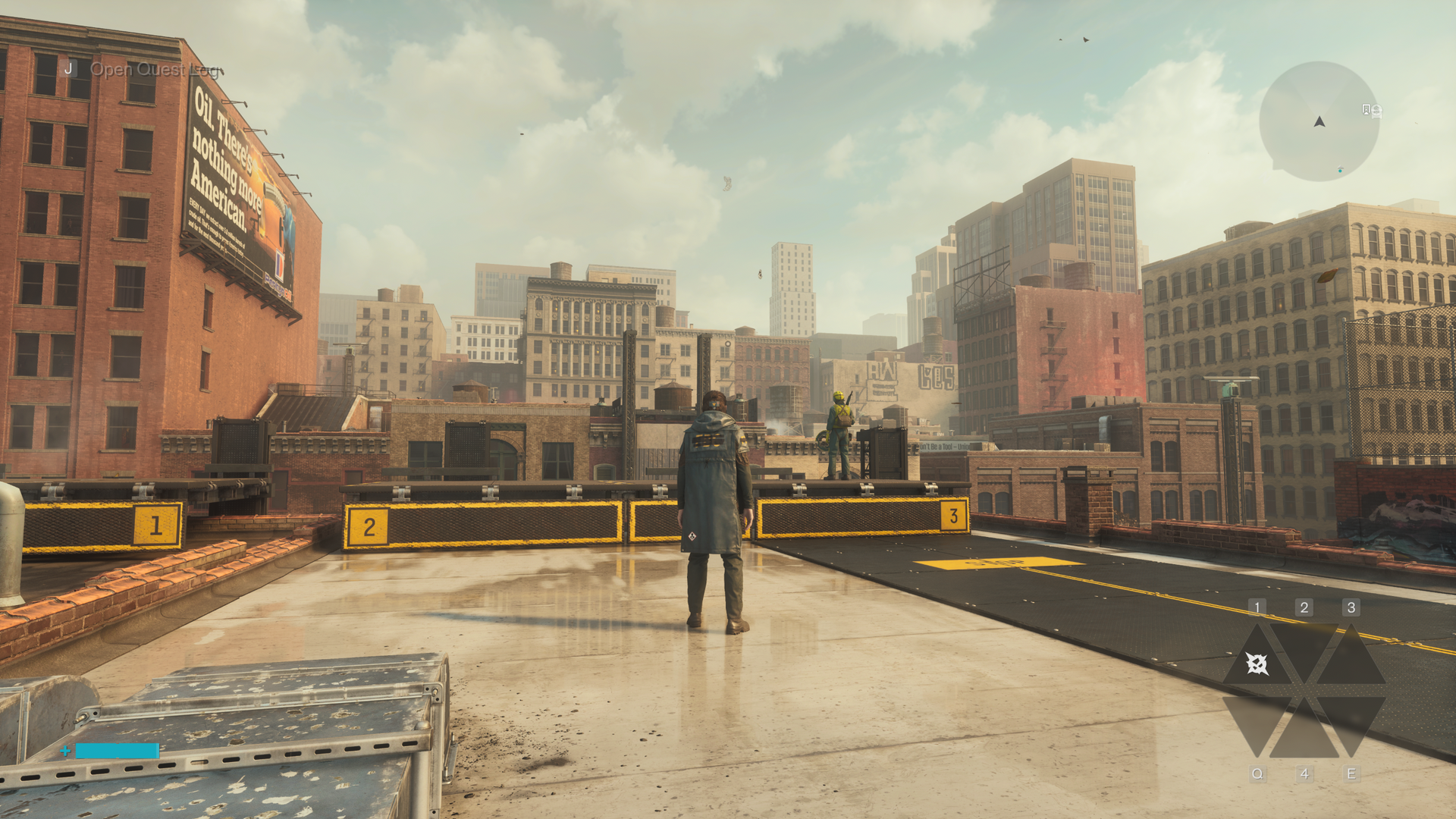
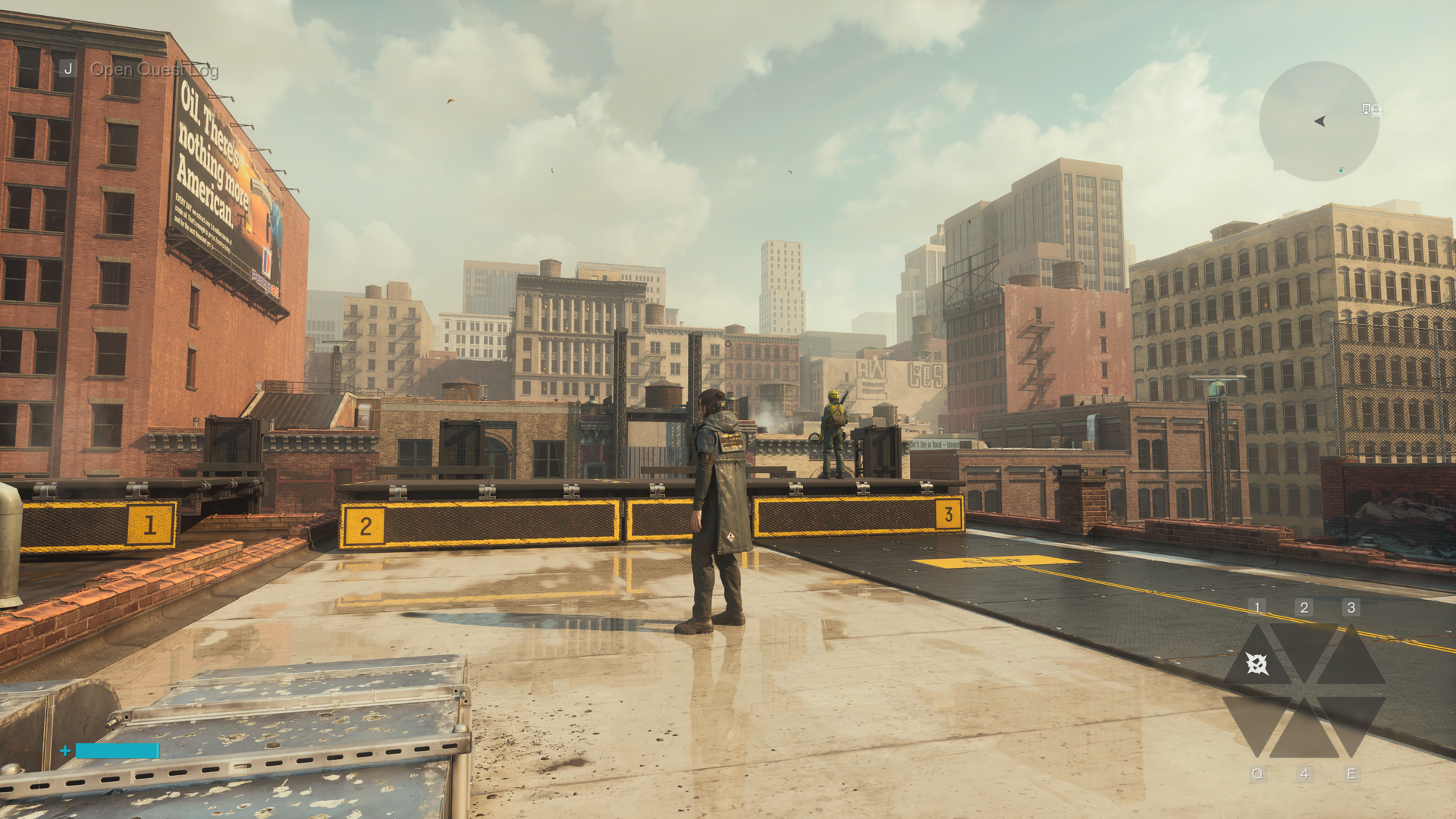
But ray tracing or path tracing is certainly worth enabling if you can. Outdoors, RT primarily improves the rather blobby shadows and soft reflections that appear in the numerous puddles around Manhattan.
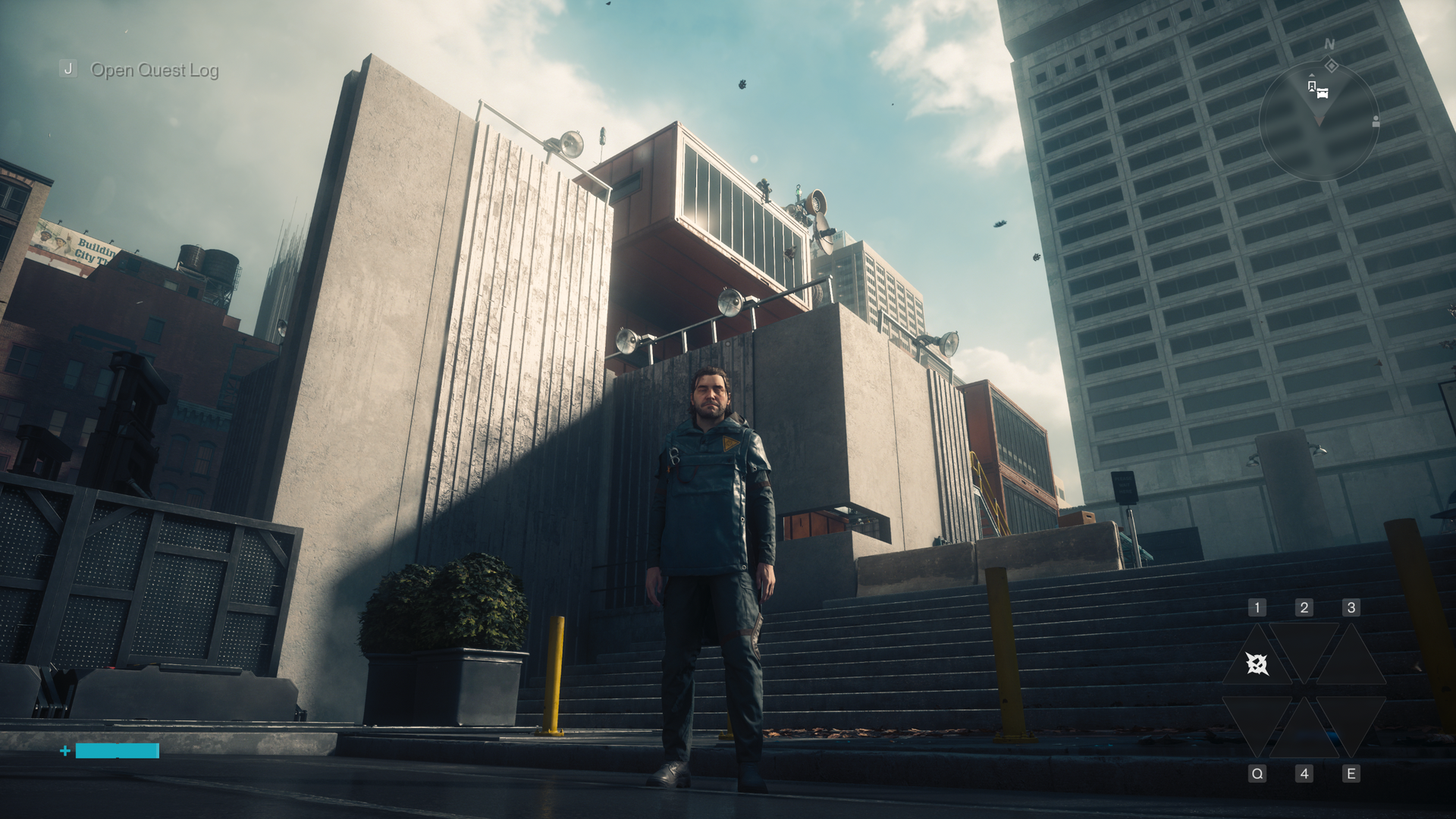
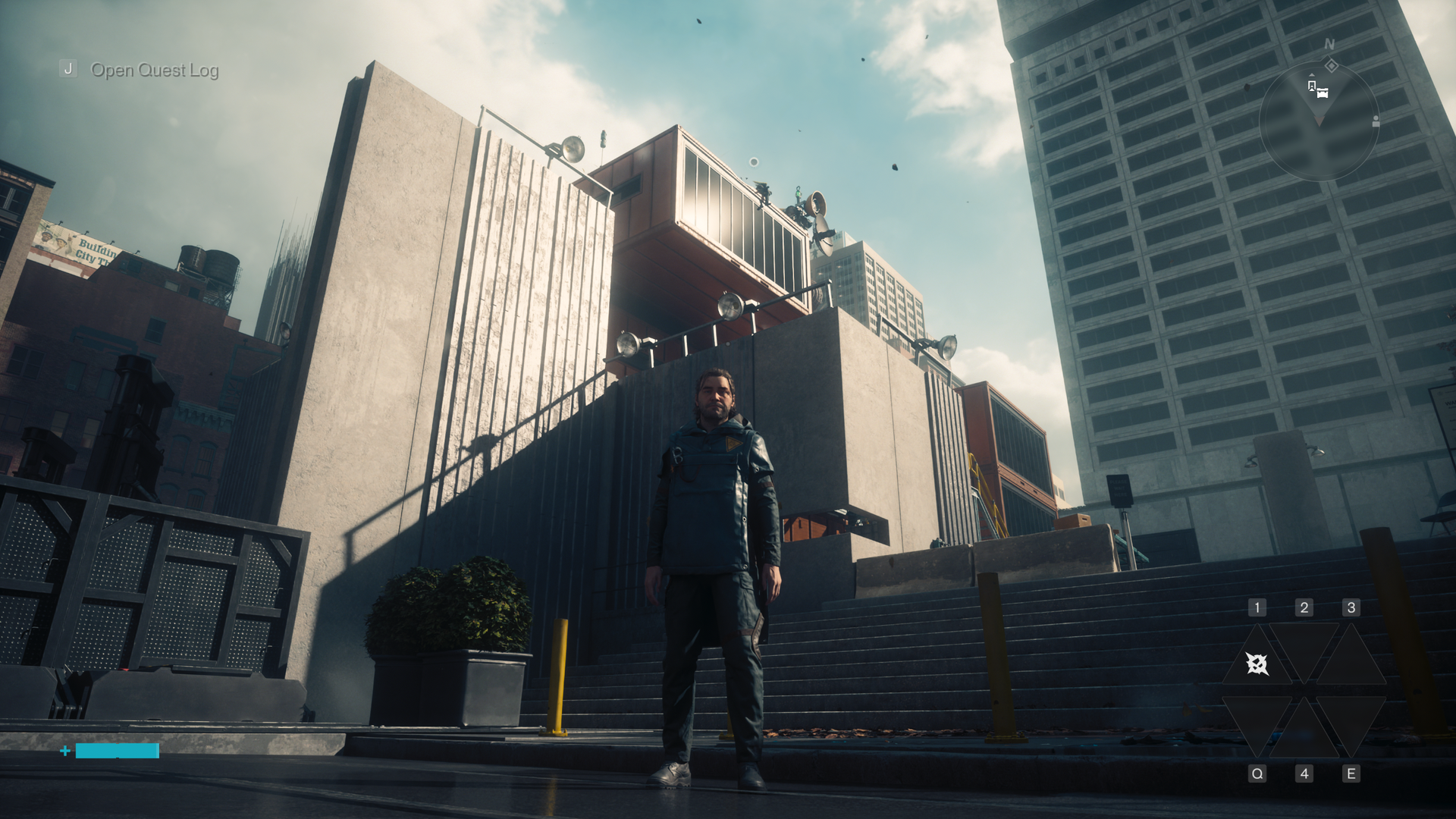
Sometimes this is subtle; other times it’s dramatic, as with the railing shadow above.
At its highest settings, path tracing turns shadows into the crisp, accurate renderings you would expect in direct sunlight and makes reflections much stronger and clearer not only in water but in glass like car and shop windows.
Inside, RT models the behavior of strong artificial light sources more accurately. Overhead lights properly shadow Dylan’s face from above and let his back fall into darkness if he’s occluding them. Metallic objects like trash cans look and shine like roughed-up metal as you move around them, not a flat and static game asset.
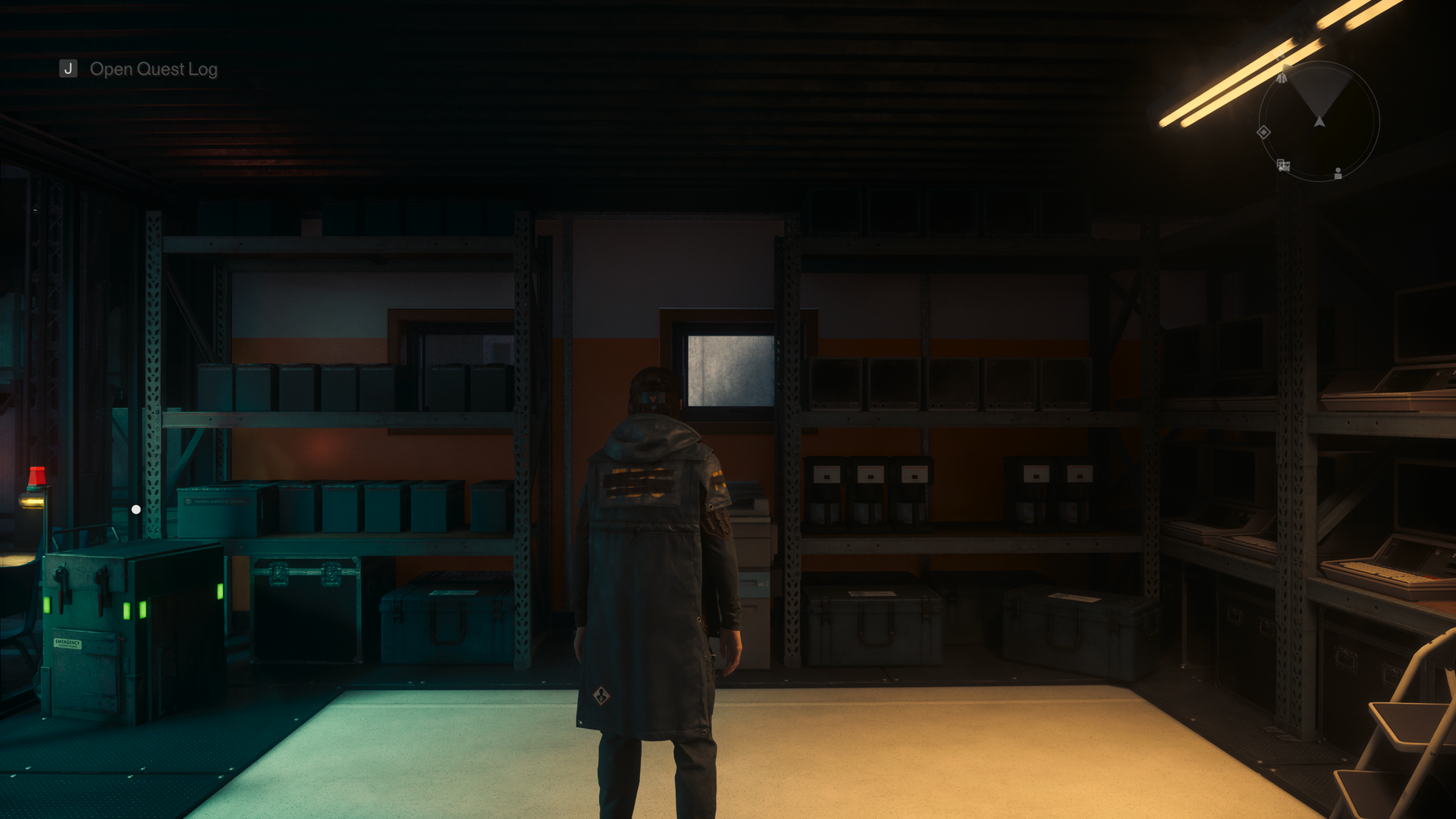
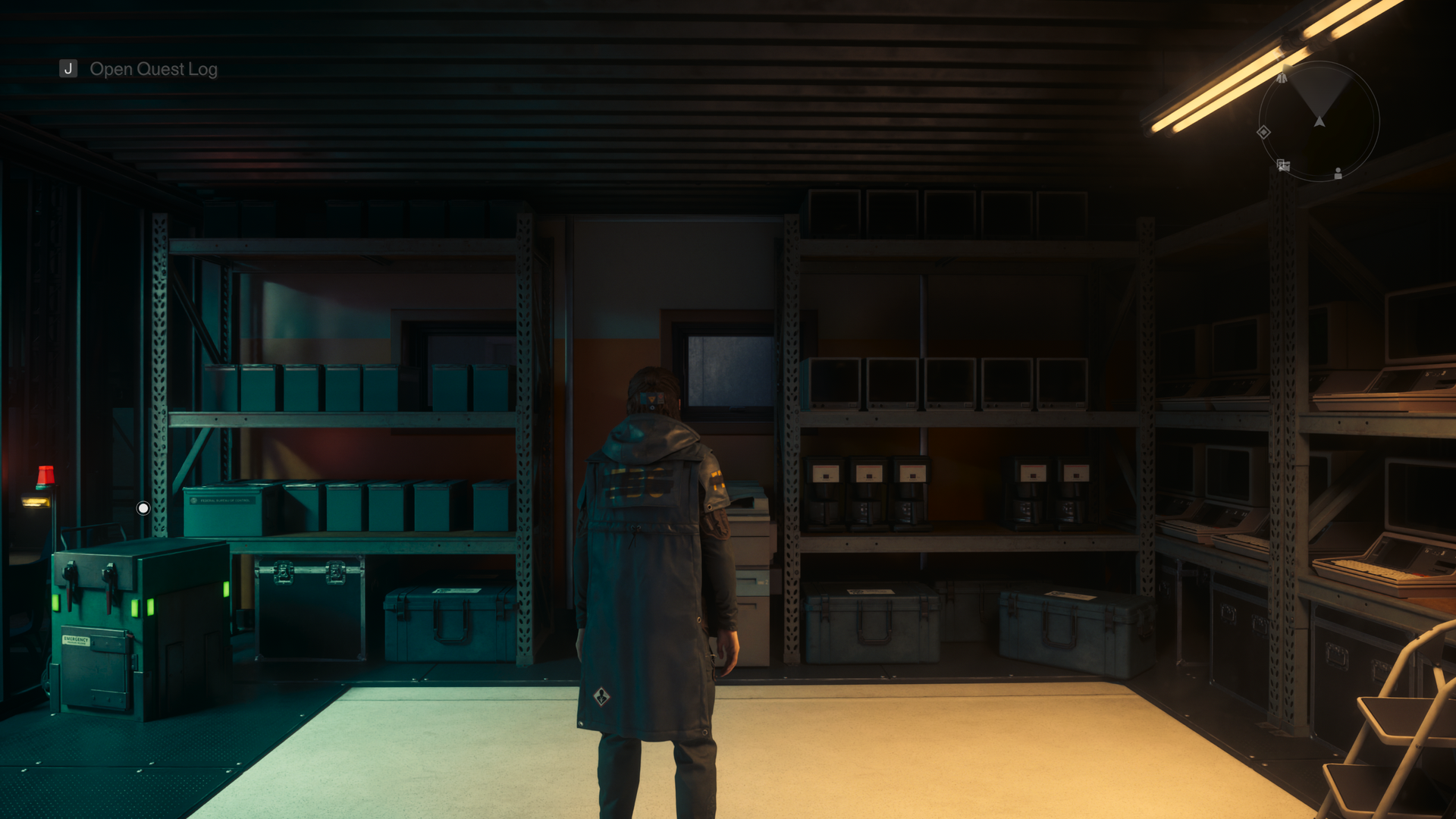
In the examples above, you can see how path tracing accurately represents the light from a fluorescent tube outside the storeroom, casting a hard shadow on the wall and a green glare on Dylan’s uniform. WIth RT off, this effect is only represented on the floor.
Everything looks more alive and more real, in other words, and these subtleties need to be appreciated in motion, not just in stills. I enable path tracing for those moments where something unexpectedly realistic catches the corner of my eye and makes me double back to explore it.
Despite all the environmental magic that path tracing and DLSS Ray Reconstruction lend to Control Resonant’s setting, that level of polish isn’t evenly applied across all the game’s assets.
Control stood out to me not only for its lighting effects but also for its amazing facial modeling work. In Resonant, however, the character models of Dylan, Zoe, and supporting characters like Langston all look like a step back from the level of detail achieved in past Remedy games. Maybe I’ve been staring at too much DLSS 5 output, but the faces in Resonant don’t match up to the environmental quality, and that gap stands out.
Control Resonant raster gaming performance
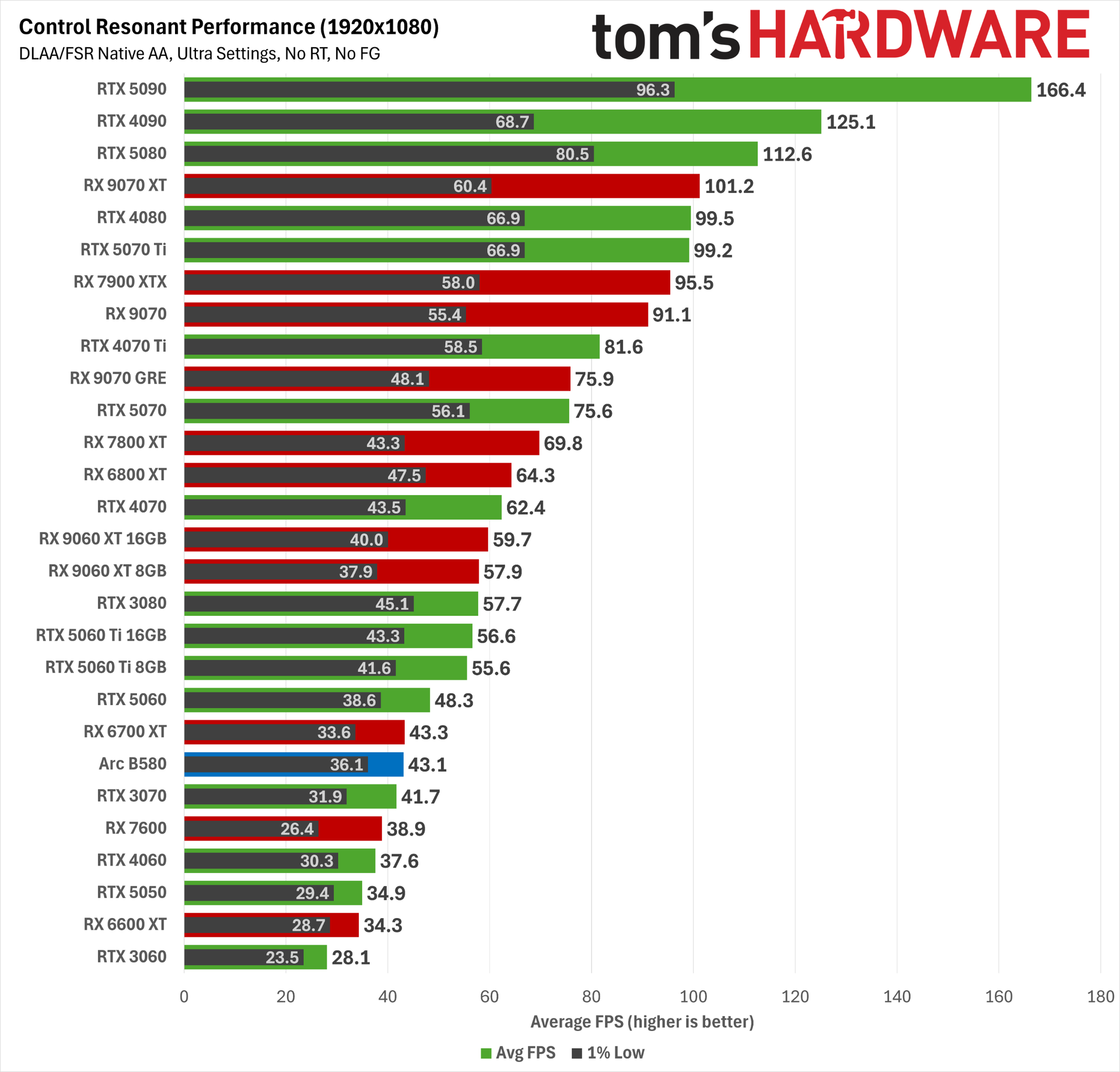
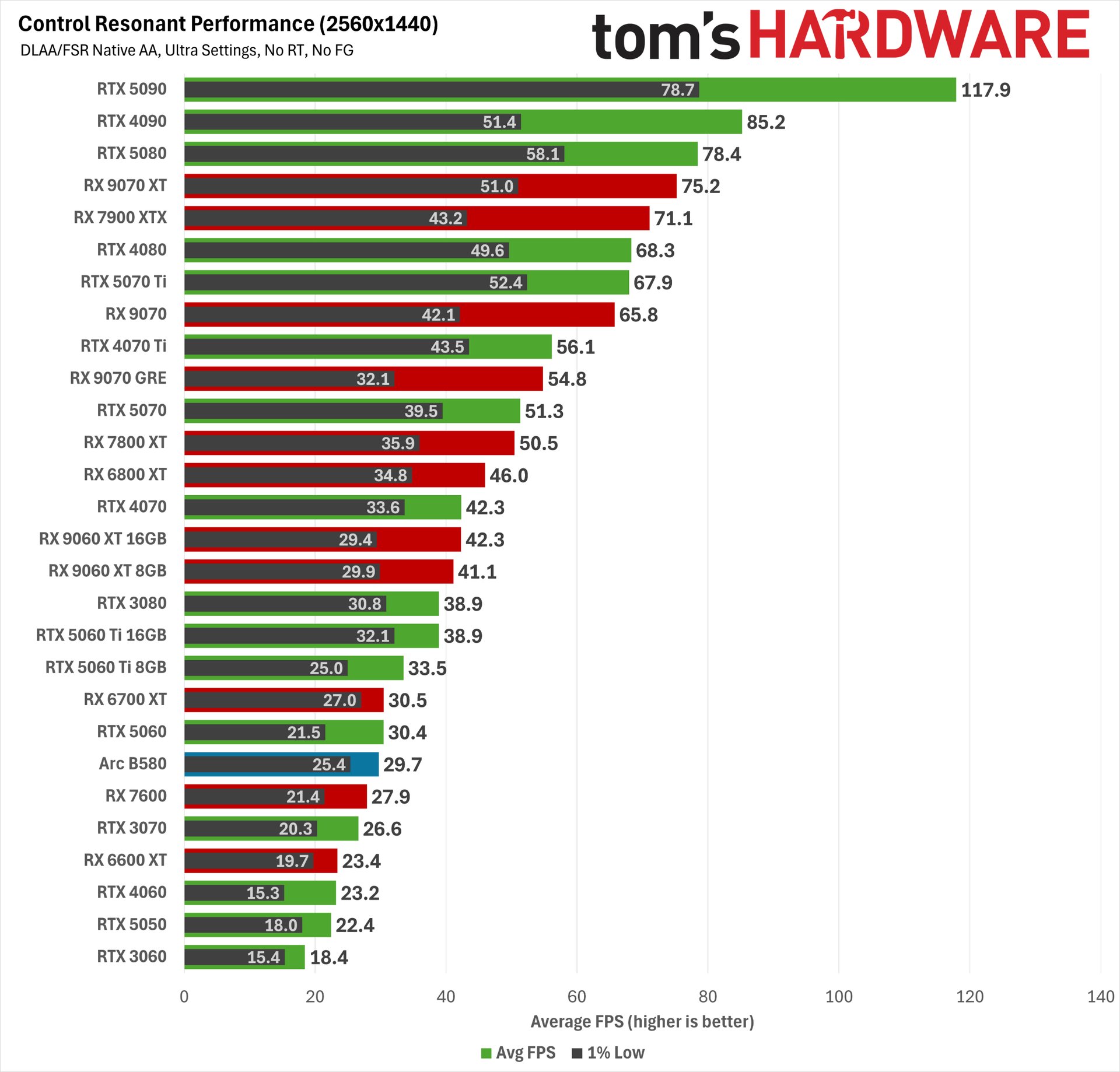
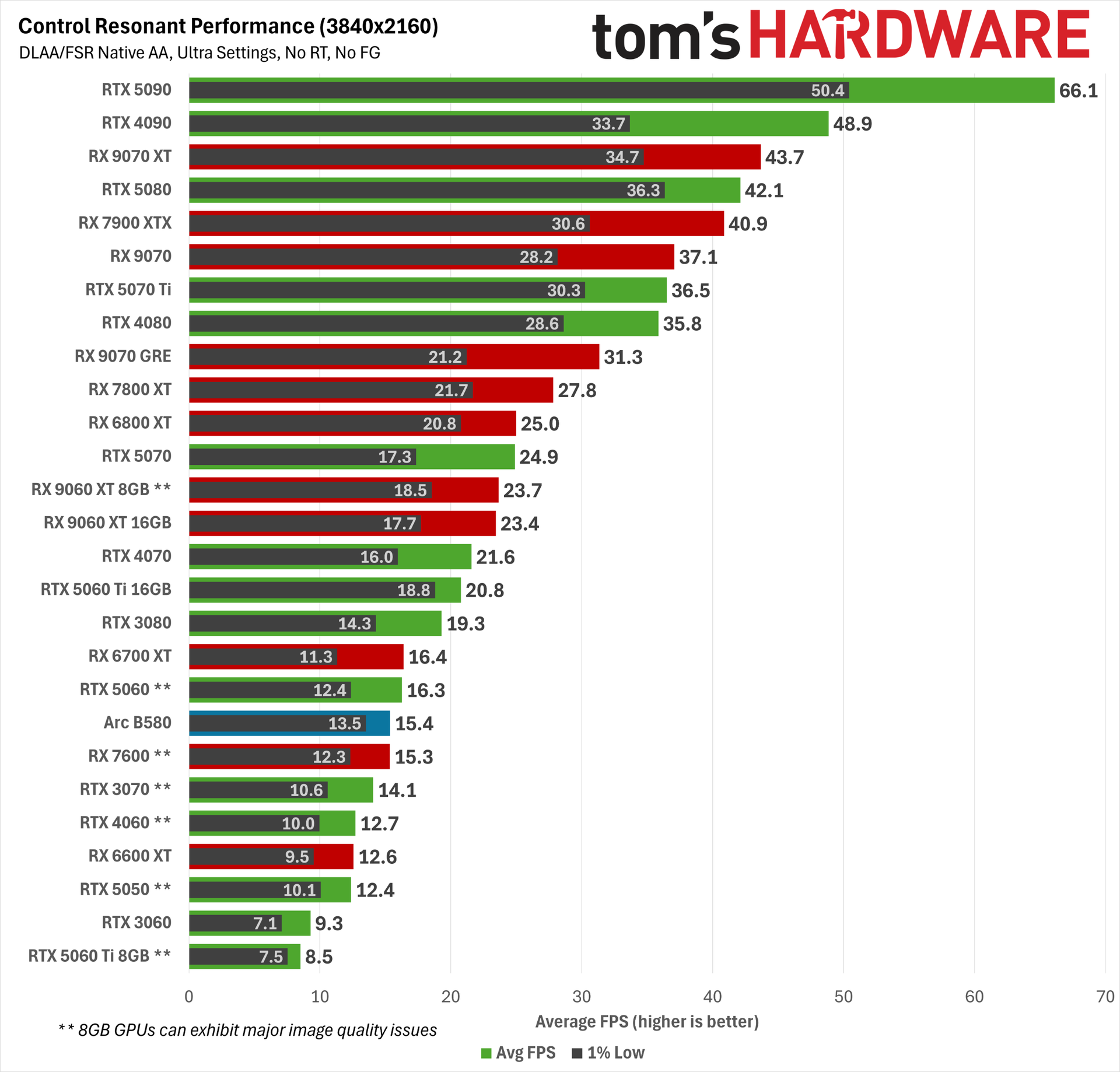
Our gaming performance results start off with native res, raster-only settings.
At 1080p Ultra with RT off, Control Resonant is already placing heavy demands on our tested cards. You want an RTX 5060 Ti or better or Radeon RX 9060 XT or better for 60 FPS (ish) average among current-gen cards, or an RTX 4070, RTX 3080, or RX 7800 XT among earlier cards. The RTX 3060 can’t even break 30 FPS on average, and that’
Radeons also tend to turn in lower 1% lows than GeForces, although that didn’t translate to a bumpy experience with our high-refresh-rate, variable-refresh-rate monitor. If you’re only playing on a 60 Hz display, that difference may be more apparent.
Even though it still lands above a 60 FPS average at 1080p, the older Radeon RX 6800 XT is stuck with FSR 3.x upscaling, so its output image quality is noticeably worse than RX 9000- or RX 7000-series cards that get FSR 4.1.
Control Resonant is also the first game we’ve tested where the demands of running the DLSS 4.5 transformer upscaling model hits RTX 30-series products hard, so if you’re not trying to perform heroic feats of upscaling, you can probably get a few frames per second back by shifting to older DLSS models at the cost of some output image quality.
2560×1440 Ultra is similarly punishing. Here, the RX 9070 GRE and RTX 4070 Ti end up just below a 60 FPS average, while the RX 9070 and RTX 5070 Ti end up slightly above it. Any weaker card will likely need lower settings, a dose of upscaling, or both to deliver a smoother experience.
Finally, at 4K, only the RTX 5090 can deliver the coveted 60 FPS average. Some degree of upscaling, frame generation, or both will be needed on every other graphics card here for this resolution (and possibly on the RTX 5090, depending on your desired experience).
Control Resonant ray-traced performance
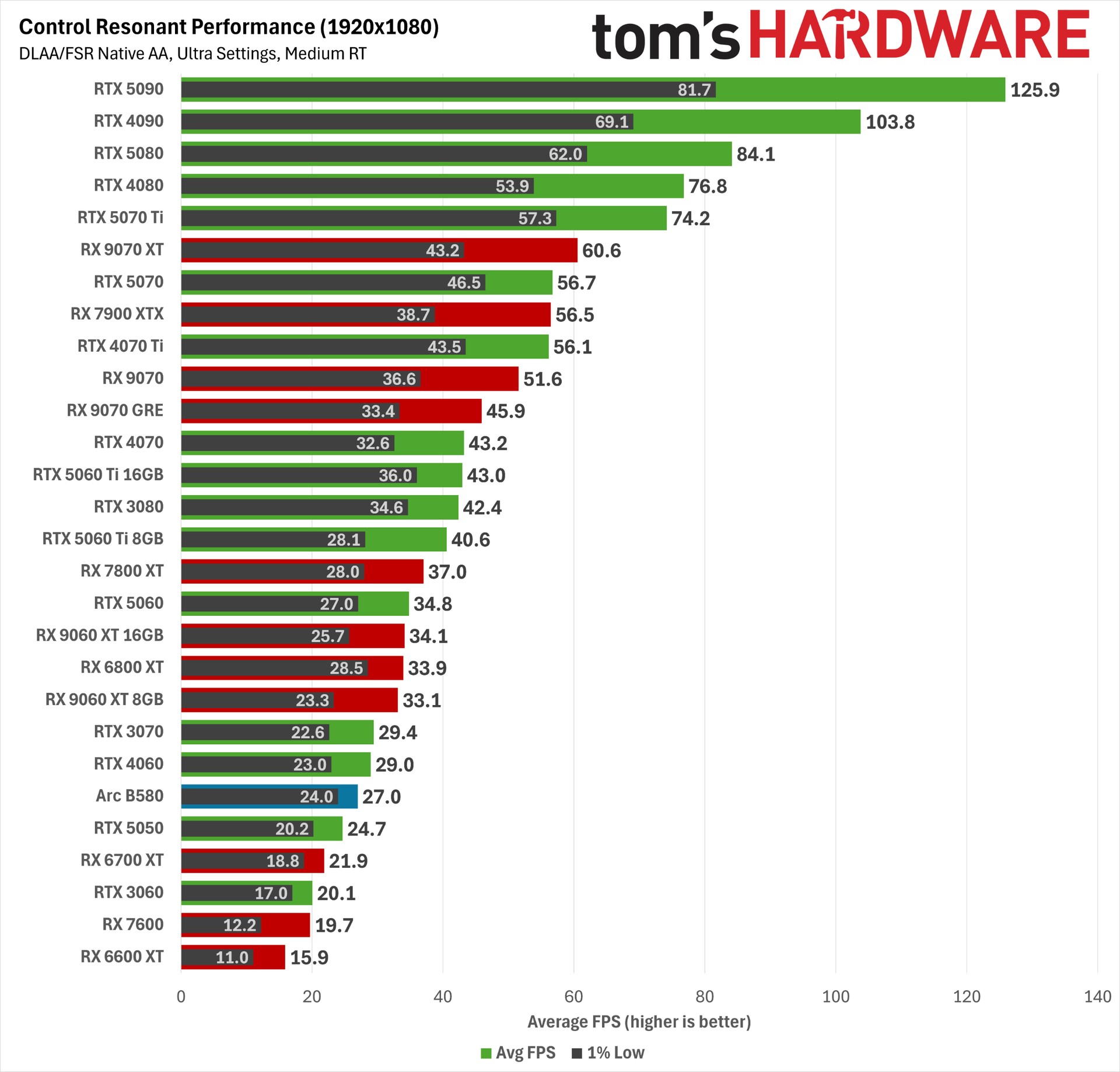
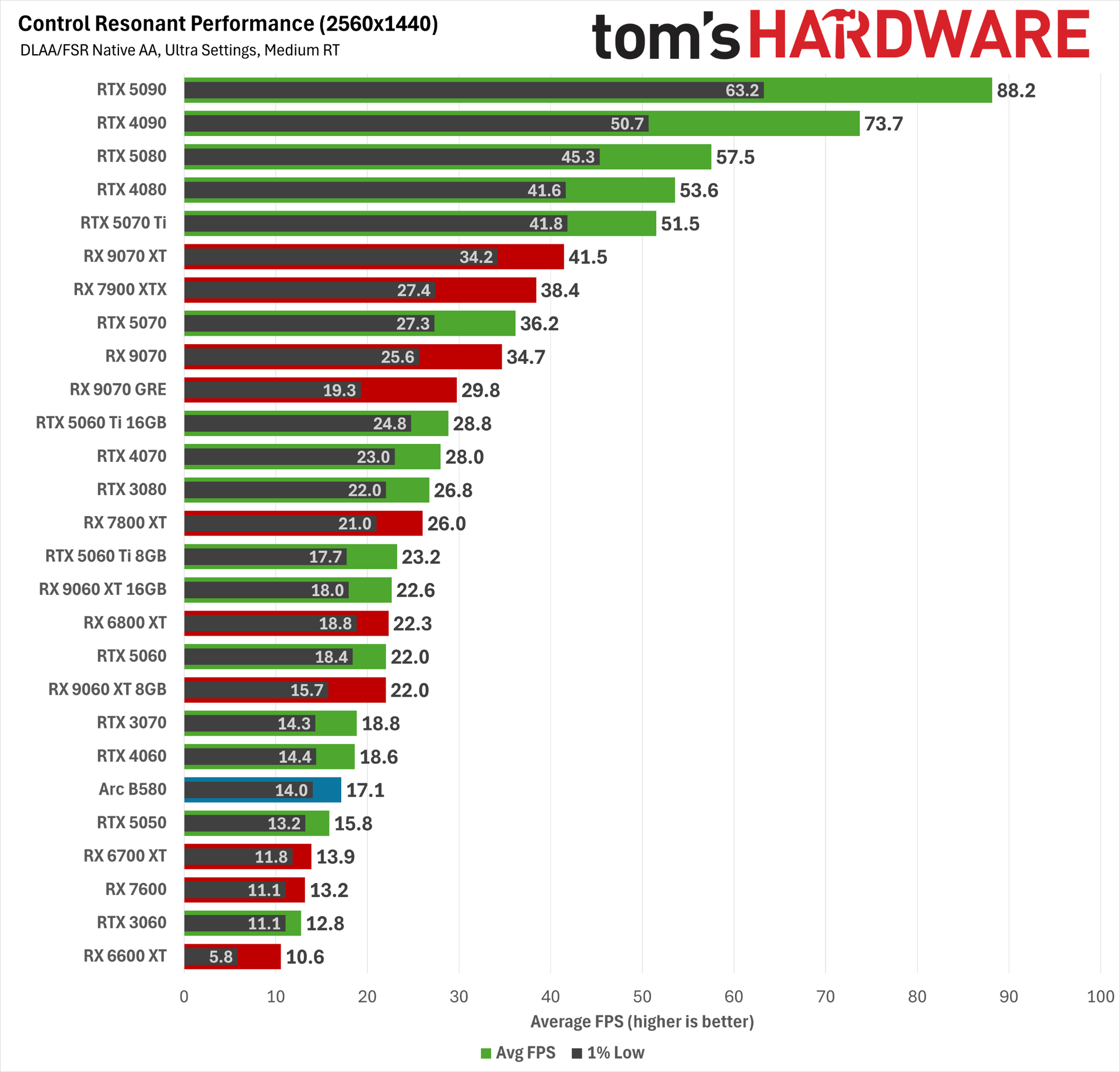
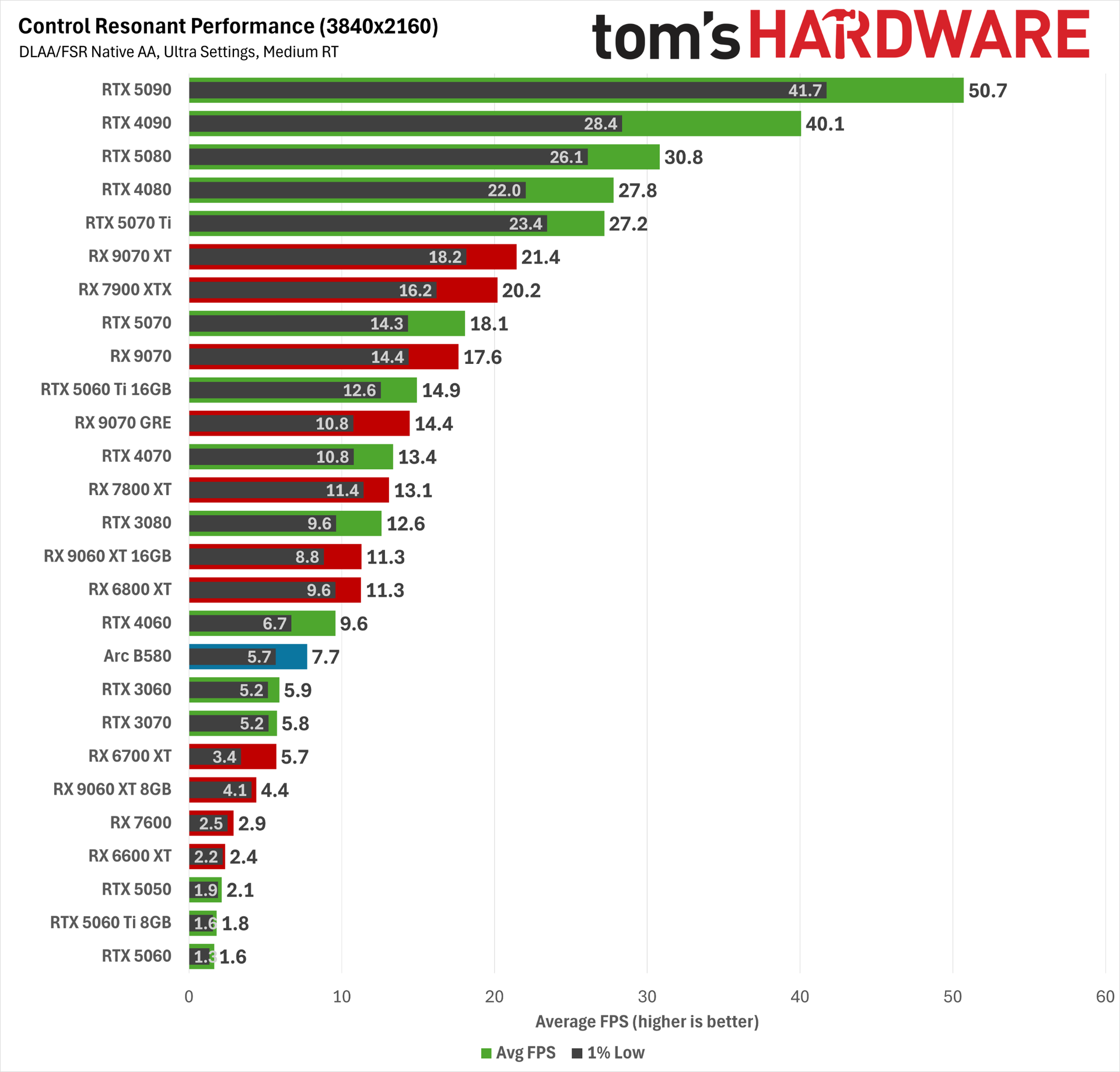
Given the already punishing raster baselines we just saw, we had little reason to believe that RT would be an attainable feat in Control Resonant at native resolutions, and it’s not.
Enabling even the medium RT preset at 1080p smacks down a wide swath of our tested cards. The RTX 4070 Ti, RX 7900 XTX, and RTX 5070 all land just below the 60 FPS mark, while the RX 9070 XT lands right on it. The RTX 5070 Ti offers a significantly more comfortable average frame rate and 1% lows for a smoother experience.
At 1440p, even the RTX 5080 isn’t quite enough to manage a 60 FPS average, and at 4K, not even the RTX 5090 can conquer Control Resonant with these settings. Oof.
These results mean that upscaling and frame generation will be mandatory if we’re going to chase RT glory in Control Resonant.
Control Resonant path-traced performance with upscaling and frame generation
There are two problems with trying to gauge competitive performance when we go ham on upscaling and frame generation, as we’re about to here.
For one, DLSS 4.5 produces a much more stable image than FSR 4, especially at extreme settings like 4K Ultra Performance. FSR 4 can look slightly sharper at rest, as reviewers usually are when creating side-by-side comparison images, but in motion, it can exhibit strong and distracting flickering artifacts, especially on fine structures with repeating elements like fire escapes and chain-link fences.
DLSS 4.5 isn’t entirely free of those artifacts, but they affect much smaller portions of the screen and to a much less intrusive degree.
The net result is that DLSS 4.5 frames are not the same as FSR 4.x frames, so that makes for two different experiential variables we have to account for in any comparison: raw performance and delivered image quality.
And the third variable is that FSR Frame Generation (whether in its ML-powered or traditional shader-based form) isn’t backed up with a robust latency reduction technology like Nvidia’s Reflex or Intel’s Xe Low Latency in Control Resonant.
Radeon Anti-Lag does reduce input latency, but even with the RX 9070 XT in full path-tracing trim, it is at best taking a high input latency and making it somewhat less high. Even with Anti-Lag enabled on the RX 9070 XT, the average latency before framegen is enabled is well above the roughly 60 ms threshold we try not to exceed.
What’s frustrating is that AMD has a more robust input latency handler for devs to use. Radeon Anti-Lag 2 exists and works well in Cyberpunk 2077. But like FSR 4 Ray Regeneration, it’s not implemented in Control Resonant.
Worse, FSR Frame Generation isn’t compatible with the performance counters that Nvidia FrameView monitors to estimate PC latency, so we’re left with only our eyes and our guts to decide whether the net result of FSR FG is a truly playable experience. Even Intel’s XeFG supports these performance counters properly, so it’s all the more annoying that AMD doesn’t, even two years after the arrival of FSR 3.1.
So before we get into these results, bear a couple asterisks in mind. Path tracing as Nvidia envisions it and as Control Resonant implements it—with upscaling, denoising, frame generation, and lag reduction all working together—is not possible to replicate 100% on AMD hardware.
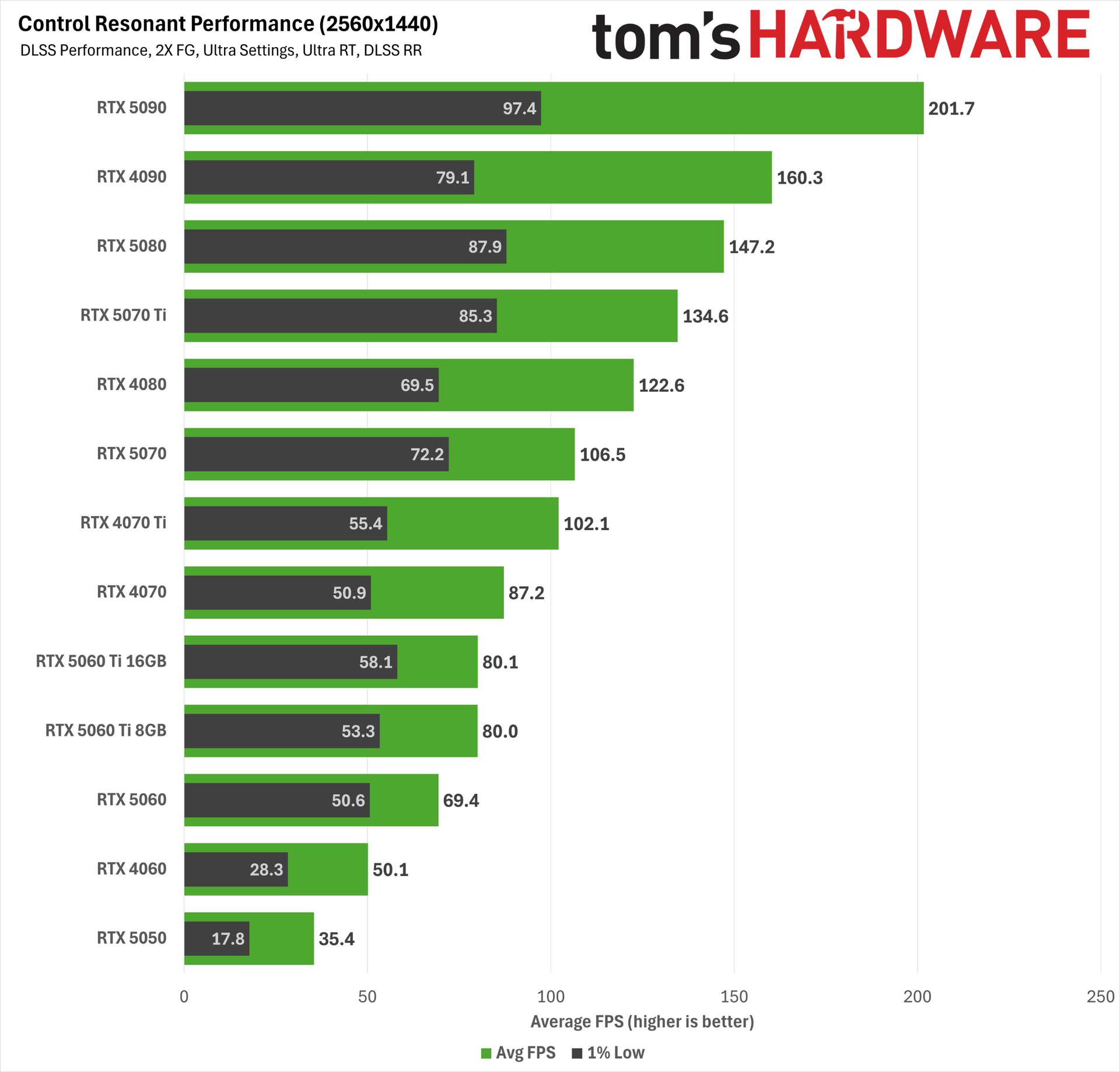
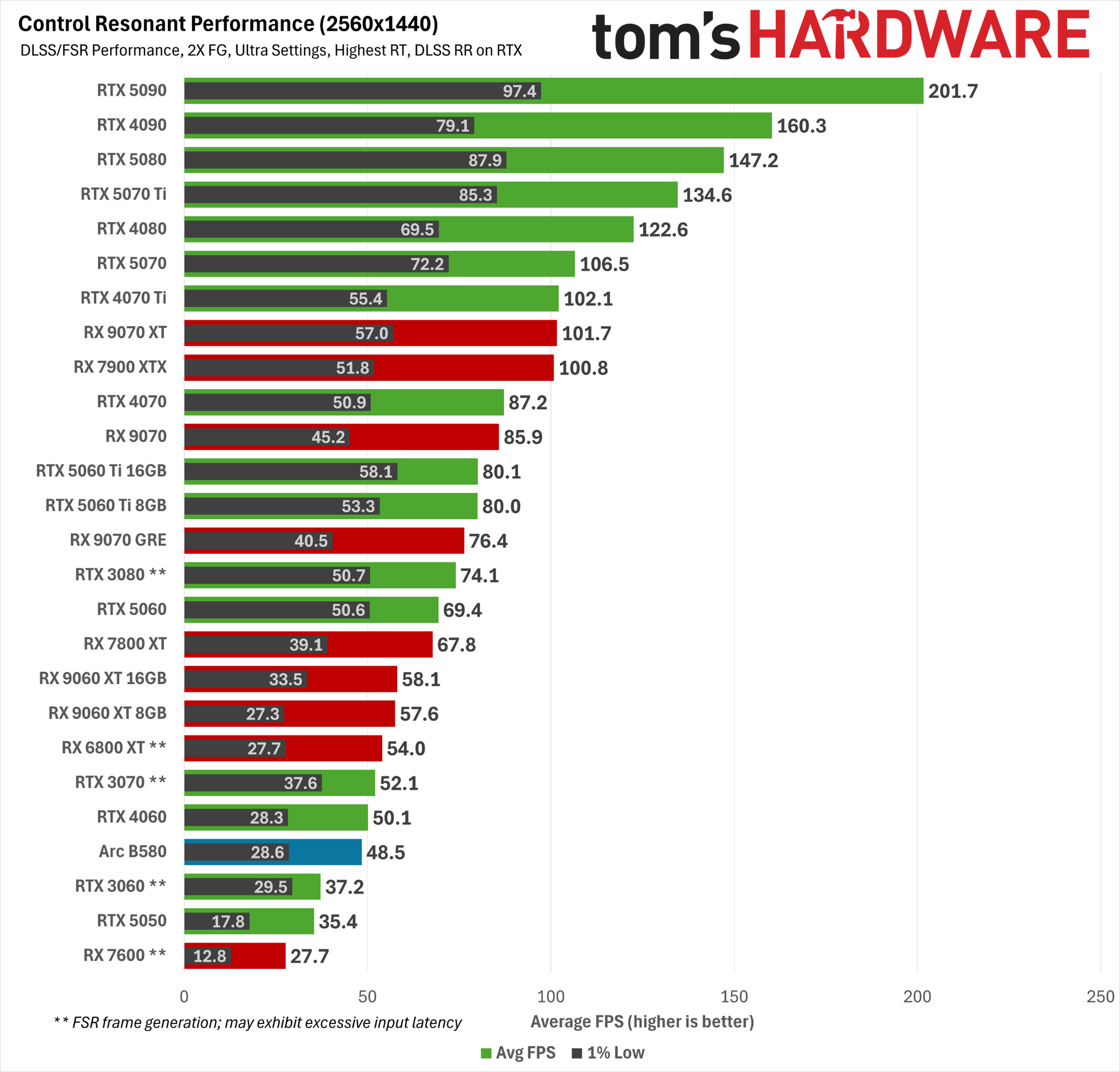
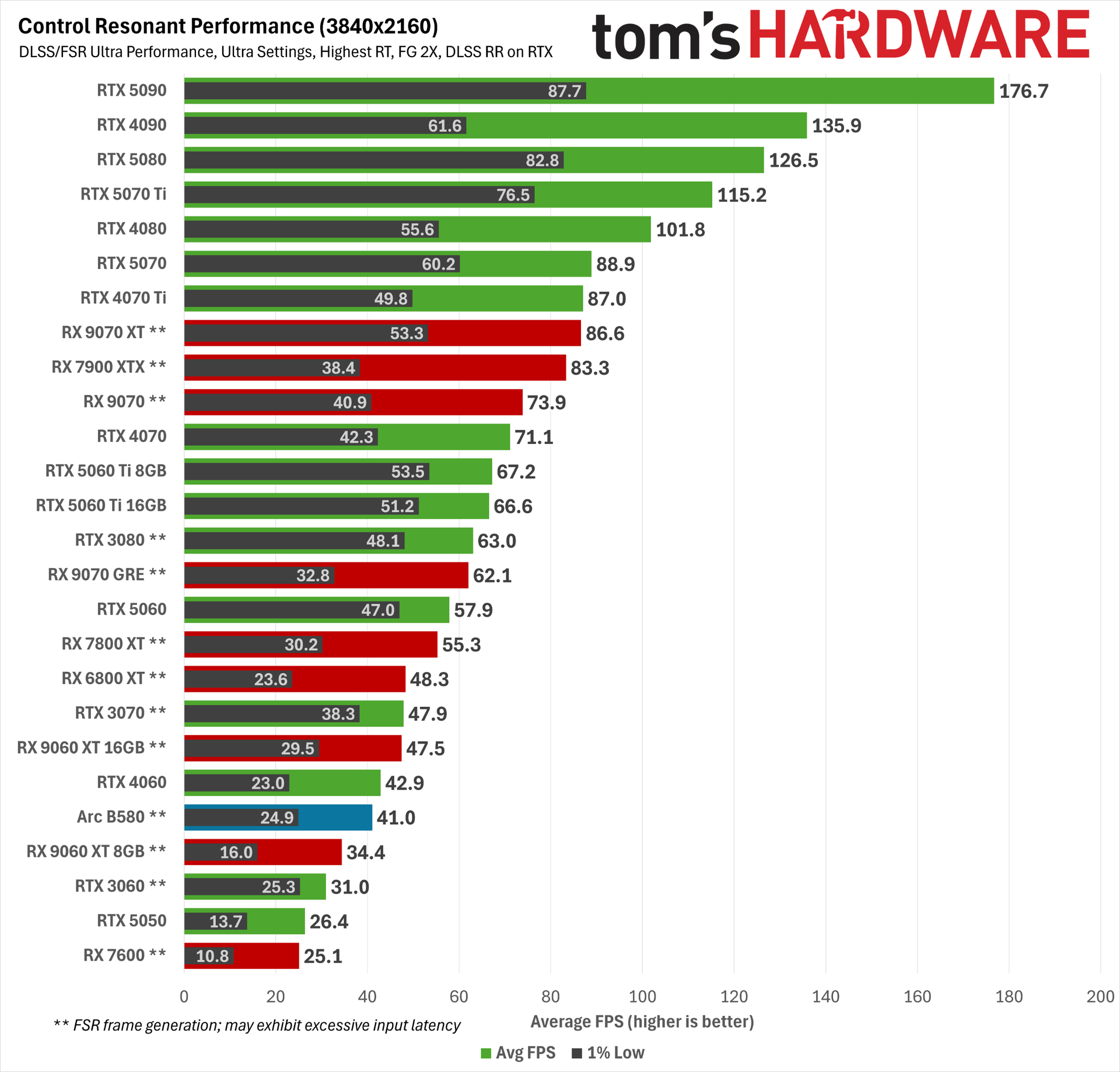
We include AMD results (and RTX 30-series cards with FSR framegen) as a sort of best-effort reference point for maxed-out RT behavior with this game, but because these are doubled frame rates, any figure below 60 FPS on these charts for RTX 30-series and AMD cards should be understood as an unpleasant (or even unplayable) experience, whether due to input latency, significant artifacting, or both.
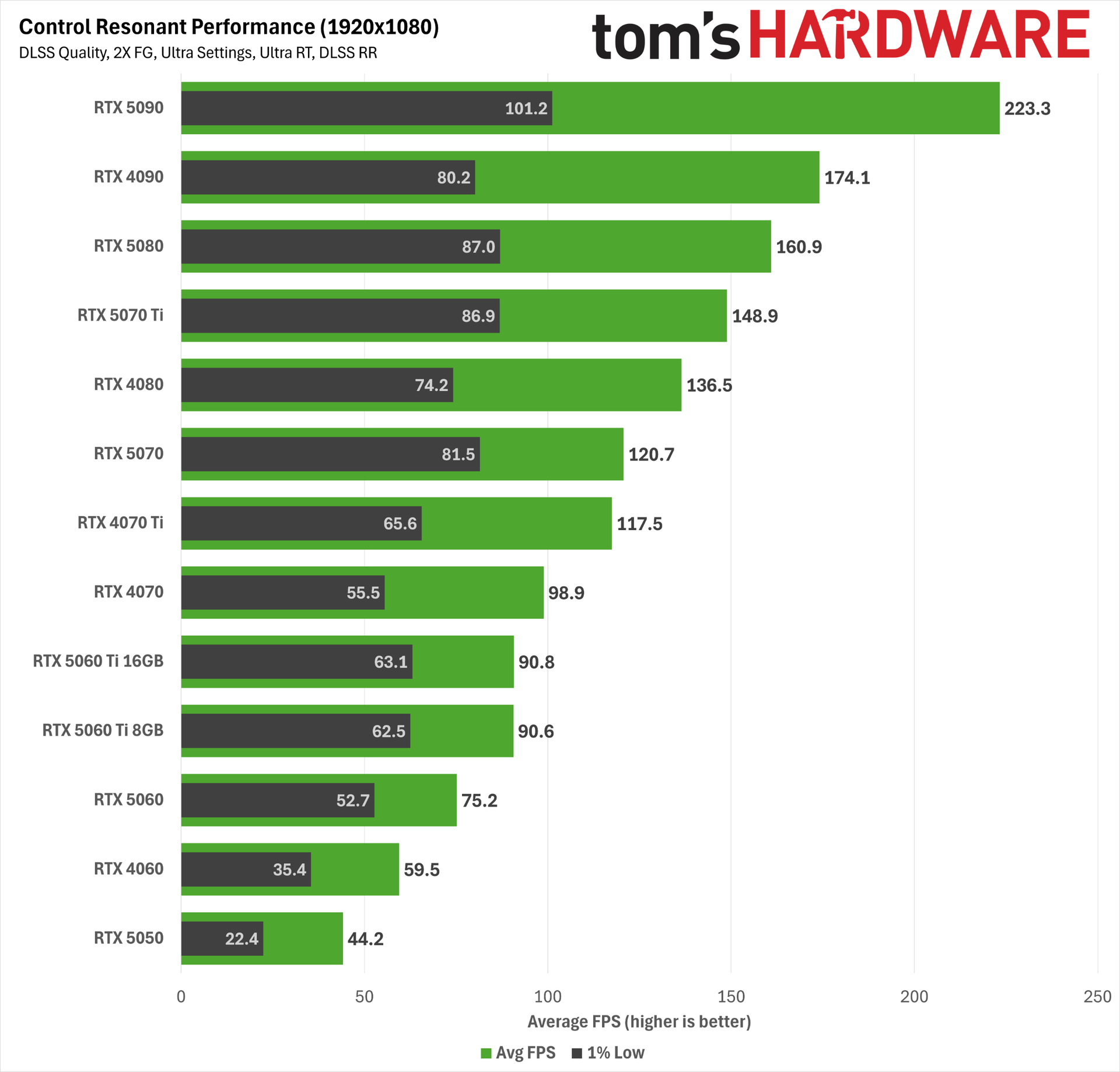
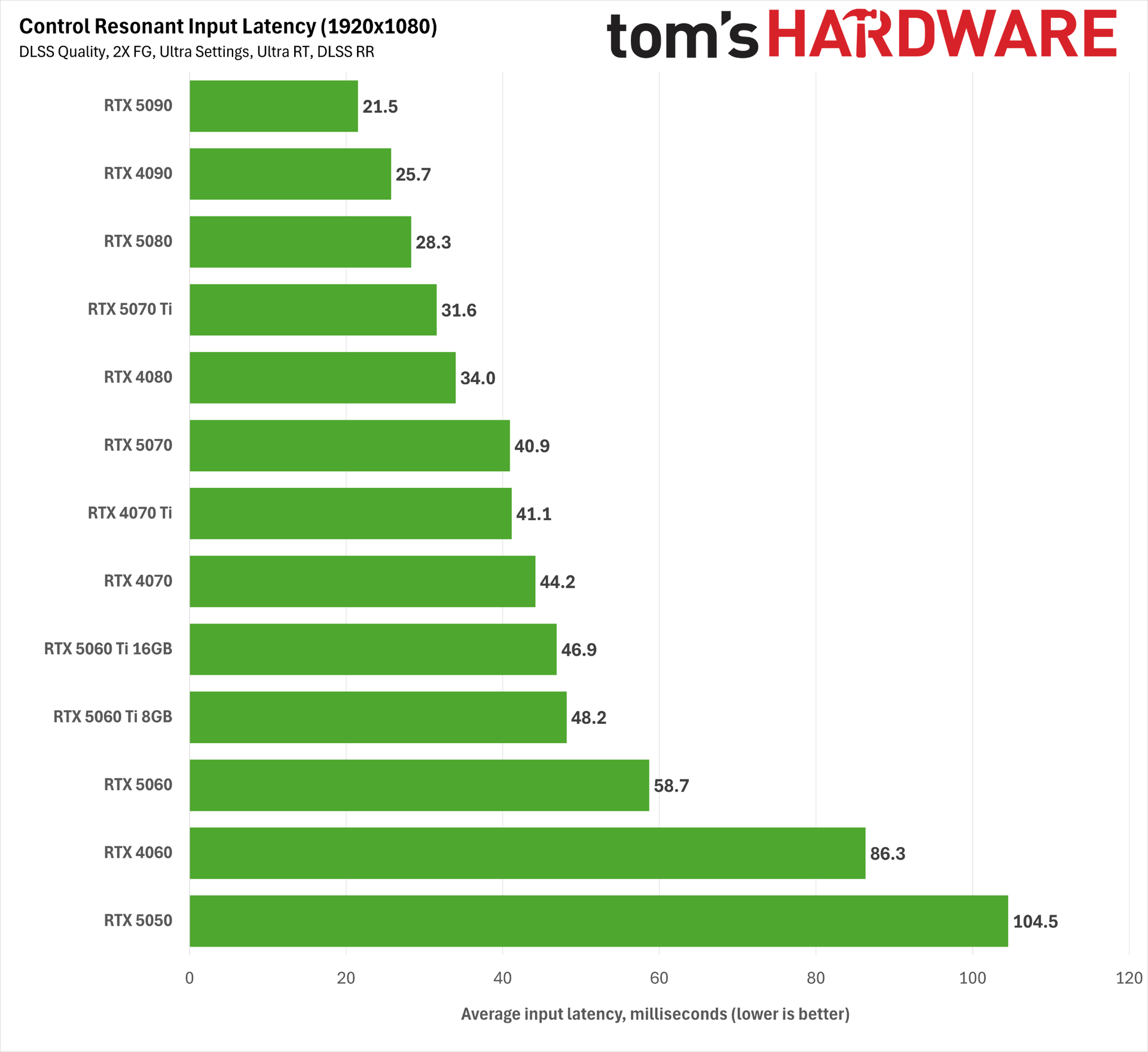
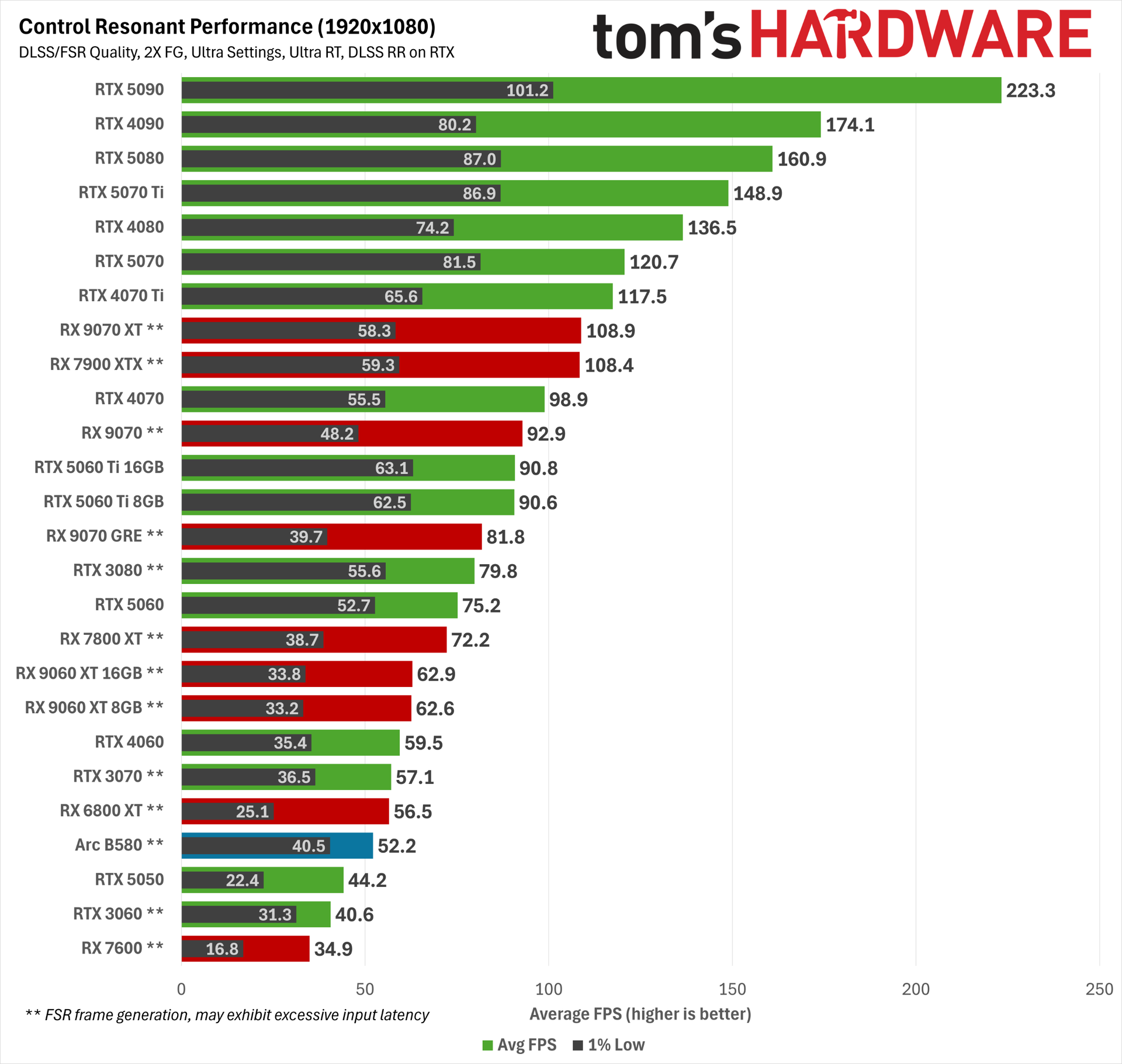
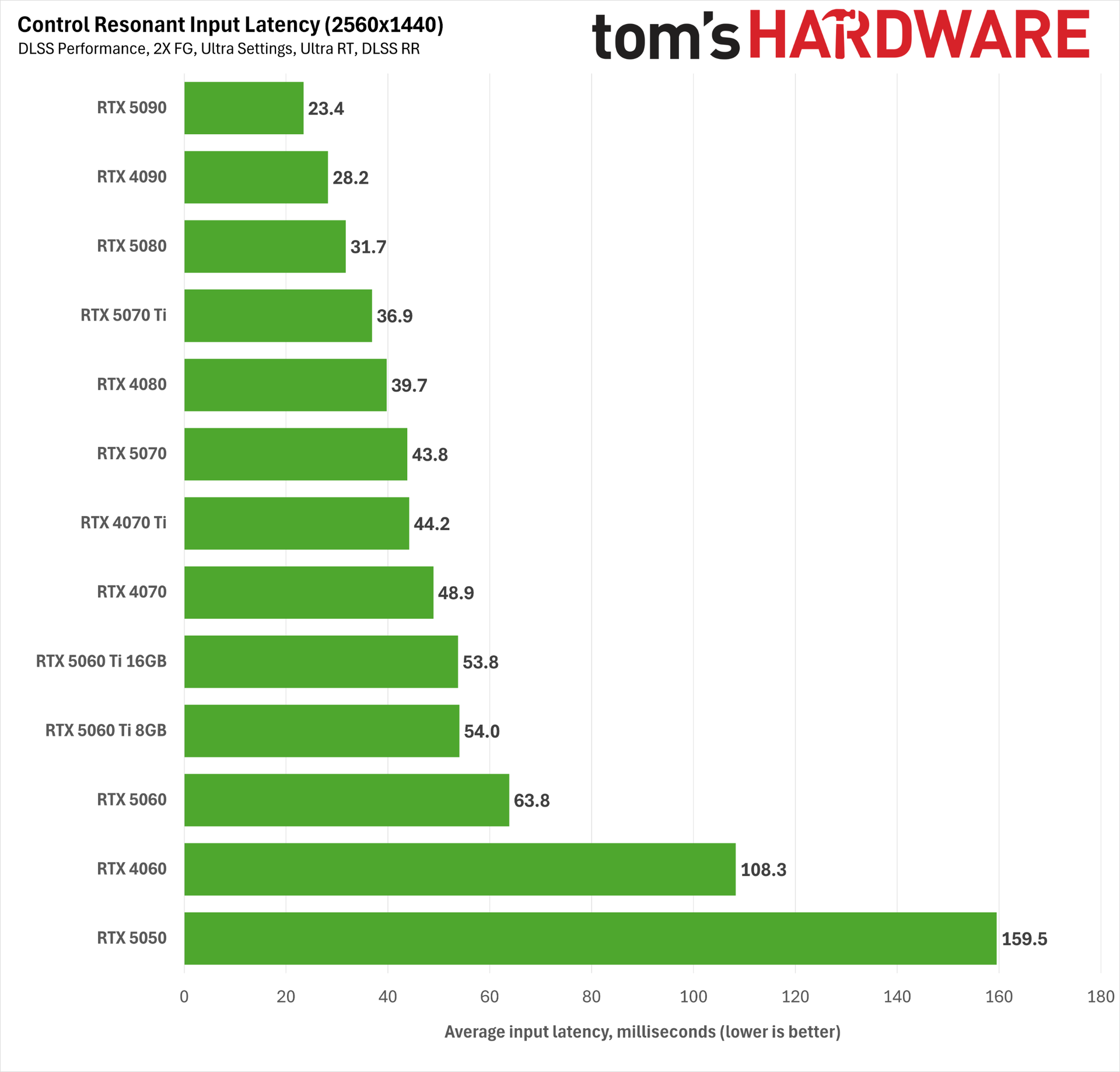
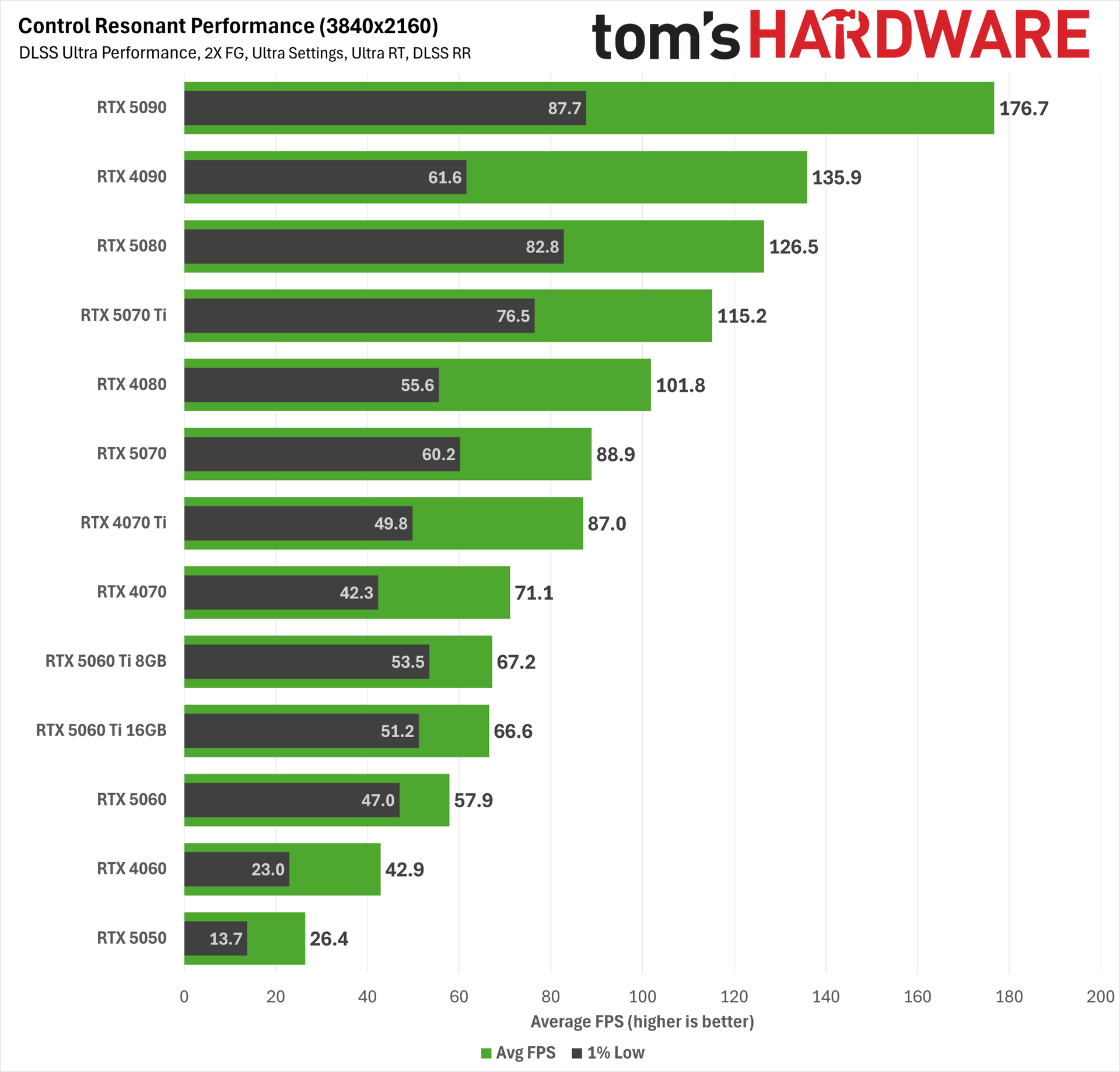
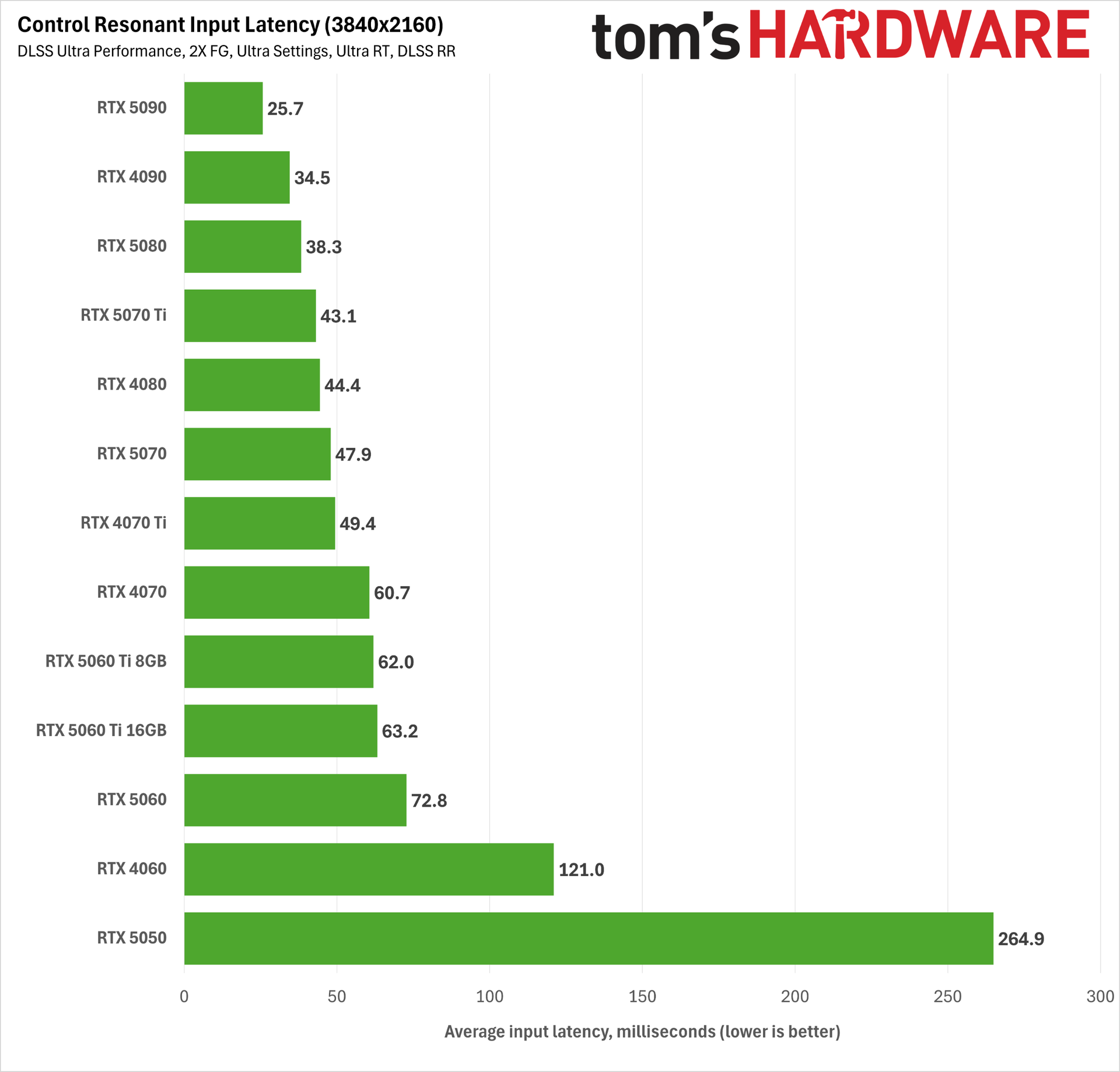
At 1080p with Ultra RT, DLSS Quality, 2X Frame Generation, and DLSS 4.5 Ray Reconstruction, only the RTX 5050 and RTX 4060 fail to deliver playable input latency. Even the RTX 5060 squeaks in under the 60 ms threshold we want for a responsive experience. That’s great news for the accessibility of path tracing on relatively affordable hardware, or at least what used to be relatively affordable hardware.
At 1440p with DLSS Performance, the RTX 5060 just barely fails to meet the 60ms mark for acceptable input latency. This is more the territory of the RTX 5060 Ti and up.
And at 4K with DLSS Ultra Performance, we’d strongly recommend an RTX 4070 Ti or better, although you can get away with an RTX 5060 Ti or RTX 4070 in a pinch.
The combination of DLSS 4.5 technologies and Reflex makes for a perfectly playable path tracing experience in Control Resonant across a wide range of hardware, and as we’ve already noted, it’s impossible for AMD gamers to enjoy the same experience.
Bottom line
Control Resonant marks a new chapter for one of my favorite gaming sagas, and I was thrilled to step back into the Oldest House. The Hiss-corrupted Manhattan setting looks fantastic, even if I’m still waiting for the story to fully grab me. I need to fully explore the full range of weapon forms, skill trees, and builds the game offers as our protagonist Dylan Faden fights through hordes of Hiss in close-quarters, split-second combat. Death is just one wrong move away in this game, and I’ve been frequently reminded of that fact.
For all its path-traced environmental splendor, there are some wrinkles on the tech side in Control Resonant that stand out. The character models, even main characters like Dylan and Zoe, look a bit basic for a 2026 game, especially with all the other graphical fireworks happening around them. Perhaps I’m ruined by DLSS 5 (and perhaps this game was meant to have it alongside more capable hardware), but I’ve come to expect more from Remedy given the artistic heights of Control and Alan Wake II.
Any graphical shortcomings like that stand out given how crushing Control Resonant is for many graphics cards. This is a game that really demands some degree of upscaling for good performance on less powerful hardware, and Ultra settings may not be possible on older, lower-end cards, period.
But at least for Nvidia RTX 50-series gamers, the aggregate improvements to the DLSS 4.5 software stack in 2026 make Control Resonant’s fanciest graphics settings incredibly accessible, and you really should take advantage of every DLSS feature at your disposal in this title.
Thanks to DLSS 4.5 Super Resolution’s remarkable capabilities, even the RTX 5060 can do path tracing at 1080p with DLSS Quality upscaling, DLSS Ray Reconstruction, and frame generation enabled, all with a reasonable input latency and solid output image quality. And if you’re willing to tolerate slightly higher input latency, you can get away with the same settings at 1440p using DLSS Performance.
The RTX 5070 provides a great experience at all resolutions with those same settings, and you really only need more powerful hardware like an RTX 5070 Ti if you’re chasing higher DLSS input resolutions. I would normally shout out the RTX 5060 Ti here, but that card’s 16GB version especially is so close in price to the RTX 5070 that you should just get the more powerful card if gaming is your goal.
The situation is less rosy on the AMD side, even for the latest RDNA 4 cards. FSR 4.x upscaling is available in this title for RX 9000- and RX 7000-series graphics cards, but it isn’t as strong at image reconstruction as DLSS 4.5, so lower RT settings and higher FSR input resolutions may be necessary on RX 9000-series cards than on comparable RTX 50-series hardware to achieve the right balance of performance and image quality.
And the lagginess of FSR Frame Generation means that you’ll have to carefully test that feature if you want to try to use it to boost smoothness, unlike the general no-brainer that is DLSS 4.5 (M)FG.
All told, the incomplete implementation of AMD’s gaming tech suite in Control Resonant, as well as the generally lower RT performance of RDNA 4 cards versus Blackwell, means that you can max out RT settings in this game, but you still won’t enjoy the same image quality as on GeForce cards, especially in the areas of the frame that DLSS 4.5 Ray Reconstruction enhances.
Once again, this situation proves that having a software feature in your toolkit is meaningless if you can’t convince a developer to adopt it. Every new game that comes out with only a patchwork of AMD features like this is another paper cut for RX 9000-series GPU owners who are left with a distinctly lower-tier experience than RTX 50-series cards get. Fine wine, this is not.
But maybe you’re totally unmoved by RT and neural rendering techniques and just want strong raster performance with a touch of upscaling where it’s needed. RX 9000-series cards deliver that experience with strong performance per dollar in today’s ever-pricier gaming graphics card market.
Going off what I’ve played of Control Resonant so far, I’d suggest checking some full gameplay reviews to see if it’s for you and perhaps giving it a post-launch point release or two to iron out some minor technical issues we saw.
But one thing is for certain: the full array of Nvidia tech in this title, and its general accessibility across a wide range of hardware, means that a GeForce graphics card is the best way to play it.