NordVPN review: More than just a VPN, it’s a privacy powerhouse

At a Glance
Expert’s Rating
Pros
- Outstanding connection speeds
- Excellent streaming performance
- Loaded with privacy and security features
- Numerous independent audits
Cons
- Expensive monthly plans and steep renewal prices
- Important features vary by platform and subscription tier
Our Verdict
NordVPN packs a lot into a single premium subscription: tons of country connections, excellent streaming site compatibility, a wealth of configuration options, and lightning-fast server speeds. It has grown beyond just a VPN, now offering a potent suite of privacy and security features that few competitors can match.
Price When Reviewed
This value will show the geolocated pricing text for product undefined
Best Pricing Today
Best Prices Today: NordVPN
Price comparison from over 24,000 stores worldwide
Price comparison from Backmarket
NordVPN in brief:
- P2P allowed: Yes
- Simultaneous device connections: 10
- Business location: Panama
- Number of servers: 9,100+
- Number of country locations: 149
- Cost: $14.99 per month, $65.88 for one year, or $94.23 for two years
NordVPN is one of the most well-known and popular VPN services, with a huge user base. The trusted premium service is notable for its excellent speeds, an enormous server network, and unrivaled set of security features.
In its aim to be a one-stop shop for all your security needs, the service has expanded into a larger umbrella organization known as Nord Security, which also owns products such as the NordPass password manager, NordLocker encrypted storage, and the NordLayer business-security platform. Some consumer tools are bundled with higher-tier NordVPN subscriptions, while its business products are sold separately.
Read on to learn more, then see our roundup of the best VPN services for comparison.
What are NordVPN’s features and services?
Let’s get this out front right away, NordVPN is one of the largest and most well-funded VPNs around. NordVPN has a user base in the tens of millions and is only one part of the larger conglomerate known as Nord Security.
There’s no doubt it’s a premier VPN service with resources most competitors could only dream of. A subscription comes with not just a VPN, but a whole slew of top-quality privacy and security features. But for the purposes of this review, and to compare apples to apples, I’ll be focusing mainly on the VPN portion.
The VPN itself is supported by most major platforms such as Windows, macOS, Android, iOS, Linux, smart TVs, and browser extensions. It also allows for 10 simultaneous device connections.
One caveat is that the feature set varies by platform. Split tunneling is available on Windows, Android, and Android TV, but isn’t offered on macOS or iOS. The full next-gen antivirus is also limited to Windows and macOS, although more basic DNS-based protection is available elsewhere. On the plus side, Linux users now get a full graphical app rather than having to rely only on command-line controls.
Its customer support services are available 24/7 via chat or email and it also has an extensive blog and FAQ section on its website should you run into trouble and want to solve the problem on your own.
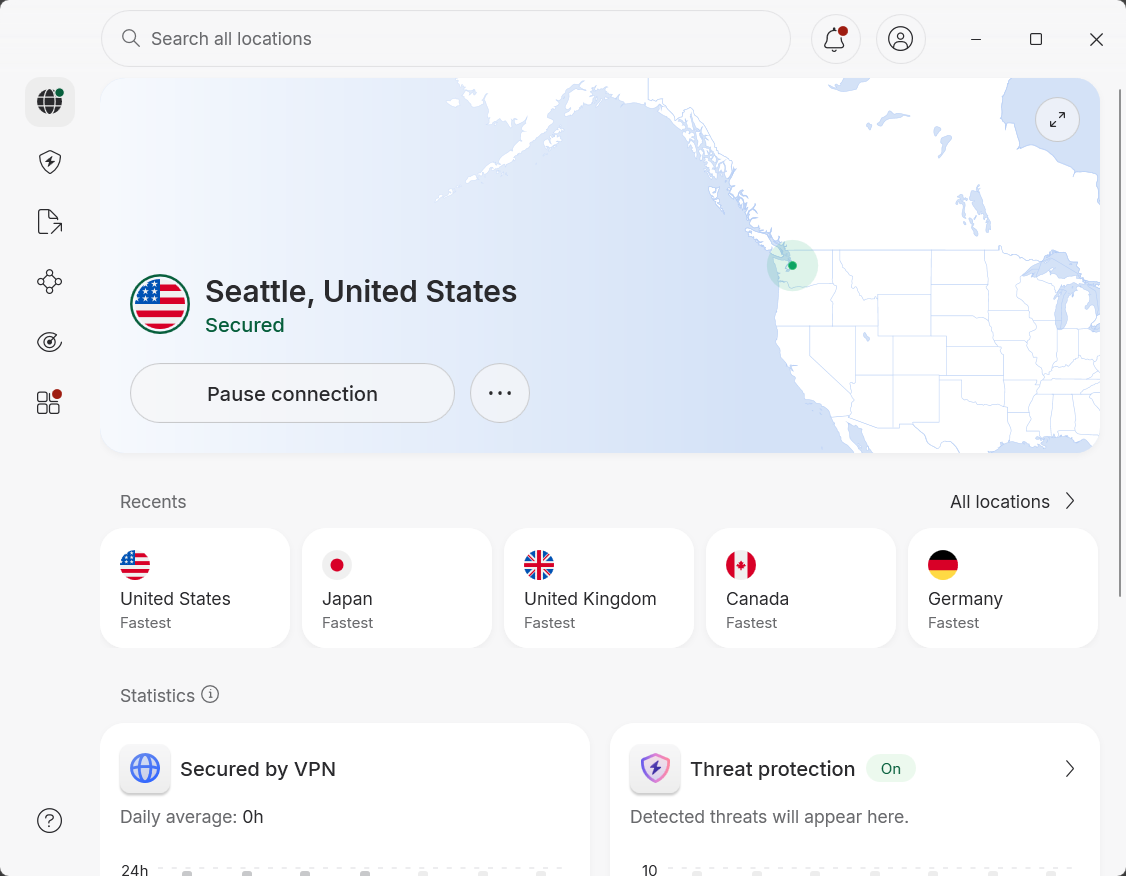
NordVPN’s homescreen is a well-designed interface that is easy to navigate and displays all of the information you’re likely to need from a VPN connection at a glance.
Sam Singleton
When you first open NordVPN on Windows, you’re presented with an information hub showing the status of your VPN connection, Threat Protection, and File Sharing. The left-hand rail includes quick links for a VPN map, Threat Protection, File Transfers, Meshnet connectivity, and Dark Web Monitoring. At the bottom you also have interface options for Contact Us and Settings.
When you click on the VPN option, the app window changes to a world map that you can drag around and select a specific country and server to connect to. There is also a small box with options for quick connect—allowing you to automatically connect to the fastest available server. In larger countries such as the U.S., Canada, Australia, Germany, and the UK, server recommendations now try to keep users within their own region, which should mean shorter routes and potentially better latency.
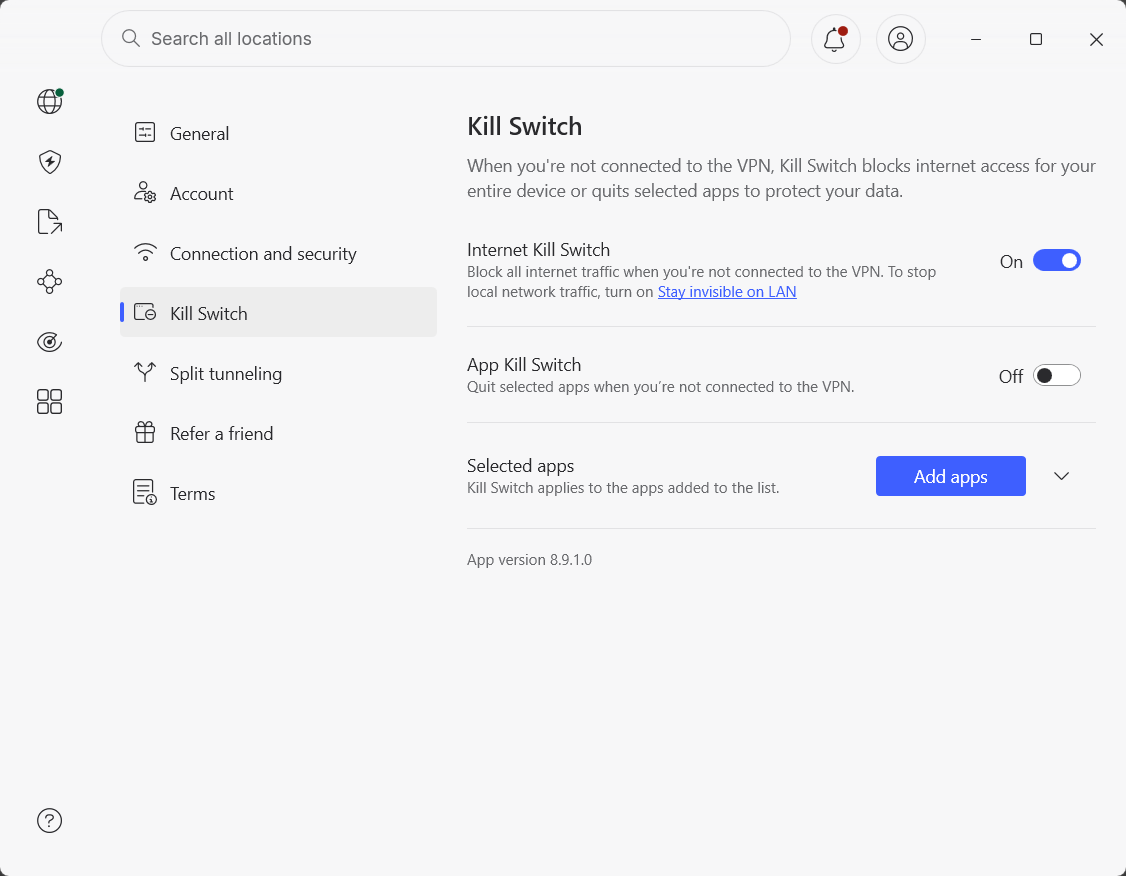
NordVPN’s Settings menu allows for a wealth of customization options and tools that allows you to really optimize your VPN experience. Features such as a kill switch, split tunneling, and more are all here.
Sam Singleton
Digging deeper into the Settings menu, you’ll find a ton of power user options including a Kill Switch and App Kill Switch. The latter stops any app from connecting to the internet if an active VPN connection drops, while the former does that for the entire device.
There are also options for Split Tunneling and Auto-connect. Split Tunneling allows you to choose which apps you specifically want to run through a VPN connection and which you do not. This is really useful if you want to surf the web while protected with a VPN, but also play games without the potential extra latency that comes with an active VPN connection.
Auto-connect is also a nice feature that comes standard with most VPN services. However, what makes NordVPN’s auto-connect feature stand out is the ability to customize the connection itself. You can, for example, automatically connect to a double VPN or a specific country. You can also choose whether to connect whenever the app starts or only on “unsecure networks” like public Wi-Fi.
NordVPN also provides a wide range of specialty connections. Double VPN routes traffic through two VPN servers, Onion Over VPN sends it through the Onion network, and obfuscated servers disguise VPN traffic on restrictive networks. NordVPN has also folded P2P support into all standard servers, so users no longer need to seek out a separate P2P category.
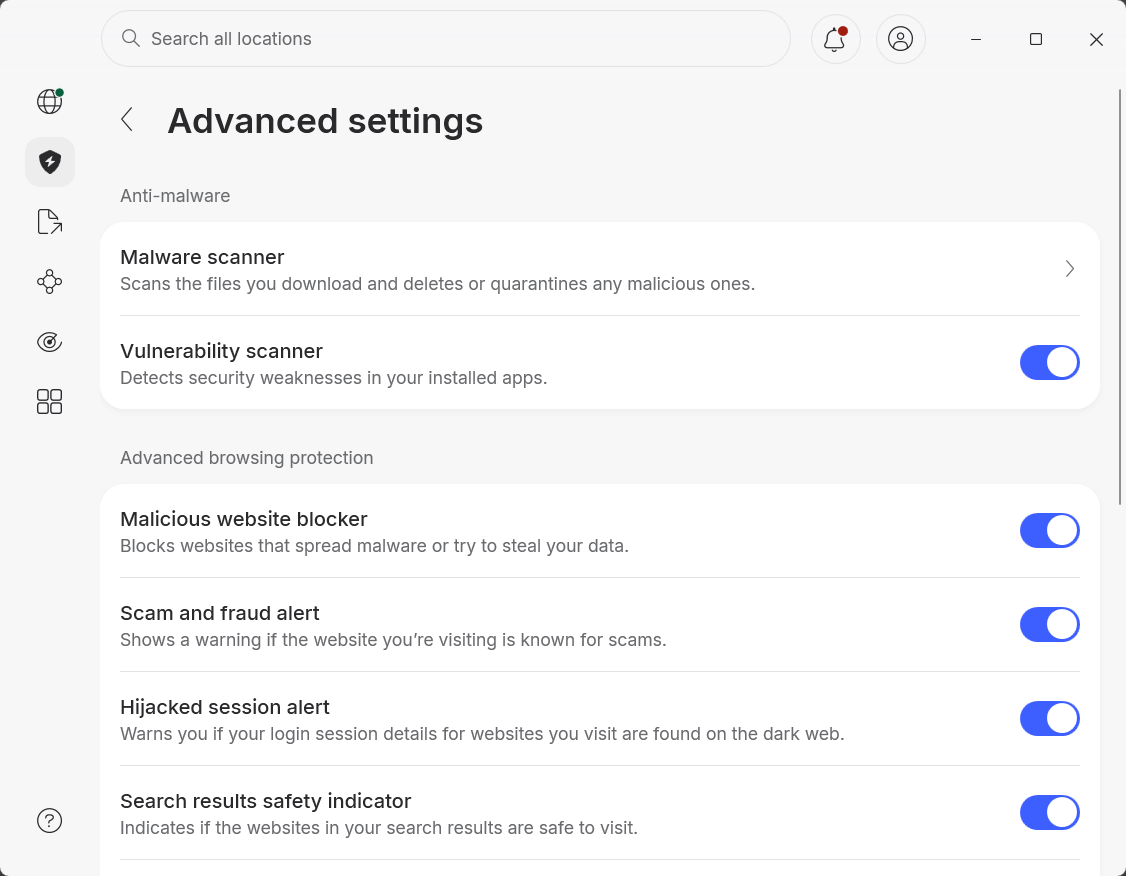
Threat Protection is NordVPN’s all-in-one security toolset that provides anti-malware, scam and fraud alerts, a malicious site blocker, and more.
Sam Singleton
Heading back out to the main menu, you’ll find the non-VPN tools. NordVPN’s higher-tier plans include a “next-gen antivirus,” formerly known as Threat Protection Pro. On Windows and macOS, it can block malicious sites, scan downloads for malware, and stop ads and trackers even when the VPN is off.
With some higher-tiers, NordVPN offers Link Checker, which scans URLs for scams, malware, and phishing. An AI-powered option can explain in plain English why a link may be dangerous. Additionally, NordVPN has also expanded its security suite with Call Protection, Message Protection, and Dark Web Monitor Pro. These features can warn about suspicious calls and texts and monitor personal information for exposure online.
NordVPN also offers its Meshnet feature. Meshnet uses NordLynx to create encrypted connections between devices. It can be used for remote file sharing, virtual LAN gaming, or routing internet traffic through a home computer while traveling.
NordVPN offers a paid dedicated IP for users who want a consistent address, as well as an entire dedicated-server add-on for more advanced needs. These provide a private virtual server with a static IP and port forwarding, but have limited locations, a 4TB monthly data cap, and may offer less anonymity than shared servers since they are linked directly to your account.
Overall, NordVPN remains one of the most feature-rich VPNs on the market. Its extra tools now cover far more than VPN use, although the best features vary by platform, require higher-tier plans, or cost extra. Even with those caveats, few competitors can match the breadth of NordVPN’s combined privacy and security package.
How much does NordVPN cost?
NordVPN currently offers three subscription tiers: Basic, Complete, and Prime. Month-to-month pricing is expensive at $14.99 for Basic, $19.99 for Complete, and $29.99 for Prime. The introductory one-year plans cost $65.88, $77.88, and $113.88, respectively. Two-year subscriptions currently include three bonus months and cost $94.23 for Basic, $121.23 for Complete, or $202.23 for Prime.
The Basic plan includes the VPN, protection against malicious domains, 10 simultaneous connections, and standard Dark Web Monitor access. The Complete plan adds antivirus protection, an ad and tracker blocker, scam-call protection, a more robust Dark Web Monitor Pro, a password manager, and 1TB of encrypted cloud storage. Finally, the Prime plan includes everything in Complete plus identity protection, credit monitoring, and identity-theft insurance and cyber-extortion coverage. The insurance and cyber-extortion benefits are currently limited to U.S. residents only.
The long-term deals are much more affordable than paying monthly, but be aware that these are only introductory rates. Basic renews at $139.08 per year, while Complete renews at $219.48 and Prime at $296.28—steep price jumps that are easy to overlook when signing up.
NordVPN does have a habit of offering great limited-time discounts throughout the year on its subscription plans, especially during the holiday season. If you’re lucky enough to snag one of these VPN deals then you can get introductory rates on these higher-end plans for even less.
The service also now offers a dedicated-server add-on starting at $11.99 per month. It provides an entire private virtual server with dedicated resources, a static IP, and port forwarding, but its limited locations and 4TB monthly bandwidth cap make it a bit of a niche extra for most consumers.
All regular plans come with a 30-day money-back guarantee. NordVPN accepts payment by credit card, PayPal, and cryptocurrency, although available methods can vary by location.
How is NordVPN’s performance?
During my testing I rated connection speeds across NordVPN’s servers in different countries around the world and then compared them to my baseline internet speed. I conducted these tests using the NordLynx protocol, which is NordVPN’s default and generally its fastest option.
NordVPN’s server speeds came through with flying colors. I noted an impressive average of 75 percent of the base download speed and an outstanding 81 percent of the base upload speed. It continues to have the fastest average connection speeds of any VPN I’ve ever tested.
With those speeds, users should have no trouble streaming HD or 4K video. Gaming should also be smooth on most servers, with the usual caveat that latency can increase significantly over long-distance connections for every VPN.
NordVPN worked well with every major streaming service I tested including Netflix, Amazon Prime Video, Disney+, Hulu, Max, and Apple TV. It should be noted that while NordVPN is likely to work with these services, streaming access can always vary by server and region.
How is NordVPN’s security and privacy?
NordVPN uses AES-256-GCM encryption with OpenVPN and IKEv2/IPsec, while the WireGuard-based NordLynx protocol uses ChaCha20-Poly1305. It also uses diskless RAM-only servers without persistent storage. Since everything runs on RAM, data is deleted whenever a server is powered off or rebooted, making it extremely difficult to pull any user data from these servers.
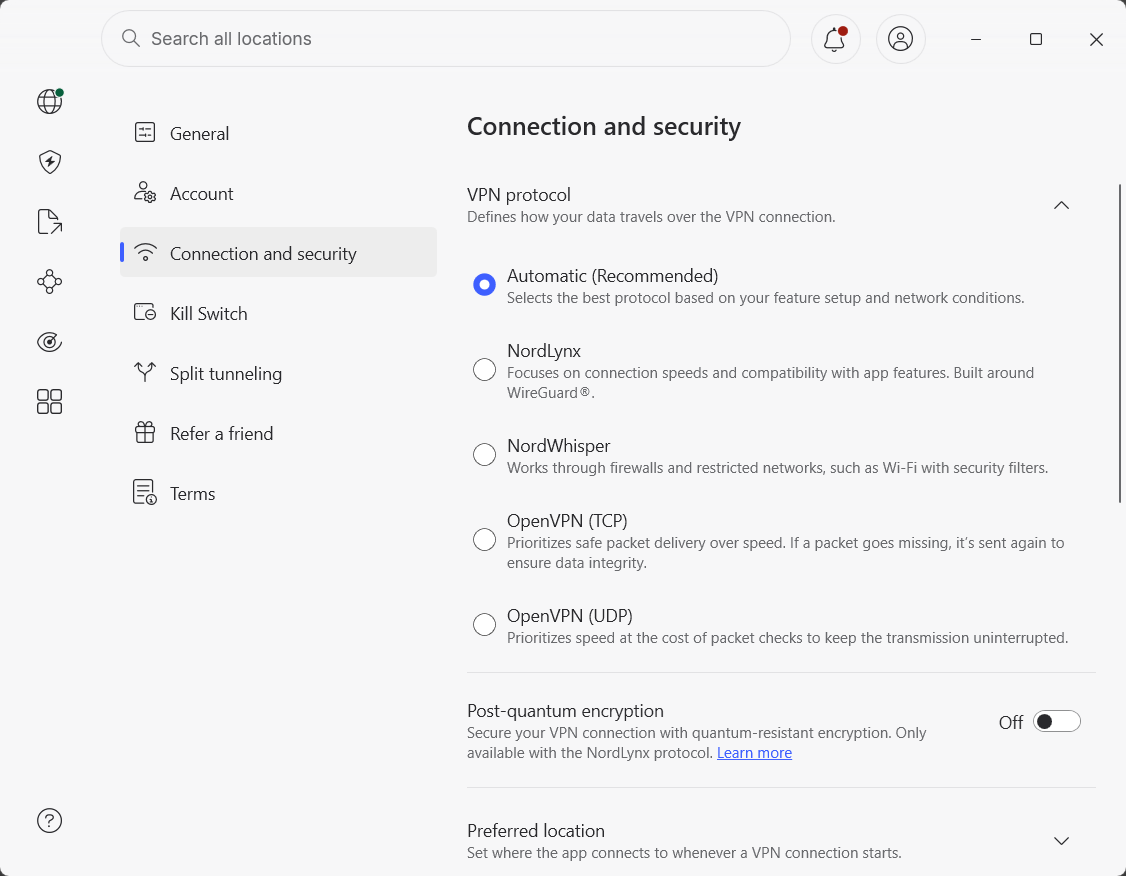
NordVPN offers three protocols: NordLynx, NordWhisper, and OpenVPN TCP/UDP.
Sam Singleton
Across its apps and manual configurations, NordVPN supports OpenVPN, NordLynx, NordWhisper, and IKEv2/IPsec protocols, although availability varies by platform. NordLynx is the default in most apps, it’s the protocol NordVPN recommends for most users, and generally offers the best combination of speed and security.
NordWhisper is the latest offering from the service and uses web tunnel technology to imitate traditional web traffic. This can be handy as some network filters attempt to catch and block other VPN connections. NordWhisper will provide a slower average connection speed, but may be a good option for those in countries that restrict VPN usage or on locked-down networks like school Wi-Fi.
NordVPN supports post-quantum encryption with NordLynx connections on most platforms including Linux, Windows, Android, iOS, and some smart TVs. This feature protects VPN connections against potential quantum computer attacks. This is mainly designed to prevent encrypted traffic captured today from being decrypted by sufficiently powerful quantum computers in the future.
NordVPN also passed my DNS, WebRTC, and IP leak tests without exposing any identifying information. When I deliberately interrupted the VPN connection, its kill switch prevented my real IP address and unencrypted traffic from leaking.
NordVPN is incorporated in Panama, a privacy-friendly jurisdiction without mandatory VPN data-retention laws and outside the major international intelligence-sharing alliances. Its parent company, Nord Security, is based in the Netherlands, but NordVPN itself continues to operate under Panamanian jurisdiction.
Additionally, NordVPN states that it has a “strict no-logs policy,” which means it doesn’t retain browsing activity, traffic logs, source IP addresses, DNS requests, bandwidth usage, or individual connection timestamps. It does temporarily process usernames and session timestamps to enforce its 10-device limit, but says this information is deleted within 15 minutes after a session ends. Account details such as an email address and payment information are handled separately.
This no-logs policy has been confirmed six times over the years. The latest was conducted by independent security firm Deloitte in November and December of 2025, and concluded that NordVPN’s systems and practices were holding true to its no-logs statement.
It should be noted, though, that NordVPN’s security record isn’t spotless. In 2018, an attacker gained access to one rented server in Finland. NordVPN says no user credentials or activity logs were exposed, although its delayed disclosure did damage user trust. The company subsequently adopted RAM-only servers, expanded its security assessments, and introduced a bug-bounty program.
Is NordVPN worth it?
NordVPN continues to be one of the best all-around VPNs on the market. It combines exceptionally fast speeds, excellent streaming support, and strong privacy protections with an unmatched suite of security tools. Its independently verified no-logs policy and continued investment in features such as post-quantum encryption also make it an easy VPN to recommend to anyone.
Admittedly, NordVPN is expensive—particularly when paying monthly or renewing a discounted plan. Many of its best extras are also limited to higher subscription tiers or certain platforms. Mullvad still offers greater anonymity, while Surfshark and IPVanish allow unlimited simultaneous connections. Even so, few competitors can match NordVPN’s overall mix of performance, security, and features, making it well worth the price for users and distinguishing it as one of the best VPNs around.
Editor’s note: Because online services are often iterative, gaining new features and performance improvements over time, this review is subject to change in order to accurately reflect the current state of the service. Any changes to text or our final review verdict will be noted at the top of this article.