
Acer Swift Go 16 AI review: A decent laptop that struggles to stand out
At a glance
Expert’s Rating
Pros
- Budget pricing (?) for decent quality
- Very good webcam
- Great battery life
- Good keyboard
Cons
- Abysmal graphics performance
- Performance drops sharply on battery
- A bunch of bloatware
Our Verdict
Acer’s Swift Go 16 AI doesn’t really stand out from the crowd as a budget laptop, but it’s a “good enough” product whose price should be the deciding factor in whether you buy it.
Price When Reviewed
This value will show the geolocated pricing text for product undefined
Best Pricing Today
Best Prices Today: Acer Swift Go 16 AI (SFG16-A71T-R5UY)

Price comparison from over 24,000 stores worldwide
The Acer Swift Go 16 AI isn’t a bad laptop–it’s just not a very interesting one, especially at full price.
There certainly are highlights, like the very good webcam I didn’t expect. But there are lowlights, too. AMD’s Ryzen AI 400 processor delivers just the basics here. Ultimately, the price should guide your decision. Acer ships a bevy of budget laptops, and I’ll point you to the ones that offer better performance.
Acer Swift Go 16 AI: Configurations
I specifically asked for this laptop because it’s one of the few that offers an AMD Ryzen AI 400 chip inside, the successor to AMD’s excellent Ryzen AI 300 chip. I found this exact laptop configuration on Acer’s own site, priced at $1,249.
Acer’s product page implies that this laptop includes OLED models, but only lists a touchscreen TFT display as an available purchase.
I would recommend checking out retailers like Amazon and Best Buy. Best Buy actually sells a similar configuration for $999.99, and Amazon currently offers a Swift Go 16 with an Intel Core Ultra 300 (Panther Lake) chip and 32GB of RAM and 2TB of storage for $1,399.99.
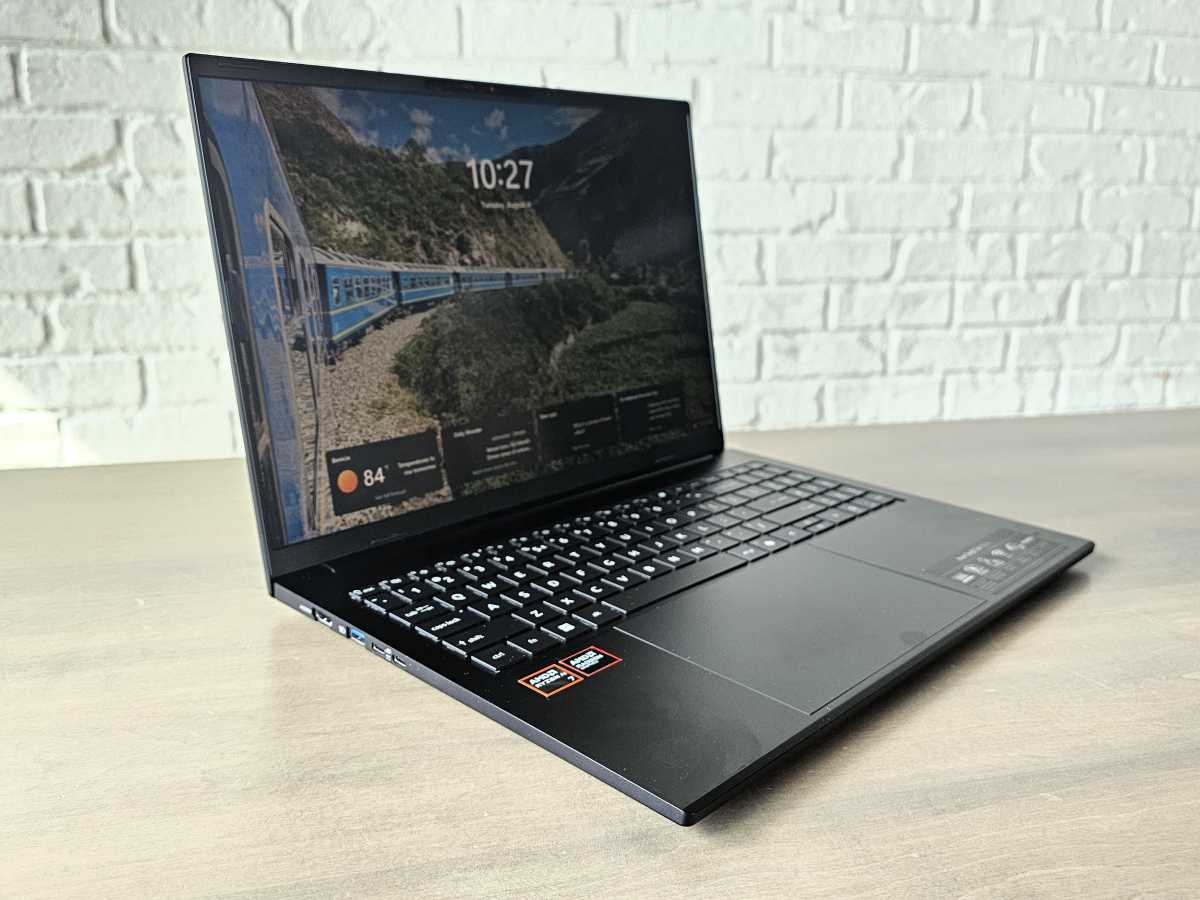
Mark Hachman / Foundry
Acer Swift Go 16 AI: Specs and features
- Model number: SFG16-A71T-R5UY
- CPU: AMD Ryzen AI 7 445
- Memory: 16GB LPDDR5x
- Graphics/GPU: AMD Radeon 840M
- NPU: Yes, 50 TOPS
- Display: 16-inch (1920×1200) AM-TFT IPS touchscreen, 30-120Hz refresh rate
- Storage: 1TB PCIe Gen4 SSD
- Webcam: 1440p (with Windows Studio Effects), or 1800p (without); depth camera with physical shutter
- Connectivity: 2X USB-C (USB4), 2 USB-A, HDMI, microSD, Kensington lock
- Networking: Wi-Fi 7, Bluetooth 5.4
- Biometrics: Windows Hello facial recognition
- Battery capacity: 65 watt-hours
- Dimensions: 14. x 9.9 x 0.63 inches
- Weight: 3.53 pounds
- MSRP: $1,249 as tested
Acer Swift Go 16 AI: Construction
Acer’s Swift Go 16 AI is a weird mix of compromises. Elevate it with an OLED screen and an Intel Panther Lake chip and a $1,299 configuration feels more like a competitive option for a midrange laptop. Our review unit’s got a more conventional TFT LCD and a Ryzen processor. What you’ve paid for this laptop really governs your expectations as you remove it from the box.
There’s really no defining feature, either. If anything, the Swift Go 16 strikes me as just as another laptop, and that’s OK. If anything, there’s a bit of a retro vibe to it all.
A few years ago, laptops were made with ports aplenty, rather than the pair of USB-C/USB4 ports some laptop makers include and then call it a day. There’s a pair of 10Gbps USB-A ports, a pair of USB-C (USB4, the generic version of Thunderbolt 4) ports, an HDMI port, a microSD slot, and a Kensington lock. You won’t find a slick OLED display with inky blacks, or even HDR. There’s a purpose-built TFT LED display, the kind you’ve seen on laptops for a while.
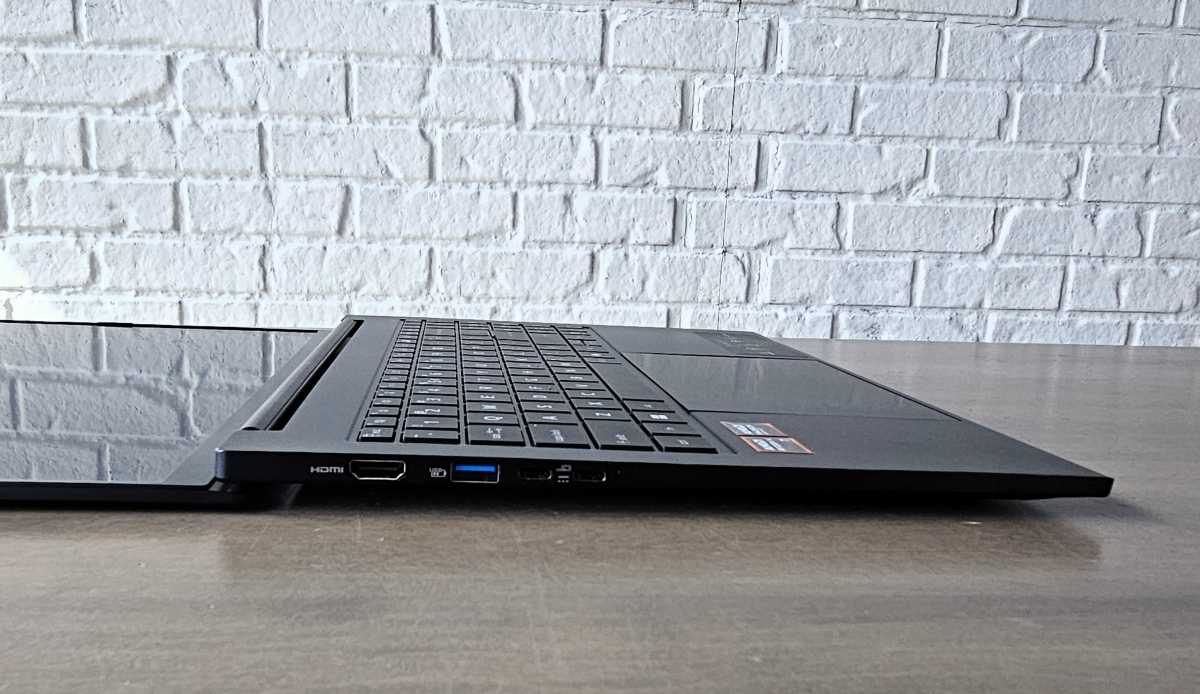
Mark Hachman / Foundry
Ditto for the internals. AMD’s mobile Ryzen processors used to offer budget alternatives to Intel’s mobile Core chips, and the moderately powerful six-core AMD Ryzen AI 7 445 chip gives me that vibe, too.
Acer says it crafted the chassis from aluminum, though it shares the plasticky feel that some aluminum laptops offer. At 3.53 pounds, it’s not especially heavy for a 16-inch laptop, either. (A couple of years ago this would have been a 15-inch laptop with a chunkier display bezel.) At 0.63 inches thin, though, it’s a pleasantly thin laptop that fits neatly in a backpack.
It does attract fingerprints and oil like crazy, though, so keep a microfiber cloth handy.
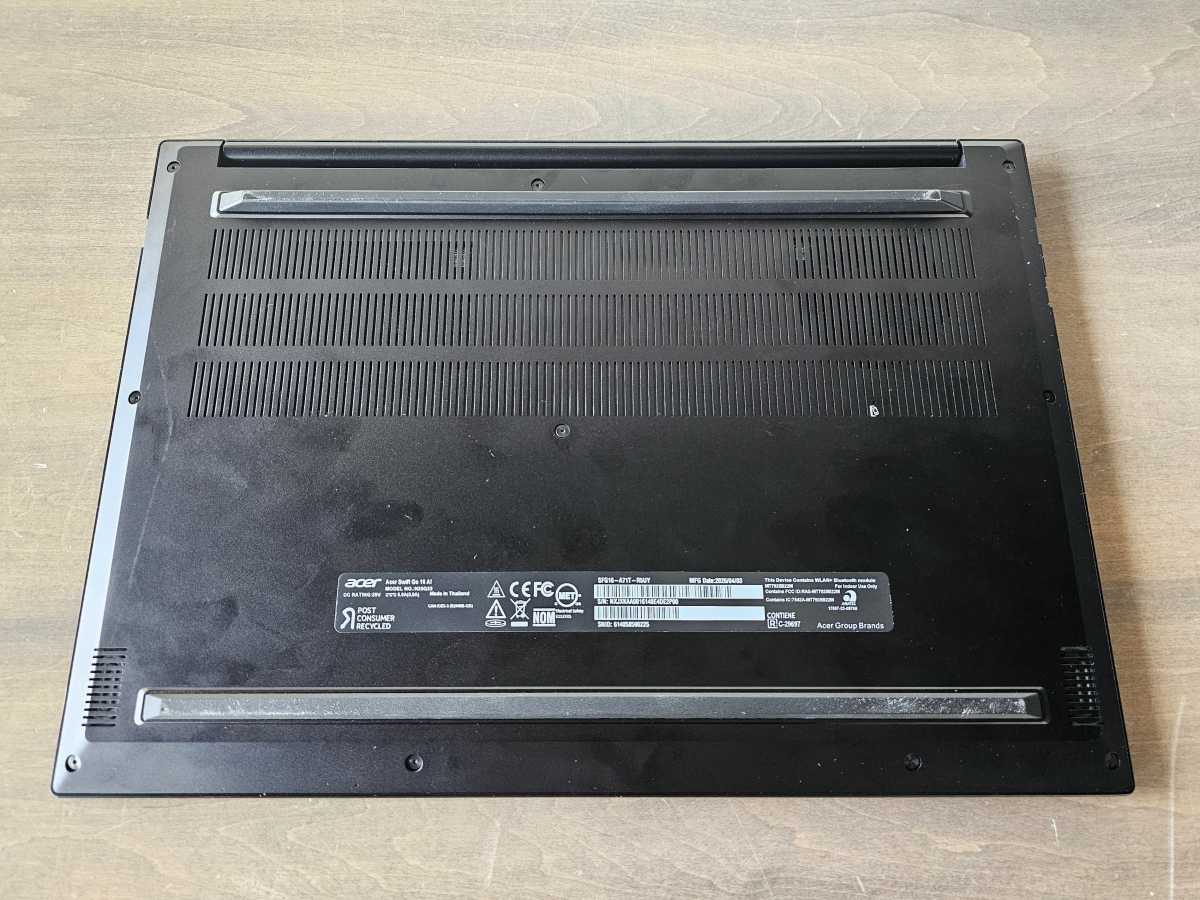
As with most laptops, the Swift Go 16 AI sucks cooler air from below, pushes it over the internal components, and then out through the vents inside the hinge. The cooling fan is noticeable, but effective enough that the laptop didn’t thermally throttle down the CPU or GPU in either stress test that we ran. The laptop uses a standard 100W USB-C charger.
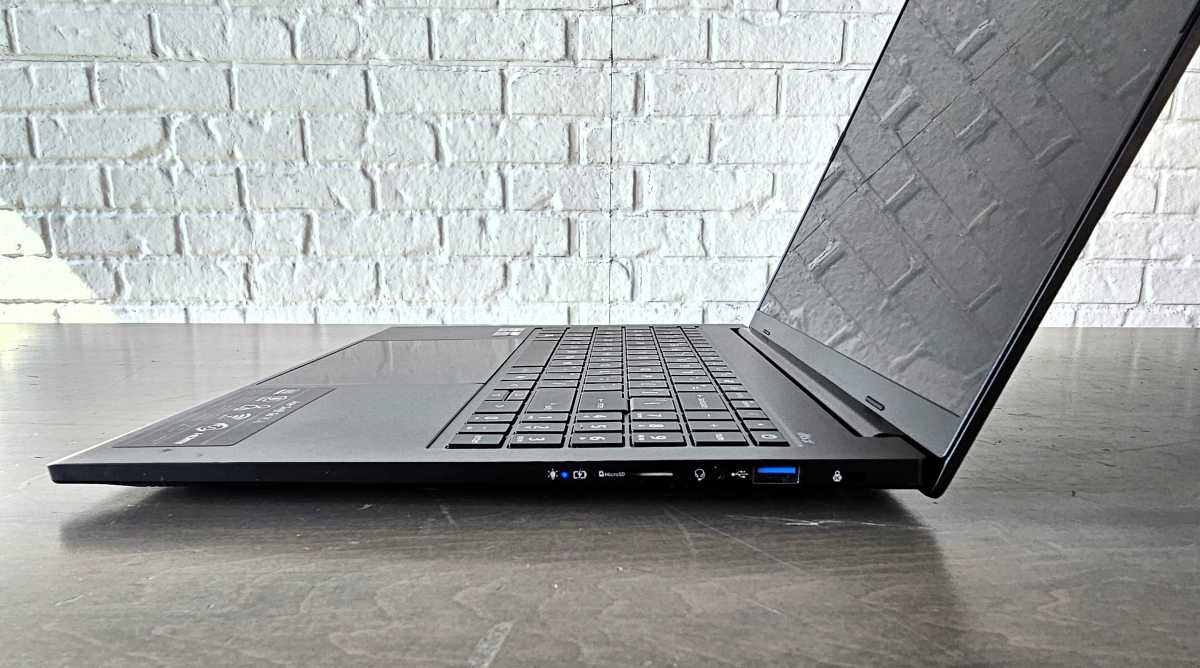
Mark Hachman / Foundry
Budget consumer PCs typically hide one drawback: lots of bloatware. There’s a bunch, from games like Forge of Empires to numerous Acer applications and utilities that promise to monitor and accelerate your Internet.
Acer Swift Go 16 AI: Display, audio, and microphone
That’s not to say that this laptop’s standard 16-inch (1920×1200) TFT touchscreen display doesn’t hide any benefits, however. One of my favorite trends over the past year or so has been variable refresh rates, where the display will refresh up to (in this laptop’s case) 120Hz, and potentially down to 30 Hz when it’s not doing anything. (Just make sure you turn on “dynamic refresh rate” in the System > Display > Advanced Display portion of the Windows 11 Settings menu.) Theoretically, at least, that can help extend the laptop’s battery life.
Nevertheless, Acer doesn’t offer too much more than the basics. The total brightness of the laptop measures just 331 nits, not too far above what we consider to be an appropriate brightness level for office work, between 250 and 260 nits. Working outside is largely out of the question. On the other hand, the laptop’s anti-glare coating does a nice job minimizing reflections for indoor work under overhead lighting.
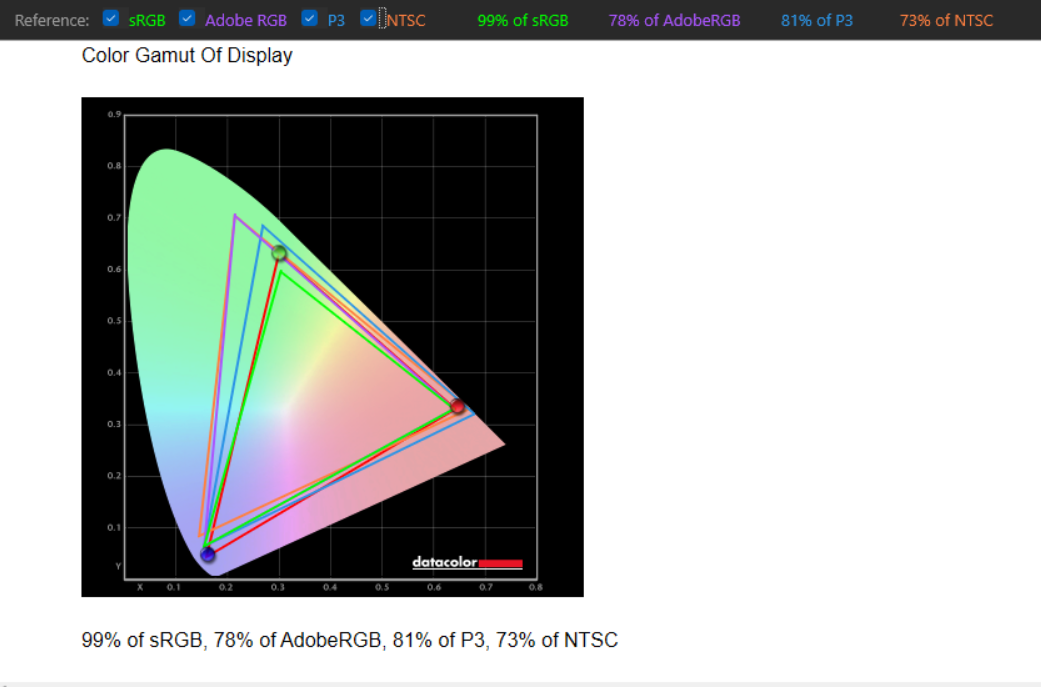
Mark Hachman / Foundry
Acer’s audio experience is also straightforward. It’s got a pair of undefined speakers, augmented by the DTS:X application.
One of the issues I have with this laptop is that there are applications to improve various aspects of the Swift Go 16 AI’s experience, such as DTS:X and Acer’s own PurifiedVoice app for filtering out unwanted sound. However, they’re not consistently highlighted. PurifiedVoice was, but not the DTS:X application.
Still, the DTS:X app seems to be on by default, and moving the settings around to the dedicated Music setting didn’t change anything. The sound is pretty well balanced but a little flat, and retains its signature up though the high end. It’s pretty good for a laptop.
Likewise, Acer doesn’t make a big deal of its input mics and PurifiedVoice, which do a decent job of filtering out extraneous noise. Some of this is augmented by the CPU’s dedicated NPU, which hits 50 TOPS.
Acer Swift Go 16 AI: Keyboard, touchpad
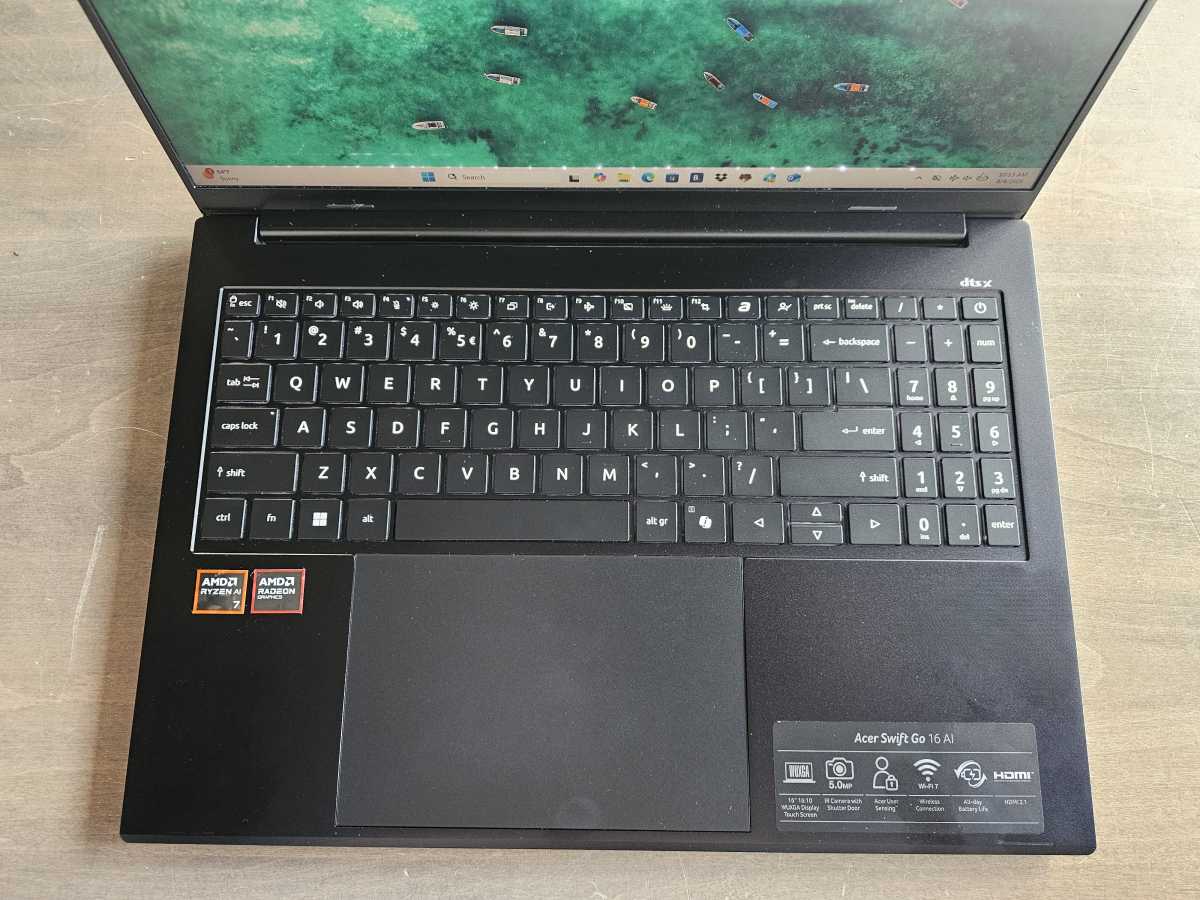
Acer didn’t specify the pitch or key travel on this laptop, but I’d recommend it. There’s a comfortable give to the keys themselves, which are spacious befitting this laptop’s generous chassis. Just be aware that while the main keyboard doesn’t make any obvious concessions, the squished 10-key numberpad simply isn’t as comfortable as a dedicated keyboard is.
Mark Hachman / Foundry
The Swift Go 16 AI’s backlit keyboard includes a dedicated key for its AcerSense utility app, which oversees many of the functions that the laptop provides, such as controlling the performance modes, USB charging, and turning off and on the blue-light shield technology and adaptive brightness. A second key connects directly to Acer’s support page.
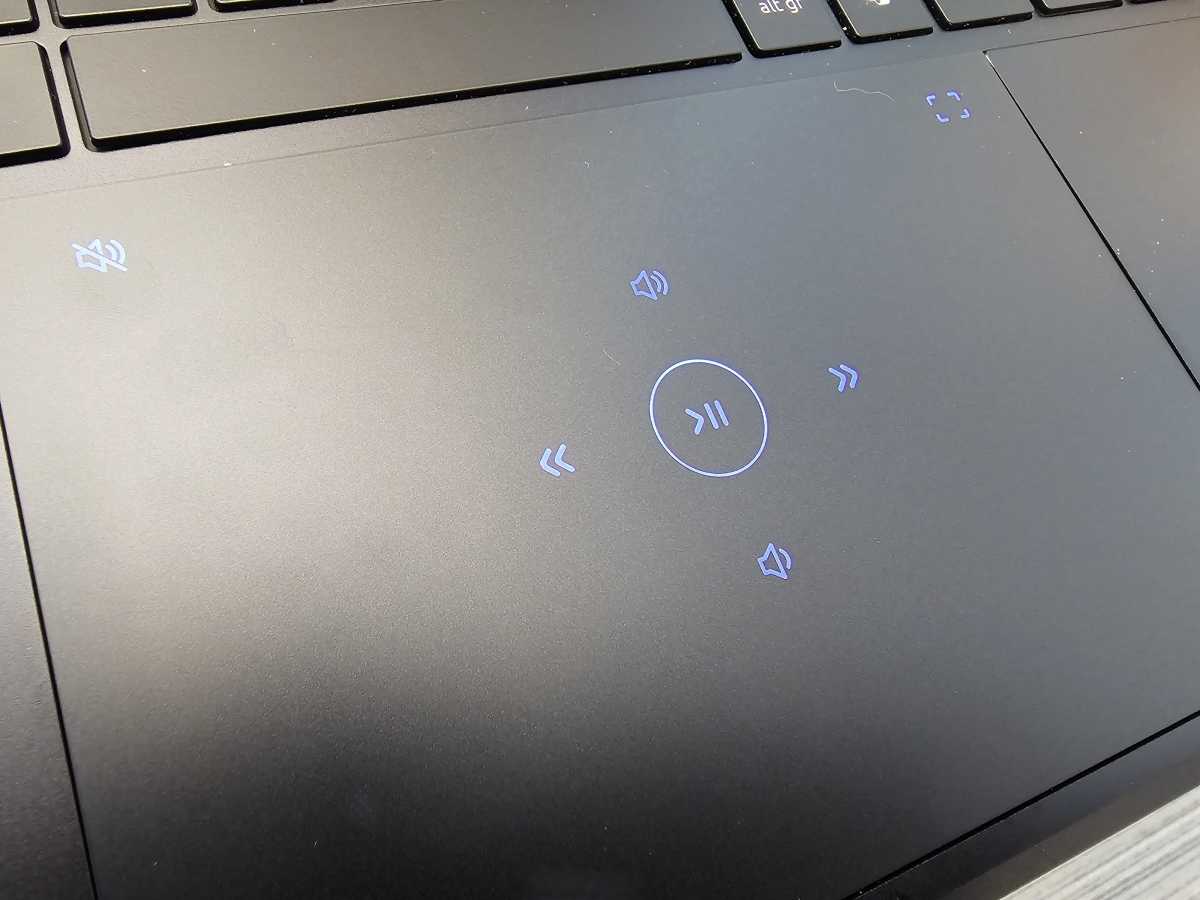
The Swift Go 16 AI’s touchpad is not outstanding. While the touchpad surface is large, most of it is not clickable. Nevertheless, it includes Acer’s nifty multi-control touchpad tech, which lights up “buttons” on the touchpad specifically for media control. You just won’t see them, however, unless the laptop is currently playing back media. (Switching apps will disable this feature to save power.)
Just be careful that you “tap” the controls and don’t click them, or else you’ll interact with what’s on the screen.
Mark Hachman / Foundry
Acer Swift Go 16 AI: Biometrics, webcam
The Swift Go 16 AI’s webcam is actually significantly better than most, reaching up to 1440p resolution at a standard 30 Hz refresh rate. Technically, the maximum resolution that the webcam supports is 1800p, though at that resolution Microsoft’s Windows Studio Effects aren’t supported. At 1440p, Windows’ automatic framing effect is still active, allowing the webcam to crop and zoom so that your face is “centered” if you move your head back and forth. Usually laptops tend to max out at 1080p, regardless, so that’s a nice plus for this laptop.
The webcam’s picture quality isn’t too shabby, either, certainly making this a solid choice for remote work and videoconferencing, either for home or for work.


Authentication is handled by the depth camera built into the webcam, all governed by Windows Hello. Over time Windows Hello tends to fail me, if only because it struggles with my beard, which is seemingly in a constant state of flux. Put another way, the relatively short time I have with each laptop (and this one) usually means that it handles biometrics quite well, but over time I often have to reauthenticate myself. A fingerprint reader is a bit more stable in this regard.
Acer’s Swift Go 16 AI includes a physical webcam shutter that slides over the webcam. A function key on the keyboard electronically disables the mic.
Acer Swift Go 16 AI: Performance
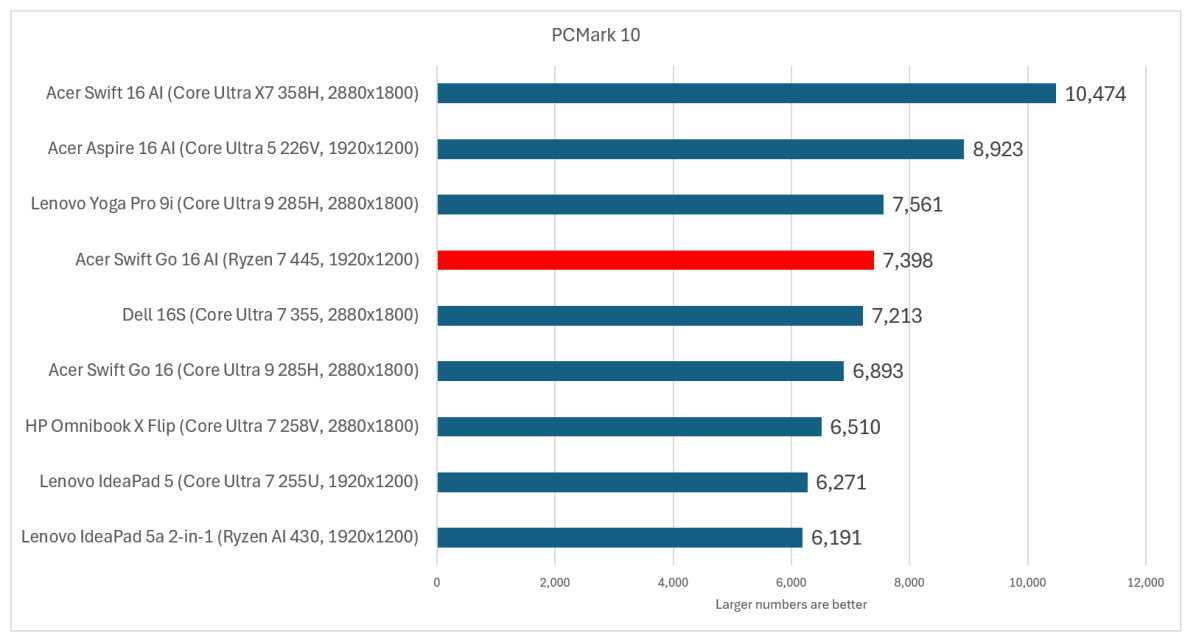
The charts below zero in on other 16-inch laptops we’ve recently tested. First, Acer’s nest of Swift laptops: both the $1,549 Acer Swift 16 AI and the $1,199.99 Acer Swift Go 16 compete with the $1,249 MSRP Swift Go 16 AI reviewed here. Acer also offers a $1,099 Acer Aspire 16 AI as an additional value offering.
Mark Hachman / Foundry
The outlier is the $999 HP OmniBook 3, whose Qualcomm Snapdragon chip isn’t compatible with a PCMark test benchmark. The $999 HP OmniBook X Flip 14 solves that problem, but it’s a smaller 14-inch laptop that we’ve let in for comparison’s sake. It seems to be hard to find, however.
I’ve also got a pair of Lenovo laptops on there: the disappointing $999 Lenovo IdeaPad 5 and the stellar though extremely pricey $1,949 Lenovo Yoga Pro 9i, which I’ve only included for comparison’s sake. The $1,769 Dell 16S rounds out the field alongside a budget $899 15.3-inch Lenovo IdeaPad 5a 2-in-1, which also uses a Ryzen chip.
All of these tests are run with the laptop plugged in. What’s not shown here is how it performs on battery power. In this case, it’s a big gotcha. Qualcomm’s Snapdragon chips run at the same speed on wall power and battery power, and performance is about equal. The performance of Intel’s Core Ultra 200 (Lunar Lake) chips also dropped steeply while on battery in certain cases. Intel narrowed the gap between wall and battery performance in the Intel Core 300 (Panther Lake) generation, however. AMD hasn’t made that leap.
I still really like the PCMark 10 benchmark for its comprehensive test suite. The problem is that the test isn’t compatible with Arm processors, which may become an increasing problem moving forward.
Mark Hachman / Foundry
I don’t mind how the Acer Swift Go 16 AI performs here, but the fact that the Acer Aspire 16 AI — a cheaper laptop at MSRP — surpasses it gives me pause. So does the battery performance, which drops by a whopping 45 percent to 4,034 while running on its own internal battery. That should be definitely noticeable in the real world.
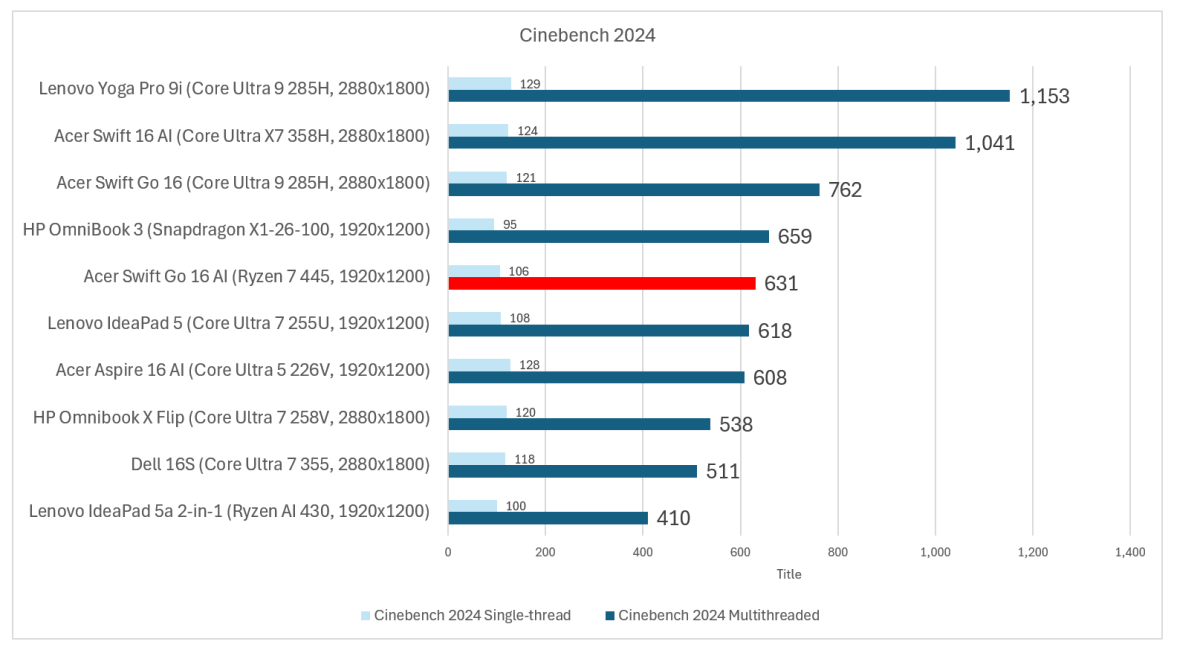
If we look at the overall CPU performance, we can use Cinebench 2024, which renders a scene using just the CPU. You can ask the benchmark to use all the cores and threads, or just a single thread. I typically use single-threaded performance as a metric of how responsive the laptop feels while using the operating system or a single-threaded application.
On battery, performance drops again to a score of 49 on single-threaded applications and 355 on multithreaded applications, a decrease of 43 percent.
Mark Hachman / Foundry
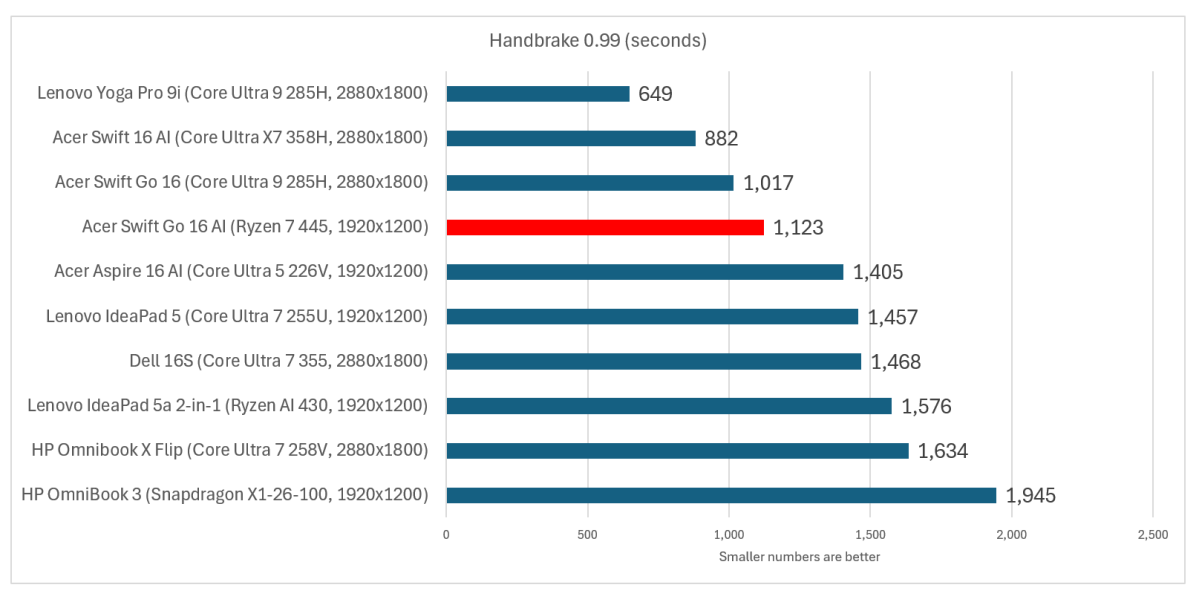
We use the Handbrake application as a way to measure the CPU performance over a prolonged period of time: transcoding a movie into a different format pushes the laptop and its CPU to its limits. It’s a good measure of how well the laptop will hold up over time.
The Acer Swift Go 16 AI passed its separate stress tests with flying colors, though, so while the performance is average, it’s also sustained.
On battery, the time to perform this task increased by 74 percent. Feel free to use this laptop to type a paper, but prolonged, CPU-intensive applications should be avoided on battery. Otherwise, the performance isn’t that shabby.
Mark Hachman / Foundry
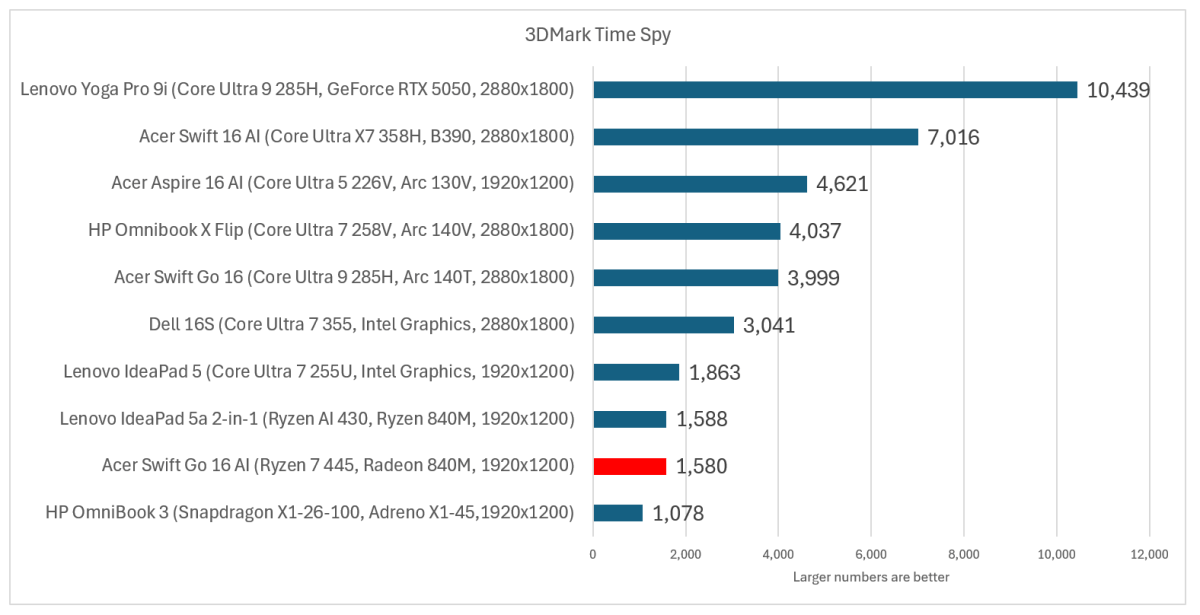
Graphics performance is its Achilles heel. Both Ryzen 400 chips suffer greatly here and that’s on wall power! Performance, somewhat thankfully, only drops by 29 percent on battery power.
However, these scores are more typical of the 11th-gen Core chips of 2021 than of a modern CPU of 2026. Many people are looking for something that can handle work and school, maybe with some light gaming thrown in. It’s that “light gaming” aspect that these Radeon chips can’t satisfy.
Mark Hachman / Foundry
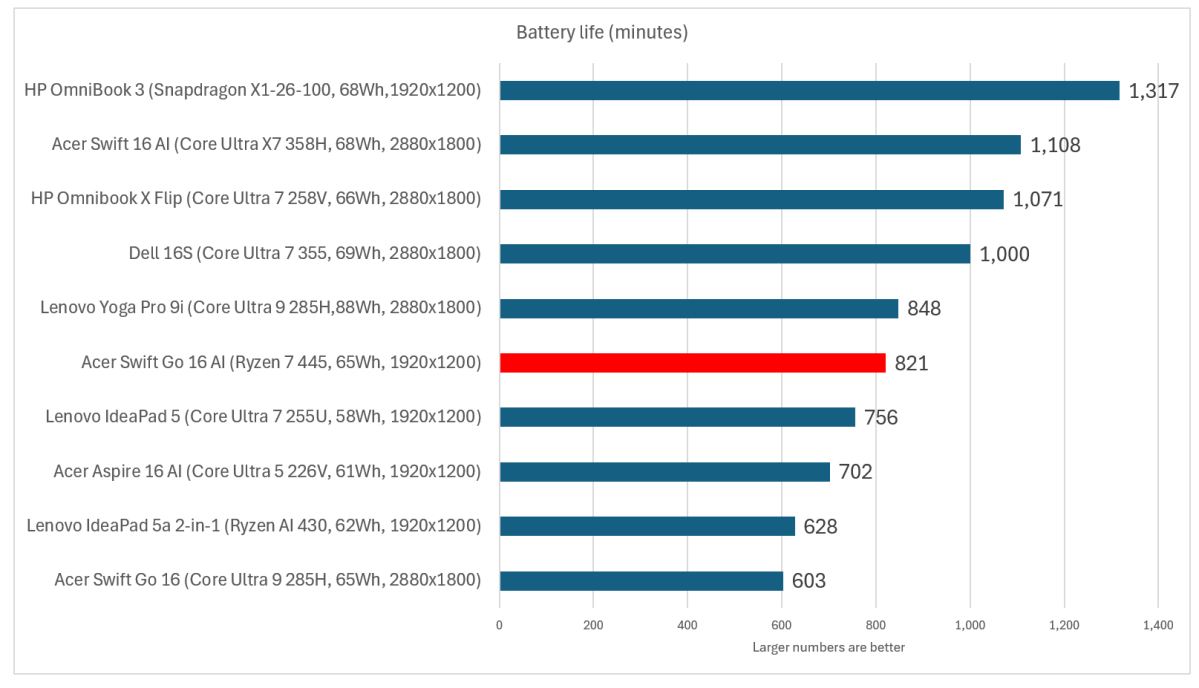
So, is battery life its saving grace? Yes and no. Battery life has improved significantly across the board in recent years, and 821 minutes equates to 13.7 hours of average battery life.
However, we do run our tests looping a video over and over, which we’ve come to realize isn’t a realistic view of battery life as CPU makers now look at video decoding as something as an afterthought.
Streaming a 1080p Netflix show produced a battery life of 560 minutes (9.3 hours), a bit less than the 9.5 hours that the laptop lasted while performing looped Microsoft Office tasks in UL’s Procyon benchmark. I’d consider those a more accurate metric — and a positive result, too.
Mark Hachman / Foundry
Should you buy the Acer Swift Go 16 AI?
Look, this laptop isn’t particularly special. There’s very little about it that you’ll want to show off to your friends. It’s just a decent all-around laptop that’s abysmal for 3D graphics and suffers when you unplug it. That said, the Acer Swift Go 16 AI includes a decent keyboard and webcam. It’ll work fine for basic Microsoft Office work, too.
I’d actually recommend the Acer Aspire 16 AI as an alternative. It’s a superb laptop that’s widely available and has more memory and storage for a few hundred more. We awarded it an Editor’s Choice for a reason. The similarly named Acer Swift 16 AI is also PCWorld’s best overall laptop, and the price isn’t that much higher either.
I normally like to find some aspect of a laptop that is worth calling out or criticizing, and there are aspects of both that I mentioned above. In general, though, this laptop is just okay. Unfortunately, “just okay” doesn’t exactly cut it at $1,249.